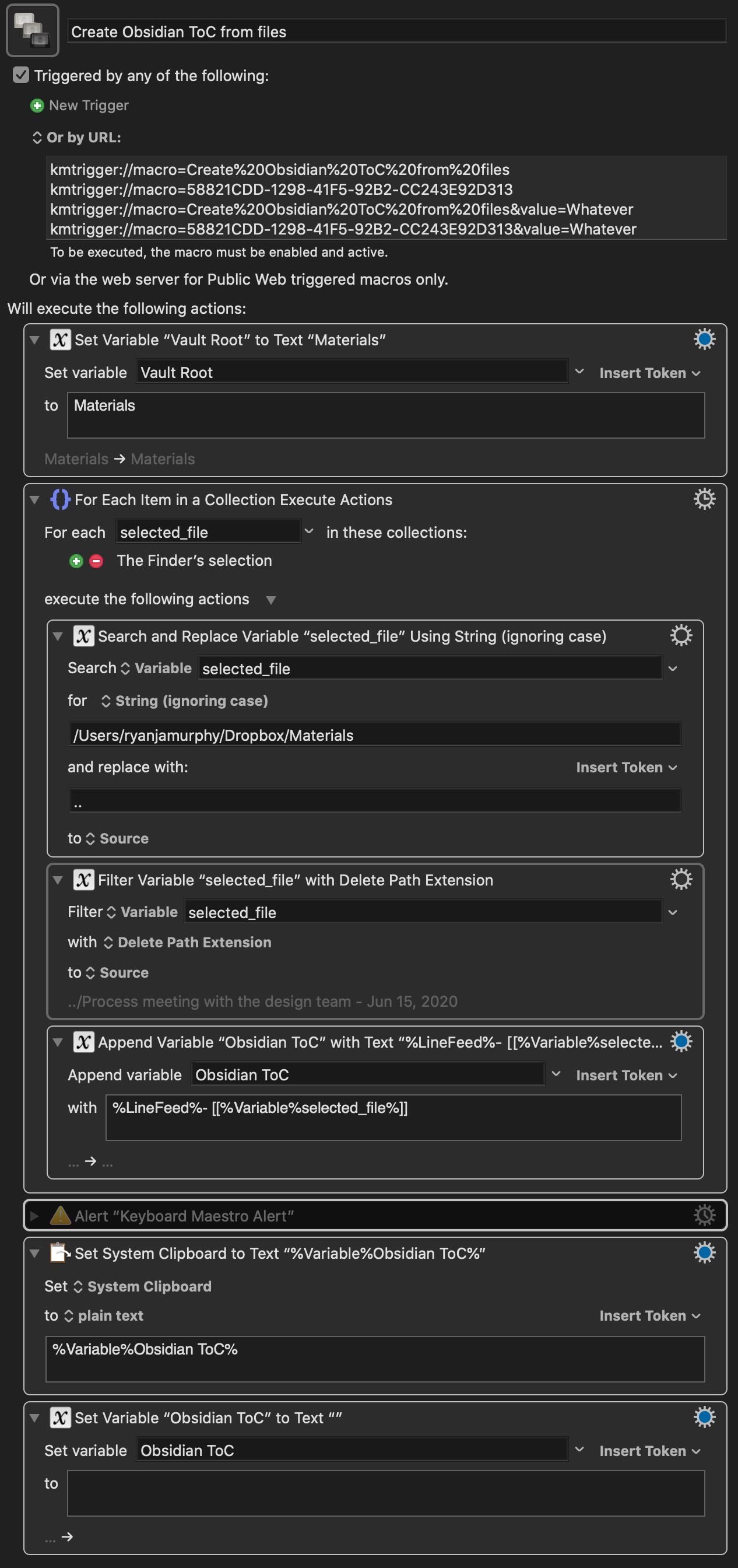
Folks have been hoping for a Table of Contents plugin for a while. This isn’t that, but if you’re on a Mac and have Keyboard Maestro, I’ve created a simple macro that will produce a Table of Contents from a selection of files.
To use it, you select a few files in Finder and activate the macro. The macro copies a bulleted list to your clipboard where each line corresponds with each selected file in link format.
E.g., if you have two files named A.md and B.md, the macro copies the following bulleted list to your clipboard:
This macro produces the full vault path link for the ToC. A key thing you’ll have to edit for it to work for you is the vault root string. Switch the string /Users/ryanjamurphy/Dropbox/Materials with the path to your Obsidian Vault in the Search and Replace action.
If you just want filenames—i.e., you don’t want [[../some folder/some file]]—you can swap the Search and Replace action for a Filter action that deletes the path. Here’s a version of the macro with those changes.
I’ve set up a SmartFolder (macOS) on the basis of a search for all markdown files opened today in root folder of my main vault. At the end of the day, I can open that SmartFolder, run this macro on all those files, and then paste the list at the bottom of my Daily Page. This gives me a convenient log of all the notes I’ve consulted during the day. It’s also possible to use other search criteria, like “modified today” or “created today”. Also, since the macro reproduces the sort order of the files selected, if I sort the SmartFolder (= Finder search results) by “Last Opened”, the notes are pasted in chronological order of which notes I’ve opened (or, if you prefered, created/modified).
Here’s a screen shot of the SmartFolder criteria, with the three notes that I’ve opened so far today:
@AutonomyGaps Great idea. It probably actually isn’t that hard to do what you’re doing automatically within KM either, so that no manual intervention is needed… I will investigate.
@JeffurryJoin us on the macOS side. Keyboard Maestro is particularly accessible and powerful, thanks to a few key design elements on the Mac. Still, try searching for macro software for whatever OS you’re using. There might be something! This macro isn’t that difficult to replicate, you just need software that copies the file names of selected files and adds the - [[ ]] text.
Macs are far too expensive for my present pocket, but almost all the ‘productivity’ things I look at on t’webz are heavily populated by Mac people. I do feel I am missing out.
I am investigating AHK at the moment…
KM generates four options for URL triggers by default. Not sure you can reduce it, actually, but you (a) don’t need to use URL triggers (there are a variety of other options) and (b) you only need to use one of them, whichever suits.
If you can write bash or windows scripting as don’t mind missing the UI way this one works. You could look at the way I posted to do something similar with “espanso” it runs on few platforms
I wrote a bash script to list all files and make an index (for me though I just wanted the Zettelkasten ids but could make it like this too)