Hello folks!
I know that many of you, who rely on a keyboard-based workflow, suffered from the lack of key bindings in the native File Explorer.
And this plugin is intended to fill these gaps and allow you stay at the home row as long as possible.
It provides Vim-like mappings (single-char), similar to popular Vim plugins like NERDTree.
The mappings include navigation, editing, selecting and opening actions.
Features
- Use intuitive mappings for the native Obsidian actions.
- Disable certain keys, if they interfere with your workflow (or other plugins).
- Minimal invasion to the native app behavior (and your note-taking workflow).
- Changes(improvements) to the native app features
- Avoid duplicating opened files: if trying to open an already opened file - focus it, instead of opening a duplicate tab (enabled/disabled in Settings).
- Background opening: for most file-opening actions, there is an alternative action to allow you to open files “in background”, while keep the focus on the File Explorer.
- Deselect all items via new key-binding.
- After deleting a node in the File Explorer, automatically focus next/prev node, instead of loosing focus.
Mappings
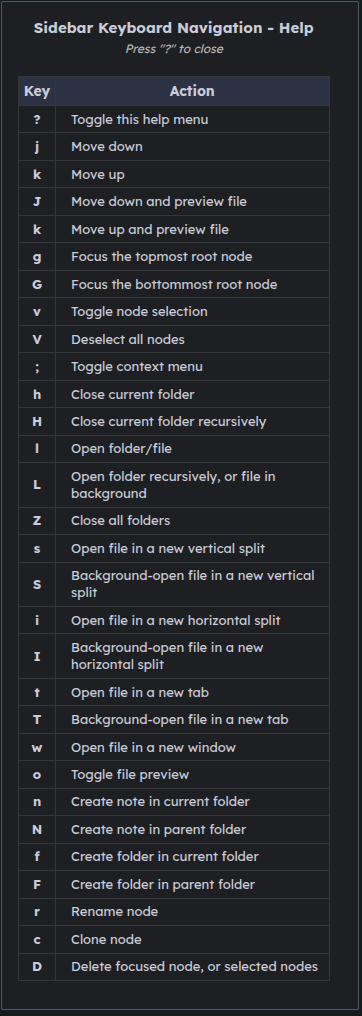
More details on mappings in the repository.
Notes/Comments
Some of controversial mappings:
- n/F, N/F - to create folder/note. It may be too complex. Previously I was just using n/N, to create new folder/note. But one particular case usually caused problems with such approach: after creating a folder, you get focus on that folder, and if you want create another folder at the same level, you need to focus parent first, otherwise it will be created inside that new folder. So I decided to split bindings for files/folders.
- Visual selection. Initially I was using “J/K” to move and select. But after reading the forum, I noted that many of you want to have “move and preview in editor, without leaving file explorer” thing. So I decided to get it more priority by assigning “J/K” to these actions.
I used a more basic version of this plugin for a few months, but just recently decided to rework it and release to the community, so it still may be unstable.
Please use a sandbox/testing Vault for initial testing.
I have more ideas for new features (e.g. other panes - Bookmarks, Search, Tags, Properties. Cut/Copy/Paste. Undo), but currently there is already a plenty of mappings, so I want to ensure it’s stable before moving on.
Installation
As it’s not released(approved) yet for the community plugins repository, you can use the BRAT community plugin for installation and updating.
Or install it manually, by downloading. directly from the repository.
More description, demo and usage info in the repository. Don’t hesitate to check it out and share your feedback in this topic. Thanks!