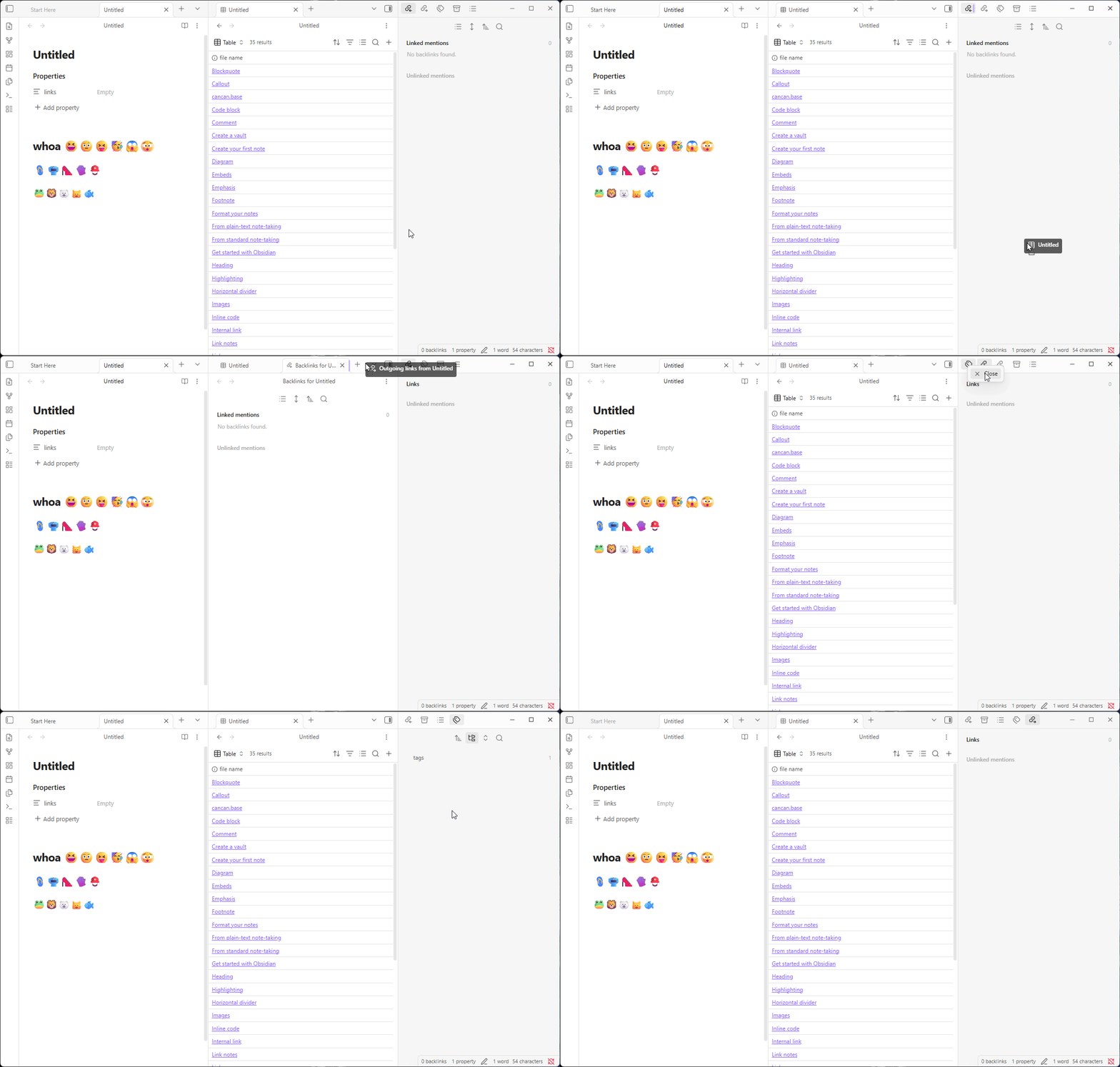
Make it more difficult to accidentally remove the buttons in the header of the Right Sidebar

Use case or problem

The muscle memory that people often have for the keyboard command [CTRL - W] or [CMD - W] to close a tab or window, frequently interferes with an Obsidian UI functionality.
I believe it is not uncommon for a person to click one of the buttons in the upper right sidebar such as the Backlinks button or the file properties button. If that button is the last thing clicked, it gets removed from the user interface when a person types CTRL-W. But that is an unexpected behaviour. Normally the expectation is for the tab or window to close as a result of CTRL-W. It’s also probably uncommon that users want to add and remove buttons from the toolbar so frequently that it requires the CTRL-W sequences of keys.
Searching in the forum shows more than one post from confused users that did not realize that behaviour would occur. For a user, such as myself, that has recognized this, I almost daily, still accidentally delete buttons from my interface because of the automatic CTRL-W muscle memory.

Proposed solution

Ideally CTRL-W would not have any affect on the user interface elements like buttons. It would just close the current tab or if there is only one tab, it could potentially close the application, which seem to be common patterns in other applications.
If somebody wants to remove a button from the toolbar, there could be a “Remove” option from a right click context menu, or the ability to drag the button off the toolbar, or an option to remove it in the command palette. Lots of possibilities aside from CTRL-W.

Current workaround (optional)

I don’t think that there really is a work-around. The problem requires that a user do something like CTRL-P, search for properties or back links, and then click to have them added back into the top, right toolbar. I imagine (based on evidence in this forum) that many users don’t even realize what the problem was or how to reinstate their toolbar icons.


Related feature requests (optional)

1 Like

I agree. What I do is press Ctrl + P to then run the command that focuses on the last editor[1] and then press Ctrl+W[2].


  1. I guess you could also assign a hotkey to it. ↩︎

  2. Maybe could make a script that runs the focus editor command and then closes the tab… Then map that to the Ctrl+W hotkey… ↩︎

which buttons in the header of the right sidebar are you referring to?

Maybe you mean this?

1 Like

Hi, I think it probably is the same idea as expressed in that link. For some reason I just had not conceived of these as “tabs” since they look more like buttons to me. :slight_smile:

But to respond more clearly to your question, I’m referring to these:

image

On desktop, if you start dragging things around, you’ll see you can drag notes into the sidebar and the plugins (that are usually there) out of it.

Also, there are commands to re-open plugins that you have closed on purpose or by accident. e.g., Tags view: show tags, Outgoing links: Show outgoing links, etc.

Obsidian_CTm6I4Ho7g

Wow, I’ve been using Obsidian for years now and today I learned something new! I did not realize that flexibility was there, and I think it’s really pretty cool.

Having said that, it is undeniable that in the default setup, those things look like buttons rather than tabs. If you hover the mouse over them, the styling looks like a button. Tabs tend to be long, show text, and have an x to close them. Buttons don’t really look that way. They’re just single icons. This is frequently true across applications.

While I think this flexibility is quite interesting, I’d guess that like me, many users won’t intuitively realize this because the patterns don’t match common expectations for how the interface elements work.

The CTRL-W problem that I’ve tried to highlight here, I think remains a problem whether or not these things are considered tabs or buttons.

The main window where we write content is where it seems clear that a command like CTRL-W would apply. Other sorts of very pointed functionality like showing a note’s properties or showing its backlinks isn’t usually the kind of thing that you would need to add/remove frequently like the content tabs.

In my case, I tend to have those “buttontabs” open to reflect information about the content I’m working with. It’s useful as you switch across different types of content for it to persist. So the use case of them being treated as tabs the same as those for content, still feels weird to me.

Maybe other people like to add/remove those “buttontabs” frequently, I don’t know what kind of a use that is, but sure, I imagine it could be someone’s workflow. Even so, the person would need to keep an awareness of what the last thing they clicked on was (a true content editing tab or one of those button-like functionalities) and that seems like needless friction that the interface adds. Also, if someone does accidentally delete one of those, it’s incredibly opaque to figure out how to get it back. It’s not as if there’s a holding tank panel that lets see your options and re-drag/insert them to the toolbar. The person would have to already know exactly what it was for/called and after teaching many people how to use Obsidian, I’m quite positive that nobody would realize that. It would just come across as a bug or as some feature that is no longer available to them.

Could there not be a way to satisfy the ability to add/remove those “buttontabs” without it using CTRL-W like a content tab? I suggested a few ideas in my initial post, probably there are other good ones.

I honestly don’t know why those sidebar tabs are styled as buttons. It took me ages to realise too. The minimal theme has an option to restyle them as tabs but this should really be the default. Obsidian should also make it clearer which pane we’re focused on, and yeah ctrl-w shouldn’t work for the sidebars, especially since ctrl-t doesn’t.

As a workaround, ctrl-shift-w does work to undo closing a sidebar tab!

2 Likes

I agree with your whole reply and I’m glad I wasn’t the only one affected by it.

Due to this bug report
ESC returns focus to last note but the cursor is not active - Bug reports - Obsidian Forum
I found out that Escape works to move focus from the sidebar to the editor. Never knew that before.