Apply CSS styling in a snippet to items styled by the theme.
Things I have tried
In Editor status bar covers / makes editing the last line hard, @ariehen provided CSS to modify the Obsidian status bar. When I put the CSS into a snippet, it worked for the default theme but not for the Minimal theme. This makes me think that the theme is overriding the CSS in the snippet.
Another example—if I apply the following CSS snippet, based on the Typography page in the developer documentation:
The snippet will set the body font if it is not set in the Obsidian Appearance settings, but if a font is set in Appearance, it overrides the CSS. The other font attributes are applied regardless of where the font is set.
When I first learned CSS, the C stood for “cascading”, i.e. external stylesheet formatting cascades down and can be overridden by page stylesheet formatting, which can be overridden by local (inline) formatting. If I’m understanding correctly, styles also cascade from more general CSS selectors and can be overridden by more specific selectors.
Here are my questions:
Where in the cascade or formatting hierarchy are CSS snippets applied?
Is it possible to apply CSS styling at a lower level by using a more specific identifier?
Does formatting applied to Obsidian variables override formatting applied to CSS selectors?
Does the above depend on the specificity of the selector?
Can I view the style hierarchy by using the developer tools view?
This is the (slightly silly) thing I was trying to do, although it could apply to something more serious.
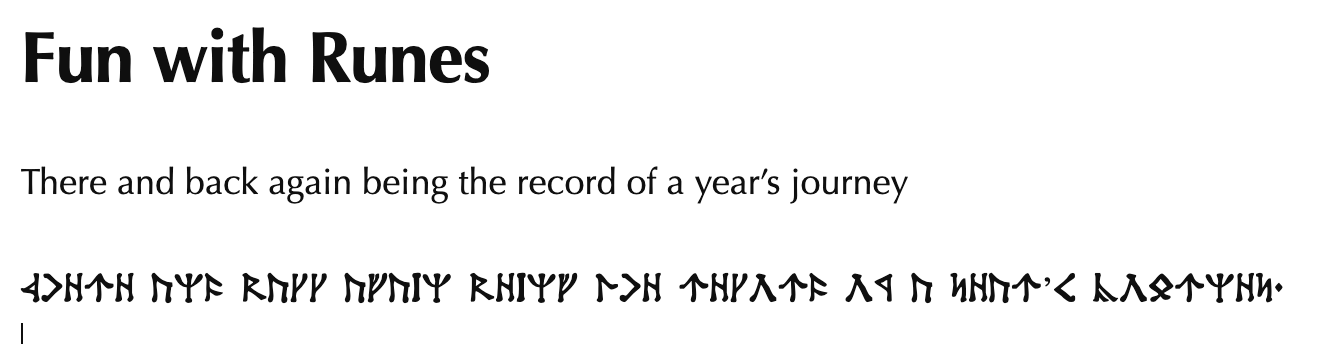
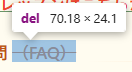
I wanted to change the strikethrough font to Angerthas (Dwarvish runes) so that I could put them in my text simply by applying the ~~strikethrough~~ tag. I isolated a bit of strikethrough text in the dev tools to find the correct selector, then changed the font family and removed the text decoration in a CSS snippet:
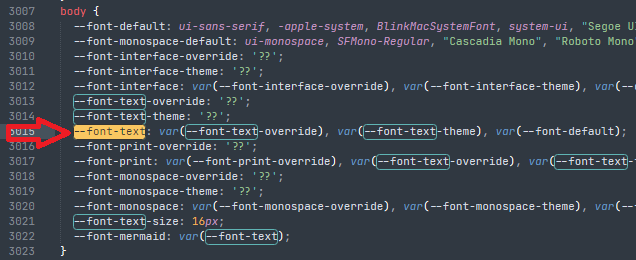
I believe --font-text-override is the font the user sets in the settings UI, so that’s being applied instead of your snippet as it comes first. If nothing is set in the UI by the user, var(--font-text-theme) is applied. If that’s not set anywhere then var(--font-default).
Hopefully someone can jump in for your other questions (I’ll check back later if I have more time), but quickly:
There’s the base app.css that loads, theme and plugin CSS (if any), and user snippets (if any). In most cases you need to be as or more specific than the app.css or (theme CSS) to get your custom snippet to apply.
The variables cover many common use cases, but not all of them, so you’ll need to write your own snippet at times, as you found.
My only suggestion would be adding in the selector for Reading view. Different font here, but as of now reading view, rendered contexts, PDF export, etc., are unchanged. .cm-strikethrough only covers the editor.
I believe --font-text-override is the font the user sets in the settings UI
I’ll try that instead.
My only suggestion would be adding in the selector for Reading view . Different font here, but as of now reading view, rendered contexts, PDF export, etc., are unchanged. .cm-strikethrough only covers the editor.
I don’t use Reading view a ton, but yes, I’ve found that my CSS often doesn’t work there unless I specifically target it.
Tried this on a vault with mostly default settings:
Both --font-text-override and --font-text-theme work in a snippet if there is no font set in the Appearance pane.
--font-text works in all modes, regardless of the Appearance setting.
Other settings in the snippet I found somewhere:
--font-text-size doesn’t adjust the body text size, and there is no way to turn off the setting in the Appearance pane (not a problem for me).
--p-spacing adjusts all paragraph spacing in Reading mode, callouts (but not block quotes) in live preview, and nothing in Source mode. (I would recommend against using it.)
--line-height-normal adjusts body line height in all three modes. It adjusts YAML in Source mode and sort of in Reading and Live Preview modes. (Might be usable.)
The YAML font follows the interface font in Reading and Live Preview modes and the monospace font in Source mode.
tl;dr --font-text seems to be what I need to set the body text in all modes without affecting the interface or YAML
.cm-strikethrough, .markdown-rendered del
Changing the selector made the new font appear in Reading mode as well. Is the del in the selector because it is setting text with the <del> tag? I only learned about <del>, <ins>, and <s> today when I was using an embedded editor that didn’t have a strikethrough option and had to add it manually in HTML.
text-decoration-line: none
Yep. Worked. I had guessed at unset and suspect it worked because it was invalid syntax and had the effect of setting the text decoration to none.
Yup, exactly. Strikethrough text in Reading view and rendered contexts gets the <del> tag.
In the default theme, the original is text-decoration: line-through, so both text-decoration: unset and text-decoration: none work fine here; unset is totally valid and as there’s nothing else going on it works fine. User choice.