Give keywords in YAML-frontmatter the same function as tags for Obsidian Tags-View.
Haven’t found this in the forum posts, possibly because it refers to inter-operation between markdown editors.
Background
After years of happily using Obsidian, I just joined an existing research team at our university institute. They organize knowledge and procedures mostly in markdown files, which sounds like pure working joy to me.
For cooperation between team members and for personal reference, they have established (in their non-Obsidian editors) a quite elaborate tagging system in YAML-frontmatter. A few thousand notes already exist which handle things like research notes, financial status, publication proceedings etc.
They (2 professors, 2 PHDs, another student like myself) are very satisfied with the markdown approach, and who am I to question that?
Trouble is: None of them uses Obsidian but other markdown editors. And their tagging evolves around keywords in YAML instead of tags, as we — You and me — are used to in Obsidian.
BIG disadvantage in Obsidian
Properties declared as keywords are not displayed in Obsidian Tags-view (right editor column), as tags would be, and thus cannot be used for search and navigation from Tab-view. — Which is strictly necessary for my tasks.
After some time spent on researching the YAML-spec, my conclusion is that declarations as keywords and tags should be treated equally by any editor for the purpose mentioned above. But in Obsidian they are not.
Possible solutions
Change the established tagging system of the team from keywords declarations to tags:
Not feasible, they are the professors, not me.
Insert an &-anchor for keywords and *-alias for tags in all notes. (Did I mention I read the spec?).
Not advisable, as it makes me, the new kid on the (team) block, the ‘trouble child’ due to Obsidian. Do we want that?
Switch to their kind of editors.
Please don’t tell me I have to.
Improve Obsidian to make this disadvantage a thing of the past. → Feature request.
Side note
I am totally aware, that the wonderful and huge ecosystem of plugins for Obsidian may be settled on tags.
But then, my request relates only to a function of the core plugin of Tags-view, and that should be fully within reach of the great Obsidian team.
And even more so, as this particular request refers to a compliance with the original YAML-spec, and thus to inter-operability.
Thanks for your consideration.
Once you are done reading, please delete the above notes
Use case or problem
For cooperation between team members and for personal reference, they have established in their markdown editors (non-Obsidian) a quite elaborate tagging system in YAML-frontmatter. A few thousand notes already exist which handle things like research notes, financial status, publication proceedings etc.
They (2 professors, 2 PHDs, another student like myself) are very satisfied with the markdown approach, and who am I to question that?Trouble is: None of them uses Obsidian but other markdown editors. And their tagging evolves around keywords in YAML instead of tags, as we — You and me — are used to in Obsidian.
Proposed solution
Handle tags and keywords equally in YAML-frontmatter, improve Tab-view in that respect.
Current workaround (optional)
None. The team wants me to change to another markdown editor than Obsidian.
Related feature requests (optional)
Found none in the forum for a similar use case, as it refers to YAML compatibility.
I think for the feature request part it would make sense to broaden the request so that this function would be applicable not only to keywords but to any property, as some might call them topics or issues, or something else. So basically, you could have a tab overview for any frontmatter key, like it exists for tags. I think this feature request goes in a similar direction: Show existing values in Properties view.
However, I think this is not a solution for your current issue, as I guess you need a solution as fast as possible.
I don’t know if there might be a plugin that already offers what you want.
As a workaround, Bases or Dataview are great for filtering your notes by specific keywords. Do they have any limitations that make them not fit your approach?
I think introducing a new hard-coded term (such as keywords) is not a good idea in this case. We should always avoid this from a software engineering perspective.
That said, I do believe there is a lot of value here:
On the implementation side, maybe it would make sense to have a new property type for Properties and Bases called “Tags” that specifies a list of strings that should be interpreted in the same way as tags. Then you can define your keywords and/or even issues property of type Tags.
Or maybe this will all become obsolete if querying capabilities of obsidian improve, then we can filter by keywords and not worry about its type at all.
I’ll try and see what I can achieve with the bases approach. If I can derive a quick navigation to several finds (files), like we can do with Tabs-view, bases might be a work-around.
Since updating tags is one of my tasks, it might become fiddly to navigate between just edited and unedited tags in bases. I have to try and see if several combinations of tags can be fit into individual bases. Doesn’t sound straightforward, but it is worth a try anyway.
I think it’s an interesting idea to introduce a new tags-like property type that behaves similarly to the current tags property — for example, having its own property tab view and appearing at the top of the property list. However, the key question is how substantial such a change would be. At the moment, the tags property plays a special role in base filters, search filters, graph view grouping, and many plugins.
I think introducing a new hard-coded term (such as keywords) is not a good idea in this case. We should always avoid this from a software engineering perspective.
From my only average level of understanding software, flexibility is a most promising goal.
On the other hand, such a great and Obsidian-only tool as Tabs-view could lose its smooth usability once it turns into something more complicated like a database dialogue interface.
Among the handful or a dozen qualities that are unique to Obsidian, at the core it seems to be developed like a very friendly, tolerant, and well-thought-out database engine. It is obviously not just an editor.
“Friendly” is the quality that could come under pressure if searches require more complex dialogues. The UI of Obsidian is so close to thinking about knowledge, it is a privilege to be using it.
For nothing in the world should we forget about this privilege, not even for a big database approach eventually to come.
The “keyword search” that Zodian suggests further down, is a possible work-around, for the moment, to navigate between keywords and tags. But then it’s not really intuitive when I have to find, for example, misfits in tagging.
With Tags-view this task is intuitive and self-explaining. You just follow the path of findings and add tags as you go.
But from both your replies, I see that my little idea of a practical modification has a lot more gravity than intended.
A short follow-up to Zodian’s proposal of filtering property “keywords” in Bases:
Steps and milestones
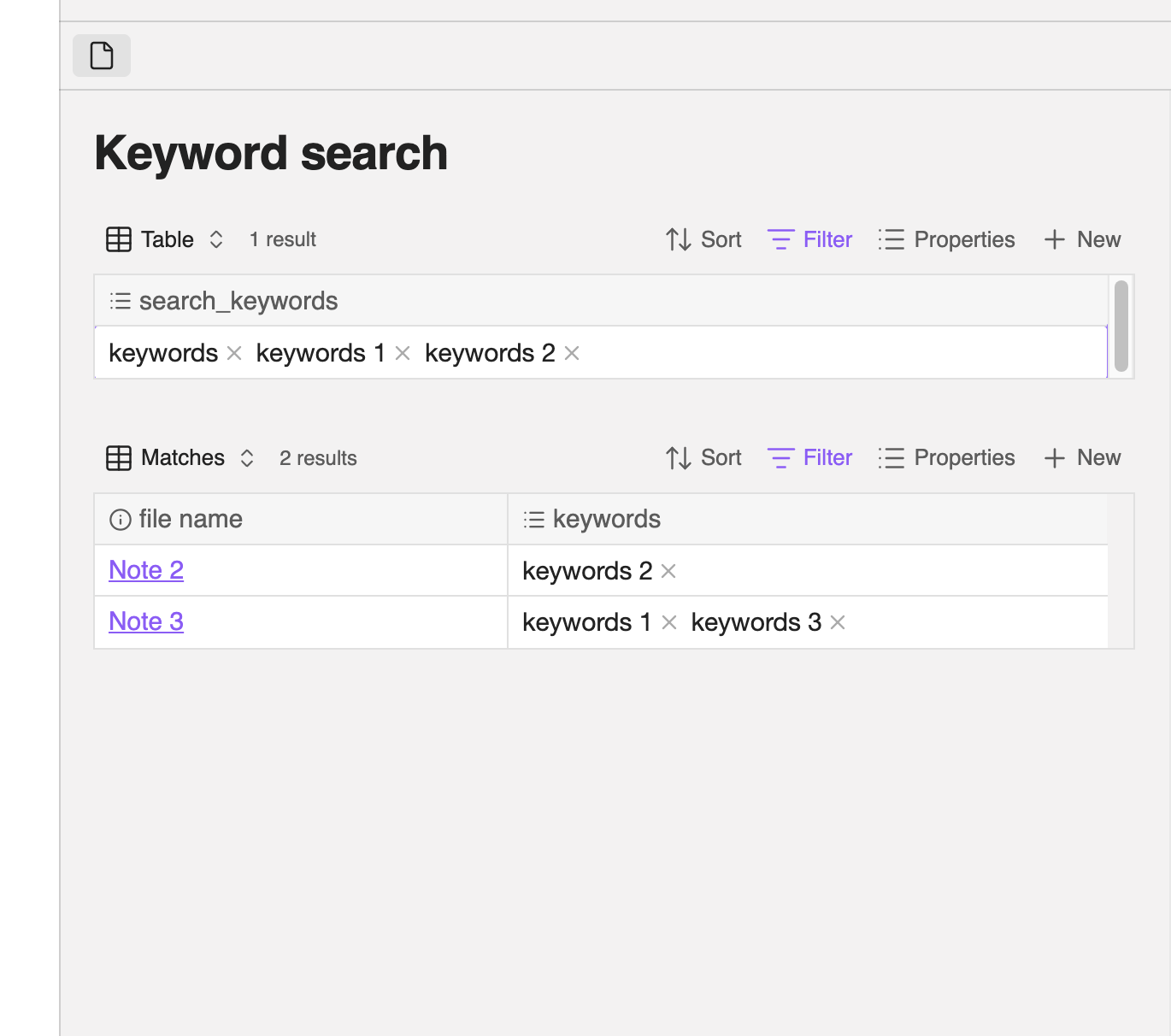
In Base, add property-columns “filename” and “keywords”, as the latter is what is declared in YAML.
(Hint: Only the “filename” property will give links to notes that can be opened by clicking.)
The result is a table of all notes with all keywords key values.
Achievement: The first time to see all keywords in the vault, but unordered and with plenty of repetitions.
In Base, create a filter with:
property: “keywords”
verb: “contains” (not “is”)
→ Value field in the filter dialogue shows an ordered list (index) of keywords values. Milestone: Index of keywords allows to actually understand which tags are used in the team.
This is what the Tags-view in Obsidian should be for, in my opinion.
In Base, combining several filters or using the verb “contains all of” allows finding notes which contain several keywords values in question.
A similar thing would be achieved in Tags-view with Ctrl-click on tags values. Additional benefit of the Bases method: By choosing other verbs in the filter, one can identify notes with particular misfits in values, like project_closed but still invoice_not_paid.
The filtered base has two disadvantages compared to a regular tag search with Tags-view:
The base doesn’t show the context of found occurrences. Therefore, each note in the filtered table has to be opened individually and checked.
The filtering process is quite fiddly when you have to look for many keywords values day in and day out. I shall try to use a whole set of bases as predefined filters as a quick start.
At this stage, I can at least cope with the tasks assigned to me. And I can do it from within Obsidian.
It takes considerably more time due to many more steps through dialogues and menus than would seem necessary if Tags-view accepted keywords as tags. But at least it’s feasible.
As an alternative to Bases, Graph view can be filtered, too, for property: keywords: my_keyword. Although for only one value, if I am not mistaken. And you have to enter the value manually, which means you cannot identify it without the value index from a Base.
You may also use the link() function (Functions - Obsidian Help) which you can combine with the icon() function to create links.
Context of the files can be shown with the search function (Search - Obsidian Help), though I dont know how useful the context of the frontmatter will be.
Graph views used the same syntax as the search function (Search - Obsidian Help). You can search for multiple values, but yes it is a bit fiddly.
though I dont know how useful the context of the frontmatter will be.
Well, it doesn’t change the rotation of the Earth. But it is still very useful.
Because this is not my own vault but a team project, I actually don’t know which keywords already exist. Even worse, besides common keywords for common subjects of the team, every member has his or her own very personal tagging system for procedures, like reading papers and things like that.
As an example, last week someone called from the road and asked me to quickly collect all data about articles he had read in preparation for a conference he had attended. All I knew was the date of the conference. So I looked up all his notes with the title of the conference in the keywords and dates within three weeks before the given date. From those two keywords I found in the context the keywords for the subjects he was reading about. And from those subjects I found the articles and copied their data. He appeared pleased with the list I sent him.
The only drawback was that to be shown the context, I had to make a shadow copy of all his notes and therein change keywords in YAML to tags with a text editor all at once to get the tags functions in Obsidian. Of course, that single-purpose vault had to be deleted afterward. My feeling is a procedure like that shouldn’t be necessary.
Thanks for the links, in particular to holroy and to the Graph View multi-value filtering. Fresh food for thought! You really helped me a lot!
What I meant by the context of frontmatter is that it will mostly consist of other frontmatter values. In general, Bases is more powerful for displaying frontmatter values and also filtering by dates compared to the Search plugin.