Currently the only block math supported by Obsidian should be in the following form:
text
$$x+1$$
text
or
text
$$
x+1
$$
text
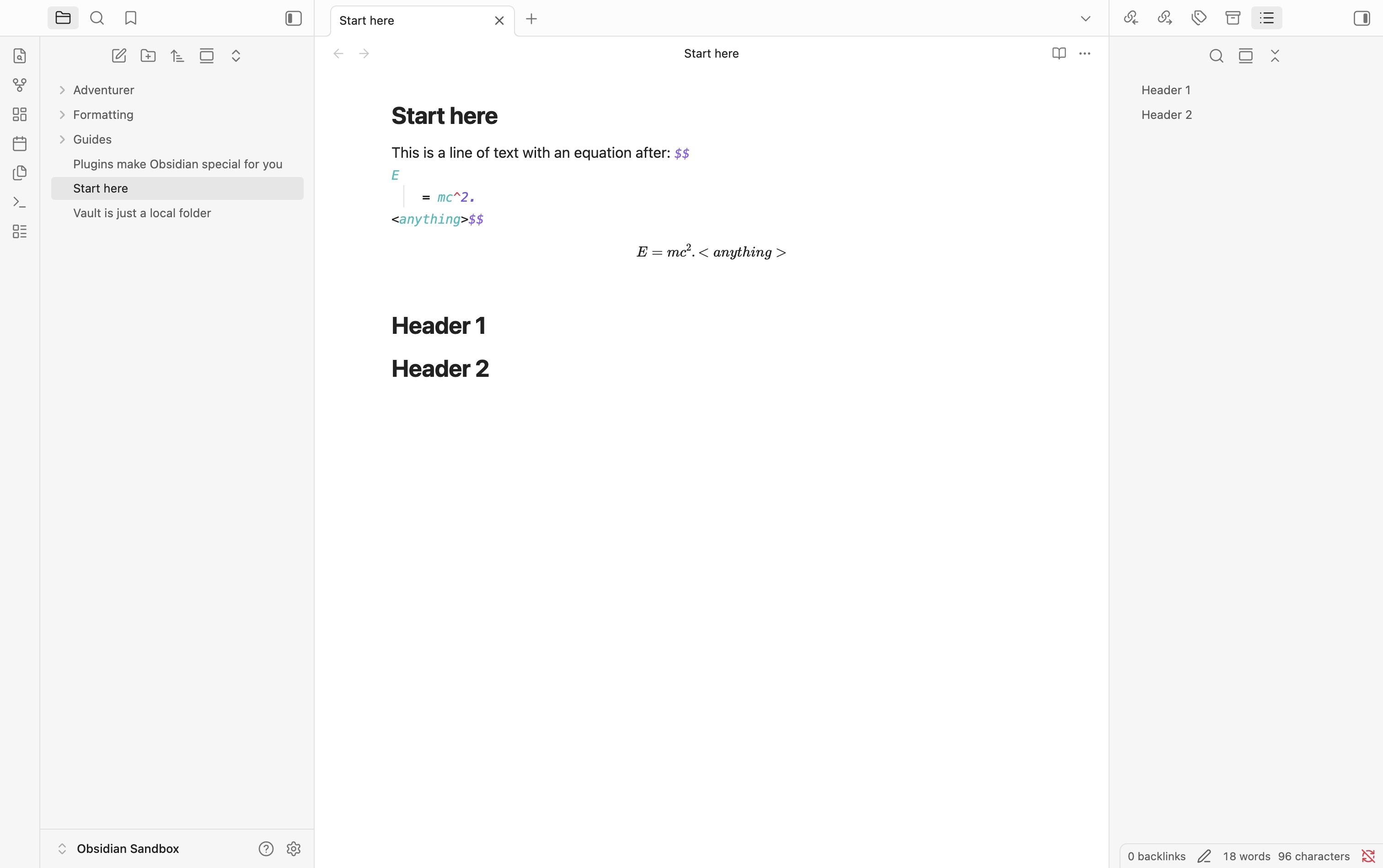
Anything else should NOT be interpreted as a math block. The reading mode follows this rule, the editor does not and may give to the user the impression that a valid math block was inserted. When this happens, there is a discrepancy between what appears in editor mode and what appears in reading mode. Sometimes, the document is severely broken in reading mode, with resulting negative consequences to the document parsing made by obsidian’s indexer (missing links, outline not working).
The solution is either to fix the editor parser to act like the reader one, or viceversa.
Once you’ve done the above, delete everything above this line.
Steps to reproduce
Open an empty note.
Add one or multiple headings.
Add a (LaTeX) math block ($$ … $$) before one or more of the headings.
Immediately after the last $$ type a space and some letters.
Finally type [[# somewhere in the document and/or open the outline in the sidebar.
Example
Full example note (only part inside code block):
# H1
[[#H2]]
$$
a+b=c
$$ abc
# H2
Rendered, the abc after $$ only appears in the next row, looking like a line break.
The link to H2 isn’t working and H2 doesn’t show up in outline.
Did you follow the troubleshooting guide? [Y/N]
Yes
Expected result
I expect [[# to suggest all existing headings in the document. Also I expect to see all existing headings in the outline. Alternatively, I expect some visual cue that there is a problem with the syntax - be it the maths block not being correctly displayed.
Actual result
All headings after the maths block are gone from the outline and not possible to link to via [[#
Environment
SYSTEM INFO:
Obsidian version: 1.12.7
Installer version: 1.8.10
Operating system: Windows 11 Pro 10.0.26100
Login status: not logged in
Language: de
Insider build toggle: off
Live preview: on
Base theme: adapt to system
Community theme: none
Snippets enabled: 0
Restricted mode: on
RECOMMENDATIONS:
none
Same behaviour on Android 16 (1.12.7) and older version (1.6.7) on Kubuntu (only had old version available, assuming this is a general behavior).
Like I said, in that case the actual bug is that rendering in default editing mode is incorrectly. There’s no way to even spot there’s something wrong, not even while editing the math block itself.
THe math block visibly ends after the equation, you can’t even notice the missing line break. The only visible clue that the line break is missing is the missing headings - which is quite obscure.
If that’s intended behavior, I expect it to behave like code blocks. That is, if you (accidentally) type something after the ending ``` on the same line, the code block visibly continues - both in editing and reading mode. This is a bug with rendering in the default editing view.
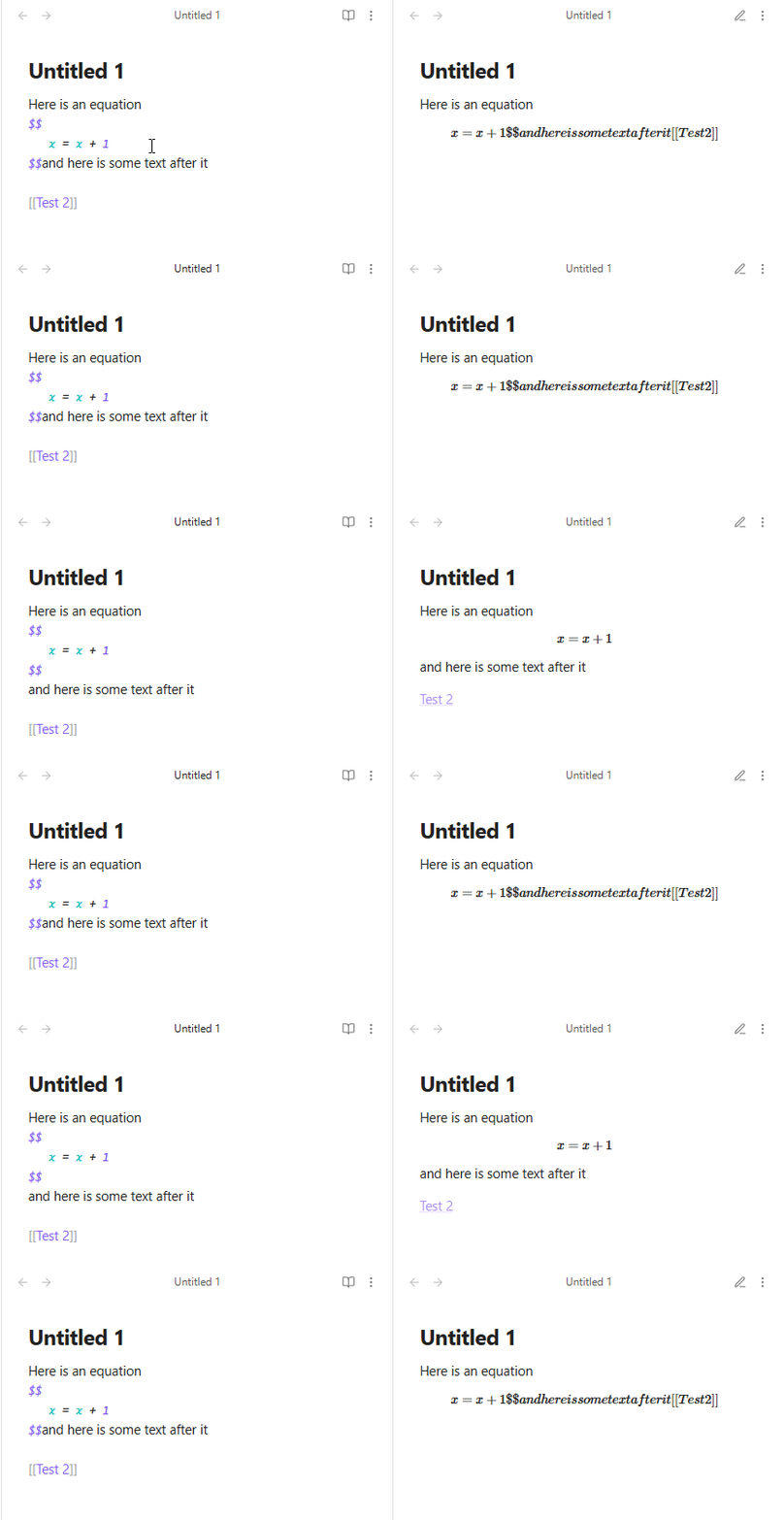
I was puzzled by a backlink not appearing in the linked mentions pane, and I was able to track down a way to reproduce it. Basically if you enter an equation without a newline after it, like this
Here is an equation
$$
   x = x + 1
$$and here is some text after it
instead of
Here is an equation
$$
   x = x + 1
$$
and here is some text after it
then any links after that won’t be counted as backlinks in the document they link to. This is hard to spot because the live preview renders identically in both cases, so you can’t easily see if you’ve done this.
Steps to reproduce
open the sandbox vault
create a file ‘Test 1’ with the following text
Here is an equation
$$
   x = x + 1
$$and here is some text after it

[[Test 2]]
click the link to create the ‘Test 2’ file
open the linked mentions panel
The link from ‘Test 1’ won’t be listed as a backlink.
However, either of the following will cause it to be listed again
put a newline (or even a space) after the second $$, or
move the [[Test 2]] link before the equation
Did you follow the troubleshooting guide? [Y]
Expected result
Either backlinks should appear in both cases or else there should be an error or other indication that the syntax is incorrect.
Actual result
If a document contains an equation entered this way, any links after the equation are not counted as backlinks.
Environment
SYSTEM INFO:
Obsidian version: v1.9.14
Installer version: v1.8.4
Operating system: Darwin Kernel Version 23.6.0: Thu Apr 24 20:26:36 PDT 2025; root:xnu-10063.141.1.705.2~1/RELEASE_X86_64 23.6.0
Login status: not logged in
Language: en
Insider build toggle: off
Live preview: on
Base theme: adapt to system
Community theme: none
Snippets enabled: 0
Restricted mode: on
The issue is that in live preview they render identically. So if you always work in the live preview pane as I do, then you can’t tell if you’ve made this mistake or not. It can easily happen by accident, and then the backlinks stop working with no indication as to why.
I agree that it should probably be considered incorrect syntax, but then it shouldn’t render as if it’s correct in the live preview.
Even though it is incorrect syntax, I guess that shouldn’t prevent backlinks from working. This message suggests that bugs of the form “a specific kind of bad syntax stops backlinks from working” have been fixed before.
I didn’t think to check before, but this also affects the graph view, not just backlinks. (To reproduce, follow the steps above and enter the graph view - the nodes “Test 1” and “Test 2” will not be linked.)
Create another node, say “Child”. With the following content
 >$$
\frac{d}{dx}(x^{n})=nx^{n-1}
$$

[[Parent]]
Did you follow the troubleshooting guide? [Y/N]
Y
Expected result
The Child note should be linked to the Parent node. Graph view should show connection between them.
Actual result
The graph view doesn’t show the connection.
In addition, Child’s outgoing links panel seems empty (and so Parent’s backlinks).
Environment
SYSTEM INFO:
Obsidian version: v1.9.14
Installer version: v1.9.14
Operating system: Windows 10 Pro 10.0.19045
Login status: not logged in
Language: en
Insider build toggle: off
Live preview: on
Base theme: adapt to system
Community theme: none
Snippets enabled: 0
Restricted mode: on
fwiw the syntax for display math in block quotes should be
> $$
> \frac{d}{dx}(x^{n})=nx^{n-1}
> $$
and with this syntax the link afterward is tracked correctly. however this does not get rendered correctly, with > showing up in the equation. this is fixed by the community plugin Better Math in Callouts & Blockquotes.
If you switch to Reading View (which usually renders things more accurately) you’ll see that the link is included as part of the equation. This probably explains what you’re seeing. I’m not sure if it’s the correct behavior or not.
This appears to be a quirk of Live Preview. It displays correctly in Reading View.
SYSTEM INFO:
Operating system: ios 18.6.2 (Apple iPhone14,5)
Obsidian version: 1.9.14 (241)
API version: v1.9.14
Login status: logged in
Language: en
Catalyst license: none
Live preview: on
Base theme: adapt to system
Community theme: none
Snippets enabled: 0
Restricted mode: on
Add a latex block (not inline latex) directly after a text (1) or inside a comment (2). All titles and subtitles after the latex block stop being updated in the outline side panel.
1)
SYSTEM INFO:
	Obsidian version: v1.6.7
	Installer version: v1.5.3
	Operating system: Darwin Kernel Version 19.6.0: Tue Jun 21 21:18:39 PDT 2022; root:xnu-6153.141.66~1/RELEASE_X86_64 19.6.0
	Login status: not logged in
	Insider build toggle: off
	Live preview: on
	Base theme: dark
	Community theme: none
	Snippets enabled: 0
	Restricted mode: off
	Plugins installed: 9
	Plugins enabled: 3
		1: Periodic Notes v0.0.17
		2: Calendar v1.5.10
		3: Advanced Tables v0.22.0

RECOMMENDATIONS:
	Community plugins: for bugs, please first try updating all your plugins to latest. If still not fixed, please try to make the issue happen in the Sandbox Vault or disable community plugins.
Additional information
Also happens on Linux (Flatpak, AppImage), same Obsidan version.
typing [[# here will only show “heading 1”.
Basically all links are broken in the sense that they are not reachable in search, nor will they work.
Since empty $$$$ blocks are/seem legal, this is a bug.
The bigger issue is that because $$$$ are invisible, it’s hard to spot what’s causign the problem. I did a binary search through the doc to figure out what’s wrong.
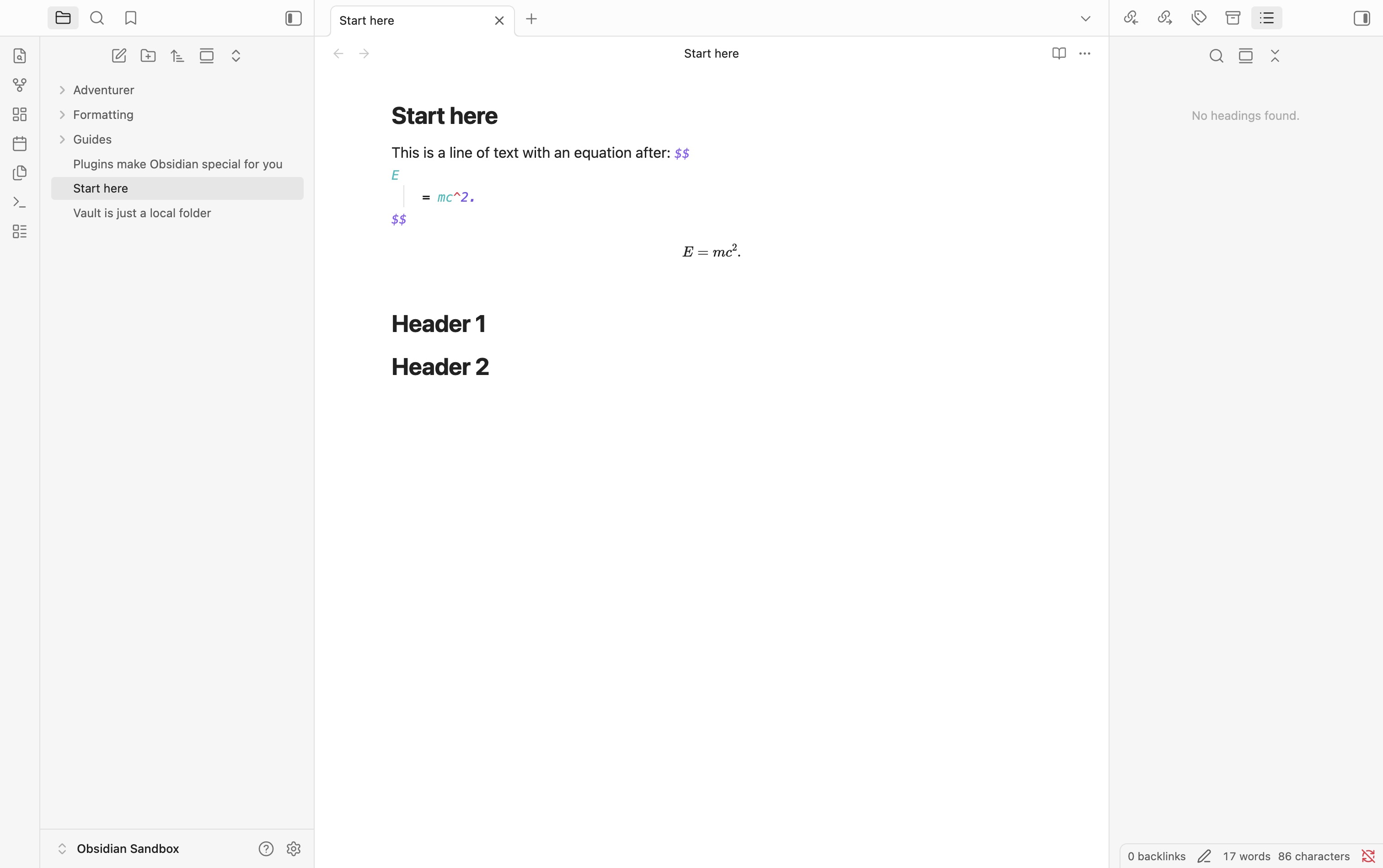
Have a line of text which ends with a $$ LaTeX equation, with a newline directly before the closing $$.
Did you follow the troubleshooting guide? [Y/N]
Y
Expected result
Headings and LaTeX both work normally. In particular, headings can still be linked to from outside the file, and they show up in the outline pane.
Actual result
Headings cannot be linked to from outside such a file, and do not show up in outline pane.
Environment
SYSTEM INFO:
Obsidian version: v1.11.5
Installer version: v1.8.4
Operating system: Darwin Kernel Version 25.2.0: Tue Nov 18 21:07:05 PST 2025; root:xnu-12377.61.12~1/RELEASE_ARM64_T6020 25.2.0
Login status: logged in
Language: en
Catalyst license: none
Insider build toggle: off
Live preview: on
Base theme: adapt to system
Community theme: none
Snippets enabled: 0
Restricted mode: on
RECOMMENDATIONS:
none