SVG: Pasting SVG / HTML code directly into the markdown note causes it to be incorrectly rendered in reading mode

This only happens with some SVGs. I’ll provide one that triggers the bug below.

Steps to reproduce

  1. Open a new obsidian note.
  2. Paste in an SVG that triggers the bug.
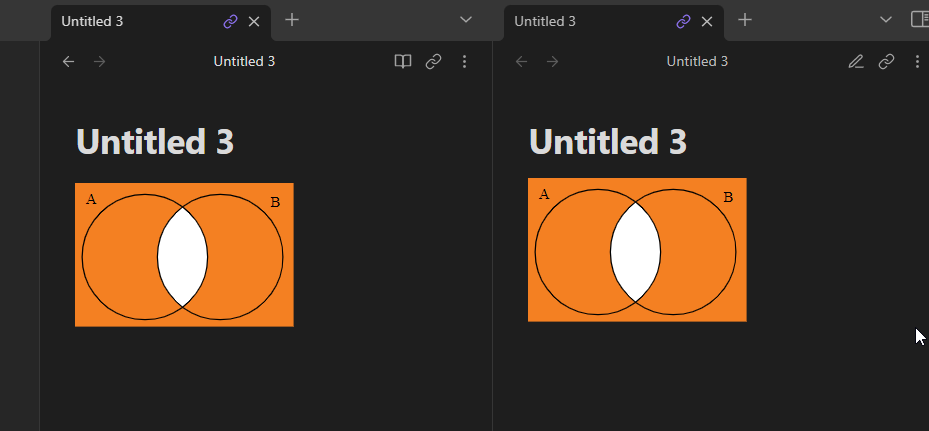
  3. Observe that in edit mode the output is correct
  4. Observe that in reading mode the output is different and incorrect.
  5. Paste SVG into an external SVG renderer / html and observe that the output is always correct.

Expected result

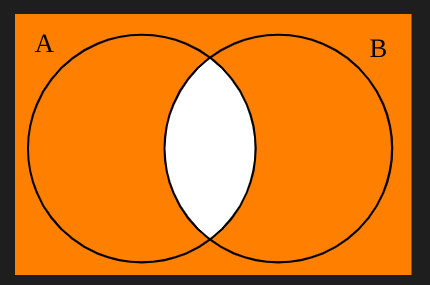
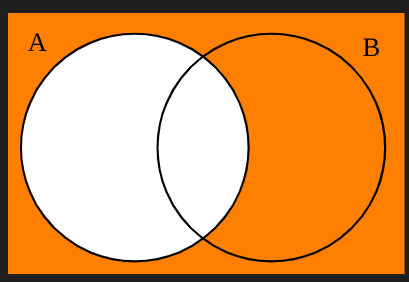
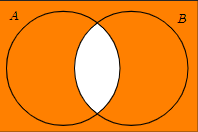
This SVG should be rendered on the page:
Actual result

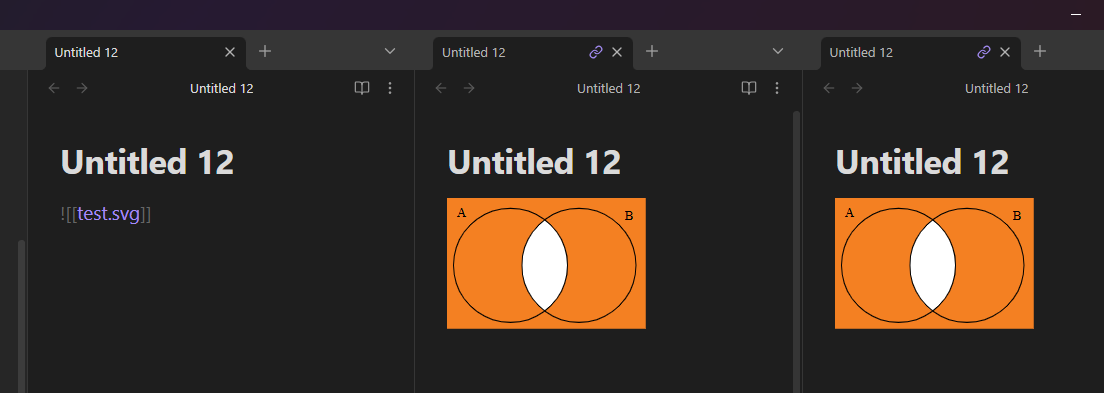
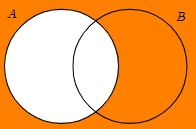
In reading mode this SVG is rendered on the page instead:
Environment

  • Operating system: Windows 11 Home
  • Debug info:
SYSTEM INFO:
	Obsidian version: v0.15.9
	Installer version: v0.15.9
	Operating system: Windows 10 Home 10.0.22622
	Login status: not logged in
	Insider build toggle: off
	Live preview: on
	Legacy editor: off
	Base theme: dark
	Community theme: none
	Snippets enabled: 0
	Restricted mode: on

RECOMMENDATIONS:
	none

Additional information

Here is a paste bin of the above SVG file which triggers the bug.
SVG Code

Here is a link showing the SVG being rendered correctly in an html file:
nathang.dev/fileshare/svg_test.html

This SVG was originally generated using tikz. Here is the tikz code, however I don’t think this is probably relevant considering the SVG is rendered correctly everywhere other than obsidian:

% Required packages
\usepackage{tikz}
\usetikzlibrary{backgrounds}
 
\begin{document}
 
\begin{tikzpicture}[thick,
    set/.style = {circle,
        minimum size = 3cm,
        fill=orange},
	background rectangle/.style={fill=orange}, show background rectangle]

% Set A
\node[set,label={135:$A$}] (A) at (0,0) {};
 
% Set B
\node[set,label={45:$B$}] (B) at (1.8,0) {};
 
% Intersection
\begin{scope}
    \clip(0,0) circle(1.5cm);
    \clip (1.8,0) circle(1.5cm);
    \fill[white] (0,0) circle(1.5cm);    
\end{scope}
 
% Circles outline
\draw (0,0) circle(1.5cm);
\draw (1.8,0) circle(1.5cm);
 
\end{tikzpicture}
 
\end{document}
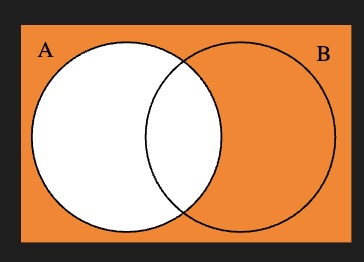
works for me. post a screen recording of this happening in the sandbox vault

Hello, sorry I didn’t follow up on this yet! Here is a video inside the Sandbox on the latest version of Obsidian:

svg_screen.mp4

I also see it as “incorrect” in Editing mode. And I see nothing in Reading mode. (0.16.3)

screenshot_2022-10-01_12-19-59

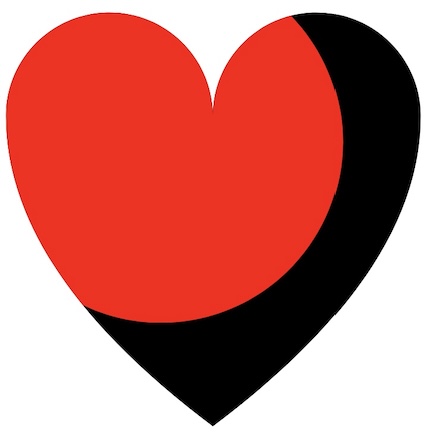
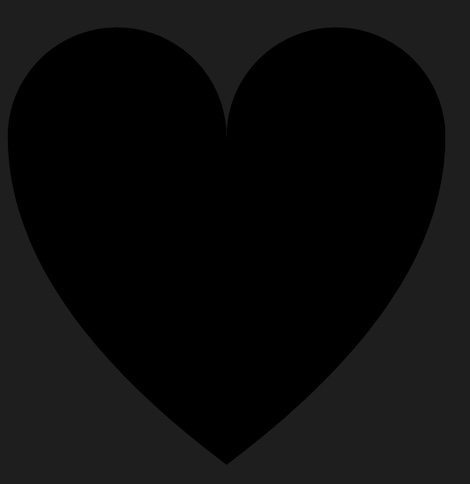
Testing another example I found on the web. <clipPath> - SVG: Scalable Vector Graphics | MDN It fails too. It seems in Obsidian (or in CodeMirror, and/or in certain modes in Obsidian) the clip path just isn’t working.

<svg viewBox="0 0 100 100">
  <clipPath id="myClip">
    <!--
      Everything outside the circle will be
      clipped and therefore invisible.
    -->
    <circle cx="40" cy="35" r="35" />
  </clipPath>

  <!-- The original black heart, for reference -->
  <path
    id="heart"
    d="M10,30 A20,20,0,0,1,50,30 A20,20,0,0,1,90,30 Q90,60,50,90 Q10,60,10,30 Z" />

  <!--
    Only the portion of the red heart
    inside the clip circle is visible.
  -->
  <use clip-path="url(#myClip)" href="#heart" fill="red" />
</svg>

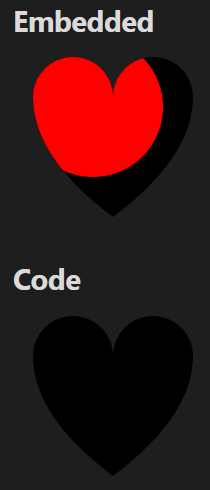
Intended look:

screenshot_2022-10-01_12-53-13

How it shows up in Obsidian:

screenshot_2022-10-01_12-54-13

Curious… I can get it to show up as intended in the Sandbox vault. But in my own vault, with Restricted mode turned on, default theme (dark or light) and no CSS snippets (and restarted Obsidian after turning it all off) it shows up as incorrect.

So I’m wondering if there is some core plugin or setting that is causing the issue.

Yes I have noticed that before, if you open it side by side they do not act independently:
double_pane.mp4

It doesn’t work in my sandbox vault, if that makes a difference.

Any updates? It seems this is at least somewhat reproducible

1 Like

It’s the exact same bug as here, but it’s still present (as of the current latest version of Obsidian, v1.8.10). I’m opening a new topic because the old topic was moved to the bug graveyard without ever being addressed (or it was, the post wasn’t updated, and it’s come back).

Steps to reproduce

  1. Put an SVG with a clipping path in the vault[1]
  2. Observe the (probably correct) rendering in editing mode
  3. Switch into Reading mode
  4. Observe the incorrect rendering

Suitable SVGs: See the original topic. I’ve used this one to confirm the bug, but the one provided in this comment renders incorrectly in both modes.

Did you follow the troubleshooting guide?

Yes, all testing was confirmed in the sandbox vault.

Expected result

The SVG renders with correct clipping paths in both editing and reading views (screenshot taken in editing view in the sandbox vault):

Actual result

The SVG renders as follows in reading view:

Environment

SYSTEM INFO:
	Obsidian version: v1.8.10
	Installer version: v1.8.10
	Operating system: #1-NixOS SMP PREEMPT_DYNAMIC Thu Jul 24 06:56:38 UTC 2025 6.12.40
	Login status: not logged in
	Language: en
	Insider build toggle: off
	Live preview: on
	Base theme: adapt to system
	Community theme: none
	Snippets enabled: 0
	Restricted mode: on

RECOMMENDATIONS:
	none

Additional information

The text of the linked other bugged SVG:

<svg viewBox="0 0 100 100">
  <clipPath id="myClip">
    <!--
      Everything outside the circle will be
      clipped and therefore invisible.
    -->
    <circle cx="40" cy="35" r="35" />
  </clipPath>

  <!-- The original black heart, for reference -->
  <path
    id="heart"
    d="M10,30 A20,20,0,0,1,50,30 A20,20,0,0,1,90,30 Q90,60,50,90 Q10,60,10,30 Z" />

  <!--
    Only the portion of the red heart
    inside the clip circle is visible.
  -->
  <use clip-path="url(#myClip)" href="#heart" fill="red" />
</svg>

EDIT: Worth mentioning that this applies to both both my Linux and Windows installs, I’m just not at my Windows PC right now to get the debug info.


  1. I discovered this bug using the TikZJax plugin with clip, but it applies to all clipping SVGs ↩︎

I still can’t reproduce this problem

I think it’s because you embedded the .svg as opposed to “hardcode” it in a note and let Obsidian render it :innocent:

I can repro on Mac (Sequoia 15.6) + Obsidian 1.9.7 in the sandbox vault :blush:
Although, the results also seems to depend on the svg, how many tabs with the svg are open … and in which view mode the note is in which tab :upside_down_face:

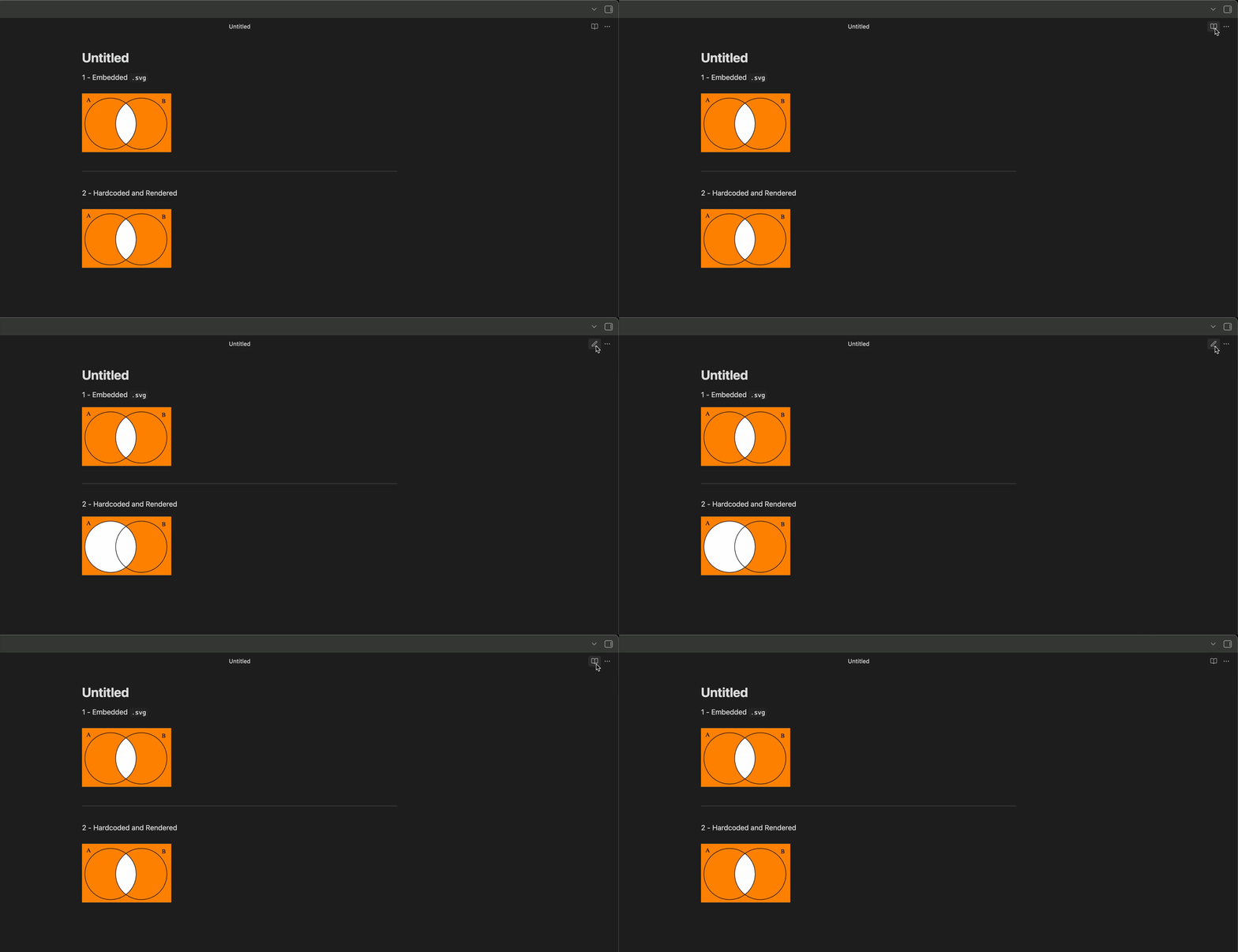
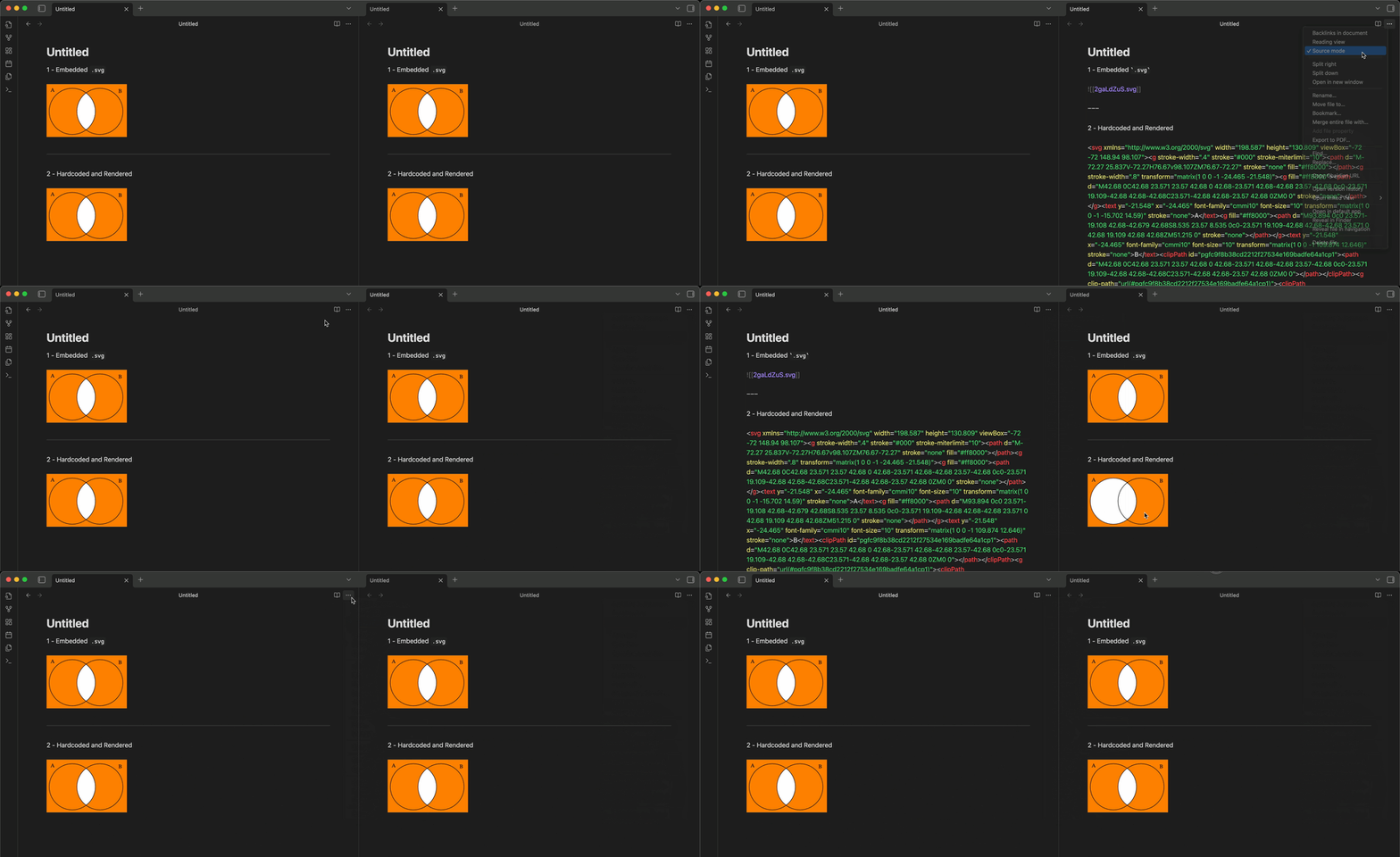
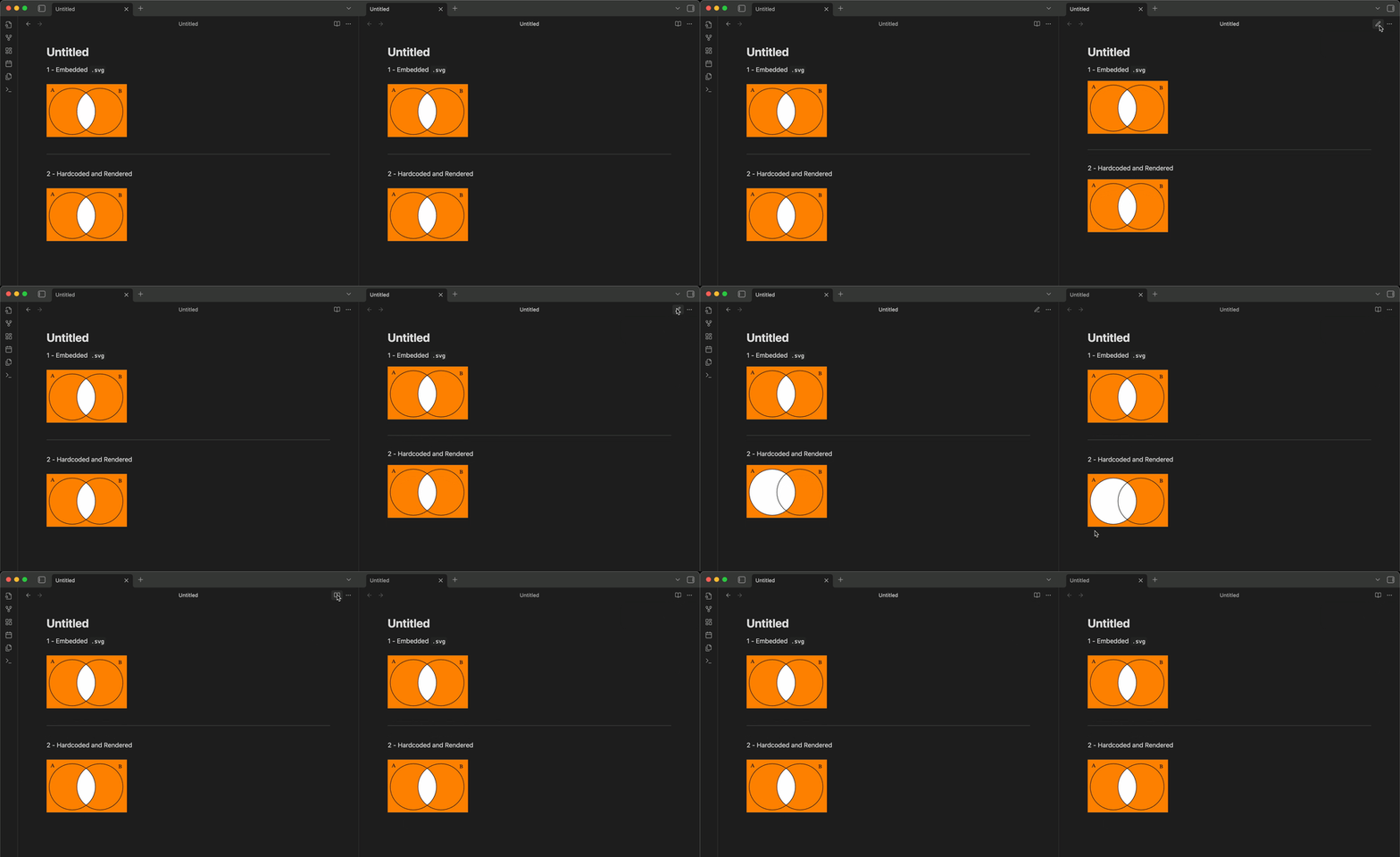
Using the SVG from the post a little bit above, this is what I see when switching from LP to Reading: The embedded SVG renders fine but the written/“hardcoded” one is problematic
SVG 1

Now, if I open the same note in 2 tabs and switch from LP to Source I get some incorrect rendering depending on the tab I select to switch the view :sweat_smile:

I mean, if I switch from LP to Source in the right tab, the “hardcoded” SVG in the left tab stays as it is… but that’s not the case if I switch from LP to Source in the left tab (in that case, the “hardcoded” svg in the right in LP is incorrectly re-rendered for some reasons :woman_shrugging:

SVG 2

And I get similar results switching from LP to Reading :blush:
Making the switch on the note in the right tab doesn’t impact how the SVG is rendered in the left tab but making the switch on the note in the left tab impact the rendering of the “hardcoded” SVG in the right tab and the left one :woman_shrugging:

SVG 3

Using the “heart and circle” SVG sample shared in this topic, I get the same results as Rigmarole here … even with the SVG written “inline” in Source :blush:

In any cases, the embedded .svg seems to be rendered fine :blush:

Can confirm the bug seems to go away if it’s embedding a separate SVG file. I was pasting the SVG code directly into the file as text. A quick inspect element seems like the TikZ plugin does an in-place replacement with SVG code, which explains why it’s also bugged. I also fixed up the heart graphic so it actually renders, and I noticed it doesn’t seem to render correctly at all if it’s pasted as code in either mode, but works fine in both if it’s embedded:

No idea what to make of that, it just feels weird.

Fixed heart code:

<svg xmlns="http://www.w3.org/2000/svg" width="200" height="200" viewBox="0 0 100 100">
  <clipPath id="myClip">
    <circle cx="40" cy="35" r="35" />
  </clipPath>
  <path
    id="heart"
    d="M10,30 A20,20,0,0,1,50,30 A20,20,0,0,1,90,30 Q90,60,50,90 Q10,60,10,30 Z" />
  <use clip-path="url(#myClip)" href="#heart" fill="red" />
</svg>

Ok, so the problem is that you are adding HTML to the page (even though it’s the HTML of an SVG). This HTML in one part of the app is interfering with the HTML of other parts of the app.

I don’t think we are going to work on this anytime soon.

I see. I thought it was intended behaviour for Obsidian to be able to render them in-line, since it does mostly work. If it isn’t “fully officially” supported, would it be worth putting that on the docs for people running into this in the future?

I also might eventually look into fixing it myself from the user side with CSS snippets or a plugin if it bugs me enough.