I support this. The configuration includes theme, look, layout (beyond elk).
Section about Look :
Layout and look
We’ve restructured how Mermaid renders diagrams, enabling new features like selecting layout and look. Currently, this is supported for flowcharts and state diagrams, with plans to extend support to all diagram types.
Selecting Diagram Looks
Mermaid offers a variety of styles or “looks” for your diagrams, allowing you to tailor the visual appearance to match your specific needs or preferences. Whether you prefer a hand-drawn or classic style, you can easily customize your diagrams.
Available Looks:
- Hand-Drawn Look: For a more personal, creative touch, the hand-drawn look brings a sketch-like quality to your diagrams. This style is perfect for informal settings or when you want to add a bit of personality to your diagrams.
- Classic Look: If you prefer the traditional Mermaid style, the classic look maintains the original appearance that many users are familiar with. It’s great for consistency across projects or when you want to keep the familiar aesthetic.
How to Select a Look:
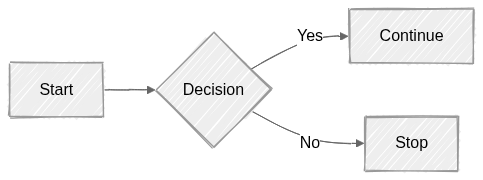
You can select a look by adding the look parameter in the metadata section of your Mermaid diagram code. Here’s an example:
Code:
---
config:
  look: handDrawn
  theme: neutral
---
flowchart LR
  A[Start] --> B{Decision}
  B -->|Yes| C[Continue]
  B -->|No| D[Stop]
Section about layouts:
Layouts
This page lists the available layout algorithms supported in Mermaid diagrams.
Supported Layouts
And tidy-tree layout (for mindmaps):
Tidy-tree Layout
The tidy-tree layout arranges nodes in a hierarchical, tree-like structure. It is especially useful for diagrams where parent-child relationships are important, such as mindmaps.
Features
- Organizes nodes in a tidy, non-overlapping tree
- Ideal for mindmaps and hierarchical data
- Automatically adjusts spacing for readability
Example Usage
Code:
---
config:
  look: handDrawn
  theme: forest
  layout: tidy-tree
---
mindmap
root((mindmap))
    Origins
      Long history
      ::icon(fa fa-book)
      Popularisation
        British popular psychology author Tony Buzan
    Research
      On effectiveness<br/>and features
      On Automatic creation
        Uses
            Creative techniques
            Strategic planning
            Argument mapping

This is IMO much better for mindmaps than the default engine.
Similar to Elk, the tidy tree layout engine is not included with Mermaid but provided as a package.
This package provides a bidirectional tidy tree layout engine for Mermaid based on the non-layered-tidy-tree-layout algorithm.
@mermaid-js/layout-tidy-tree
I don’t know what would be the best way way to provide support for this, while maintaining the syntax. But that would improve mermaid diagrams a lot.