The sharp in “C#” is seen as a tag.
Obsidian doesn’t play will with the # character in paths. When Obsidian reached your #, it thought the file path was done. So all you got were the characters before it: “C.md”.
Options:
- If your imported links are relative-enough to not include “C#” in the path, you can simply rename the folder. The links should work fine after that, including creating new notes from the links.
- If any imported links do include “C#” in the paths, I would rename the folder in OneNote then redo the import.
Additional info
There’s s big ole warning when you manually name a folder, but importing—or even just using the OS file system—bypasses it:
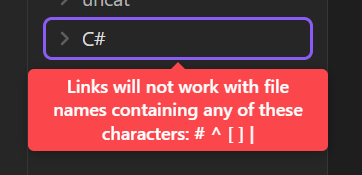
Importer’s developer might appreciate a heads-up (on their GitHub issues page) about your experience, so they know to put in a warning of their own.
You might also be interested in adding a comment to this related feature request: Setting to block users from naming files and folders with characters reserved for / conflict with linking