I’m by no means an obsidian expert or an css wizard, but i have made an css snippet to make some “spoiler” text.
This code is based on this reddit comment
Feel free comment a better way
I’m by no means an obsidian expert or an css wizard, but i have made an css snippet to make some “spoiler” text.
This code is based on this reddit comment
Feel free comment a better way
Are you on desktop or mobile? Is hovering an option on your platform?
Desktop
In the thread below a blurring is used:
I wrote a similar version related to anki Q&A’s, see answer below. This could also be adjusted to show/reveal different parts related to what’s hovered.
It works well, thanks!
Although it was disturbing to see the “checkbox” disappear when editing the line and caret was after the - [#] part:
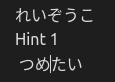
so I changed:
/* Hide the checkbox */
[data-task="#"]>label {
    display: none;
}
with
/* Hide the checkbox */
[data-task="#"]:not(.cm-active)>label {
    display: none;
}
Now it shows a standard checkbox:
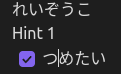
not ideal but I’d need to draw a “sharp / spoiler” symbol in CSS to display the ideal symbol, so that’s too much effort right now.
I should probably post this variant on GitHub gist too.
EDIT: DONE