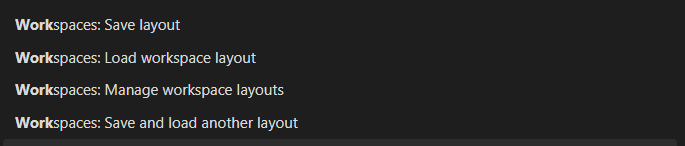
I’ve recently started using Obsidian at work, and discovered the Workspaces core plugin, which really helps me keep the various aspects of my job in focus. That said, this happens repeatedly during the day:
I’ve added several notes that belong to the workspace layout I believe I’m working in. I want to make sure they’re saved in that layout in case I have to switch workspaces suddenly; I want to be sure I’ll see them when I switch back.
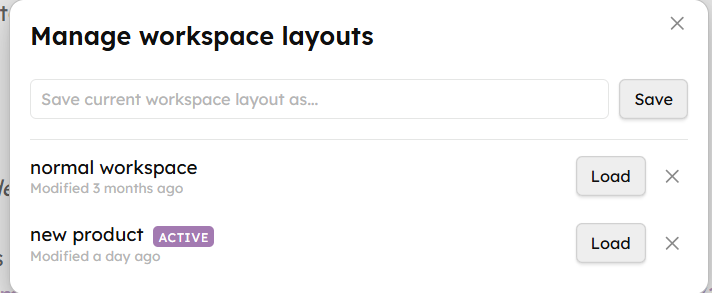
I click the “manage workspace layouts” icon on the ribbon menu. I see a list of the 6-8 different workspaces I juggle, with an “ACTIVE” indicator on one of them. Each one tells me the last time it was modified - minutes, hours, or days ago. There’s also a text box and a “Save” button in case I want to save the current layout under a new name.
If I’m correct that the layout I want to save is the one that’s marked “ACTIVE”… I have to close the layout manager, go to the Command Palette, and pick “Save layout”.
Often I then have to go back to the layout manager, to load a different workspace.
Proposed solution
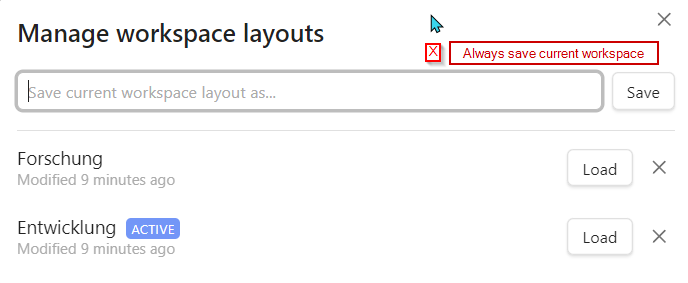
Currently if you click “Save” in the layout manager when there’s nothing in the text box, it gives an error message. Why not simply have it save to the current layout, the one marked “ACTIVE”? And then if I need to load a different workspace, I’m already there in the manager.
(Extra-great would be if the manager could tell you whether the layout had been modified since it was last saved. If I don’t remember whether I created that important note 4 minutes ago or 6 minutes ago… seeing that I saved the layout 5 minutes ago doesn’t tell me what I’d really like to know.)
Current workaround (optional)
Well, as described above, I can leave the layout manager, go to the Command Palette, and then go back to the layout manager if needed.
It would just be much easier if I could see whether my layout needs to be saved, and then save it, without leaving the layout manager.
I was coming to suggest this exact change. Workspaces are so useful, but I want to map a single hotkey that would allow me to do everything I need with workspaces, saving, switching, and loading.
I have a different suggestion on the same theme:
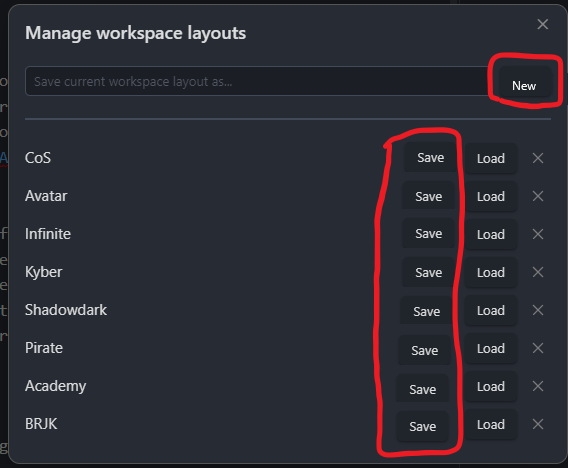
Just like there is a Load button for every entry there, please add a Save button too. I might not always want to save my open tabs to the active layout, but to another layout.
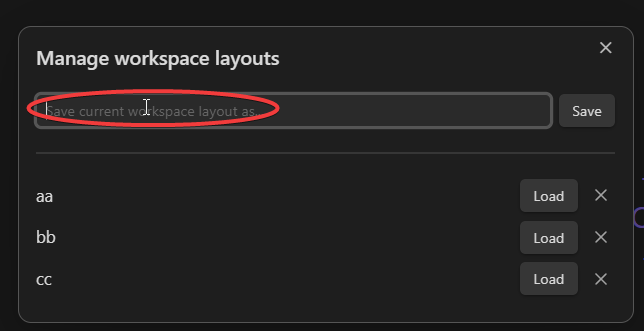
When using the workspace manager to save your workspace you need to retype the title. This is annoying as it makes correcting workspaces more difficult.
Because it is easy to forget what specific workspace is loaded the save and load another workspace option is basically useless. As you can accidentally overwrite one workspace with another. (Thankfully GIT can rescue.)
Proposed solution
Add a button to the manager to save the current view as a workspace that is already titled. See the image for a proposal.
Re type your workspace name in the manager to save.
Related feature requests (optional)
It would be nice if the workspace was displayed somewhere by default so that it is obvious if you are still on a specific workspace. Like some option to display it in the footer with the word count would be nice.
That would also work. I mostly wanted the buttons as I sync my obsidian using git and the number of times that the workspaces get out of sync due to conflicts is very high. So having the button on each would prevent the confusion that obsidian+git seems to create. AKA I’m not sure that the workspace that obsidian thinks is open is always the one that is open.
In addition it isn’t like there is a lack of screen real-estate on that modal.
If you use the command Workspaces: Save and load another layout whenever you switch workspaces (instead of using “Workspaces: Load another workspace layout”), it should solve your problem
Workspaces should not act (or not necessarily) as a “defined saved state” to the end-user. Right now, you have to save a workspace A, before you load another workspace B and want to come back to your previous state. This is a rather technical approach.
Instead the overall design of Workspaces should be more of a “real” Workspace. When I left my desk and come back to it, nobody cleaned it, but it is the state I left.
Proposed solution
The current behavior should probably stay, because there are users which like it that way.
Option 1: Additionally, the buttons could be replaced with these. This makes it clearer that the active workspace will be discarded (current behavior), or that you can also chose to save it (the keyboard shortcut “Save & Load” behavior).
Option 2: Add a checkbox whether the active workspace should be saved on load.
Option 3: Same as option 2, but as a Plugin setting.
When I started out with only occasionally trying to work with workspaces, the way it’s all laid out was unclear enough that I wound up accidentally saving to the wrong workspace several times and losing my work, which was very aggravating. I think this was partially due to the current workspace not being set to what I believed it to be, which someone above mentioned being an issue for them as well.
Now that I’m starting to use workspaces as a more central part of my workflow, I find that the “manage workspace layouts” command is the only one I can really use with full trust, and I find myself tip-toeing around the whole process to make sure I don’t accidentally lose a workspace. But I find myself hamstrung by the same issues everyone above has mentioned and independently thought that the proposed fixes in the quoted post and similar ones proposed by others would be a very simple, easy, and natural solution-- a real no-brainer of a tiny fix that would have an outsized quality of life improvement.
I particularly like the very explicit button instructions “Save current & load” and “Discard current & load” in the quoted proposal because it effectively addresses the issue of ambiguity and confusion that I’ve found can arise when using workspace commands.