Make sure you enable PDF export it in the settings first. It’s experimental and the way it works is to subvert Obsidian’s normal print function so I wanted to make it something the user has to opt in to.
it was on
Hi, I’d also like to ask: Have you yet come up with a way to implement simple notes without numbers? In one of the messages, you talked about this
The most obvious way would be to do it using HTML. I have not implemented it yet but its on the list of things to do.
Regarding PDF export, were you testing this with HTML sidenotes?
yes, i was testing
I released 0.2.9 which adds:
- Margin notes: Non-numbered notes in the margin. Use the command
Insert margin noteto start one.- When using HTML sidenotes this uses
<span class=”sidenote margin-note”>…</span> - When using Footnotes, it uses
[^mn-…]where it can be tagged if needed - e.g.[^mn-blah]
- When using HTML sidenotes this uses
- A setting “Gap Drift Factor” that lets the sidenotes move away from the note text as the editor size gets larger horizontally - just something that helps the sidenotes fill in space in a natural way if set properly
I had initially released this earlier today but pulled it down as soon as I realized it had caused buggy behavior in the plugin. It may still be experimental but the basics should work. If you see any issues let me know.
Non-numbered sidenotes are an amazing innovation. But is there any way to add a different display for these margin-notes? The way I’m used to seeing them. I think the symbol I indicated in the photos was better and much more familiar. It would allow comments to be strictly separated from original sidenotes. I don’t know if it’s possible to add it to the Markdown format (as a display in the main text), but it would be great. I don’t know about others, but personally, I have always associated margin notes with this symbol (the second picture is more preferable)
P.S. Thanks for your work! Besides, I wrote to you in private messages regarding the Gap Drift Factor parameter.


For the margin notes, I was referencing Edward Tufte’s standards. Can you show me an example of what you mean in a website or an image of it in use, then I can see if i can make more options.
Like that
ⓘ

https://www.consultant.ru/document/cons_doc_LAW_28165/a1d86f7078e645869b02fde85e8c972193557dee/
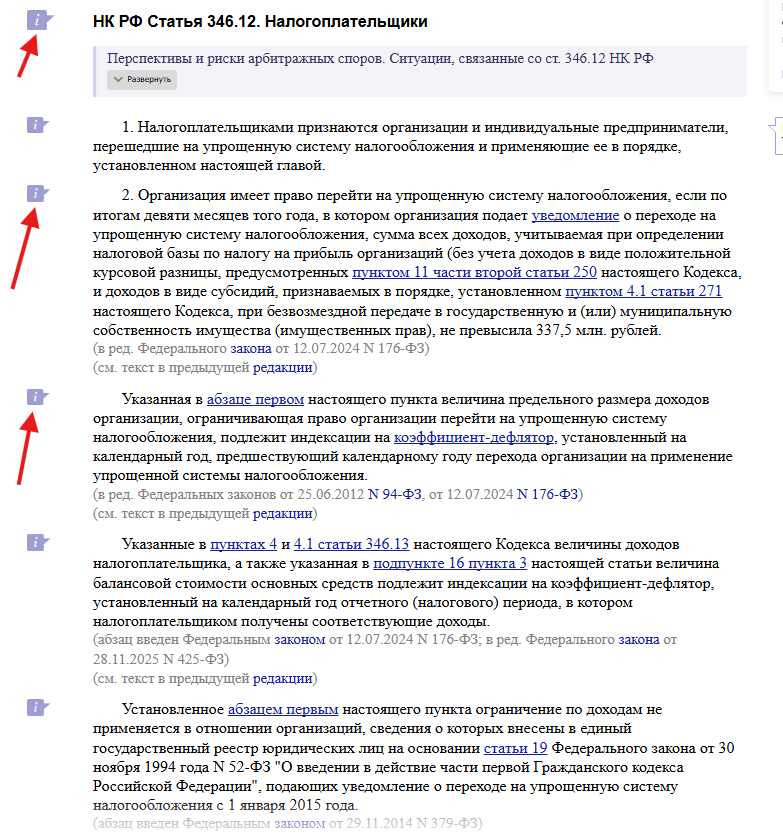
options that I managed to find
(U+2139)
🛈 (U+1F6C8)
🛈 (U+1F6C8)
🗩 (U+1F5E9)
🗪 (U+1F5EA)
𝚤 (U+1D6A4) - best 1
ⓘ (U+24D8) - best 2
Ⓘ (U+24BE)
🄸 (U+1F138)
Before I forgot. It would be great if this icon is displayed not only near sidenotes, but also directly in the main text, so that when working with it, you can immediately distinguish sidenotes from margin notes.
I released 0.3.2
Adds:
- Option where, when enabled, an icon is shown where margin notes go. When clicked, the margin notes shows in a popup. In Editing Mode, the margin note can be edited inside the popup. For now, the icon is set to ⓘ but more options or a custom field may be used in the future.
Also in 0.3.1 I added:
- A Command “Resequence footnotes“ to re-number footnotes sequentially. When adding sidenotes it’s easy for these to start getting out of order. This command should clean that up. It will leave margin notes alone.
Maybe I missed something, but the Insert margin note command is gone and there is a bug with character substitution. If you click on the icon (ⓘ) many times, it disappears and only the standard option (right) remains.
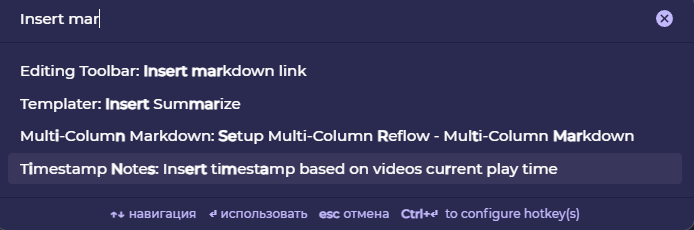

Fixed the “Insert margin note” command in 0.3.3
I’ve released 0.3.4 which adds customization for the margin note icon.
-
To use an image, store it in
plugins/sidenotes/assets. Supply the image filename in the settings field “Margin note popup icon”. -
I’ve packaged one image with the plugin in the .ZIP file that can be used for this. It is called
information_source.png.
This is fantastic! Thank you for your work! The only thing I would add is the ability to enlarge the symbol directly in the text. The symbol I use is too small. It would be great to add the ability to enlarge it and give it volume in the main text. This is similar to how it is implemented with the number badge style (if I’m not mistaken, depending on the selection, a frame with volume and other things appears). I tried to do this via CSS, but I didn’t get very far. I only managed to add a frame to the margin-sidenote and duplicate the symbol in the text for better visibility. Maybe you have some ideas on how to implement this (the scaling process).
P.S. It would also be great to add highlighting to the main section of text to which the margin note refers. This is also implemented with sidenote. It’s not much, but it’s missing.
I think, if you try my CSS you will understand what I was trying to implement
Neumorphism.css (4.7 KB)
So happy about the development of this plugin and where this is going at such a fast pace. And the “Resequence footnotes” command is a godsend. I’ve been using it already several times in the two and a half days since it’s release….Great work!
1 Like
I tested margin notes a little more and can say
- There is a significant lack of icon scaling in the text (whether it’s a symbol or an image), making it almost impossible to see. This applies to both the symbol in the text and the symbol located to the side. On the other hand, The icon/symbol on the right sometimes is too large.
- There is also a lack of margin note icons, as implemented with sidenotes, which have a specific visual style added to them (i mean, setting parameter “Number badge style”). If the symbol or image is not large enough, it may not be visible.
- We need to think about the scale of the image on the side (which replaces the margin note on the sides). Some users may need more or less scaling.
- There is no text highlighting when interacting with margin notes. If there is a lot of main text in a note, it can sometimes be unclear which line the margin note refers to if the text block is not highlighted when hovering over it.
- There is no way to add a link format in margin note when you wanna editing it later. Even if you manage to place a link inside margin note, it is practically impossible to follow it. For this I propose the following idea

P.S. Idea. I suggest making two types of margin notes. The first type is as you have implemented it. That is, there is a symbol or image that is displayed in the side margins and replaces the margin note text. The second display option is to make it like a sidenote, that is, leave the same field and make a visual style (“Number badge style”) to the left of the text, as is again implemented in sidenotes. Or maybe somehow combine the advantages of both options.
I sent another issue related to moving to another line after using margin note in private messages. (My additional CSS was off)
P.S. In addition, another idea came to mind. It’s something from the distant future. I don’t know who might find it useful, but theoretically, it’s possible. Integrate into the already created sidenote margin note. That is, margin notes within sidenotes. Let’s say we need to explain a term or a person in a sidenote, and in order not to clutter up the sidenote text, we transfer this information to a margin note (which refers to the sidenote, not the main text), so as not to describe it in the sidenote itself and leave only the main idea that came to mind.
