Release 0.1.7
Added:
-
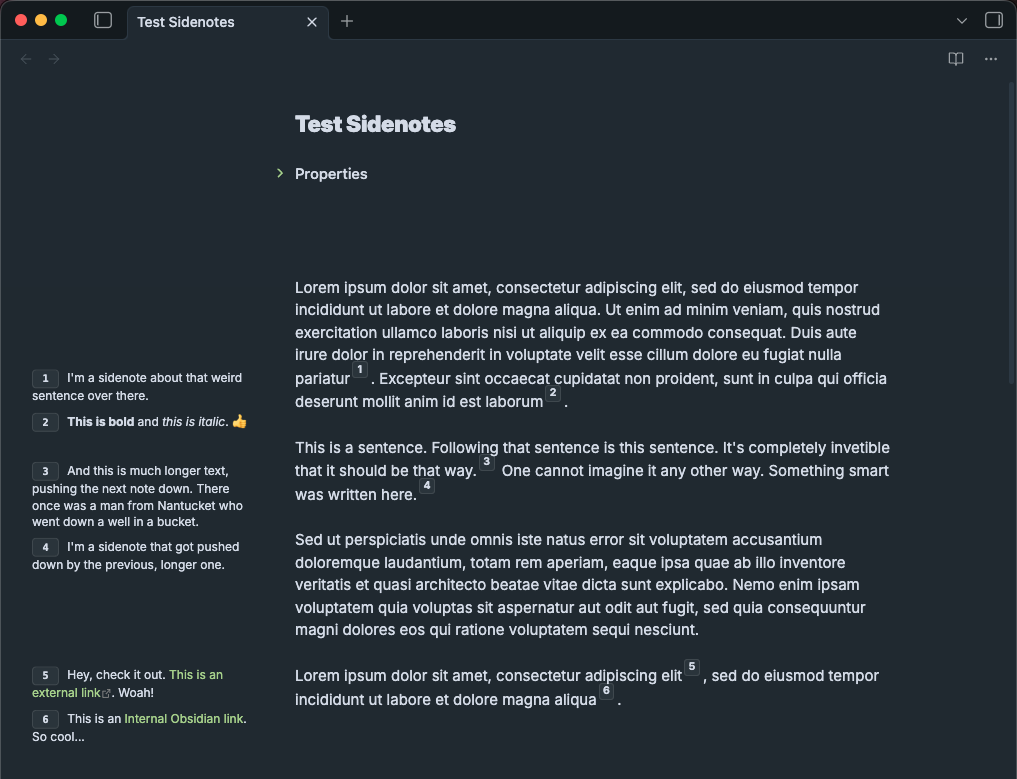
Better alignment of the sidenotes. They were lining up with the beginning of the paragraph that the note was added to. Now it follows the specific line of the reference.
-
More streamlined way to edit sidenotes when using footnotes, allowing you to click on the sidenote number and start editing it in the margin. This also works in Reading Mode.
Fixed:
- Source Mode works for both footnotes and HTML formatting. Before it didn’t work with footnotes.
New screenshot, showing the newer neumorphic badge style, improved alignment.
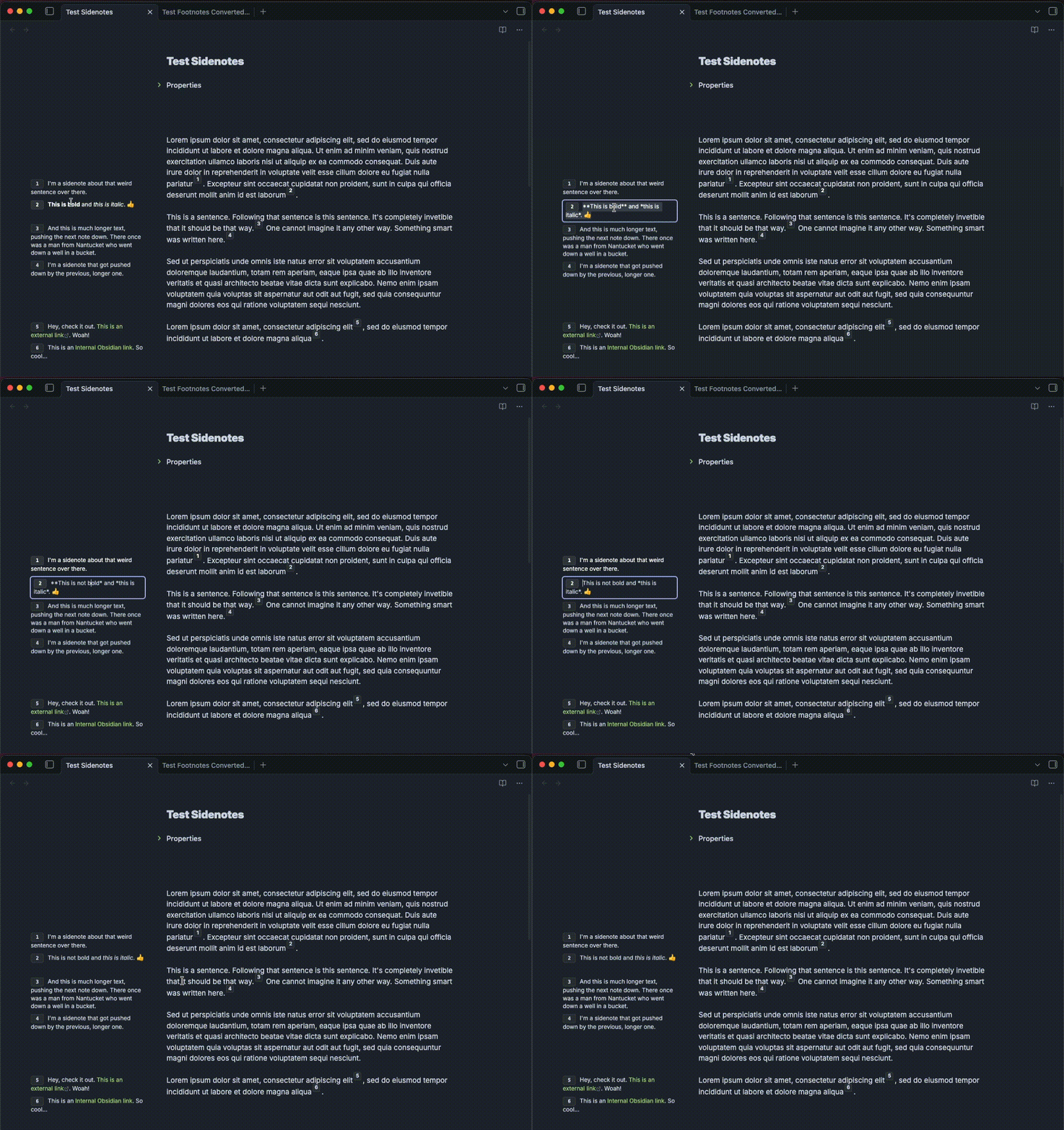
Editing sidenotes in the margins.
1 Like
Hi, You’ve done an amazing job! Just to mention a few more shortcomings.
-
It is not possible to edit footnotes directly in place. I can interact with the field and select it, but I cannot edit it yet.
-
I noticed a strange bug. Let’s say I decided to edit footnote #3 (finished with it), moved on to footnote #5 (edited it), and as soon as I stop interacting with the footnote #5 field, I am automatically returned to footnote #3 at that very moment.
-
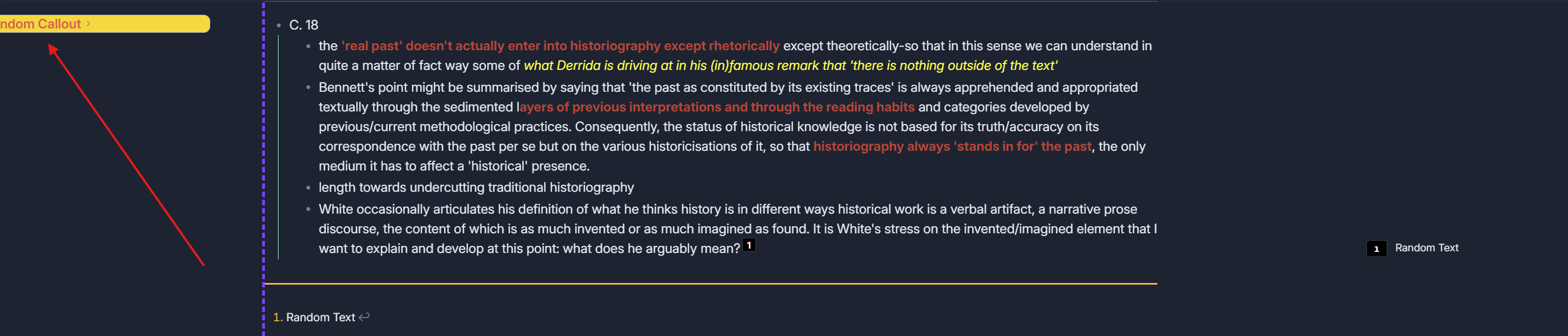
Centering violation. When interacting with sidenotes (span) in reading mode, the centering of the note is violated. It shifts to the right, making the left part partially visible, and it is impossible to move to it using horizontal scrolling. I tried varying different values in the settings, but the situation did not change.
P.S. For Callouts on the left, I use tufle sidenotes. Could that be the problem? But I only configured it to interact with the left side of the note, so I think the problem is with the plugin, because this didn’t happen before.
1 Like
Regarding the first point. The situation is as follows.
-
The process is indeed implemented as you described, but editing works as follows. I can either rewrite the entire footnote field or not edit it at all. In other words, I can’t edit only one sentence, no matter how hard I try. In addition, when I select a field for editing, I don’t see a horizontal cursor that would allow me to edit only one word or sentence. The only option is to edit the entire text by deleting it completely and rewriting it. This is not convenient at all.
-
I think I managed to reproduce the bug I mentioned. In an attempt to edit a specific sentence in a side note, I clicked on the side field several times (3 to 5 times), after which I was abruptly thrown either to the beginning of the note or to the previous edited note.
-
I am attaching the CSS file that I use with your plugin.
-
It is not possible to use bold or italics in side footnotes due to the issue described in point 1.
P.S. You haven’t yet figured out a way to display footnotes in reading mode, because everything works great in editing mode?
Cornell TfTHacker 3.css (15.7 KB)
Neumorphism.css (2.0 KB)
- When I select a sidenote and it goes into editing mode, it selects the whole sidenote. If I press the right or left keys, I can then edit as needed. But sometimes it doesn’t respond well to the mouse so I’ll see if I can fix that by just not having it select the whole text.
I still do not understand. Can you make a screen recording or be more descriptive of the context and steps? I’m not experiencing this. I think I just replicated this once. I’ll check it out.- I did try loading a new vault with the fresh Cornell Notes Learning Vault and it definitely caused problems using both simultaneously. As I understand it the sidenotes in that don’t use callouts. Is that something you’re doing specifically? In any case, I don’t think you can use both my plugin and this without them interfering with each other. They’re going to try to use the same spaces to put text. My plugin was intended as a way to fill in the gaps where these other sidenotes snippets lacked.
- It looks like bold and italic don’t work in footnotes in Reading Mode. I’ll fix that.
Foot notes work in Reading and Editing mode. Its a third choice in the settings. I’ll probably eventually just make it HTML or Footnotes, but initially it was experimental so I made it a third experimental choice.
I actually do see bold and italics working in Reading and Editing Modes (with footnotes). Maybe clarify what you’re seeing and how it relates to your first point.
After messing around, I’m guessing you mean that it doesn’t respond to keyboard shortcuts for bold/italics? I’ve just been typing the asterisks manually so I hadn’t seen this. I’ll see if I can get it to respond to the key shortcuts.
So, I tested some things and can say the following:
-
In edit mode, it is not possible to edit or copy the content of a block with a footnote (I showed this in the video). This is what I meant: in read mode, you can edit the footnote using completely normal functions (change a word, make it bold or italic, etc.), but in edit mode, this function is not available (the text is simply highlighted, and I can either delete it or rewrite it from scratch. This is shown in the video).
-
It is still possible to combine the functionality of both options for working with footnotes, both tufle’s and yours. This can also be seen in the video. In addition, before that, I turned off all plugins and CSS snippets in the repository, and the functionality was exactly the same as with the plugins and CSS enabled.
-
I was unable to reproduce this on video, but if you set the footnotes mode (editing + reading), sometimes a bug occurs when interacting with the left panel or moving between notes, when the footnotes disappear in one of the modes. The problem can be solved by restarting the plugin or changing the mode.
-
I tried to show this on two notes (with almost identical content), but in one of the notes the footnotes are not read by the plugin. And it looks funny, because 7 out of 8 footnotes are not read, but eighth is read and visible. In addition, the plugin apparently does not see old footnotes (created before the plugin was activated). I tried to create two new footnotes in my note, and it displays them in both read and edit modes. I mean, the numbering does not start with the eighth footnote (assigning it the value 8), but with assigning it the value one. It is also interesting that these footnotes (recognized as footnotes) sometimes appear and sometimes disappear. They can be restored by changing the display mode in the plugin settings.
-
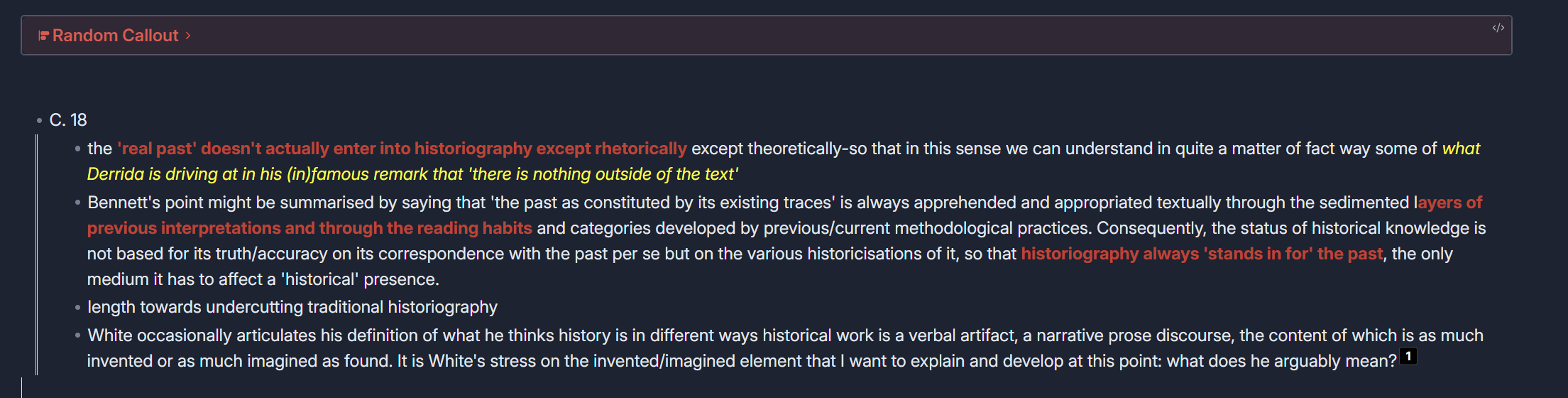
And as you can see in the video, due to the shift towards the footnotes, the left side is no longer visible. Like i said before
P.S. I apologize for the quality; I didn’t know that only GIF files could be attached (I had to compress it). I sent a link to the video in normal quality in a private message.
As an idea for the future. Obsidian has a feature that allows you to export notes to PDF files. I tried doing this with a note that works fine in both modes with footnotes, and the side notes were not displayed there. It would be great to integrate them into the PDF export.
I also noticed that in edit mode, when using the plugin, the footnotes disappear at the very bottom. I would add a function to choose whether to display or hide the footnotes at the very bottom of the note, because in case of a bug, I don’t have the option to completely delete or rewrite the footnote. The footnotes section at the very bottom of the note is only displayed when I delete the footnote in the text.
Thanks for the video. I think I see what you mean. I’m trying to work out some of those editing quirks. I noticed hiding the footnotes might be an issue as well so those will show in the next release and make that optional.
I’ve got it set up to no longer select the entire sidenote when you click on it. And it should hopefully not kick you to the top of the doc anymore. I can’t seem to intercept the hotkeys for things like bold, italic, etc. so, for now, it might be necessary to just type the Markdown formatting.
I’ll hopefully have a release later today that fixes some of this.
Regarding the PDF, I’m not sure if it’s possible. I’ll look into what would be possible - maybe basic sidenotes but it might not include Markdown formatting. The plugin is basically replacing those with links on the spot - not really putting them in the document itself.
I released 0.1.8 to try to fix some of the issues with editing sidenotes in the margin. I like the margin editor as an idea but it causes problems. It’s not possible to undo or use keyboard shortcuts for bold, italic, etc.
I’ve added code to intercept keys and try to add capability to apply bold, italic, etc but its unreliable at intercepting those key combos. I’ll keep working on making it more stable but that will take time.
I also added an option to hide/show footnotes at the bottom of the note.
You may not believe me, but after the 0.1.8 update, footnotes that were previously invisible reappeared, and in edit mode it became possible to edit content and highlight text in bold or italics. This is fantastic! Thank you for your work! A couple more important points that I noticed.
-
Duplication of the footnote number and the plugin itself. To be honest, I like it because I see two numbers and it allows me to pay attention to them, but some users may find it annoying. I would make this feature optional, as desired by the user (i.e., whether to display the original footnote number along with the number displayed by the plugin or not).
-
While editing a block in edit and read mode, I noticed that it does not respond to the ctrl + z key combination (undo) and there are some minor issues with selecting bold or italic text. What I mean is, in a regular text note, you can select a word or an entire sentence after that pressing Shift + ** and it will become bold. This functionality does not work with these footnotes, so I have to manually place ** on both sides, which makes it a little difficult to select the most important details.
P.S. Otherwise, the functionality is amazing. I want to thank you once again for your hard work and perseverance! If I find any more flaws or bugs, I will be sure to let you know as soon as possible.
Thanks again!
1 Like
Before I forget, here are a few ideas that came to mind.
-
It would be interesting to see if it’s possible to implement double display of sidenotes, i.e., simultaneously on the left and right. I think that would be a cool feature. Another amazing innovation would be to adjust the format of these side notes. What I mean is, let’s say footnotes are placed on the right, and typical sidenotes on the left are recognized by span. As a result, we have double footnotes (left and right) and thus completely replace the functionality of tufle. I think it would be an interesting implementation and feature, but it’s a long way off, something out of science fiction. In short, we combine the functioning of both footnotes and sidenotes via span. They will simply be located on different sides. One on the left, the other on the right, or vice versa (as the user decides).
-
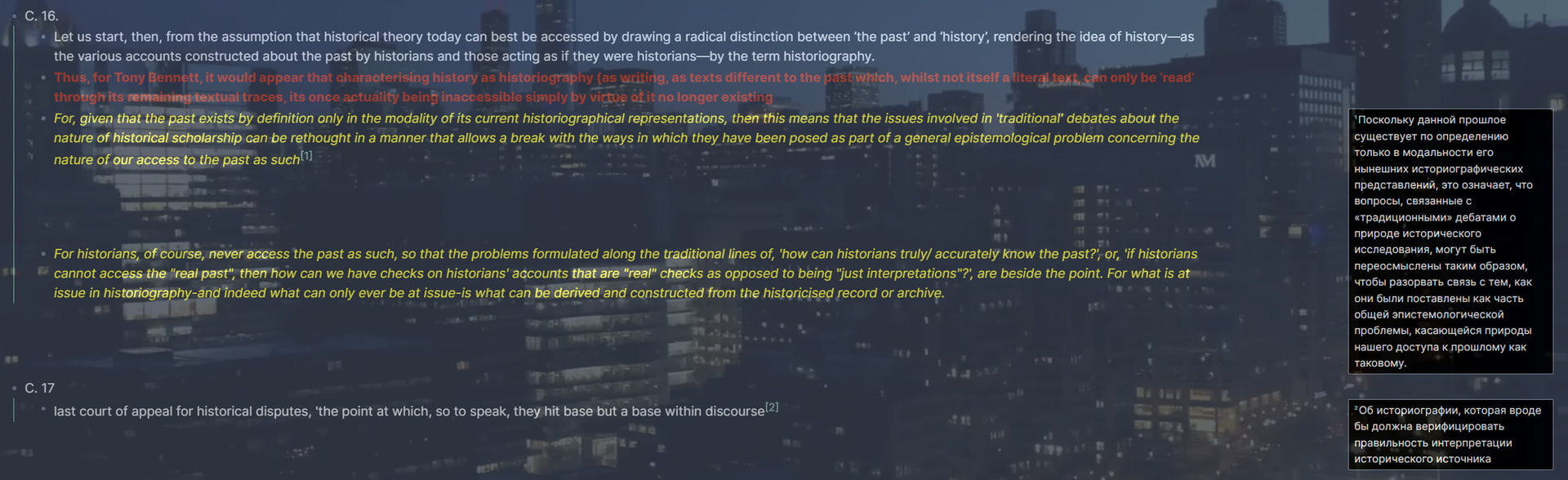
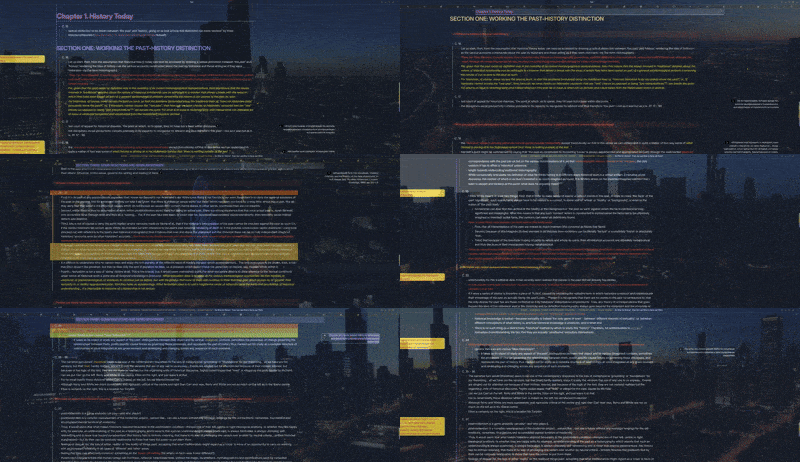
You can add a background color to sidenotes (with transparency settings and other things). Personally, I find such an implementation unnecessary, but for some users it may be really important that sidenotes stand out more clearly against the background of text and other elements. As an example of how this might look, I have attached a photo below.
- In connection with the above (especially point 2), it would be possible to add the option of specific settings for individual notes. For example, in one note, the user may need a background for sidenotes, while in another, they may not. Or they could adjust the transparency of the background color and other settings depending on the note and the specific task.
Again, I repeat that these are only suggestions for the future. I think that personally, the functionality described above is unlikely to be useful in my everyday tasks, but it may be important to some users.
1 Like
I’m glad it works better. It definitely works better for me too
-
The issue of seeing the original footnote numbers is interesting because that hides for me. I wonder if the Tufte sidenote CSS has anything to do with that. Maybe try disabling the Tufte sidenotes CSS snippet and restarting Obsidian to see if they still show or not. If it’s not that then I’ll have to explore some more.
-
Yes this is a known issue. Keyboard shortcuts are still unreliable when editing a sidenote in the margin. Whenever I press CTRL+B (or CMD+B on Mac) it tends to make something bold in the note - not what I have selected in the sidenote. When I press CTRL+Z, it undoes something I typed in the note body rather than whatever I edited in the sidenote. you can edit a sidenote, press enter, then press CTRL+Z to undo. This seems to work I think.
I have implemented something that intercepts those keyboard shortcuts but it doesn’t always work. I haven’t been able to crack it but I hope to make that work better eventually.
-
Having sidenotes on both sides is possible but there needs to be a way to encode which side you want it so show on if one enables both margins. For example, [^1L] and [^2R], however that could break normal Markdown formatting so they might not show as footnotes anymore. That feature would be much easier using HTML.
-
Adding an option for background color for all sidenotes should be easy enough.
-
Styling individual sidenotes: It would be difficult to style every sidenote individually but maybe a custom CSS template could be provided that allows someone to do that. Say, you name the CSS class just for that note, add it to cssclassesin the frontmatter, and that would style them. But I’ll have to backburner it for now since it doesn’t seem vital.
One feature that would be nice is non-numbered sidenotes (or what Tufte calls margin notes). For example, you put some kind of marker in the text and that makes a margin note show next to it that has no number - it’s just a note related to the text. You cane see examples of numbered sidenotes and non-numbered margin notes on this page.
Thanks for taking the time to test it out and explain what you’re experiencing. I’ll keep working on it. Getting feedback on how it works for others is really helpful for me to continue shaping it into something that could go into the Community Plugins.
It is important to clarify that it would be better to add the background for sidenotes as an additional feature that can be disabled if necessary. For example, I am quite happy with their current appearance without any changes.
As for unnumbered sidenotes (Tufle margin notes), this is quite an interesting suggestion. I will read about it a little later, but I really like the idea. I would pretty much like to see this concept put into practice.
I created a new release, 0.1.9.
The only added feature is the option to show/hide the original footnote numbers.
@RepresentatiON, When you have time to update it and test this, let me know if this works for you. When turned on, it should hide the default [1] in Editing mode and Reading Mode. If it shows no matter what, let me know if its in Reading Mode, Editing mode, or both.
Edit: I also fixed the issue of not seeing Markdown when editing footnotes/sidenotes in Reading Mode.
Thanks for your work.
But, The problem with displaying footnotes in read mode in the note I tested still persists, and it’s strange. In edit mode, they are visible, everything is fine, just like with span, but in read mode, they are not displayed at all. Moreover, if I create a new note, everything works. CSS from Tufle has no effect on this!
P.S. I sent you two notes in private message: the original note and the test version. Everything works in the test version, but not in the original. Maybe you can figure out what the problem is.
Interestingly, as soon as I added a new footnote to my note, the eighth footnote and the new ninth footnote were displayed. The rest (from the first to the seventh) are not visible in reading mode. In general, the problem with reading mode is very similar to the problem with displaying footnotes in editing mode, which I described earlier (which you have already managed to fix). The plugin seems to refuse to recognize footnotes created before the plugin was activated.