Is this project open source? Yes
Is this project completely free? Yes
Is this project vibe-coded beyond the author’s ability to comprehend how it works? No
Link: Calendar Hub - Obsidian Plugin
Sound familiar?
You write a daily note in the morning, a meeting log in the afternoon, and maybe an AI summary in the evening. They live quietly in different folders – Daily/, Meeting Notes/, Work Logs/. But when you open Obsidian’s calendar and click on a day, you see only one note: the daily note.
What about the others? They happened on the same day, but your calendar can’t see them.
That’s the blind spot of typical calendar plugins: they assume one day = one note. But your note‑taking life is rarely that simple.
Calendar Hub changes just one thing – but it changes it completely
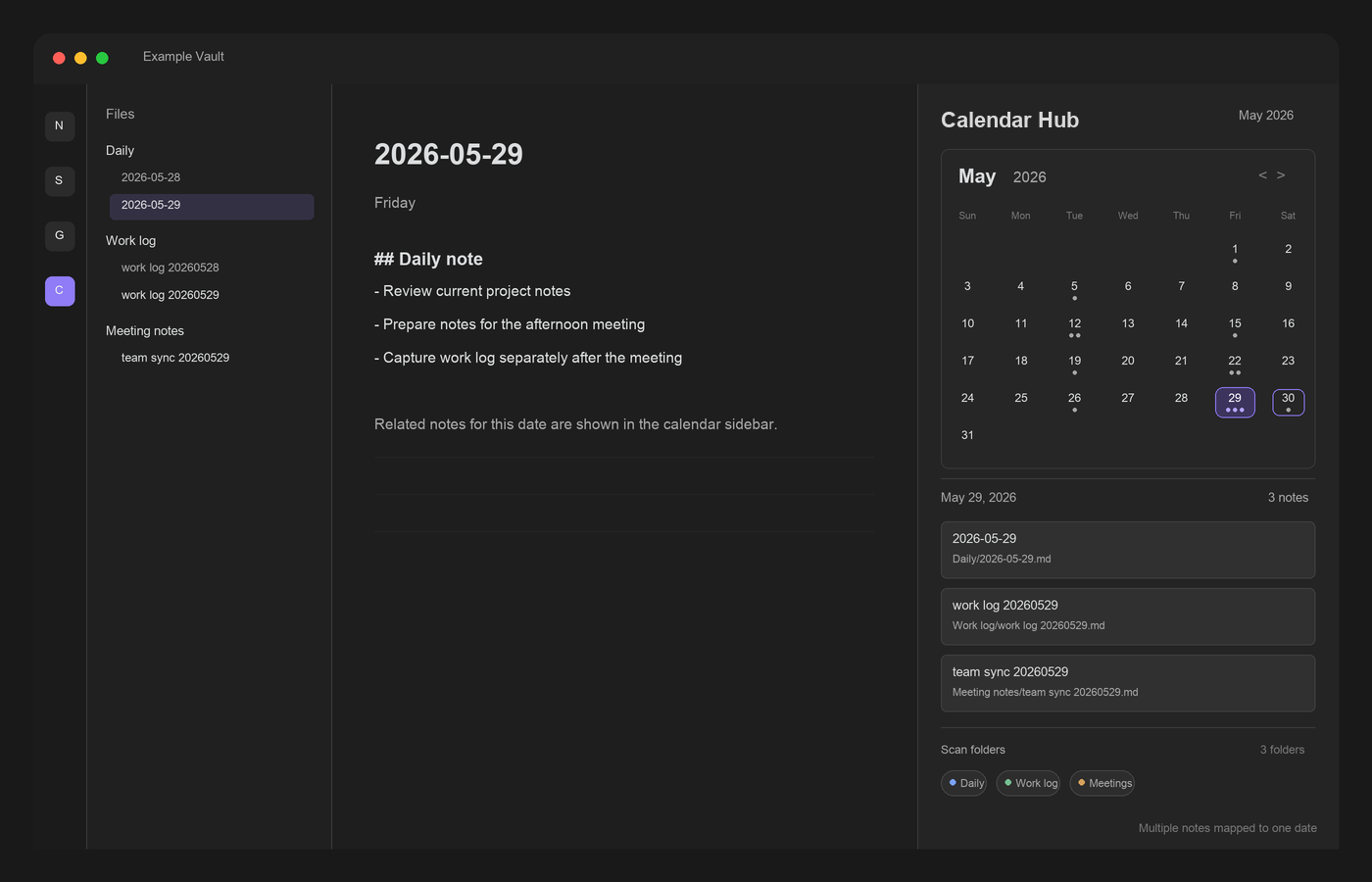
Click any date, and it shows every note that belongs to that day – no matter which folder it’s in, whether the date is in the filename or frontmatter.
For example, on May 29th, all three of these would appear together:
Daily/2026-05-29.md
Work Logs/work log 20260529.md
Meeting Notes/team sync 20260529.md
Click the 29th, and you’ll see all three. Open whichever you need.
How does it relate to the original Calendar plugin?
Calendar Hub is a fork of Liam Cain’s Calendar. It keeps everything you already use: month view, daily/weekly notes, dot counters, theme following. It simply adds what Calendar was missing:
Calendar
Calendar Hub
How many notes per day?
Only the configured daily note
Every matching note
Scan scope
Only the daily note folder
Entire vault, or specific folders you choose
Date detection
Only daily note filename
Filename + extra formats + frontmatter fallback
The plugin ID is independent – you can run it side‑by‑side with the original Calendar.
Key features (short version)
Lists all notes from a given day by checking filenames or frontmatter dates, across folders
Scan the whole vault or only specific folders (adjustable from the sidebar)
Recognises daily note filenames and embedded dates like YYYYMMDD
Falls back to frontmatter fields (date, daily_date, etc.) if no date in filename
Shows dot counters for how many notes each day has
Preserves weekly notes – doesn’t break your existing workflow
Installation
Settings → Community plugins → Browse → search for “Calendar Hub”, install and enable. Open it from the left sidebar icon or the command Open calendar view.
It’s newly released – feedback, bug reports, and honest opinions are very welcome. If you’re tired of calendars that only see daily notes, this one is made for you.
I think this plugin is brilliant — by using the “date created fallback” you can use it for any of your Obsidian content, which is how I think it should be used (though I’m not sure how reliable that “fallback” is). The only trouble is that it doesn’t appear to work on mobile (iOS) — unless I’ve missed something. But thanks anyway.
I also like the idea but the problem is that notes with related ideas may have been created in the past or yet to be created.
So my workaround is create a single daily note where I outline a problem and link to notes and in the other notes I add blockID’s based on the date created field value of the daily note, thus for 2026-07-10, I’ll have ^260710 blockID’s scattered all over where particular paragraphs are related (better than linking to a whole note, which can be long).
Then I create canvas cards with my plugin and if I want I can create a 260710 Some topic workspace as well, which workspace I can sync to mobile/tablet to with another plugin, and the canvas cards will sport the link to the workspace as well, so I can go back to topics and fine-tune ideas later, where tabs of the workspace can be markdown files, WebViewer tabs, etc.
Yes, it’s possible that Bases with simple MOC’s with block level linking should suffice but the canvas can be much more easily customized with groups, colouring and can be searched as well with Advanced Canvas, etc.
I never used to want to deal with daily notes but now they are very much an intergral part of my note taking because of the YYMMDD anchors.
Thanks, glad you like it — and good news: it does work on iOS, the entry point is just buried right now.
On mobile the calendar lives in the right sidebar. Swipe in from the right edge to open that drawer, then tap the tab/view switcher at the bottom and pick Calendar Hub. Or open the command palette and run “Open calendar view” (or “Open list view” for the plain list) — you can pin that command to the mobile toolbar for one‑tap access.
You’re right that it’s far from obvious, though — the plugin doesn’t add a ribbon icon yet, so there’s no visible button to tap. That’s on me; I’ll add a more prominent button (a ribbon icon, like the original Calendar) in the next update so it’s easy to find on both desktop and mobile.
On the “date created fallback” — your instinct is spot on, it’s the least reliable signal, which is exactly why it’s the last resort. A note’s day is resolved in this order: a date field in frontmatter → a date in the filename → creation time (creation time only when you switch that fallback on in settings). Creation timestamps are device‑set and can shift when a file is copied or re‑synced across devices, so any date you’ve actually declared always wins over them.
So if you want a note reliably pinned to a specific day, give it a date in frontmatter (e.g. date: 2026-07-10) or put the date in the filename — those never drift. The creation‑date fallback is best treated as a convenience for bulk notes where “roughly the day I made it” is good enough, rather than a guarantee for every single file.
Really nice workflow — I like how you’ve turned the date itself into a topic key with those ^260710 anchors.
That said, you’ve pinpointed what Calendar Hub doesn’t do: it works at the file level by date, while you want paragraph‑level fragments grouped by topic across many days. Different axis — and a calendar isn’t really the right shape for that; your canvas setup fits it far better. I’ll keep this one a calendar, but thanks for sharing the idea.
I have three input folder notes: This Month, Later, and Maybe, with their respective supporting files. The first two are reminders/todos and Maybe is for ideas that I may want to try out sometime.
I also have a folder note for the current month where I record what I’ve done. I work from This Month ( and sometimes Later and Maybe) deleting items there as I’m done with them. At the end of the month I clear This Month of anything I won’t get done, move in from Later anything scheduled for the next month. and have a look at Maybe to see if there’s anything I can schedule, or else delete because I’ll never get round to it.
The current month folder note is archived read-only together with any new files it references, and a new folder created.
If an archived file needs further work, then a copy or a comment is created in the new month folder and linked back to the historic version.
Thanks for that — I found the right side panel on iOS. It’s very good. I couldn’t find an “Open calendar view” in the command palette though. (Was your reply AI btw ? )
Thanks for the report — that was a real bug, fixed in 0.2.3, just released. It should show up in Community Plugins within a day or so. Give it a try and let me know if it works on your end.
I do nearly all my own work on desktop and I’m a light mobile user, so mobile gaps like this slip past me. Reports like yours genuinely help.
And good catch on the AI English isn’t my first language, so I lean on it for translation and polishing.
 )
) English isn’t my first language, so I lean on it for translation and polishing.