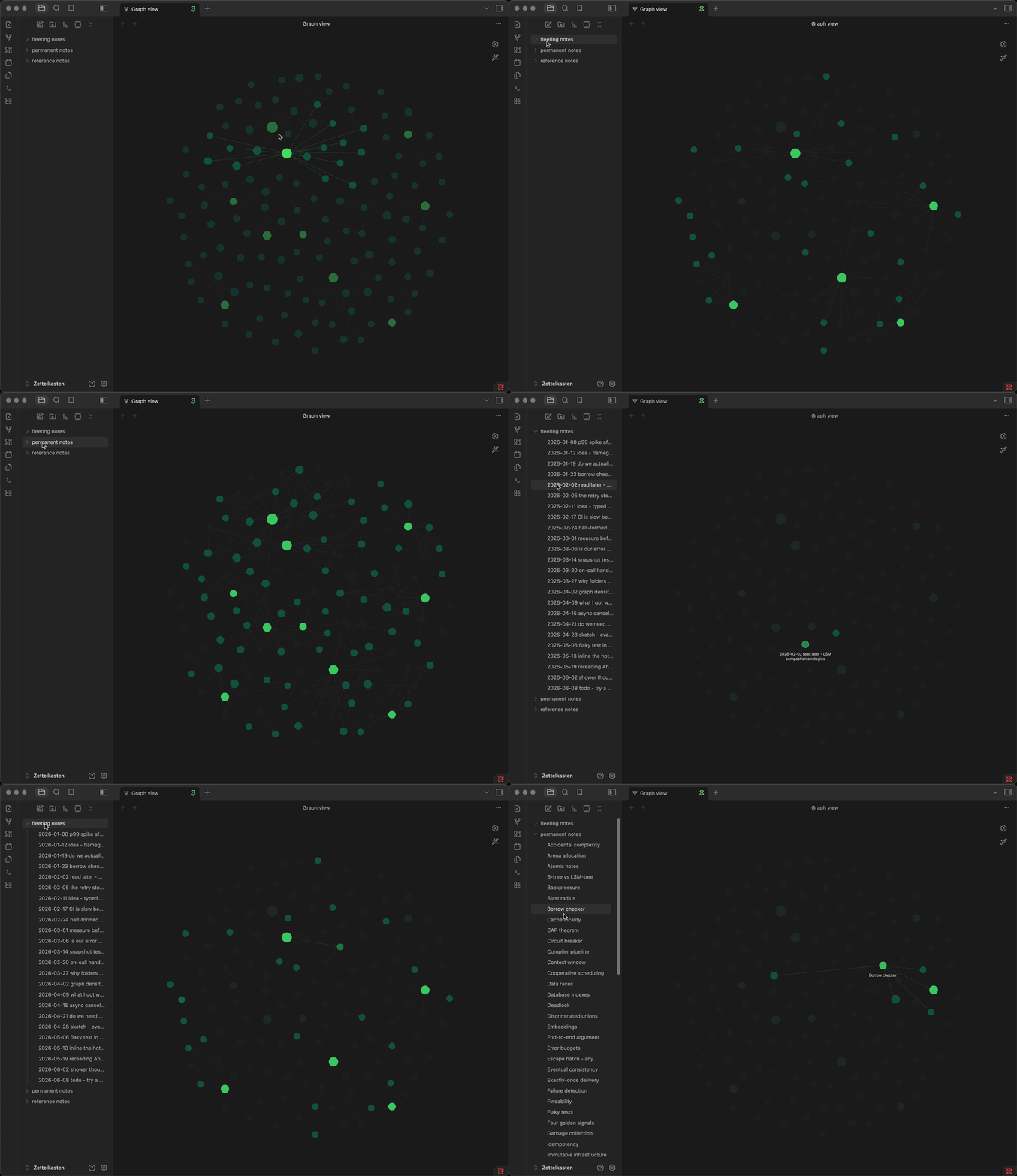
Graph Files Highlight Sync connects your sidebar file explorer to the graph view: hover a file in the sidebar and its node stays highlighted while the rest of the graph fades. Hover a folder and every note inside it lights up at once.
I built it because I kept losing track of which dot was which. In a vault past a few hundred notes the graph is a pretty cloud that I couldn’t actually navigate — I’d hover nodes one by one to read the labels and forget which one I started from. It turned out I wasn’t the first: someone asked for exactly this back in March 2021 in Highlight note in graph view when hovered in sidebar file list, and the request kept resurfacing in other threads. So I built the plugin for it.
How to use it
There’s nothing to configure to get started and no syntax to add to your notes. Open the graph view, then move the mouse over the file explorer:
- Hover a file — that note and its direct neighbours stay at full opacity; everything else fades.
- Hover a folder — every note under that folder lights up, subfolders included, together with their tags and attachments.
- Works in both the global Graph view and the Local graph.
Settings
- Enable file-hover highlight — on
- Enable folder-hover highlight — on
- Highlight tags on folder hover — on (needs “Tags” enabled in the graph’s own settings)
- Show note names on folder hover — off by default
- Fade amount — 0.1 to 0.9, how far the rest of the graph drops back
What it deliberately does not do
So nobody installs it expecting the wrong thing:
- It never moves or zooms the camera. A node that is off-screen stays off-screen.
- It highlights, it doesn’t filter. Dimmed nodes are still there and the layout doesn’t re-pack around your selection.
- It doesn’t enlarge node labels on single-node hover — the “show note names” option applies to folder hover only.
Fair warning: it hooks the core graph’s rendering, which isn’t a documented or public API. It works today in both the graph view and the local graph, and the release build is reproducible from source, but a future Obsidian update could break it. If that happens, open an issue and I’ll try to fix it.
Bug reports, feature requests and ideas are welcome on GitHub issues or right here in this thread.
Disclaimer
Is this plugin open source? Yes
Is this plugin completely free? Yes
Is this plugin vibe-coded beyond the author’s ability to comprehend how it works? Partly
Community Directory: Graph Files Highlight Sync