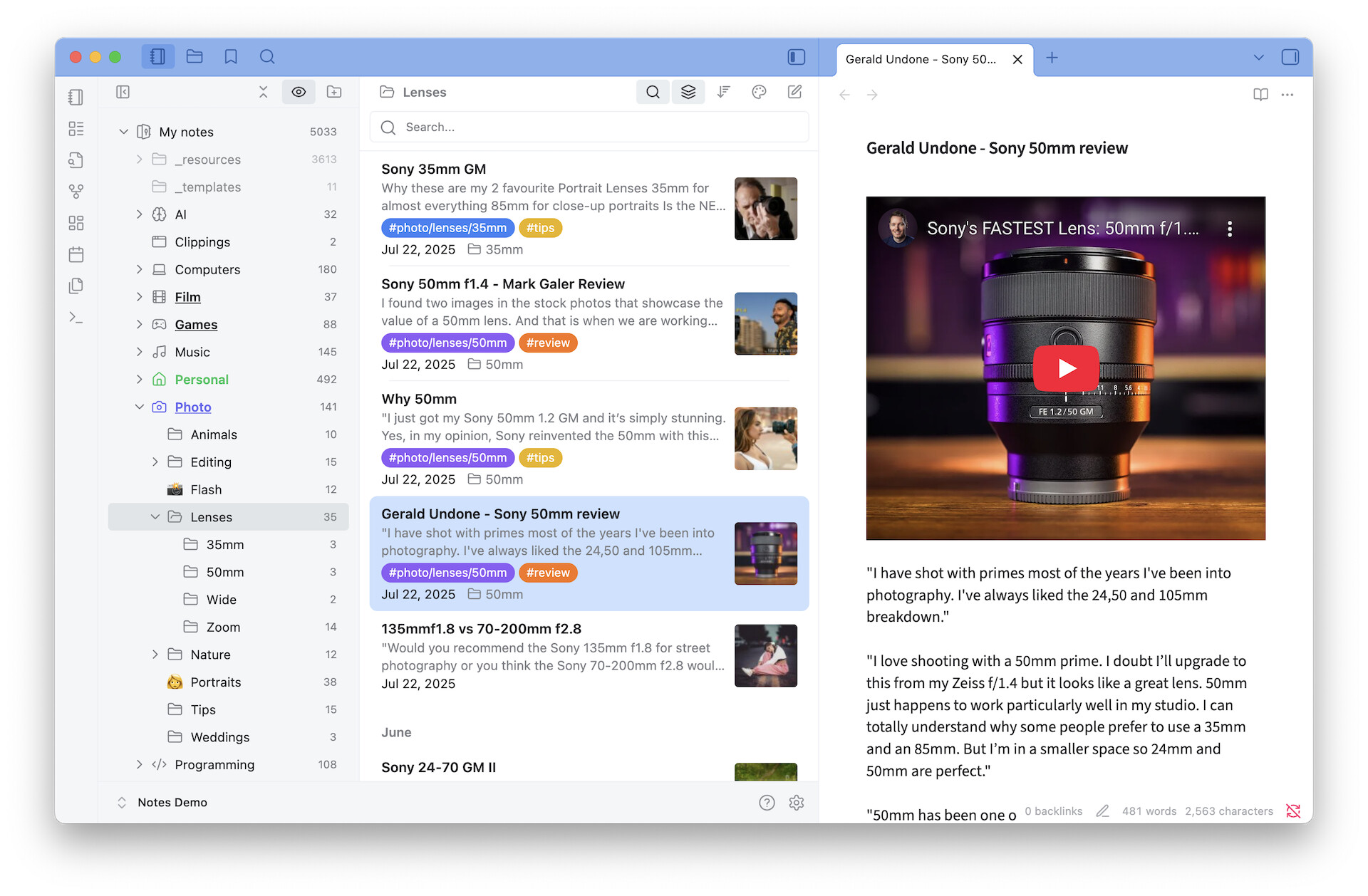
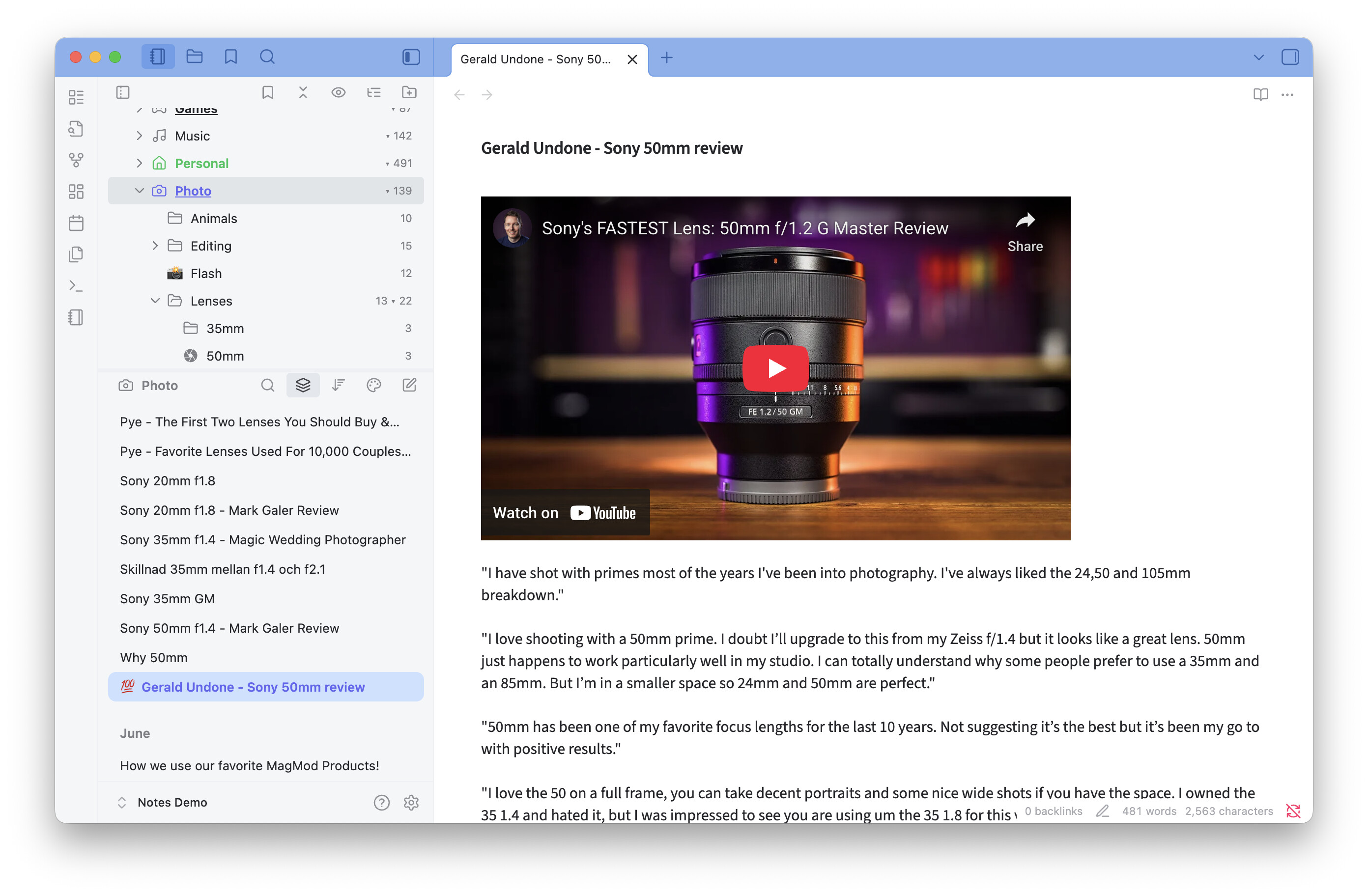
Notebook Navigator is now available! Meet your new Obsidian interface!

The speed of Apple Notes. The beauty of Bear. The productivity of Evernote. The extensibility of Obsidian.

After countless hours of work and huge amounts of help from the fantastic Obsidian community :heart:, Notebook Navigator is now available for download in the Obsidian Community Plugin list!

Notebook Navigator is a user interface replacement that transforms Obsidian into what can best be described as a mashup of all the best features from Apple Notes, Bear and Evernote but with tons of new productivity features that those older applications miss!

Want to work 100% with tags? You got it. You have favorite tags, hidden tags, hierarchical tag trees, tag icons, tag colors, quick commands to add and remove tags, drag-to-tag, and so much more, such as the unique clickable tags displayed next to each file name. Show tags on top, make it your default interface!

Love folders? You got it too. You have folder notes, folder icons, folder colors, thumbnail previews, drag-and-drop, quick actions on hover, quick search, show files from subfolders, excluded folders, custom sort orders, custom appearances for each folder, pinned notes, middle-click to open note in new tab, and so much more!

Do you use Dataview or Templater? Or do you develop plugins? Notebook Navigator has a comprehensive API that allows you to retrieve the user’s selected folder, react to navigation changes with event listeners, and pin files - opening up possibilities that Obsidian’s standard API doesn’t provide. Full documentation included!

Full theme and Style Settings support! All colors and visual styles are available in the Style Settings plugin so you can make Notebook Navigator look and feel just the way you like it! Complete CSS documentation included!

There is so much work behind this plugin that it is actually difficult just to write down all the features. Did I mention that it’s also super optimized for mobile devices including all phones and tablets? And available in six languages, including RTL! ノート管理の新時代が始まります!让你的笔记焕然一新!

Notebook Navigator is FREE and open source!

Try it out and let me know if you love using it as much as I do!

Under the hood, Notebook Navigator is built for speed. It uses React with TanStack Virtual to deliver smooth scrolling even with 100,000+ notes. A dual-layer cache system (IndexedDB + RAM cache) provides instant metadata access for all files. It’s touch-optimized, mobile-friendly, and written in clean, type-safe TypeScript with zero ESLint warnings across 35,000 lines of code.

About myself. I’m Johan Sanneblad, have a PhD in software development, and have the past decades created over 100 apps and services together with companies like Apple, Electronic Arts, Google, Lego, Microsoft, SKF, Volvo Cars, Yamaha and many others. I love creating small details in software applications and making applications that appear simple but have lots of thoughtful logic under the hood. I use Obsidian every day for my weekly AI newsletter Tech Insights and plan to support and develop Notebook Navigator as long as there are people using it. Notebook Navigator is my third Obsidian plugin, I have also developed Featured Image and Pixel Perfect Image.
25 Likes

This is amazing! Working with tags is so much more convenient this way.

1 Like

Wow, this looks amazing! Thank you!

1 Like

This is the best implementation of a file explorer I’ve seen in any app, let alone in Obsidian. The keyboard shortcuts work better than I expected. Finally, I can browse my files quickly and edit them without constantly using the mouse. Truly awesome!

1 Like

Tremendous! I’ve barely dug in, and so far I already love: being able to pin, folder-focus, pin-per-folder-focus, and have image previews with customizable image properties to monitor. This adds a level of structure and navigation I’ve always been missing, but was unwilling to install extremely heavy plugins to fix.

One small wish: I wish pinned items had a border separation, same as separated date-grouping. But also the next thing I’ll do is check if there is an option or easy CSS way to change the background colour of pinned item.

3 Likes

Great work, thank you so much. You’ve solved the problem of the visual separation between the notes overview and the folder structure.

(In fairness, I would also like to thank the developers of the “FolderFile Splitter” extension, who have certainly put a lot of work into a similar approach.)

1 Like

Lots of new features since I posted this two weeks ago.

Just a few things added after release:

  • Omnisearch integration
  • Manual sort order for folders
  • VIM keyboard support
  • Shortcuts
  • Recent notes
  • Homepage document
  • Icon packs: Bootstrap Icons , Font Awesome , Material Icons , Phosphor Icons, RPG Awesome and Simple icons
  • Background colors and colors + icons for files
  • Banner on top of navigation pane

And over 100 other quality of life improvements.

If you haven’t yet checked it out you are missing something.

5 Likes

Hey, thanks for the update, this looks really good. I’ve got a small feature request that might fit as an optional toggle.

Would it be possible to have folders open only on double-click, rather than single-click? The idea is that a single click would just expand and colapse the folders, but a double-click would actually open the list pane that we all love so much.

If it’s doable, I’d also really like it so that when you double-click on a larger folder, the list pane opens as usual, but the subfolders inside it still show up as collapsible tabs or something. That way you’d still have the whole folder structure visible within the list pane itself, instead of just a long stream of files. This would keep the layout more structured.

Also, I can’t seem to get the icons working on my end—maybe I’ve missed something, but thought I’d mention it just in case.

Thanks again for the work you’re putting into this.

P.s. I am on windows.

1 Like

Seems very usefull! is it compatible with workspaces?

I haven’t tested actually, maybe you could give it a go and report back after?

1 Like

Notebook Navigator 1.7 is out now with support for VERTICAL SPLIT MODE!

If you missed File Explorer Alternative (which hasn’t been updated for over a year), this is for you!

You can now also set custom zoom size for mobile and desktop, group files by subfolder, and 20 more improvements.

4 Likes

Thanks for this plugin. Quick question.

Is it possible to display files in folders or tags directly in the current list (like in Obsidian) instead of opening the file list in a “new” window from which you then have to return to see the folder / tag list again? Like

-Tag1
–Subtag
— File
— File
— File
-Tag2

Thanks again.

Regards

Mick

2 Likes

Can you Filter on file names? This used to be in a plugin called Bartender but is no longer supported

What theme are you using in the screenshots? I’ve been looking for something like that but have not been happy with what I’ve found so far…