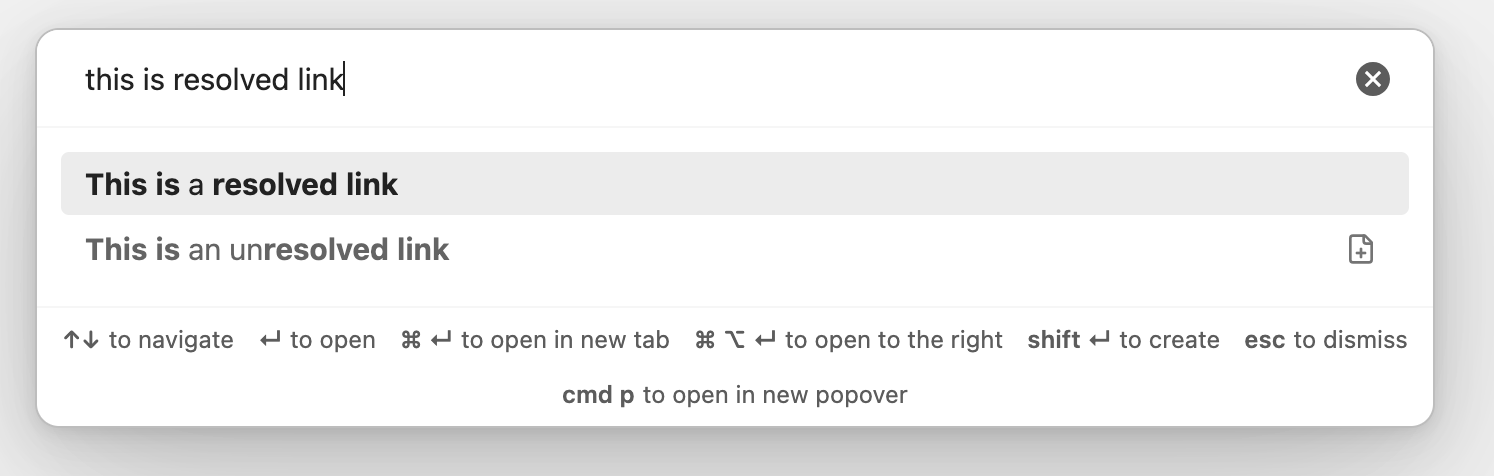
I often confuse unresolved links for existing notes and mistakenly open them, which turns them into proper notes. The icon to the right of unresolved links is very easy to miss too.
While there’s an option to hide unresolved links in the Quick switcher core plugin settings, I still want to see them.
This CSS snippet solves this by making unresolved links appear at 0.7 opacity of resolved links—mirroring how unresolved links appear muted in the editor:
Muted_unresolved_links.css (242 Bytes)
/* Quick switcher */
.suggestion-item.mod-complex:has(.suggestion-flair > .lucide-file-plus) > .suggestion-content {
    opacity: 0.7;
}

/* Link suggester*/
.suggestion-item:has(.suggestion-note:empty) .suggestion-title {
    opacity: 0.7;
}
Alternatively, one could italicize such links (or format them however one prefers):
/* Quick switcher */
.suggestion-item.mod-complex:has(.suggestion-flair > .lucide-file-plus) > .suggestion-content {
    font-style: italic;
}

/* Link suggester*/
.suggestion-item:has(.suggestion-note:empty) .suggestion-title {
    font-style: italic;
}
From Discord.