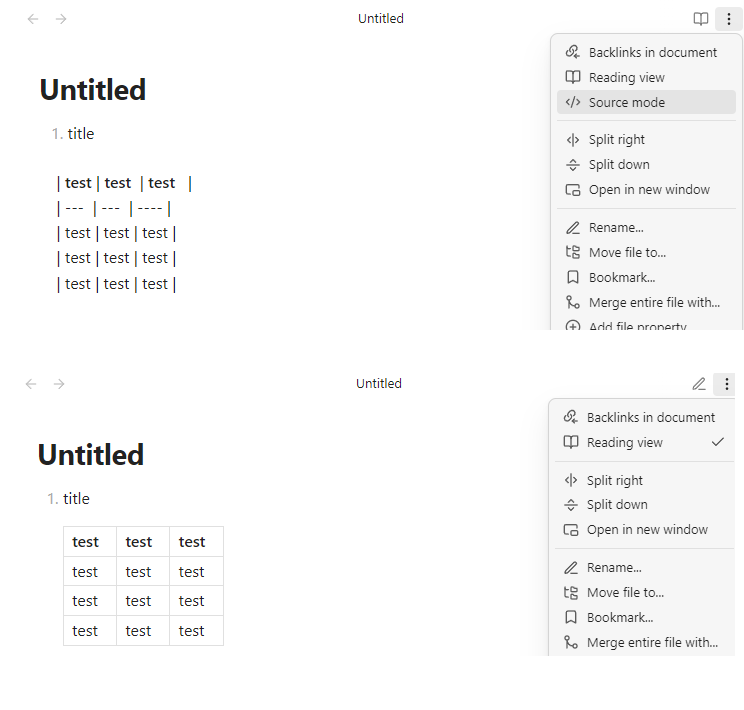
1. title

    | **test** | **test**  | **test**   |
    | ---  | ---  | ---- |
    | test | test | test |
    | test | test | test |
    | test | test | test |
Did you follow the troubleshooting guide? [Y/N]
Y
Expected result
Preview the table normally in live preview, and indent left
Actual result
Only the code of the original table will be displayed
Environment
SYSTEM INFO:
	Obsidian version: v1.8.10
	Installer version: v1.8.10
	Operating system: Windows 10 Pro 10.0.19045
	Login status: not logged in
	Language: en
	Insider build toggle: off
	Live preview: on
	Base theme: light
	Community theme: none
	Snippets enabled: 0
	Restricted mode: off
	Plugins installed: 5
	Plugins enabled: 0

RECOMMENDATIONS:
	none
This problem will cause a lot of md files copied from typroa and vscode to have table preview problems, not for files created in Obsidian. These files are displayed normally in typroa and vscode. This is a serious compatibility issue