Live Preview: Support Tables in list items

Steps to reproduce

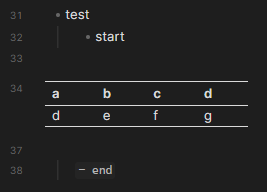
Add a table in a list:

- test
	- start

		| a    | b   | c            | d   |
		| - | - | - | - |
		| d   | e | f | g  |
 
	- end

Did you follow the troubleshooting guide? Y

Expected result

Table is rendered the same in live preview and reading mode.

Actual result

Table is rendered in reading mode. Table is not rendered in live preview.

Environment

SYSTEM INFO:
	Obsidian version: v1.3.4
	Installer version: v1.1.16
	Operating system: Darwin Kernel Version 22.5.0: Mon Apr 24 20:52:24 PDT 2023; root:xnu-8796.121.2~5/RELEASE_ARM64_T6000 22.5.0
	Login status: logged in
	Catalyst license: none
	Insider build toggle: off
	Live preview: on
	Legacy editor: off
	Base theme: dark
	Community theme: none
	Snippets enabled: 0
	Restricted mode: on

RECOMMENDATIONS:
	none

Additional information

Misc question: why does it seem like there’s a lot of discrepancies between live preview and reading mode? Is it not possible to use the same rendering engine for both?
We don’t support this yet. renamed and moved to FR.

Is there a list of features not supported in Live Preview? I assumed any major discrepancy between Live Preview and Reading mode is a bug, if it’s not rendering valid markdown.

People continue reporting this as a bug (ex1, ex2) which makes sense to me. It’d be really helpful to have a description of what’s supported and what isn’t.

Not sure if this was resolved but I found a way to at least get the table acknowledged by the list hierarchy so that it can be folded under the parent bullet. THIS IS A LIMITED SOLUTION because it only works directly under a Parent bullet that is not a Child to any other bullet (only under first-order bullets). Just create the table under the bullet with no indent and add a space before the first pipe for each row. One downside is that if you want to add another bullet that is the direct child of the same bullet that is the direct parent to the table, it will render as a dash bullet rather than a styled bullet. However, it will still have the functionality of a bullet including creating new bullets below after pressing Enter and folding under the parent bullet. It doesn’t looks as pretty in either Reading Mode or the live preview in Editing Mode, but it retains the functionality. Hope this was in any way relevant/useful for one use case!

It has been bugging me for a while and thought it is because of me being so stubborn.

Let us know if this request does not meet the markdown “standard”, I shall give up.

ps. I do not find any FR for this, can you maybe give a link to the FR?

Thank you!

btw. Despite the unsupported table in list, I think the following situation is a bug then.

- test
	- start

| a   | b   | c   | d   |
| --- | --- | --- | --- |
| d   | e   | f   | g   |
 
	- end

With a standard table in between list items breaks the list, renders in live preview:

image

The live preview and reading mode look really bad and bit unreadable (due to missing indents) without this feature.

It’s really hard to understand why rendering tables inside lists isn’t supported in preview mode.

  1. This is a very common use case that users are likely to encounter. More importantly, this structure is the only way for list items containing tables to be block-referenced, which should be one of Obsidian’s strengths.
  2. It’s supported in reading mode, so why not in preview?

If it’s due to technical limitations, then I believe it’s something worth overcoming—especially when there’s clear user value in the scenario.
If it’s a technical constraint that Obsidian simply can’t address at the moment, then that would be the only reason I could accept.

That said, I still hope this feature can be implemented soon. Obsidian is deeply loved by many users, and I genuinely hope it continues to improve!

+1 have just hit this bug and instantly thought to file a bug report. This “missing feature” is up there with math block renders unable to be indented, and code block delimiters having no indentation guide lines

+1 Any update on this? It has been long since this issue was opened.

This problem will cause a lot of md files copied from typroa and vscode to have table preview problems, not for files created in Obsidian. These files are displayed normally in typroa and vscode. This is a serious compatibility issue

+1, I need this feature, too.

+1. Waiting for implement

We understand the technical complexity involving CodeMirror 6’s block rendering. However, given this issue has persisted since 2023, we hope the team can prioritize a solution to ensure rendering consistency across all modes.

This feature has massive value. The viewer does such a great job rendering nested tables. The ability to edit a nested table would be incredible. Current workflow is to open the MD file in MarkText and edit it there.

pls fix this. Table function is way too simple

Steps to reproduce

When inserting tables in list (so with same indentation than current bullet), the table is not interpreted as a table…

- My bullet 1
- My bullet 2
    - My bullet 2.1
      | Col 1   | Col 2   |
      | ------- | ------- |
      | Row 1.2 | Row 1.2 |
    - My bullet 2.2

is rendered as:

Even when the table is not indented:

- My bullet 1
- My bullet 2
    - My bullet 2.1
| Col 1   | Col 2   |
| ------- | ------- |
| Row 1.2 | Row 1.2 |
    - My bullet 2.2

is rendered as:

Same thing when the table is inside a blockquote:

> **Quote:**  
> 
> | Col 1   | Col 2   |
> | ------- | ------- |
> | Row 1.2 | Row 1.2 |

is rendered as:

Did you follow the troubleshooting guide? Yes

No plugin enabled.

Expected result

From Azure DevOps wiki, table in list should appear like this:

And table in blockquote should appear like this:

Actual result

See steps to reproduce.

Environment

SYSTEM INFO:
	Obsidian version: 1.12.7
	Installer version: 1.7.7
	Operating system: Windows 11 Enterprise 10.0.26100
	Login status: not logged in
	Language: en
	Insider build toggle: off
	Live preview: on
	Base theme: adapt to system
	Community theme: none
	Snippets enabled: 0
	Restricted mode: off
	Plugins installed: 5
	Plugins enabled: 0

RECOMMENDATIONS:
	none


Additional information

Alternatives doesn’t works…

If I add a space before the table, the table correctly appears, but I cannot continue the next bullets without starting again from root level.

- My bullet 1
- My bullet 2
    - My bullet 2.1

| Col 1   | Col 2   |
| ------- | ------- |
| Row 1.2 | Row 1.2 |
    - My bullet 2.2

Adding a space before and after the table, the table is also correctly considered, but when continuing the next bullets, it appears as code block…

- My bullet 1
- My bullet 2
    - My bullet 2.1

| Col 1   | Col 2   |
| ------- | ------- |
| Row 1.2 | Row 1.2 |

    - My bullet 2.2