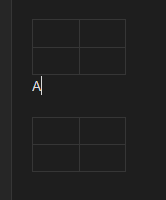
Steps to reproduce:
-
Create a table in Live Preview using the standard UI/button.
-
Try to type text immediately on the line above the table or between two closely spaced tables.
-
Observe the editor’s behavior.
Expected result: The text is entered normally without moving the table or creating unnecessary vertical space.
Actual result: Every keystroke triggers the generation of a new empty line between the text and the table. The table is pushed down infinitely, making it impossible to type in close proximity to the widget.
Additional context: This happens even with all CSS snippets disabled and community plugins turned off. It appears to be a core layout collision issue in CodeMirror 6 where the cursor position fails to reconcile with the table widget’s boundaries. It effectively prevents users from writing fluidly when tables are involved.
Technical note: Exhaustive CSS debugging was performed (using display: contents, position: relative, and margin resets), but the issue persists. This confirms the bug is not a stylesheet conflict but a core JavaScript event-handling loop in the CodeMirror 6 rendering layer. It forces a \n insertion on every input event when the cursor is in proximity to a table widget.
Before:
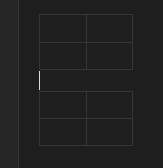
After: