First, search the help docs and this forum. Maybe your question has been answered! The debugging steps can help, too. Still stuck? Delete this line and proceed.
What I’m trying to do
Journals Version: 2.1.10 By Sergii Kostyrko in my left side bar can be sorted Z-A so the most recent dated journal shows at the top. This is handy as Journal entries accumulate.
All other titles in the side bar must remain in A-Z sort.
Things I have tried
I’ve tried selecting titles that highlight and then selecting the sort icon…works on Desktop but phone just sorts all titles.
Searched Obsidian forum and Internet for solutions.
The left side bar also has other titles like:
Contacts
Excalidraw
Kanban
My_folder
Other
Templates.
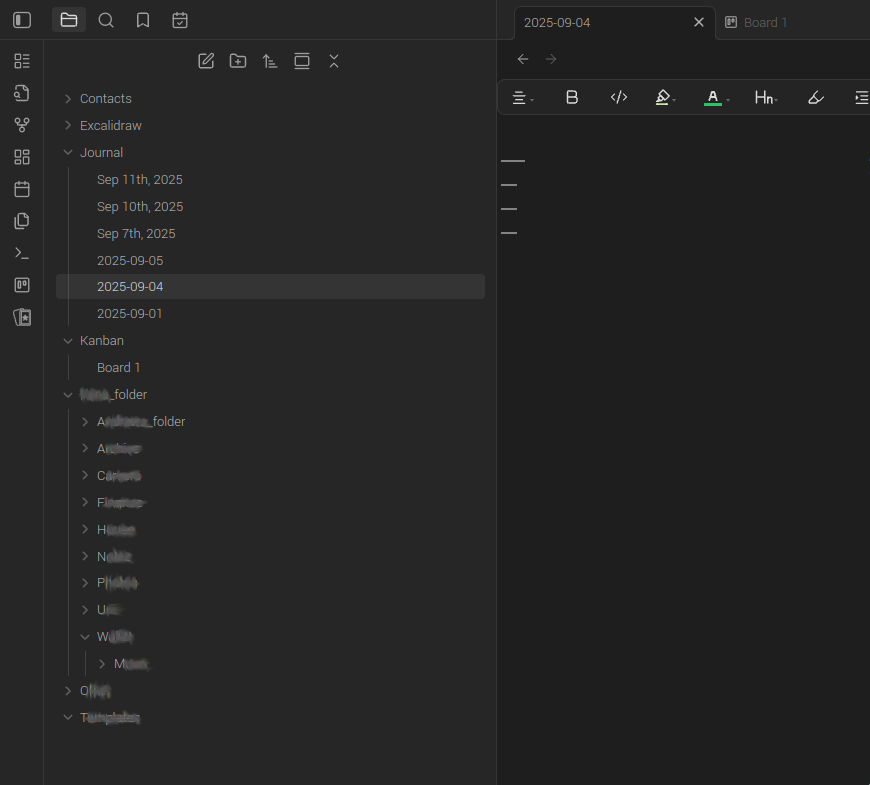
I need these titles with the sub headers to be sorted A-Z.
Desktop is able to do this, however the phone sorts Z-A when I set the Journals title to Z-A.
Desktop screenshot:
Have you checked the Issues page of the plugin’s GitHub? (The GitHub is linked near the top of the plugin’s description.) Maybe someone has reported this issue of Journals setting affecting the main file browser; and if not you could post a bug report.
Ok, however I’m unsure which plugin to report the bug to? The Journals Version: 2.1.10 By Sergii Kostyrko has been disabled on my Desktop Obsidian App Current version: v1.9.12 (Installer version: v1.4.16).
I would assume the left side bar File Manager is managed by Obsidian, therefore a bug report to Obsidian?
Or perhaps Obsidian Core plugins, Files?
If the plugin is disabled then how are you using it? Its settings aren’t likely to be affecting anything if it’s not enabled.
Do you mean you want to sort 1 folder differently than the others? I don’t think the file browser can do that, at least not by itself. The “Custon File Explorer sorting” community plugin will let you sort individual folders differently. (It’s not very user-friendly, but once it’s set up you shouldn’t have to think about it again.)
I stopped using the Journals plugin as the Obsidian default seems to be creating ‘Open today’s daily note’ automatically.
I simply need a Logseq-like sorting of Journals with most recent at top.
Next challenge is if Journal files are stored in the left side bar, then the left side bar is going to soon fill up with years of empty journal files.
Ok, thanks. I turned on Open daily note on start up to have Obsidian auto open to Journal (Logseq-like) which is very handy when quickly note taking.
Ideally if empty Journals with no entries could be deleted, that would reduce the left side bar filling up over the years.
Still thinking how to manage the left side bar with Journal fill ups…perhaps renaming Journal to zJournal so zJournal is the bottom directory, then I never see the lower files with years of empty Journals, leaving my other directories at top for regular use without interruption?
Yes, that’s what I’ve been doing, but it’s another work around that I didn’t have to do with Logseq.
Currently playing around with the plugin Custom File Explorer sorting Version: 3.1.6 By SebastianMC, but no luck yet. Might have to actually read the instructions!
Unfortunately, Logseq has no TOC (table of contents) on the phone yet, so that’s a deal breaker.
Obsidian seems to have lots of fun plugins which is nice too.
Created a new note in Obsidian root which sorted Journal Z to A and other directories as A to Z.
---
sorting-spec: |
  # Default rule: all folders
  target-folder: /*
    sort-by: name
    order: asc
    priority: 0

  # Override: Journal folder — high priority to force Z→A
  target-folder: Journal
    sort-by: name
    order: desc
    priority: 100
---
However after syncing to phone (phone plugin installed and enabled, but no icon and no sorting) and rebooting desktop, the plugin runs, but doesn’t sort Journal Z to A?
I see you already have them in a folder. You can subdivide the folder by years or other time units by adding slashes in Settings > Daily Notes > Date Format to mark folder divisions. So for example, YYYY/YYYY-MM-DD puts the notes (YYYY-MM-DD) in yearly folders (YYYY/).