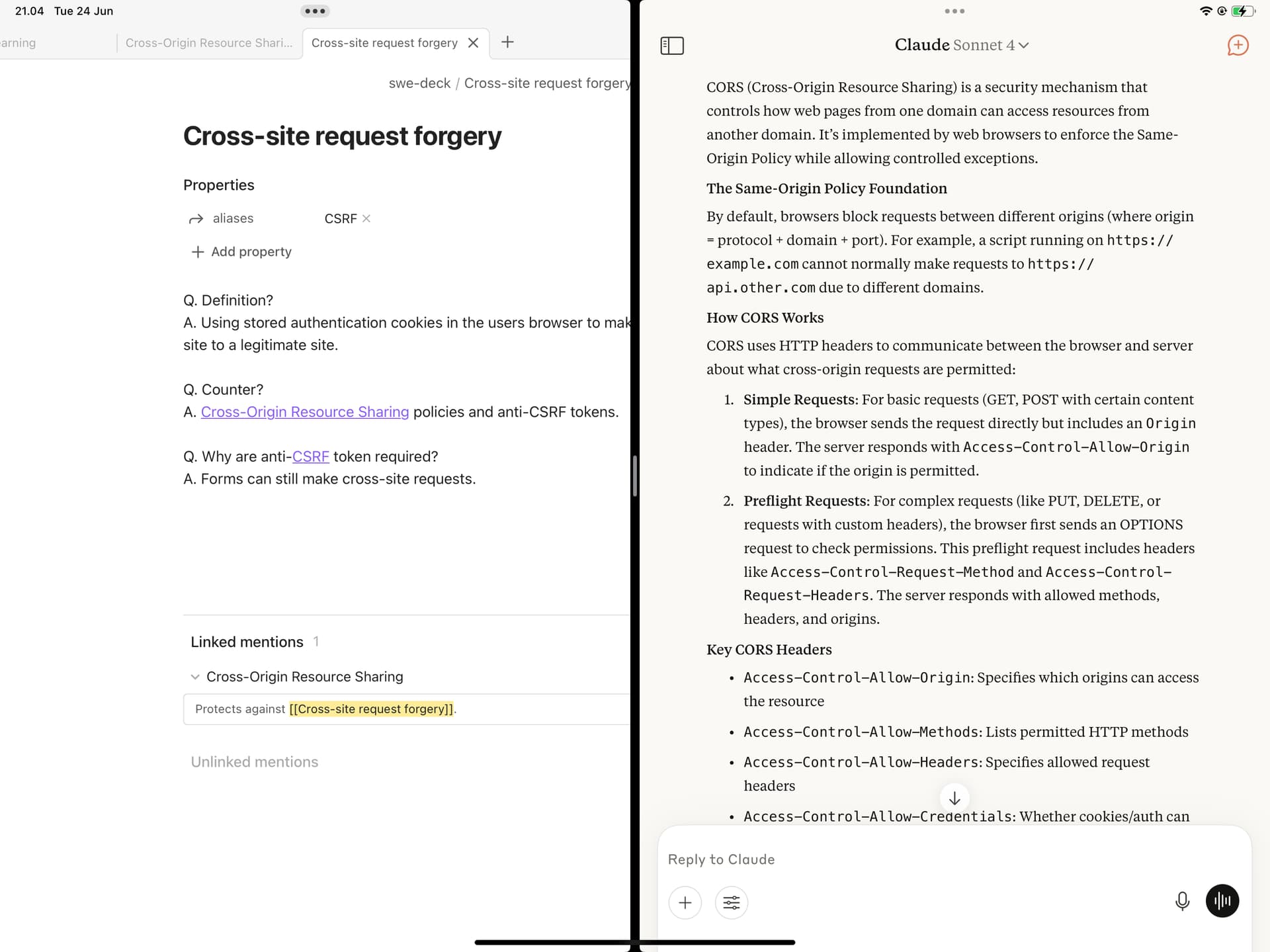
It was unclear to me from the prior thread whether this was considered fixed already. Just wanted to report that I still experience this issue on 1.9.2 (212).
I’m having this same issue and I’m running 1.9.2. Setting up split screen initially works fine, but it’s when I minimize the split screen view (open another app or go to home screen) and then switch back to it that it happens.
I tried it in a default vault with restricted mode and default theme
Expected result
It should stay rendered correctly at 50/50 size
Actual result
Obsidian will now be being rendered as if it’s full screen, despite being split. If it’s the leftmost window, you are seeing the left 50% of the 100% sized obsidian window. It stays this way until the split size is adjusted.
Environment
SYSTEM INFO:
Operating system: ios 18.6.2 (Apple iPad13,8)
Obsidian version: 1.9.12 (237)
API version: v1.9.12
Login status: not logged in
Language: en
Live preview: on
Base theme: adapt to system
Community theme: none
Snippets enabled: 0
Restricted mode: on
One additional observation to my last post: I just started Obsidian in 50/50 mode after iOS had closed the app from memory. When I started it up, this time it displayed the /center/ 50% – so 25% missing on the right, 25% missing on the left. Once I tabbed out and back, it want back to its previous behavior of showing the left 50% of the screen, as described in my post.
We have been unable to reproduce this bug in iOS 26. If you still can, please provide exact reproduction step. Please note that this BR is about split screen mode. If you are using any other mode, open a separate BR.
I am on ios 26 and im still having this issue but instand it happends anytime i back out of the app and then go back into it (landcape mode)
Fling the screen and back fixes it but it happends any time i reopen the app
It dosent happend 100% pf the time but offen enoth thats it increbully anjoing
The added link here includes a screen recording