So I sync my vaults using Syncthing.
The vault on my android displays images fine.
The vault on my PC used to display all the images properly but it has suddenly stopped.
I have checked the vault and the images are in the vault.
If I try to add an image from within Obsidian on my PC, it finds the image and creates the sytax ![[RulerClamp.jpg]] but will not display the image.
When I look for the image in Obsidian’s file explorer, I find the image right where I expect it to be but if I click it, I get a little icon that looks like a broken link.
Any ideas?
Everything was definitely working a few days ago. I am not an utter Obsidian noob!
Have I accidentally changed a setting? I can’t think what.
Let me tell you a few other bits. I have my vault on an Android, where it works fine, but I like to be able to see it at work. The machine at work is windows 10. I have the ability to sign into many different machines at work (I work in labs at a university) so IT have our machines setup so that our documents folder is synced between all the machines we may sign into and use.
To test for you, I setup a new, simple vault that is mostly one file and an assets directory.
Even in this vault. If I just click the image, it too does not show up.
I then have one file, with a link to the image in it and that too, as expected does not show.
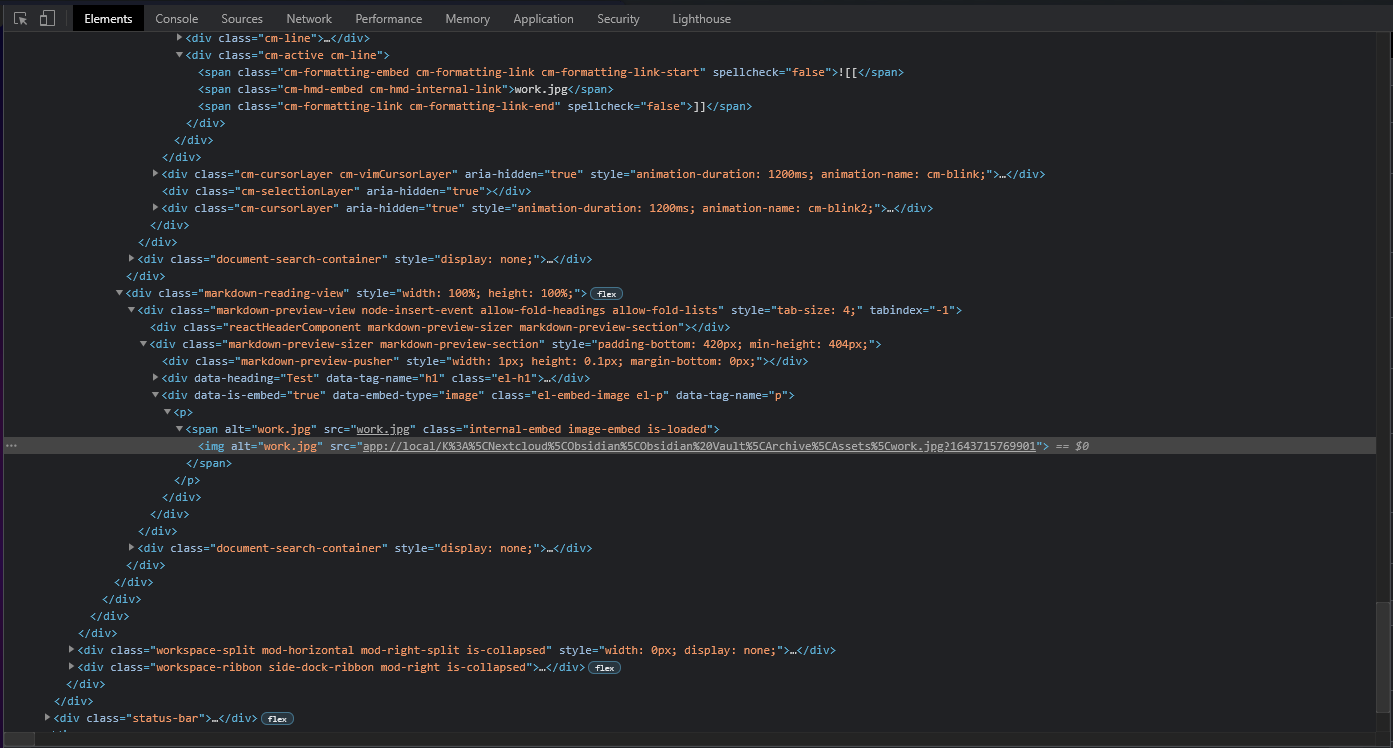
I followed your instructions and this is the information I got for the image:
I am not that familiar with this notation “app://local/”, but the “\viu.int.viu.ca\redirects\f\frostd\My Documents\AnObsidianTestVault_dfgn10\assets\Cube.jpg” looks correct
to me.
If I go to the vault in windows file explorer and copy the path I see it is:
“\viu.int.viu.ca\redirects\f\frostd\My Documents\AnObsidianTestVault_dfgn10\assets\Cube.jpg”
I just tried making a vault deep down in the root of my windows machine. When I do that, and drag an image into the vault, if I click it from Obsidian’s file explorer, I see the image.
If I take the exact same vault and put it into my “Documents” folder, then when I click the image, it is not visible in obsidian. My “Documents” folder is a windows redirected folder.
Is this an obsidian issue or is it something weird going on with our university’s network.
Oh, one more thing, I can see the images if I go click them from the windows file explorer.
Any insights or ideas would be well received. I am loving Obsidian, but at this point I am about ready to switching back to just having “standard” markdown files in a directory structure and using Typora on windows and Mac and Epsilon notes on Android.
I just love the way Obsidian does links ![[image.jpg|100]] or [[myfile]] just makes so much sense to me and is so much easier to work with.
Could this be an Obsidian needing local files problem?
Obsidian needs all the files in an open vault to be available all of the time. Presumably a latency issue can interrupt this. At times thus requirement seems to conflict with other assumptions in the system.
Hmm, thanks Ken.
I am a Mac person. Windows drives me nuts. Alas I have to use it for work. It is my understanding that the way these machines work is that yes, my “Documents” is somehow synced on the network, but it is available offline when I am not connected to my work network, either at work or via VPN.
I am 100% sure it was working before but unfortunately did not notice exactly when it stopped working because it is only images that seem to be an issue. Text based files are fine so it took a while before I clicked an image or went into preview mode and noticed the images were not there!
I will try to involve our IT guys but that will most likely just result in “Don’t use Syncthing” and “Don’t use Obsidian” which is why I am trying to figure it out myself.
Unfortunately I don’t understand the windows redirecting system enough to know if that is the problem or something in my Vault setup is the problem.
I am wondering if it is just a case of me having to point the vault to the actual local files.
I am going to dig around and try to understand this system that our IT are using a bit more.
To see if that’s the problem, you could try to manually specify your image path in an img html tag. If that works, then this is not the problem.
Typical IT guys… I get ya.
I’ve used Syncthing, not sure how that would raise this problem though, unless something fishy is going on.
I’d try to get to see if it’s the path which is giving problems or something else. Cause for example there’s a number behind the .jpg, I personally don’t have a clue what that is for
I’m not sure if it doesn’t recognize the drive or not.
Let’s say this isn’t the problem, perhaps there’s a permission issue for third party apps to read files in that folder?
I’m just trying to think with you here.
We could def use an Obsidian Insider / Staff member on this issue
Solution: I just upgraded to the latest version and the image problem fixed itself.
I don’t know how I missed the upgrade but I did.
All images are behaving as the should now and I have installed Dataview, the Minimal theme and Quick Add and now I am really liking Obsidian. This gives me a good amount of control over my docs while still keeping them simple which is why I use markdown in the first place.



 which is why I am trying to figure it out myself.