I’d have a look at the default theme variables:
and how everything is defined for the default theme in the app.css. Open the dev tools → Sources tab → app.css. I recommend copying it all out of the dev tools and save it as a reference (in a .css file outside your vault somewhere). You won’t make any changes here – it’s just for reference.
There’s a great guide here on using the dev tools specifically with Obsidian:
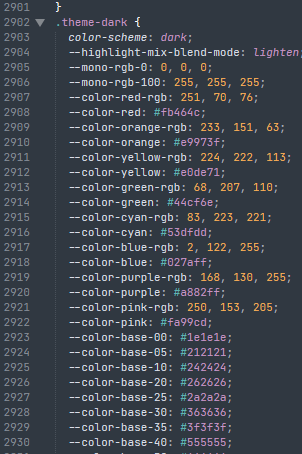
As far as .theme-light and .theme-dark go (in the app.css) they look like mostly the base colors for the different color schemes.
But if you scroll up under the body section, you can find variables that would be a good fit for the different color schemes:
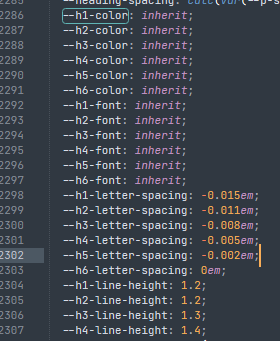
Someone has probably done it ( ), but it doesn’t make sense to me to have different letter spacing between light and dark modes. Those rules stay under
 body even if I wanted to change them, but heading color? For sure! So you could break those out into a custom snippet. e.g.
.theme-light {
  --h1-color: var(--color-red);
  --h2-color: var(--color-orange);
  --h3-color: var(--color-yellow);
  --h4-color: var(--color-green);
  --h5-color: var(--color-blue);
  --h6-color: var(--color-purple);
}

.theme-dark {
  --h1-color: #2471d4;
  --h2-color: #9149e4;
  --h3-color: #e0308d;
  --h4-color: #e03035;
  --h5-color: #e08330;
  --h6-color: #cec92a;
}
You can use .theme-light and .theme-dark on class selectors as well; this one says apply these rules to this callout in the light color scheme, these different rules to the same callout in the dark color scheme:
.theme-light .callout[data-callout="powerbird"] {
  --callout-color: 102, 66, 219;
  --callout-border-width: 2px;
  --callout-border-opacity: 0.50;
  --callout-icon: lucide-bird;
}

.theme-dark .callout[data-callout="powerbird"] {
  --callout-color: 153, 189, 36;
  --callout-border-width: 2px;
  --callout-border-opacity: 0.25;
  --callout-icon: lucide-bird;
}
It can take a bit of playing around, but usually you want to add .theme-light/.theme-dark before any other selectors you are using. Hope this was in the direction of your question and it helps a bit.