Command Palette Styling CSS works perfectly with your modification. I also changed the background transparency from 0.9 to 1.0 in .prompt so the underlying contents does not bleed through.
Tooltip Styling CSS. The modification to body works to make the text more prominent but the underlying windows contents bleed through. Please see the attached image below. In this case, I think I want the opacity of the background to be 1.0 and change the color of the text to white, which shows up better. How would I modify the background-color and color to be variables that are theme/dark mode/light mode aware?
Also, in the tooltip CSS, why does the author use red in the colors?
You could remove the body section and replace it with classes for the light and dark color schemes. Adjust the opacities if you want. We also need to add something for the font color. I came up with unoriginally “tooltip-font-color”, but that can be changed.
Thank you for the reply. In the tooltip styling snippet, I did replace the body with your dark and light color classes. How do I use the classes or implement them globally?
Woops, forgot to mention @ariehen in my last reply. Thank you for the reply. In the tooltip styling snippet, I did replace the body with your dark and light color classes. How do I use the classes or implement them globally?
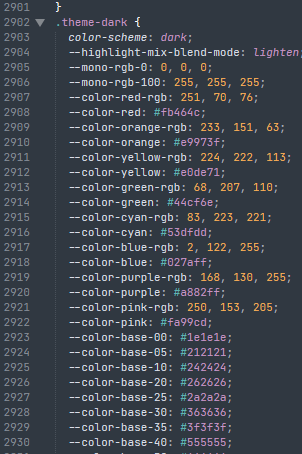
and how everything is defined for the default theme in the app.css. Open the dev tools → Sources tab → app.css. I recommend copying it all out of the dev tools and save it as a reference (in a .css file outside your vault somewhere). You won’t make any changes here – it’s just for reference.
There’s a great guide here on using the dev tools specifically with Obsidian:
As far as .theme-light and .theme-dark go (in the app.css) they look like mostly the base colors for the different color schemes.
Someone has probably done it (), but it doesn’t make sense to me to have different letter spacing between light and dark modes. Those rules stay under body even if I wanted to change them, but heading color? For sure! So you could break those out into a custom snippet. e.g.
You can use .theme-light and .theme-dark on class selectors as well; this one says apply these rules to this callout in the light color scheme, these different rules to the same callout in the dark color scheme:
It can take a bit of playing around, but usually you want to add .theme-light/.theme-dark before any other selectors you are using. Hope this was in the direction of your question and it helps a bit.
@ariehen Thank you for the detailed response. This is quite a bit of info to digest. I am not a coder so it will take a bit of time to understand.
I see where you defined tooltip-font-color now….in the light and dark theme.
Do I want to define this line… --tooltip-font-color: #fff; /* white */ — as a fixed color or call it some sort of variable? I found if the text is white in both light/dark modes, it stands out more than the black text.
Also, if I change the –red to anything else, the text is whited out. What should I change the –red to?
I figured you wanted options for theme-light and theme-dark so wrote the snippet with them separate.
So you can keep using it as is and just change the font color to whatever you’d like. e.g.,
.theme-light {
  --red: hsla(var(--interactive-accent-hsl), 1);
  --tooltip-font-color: #fff; /* <- change this to whatever */
}

.theme-dark {
  --red: hsla(var(--interactive-accent-hsl), 1);
  --tooltip-font-color: gold;  /* <- change this to whatever; can be #fff as well */
}

.tooltip {
  background-color: var(--red);
  color: var(--tooltip-font-color);
  word-wrap: break-word;
}
or if you’re fine with the font color and background+background opacity (the interactive-accent color) to be the same in both color schemes it can be simplified down to only:





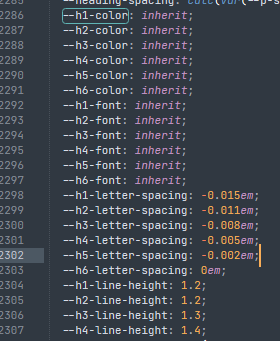
 ), but it doesn’t make sense to me to have different letter spacing between light and dark modes. Those rules stay under