Thank you Alan. I duped my vault, cleared out my content, and the same error is appearing.
Here is the link.
Wondering if it’s an issue with a plugin? Not sure but appreciate any ideas.
Cheers,
M
Thank you Alan. I duped my vault, cleared out my content, and the same error is appearing.
Here is the link.
Wondering if it’s an issue with a plugin? Not sure but appreciate any ideas.
Cheers,
M
Your Dataview plugin is three years old! Please update your plugins and it will work.
You should update them frequently if only for security reasons.
 well JFC, that’s embarrassing. Being a noob waiting for a notif saying “needs updating” I guess! Sorry to waste your time on such a low grade issue.
Good news is, yes, it works! Looks fantastic, can’t wait to adopt it into daily use.
Thanks again for your help Alan 
M.
As a long-time fan of GTD and Obsidian, thank you @AlanG very much for this system. I’m really impressed.
I have a feeling this is a contender for Dumbest Question of the Century, but I can’t find the answer. Apologies, but here goes:
Some of the images are not rendering for me, especially the progress bar image:
I don’t know JavaScript very well, but I did a little digging and found the source is
https://progress-bar.dev.
When I try to visit that site, I get the response:
Progress-bar.dev currently does not have any sponsors for you.
I tried to do a search on the problem, but didn’t get anything helpful. Maybe I have a DNS issue that blocks me from the site, or some security setting is getting in the way? I’ve updated all the plugins in my vault so I don’t think that’s the issue. Any ideas what I’ve missed?
It looks like that website is down today (or maybe forever?) There’s no notice or message on the developer’s Github: https://github.com/fredericojordan/progress-bar
Try again later and see if that site is back up.
Still, it’s not integral to the GTD setup (and I don’t even use progress bars myself). There are quite a few alternative options for progress bars if you search the forums:
Got it, thanks very much.
Hi, as the original Repo seems no longer be maintained, someone forked it to continue the project: GitHub - guibranco/progressbar: Generates a dynamic progress bar image (SVG)
You only have to replace progress-bar.dev domain with progress-bar.xyz in the project-progress.js file.
Everything will be working fine again 
PS: @AlanG maybe interesting for you as well if you want to update the template
Updated in the repo - thanks for sending that!
Hi,I just found this vault very useful today, then I updated those three plugin and countered a problem. When I use alt+N ->New Note, there will be a new file named untitled generated after a click New Note. Maybe caused by plugin updatting, could you please check it out?
alt+N is not supposed to use to create new files in this case, use Ctrl+N. Finally I figure it out, Really Confusing, maybe somewhere should mention that!
You are correct. Alt+N is the Templater new note command, nothing to do with this vault.
The “New Note” template (Ctrl+N) is not actually part of the GTD vault, I just included it because I use it myself and it’s useful. I will think about how I can actually add that to the docs properly. Thanks for the feedback!
I’m wandering where to archive projects, since tasks could be moved to Completed tasks, or I just need to move tasks from Next actions list and keep tasks in their own projects. looking forward to your response.
For projects, you can mark it as completed as per the docs, and then I personally move it to an “Archived projects” folder.
Hi AlanG,
I’ve been using your Obsidian GTD vault for a week now and it’s been a great help! However, as my task list grows, I’m finding it challenging to effectively group tasks by context. David Allen also highlighted the importance of context-based task grouping in his book. Could you share some tips or techniques for refining context categorization in your vault?
Thanks!
I don’t use contexts myself, but if you want to add those I have updated the script and added a section to the documentation:
https://github.com/alangrainger/obsidian-gtd/blob/main/00%20Documentation/Documentation.md#contexts
An easy way to do this is with tags. You can use any tags that you like. Here’s an example, but you can use anything that works for you:
- [ ] An example task with a context #contexts/home
Then, edit the bottom of your tasks.js file to create a new block which filters by your chosen tag. In the case of the example above, you could add:
taskList(Groups.Normal, '🏠 Home', '#contexts/home')
Make sure you copy down the latest version of the tasks.js script first!
Thank you for this beautiful script! It works great.
I just madea little tweak for adding context. I didn’t want to bloat the page with different groupings, so instead I added emojis at the start of the task according to the tag.
Also I added a little logic for the tags to not be shown when displayed in the Master Task List.
See the examples below:
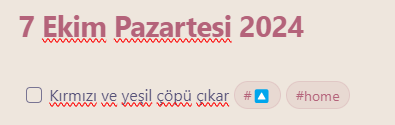
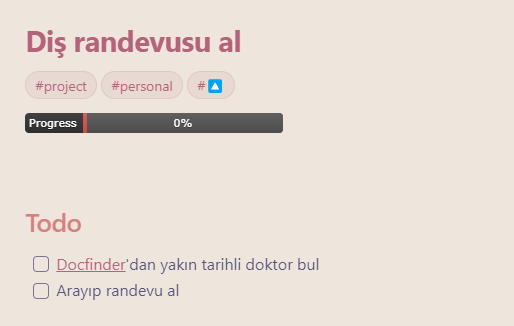
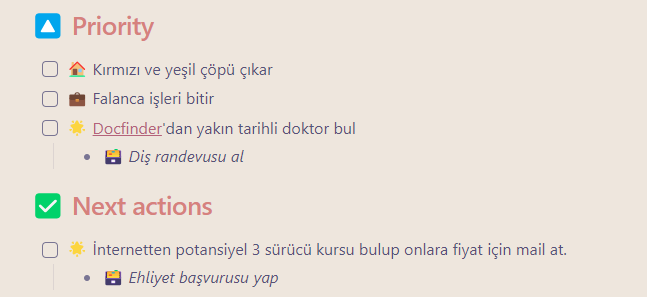
It adds  ,
, and
and  emojis as prefix to the tasks/projects that has #home, #work and #personal respectively.
It also removes these tags from the display, so they are not shown beside the task text in Master Task List.
The changes made on only generateTaskElement function and it can be reached from below.
/**
 * Take a task and the page it's from, and return a formatted element for the tasks array
 * @param {*} task
 * @param {*} page
 * @returns {object}
 */
function generateTaskElement(task, page) {
  let group = Groups.Normal;
  if (task.tags.includes('#someday')) {
    group = Groups.Someday;
  } else if (task.tags.includes('#waiting-on')) {
    group = Groups.Waiting;
  } else if (task.tags.includes('#🔼') || page.tags.includes('#🔼')) {
    group = Groups.Priority;
  }

  // Set emoji for specific tags and project tags
  let prefixEmoji = '';
  if (task.tags.includes('#home') || page.tags.includes('#home')) {
    prefixEmoji = '🏠';
  } else if (task.tags.includes('#work') || page.tags.includes('#work')) {
    prefixEmoji = '💼';
  } else if (task.tags.includes('#personal') || page.tags.includes('#personal')) {
    prefixEmoji = '🌟';
  }

  // Remove specific tags and the 🔼 emoji from the task text
  task.text = task.text
    .replace(/#home|#work|#personal|#🔼/g, '') // Remove the specific tags and 🔼 emoji
    .trim(); // Remove any extra spaces left after removing tags

  // Add the prefix emoji at the beginning of the task text
  task.text = `${prefixEmoji} ${task.text}`.trim();

  // Remove the specific tags from `task.tags` so they don’t display
  task.tags = task.tags.filter(tag => !['#home', '#work', '#personal', '#🔼'].includes(tag));

  // Get the created date of a task for sorting, either from the task text
  // in the format of ➕2024-04-20, or from the page metadata.
  let date;
  const hasDate = task?.text?.match(/➕\s?(\d{4}-\d{2}-\d{2})/);
  if (hasDate) { // Task inline created date
    date = moment(hasDate[1].valueOf());
  } else if (page.created) { // Page `created` frontmatter property
    date = page.created?.ts || moment(page.created).valueOf();
  }
  date = date || page.ctime.ts;

  return {
    task,
    date,
    group
  };
}
Thanks again!
Hi, I’m trying to use your setup, and it doesn’t seem to work for me.
I started with a new vault, set it up according to your docs, installed and configured the plugins, then added a project and some todos, and…nothing. It might be that it’s not really clear to me, from the docs, how the “ Tasks” note gets created - whether we are supposed to create it first, and the JS populates it, or whether it creates it. Given that the docs don’t mention creating any notes in particular, I figured the latter, but nothing seemed to happen, so I added the note and, still nothing.
Also, the configuration of the plugins was confusing because the plugins in your example vault were out of date.
Anyway, I’m very confused as to what I’m doing wrong here, my test vault is here. Any help you can provide would be greatly appreciated!
Thanks!
I’ve had trouble getting a new one started.
activating plugins
getting the scripts to work properly.
I’ve resolved to just using the original copy, and later I’ll delete the examples I don’t need (for now I renamed them “XXX.old”)
another issue that occurred
on a mac - using unzip from the shell, ignores all the files that have a name that starts with an emoji
unzipping from the finder - works.
Hello AlanG,
Many thanks for your work on this vault, it is working great on my side and has already helped me a lot achieve more
I have a question/request regarding the context feature. Would it be possible to add the context at Project level, so that we don’t have to define it for each single task of the project?
Thanks again!
The Tasks note already exists in the demo vault - it’s here.
But you can make any note the Tasks note, just add this Dataview code to any note:
dv.view('tasks')