Topic : 1/4
Summary
- How to simplify nested
choiceoperators via JavaScript Objects? (DQL10_Q1,DQL10_Q3,DQL20_Q1,DQL10,DQL20) - How to simplify multiple
ORoperators via JavaScript Objects? (DVJS01_Q1,DVJS01_Q2,DVJS10_Q1,DVJS10_Q2,DVJS10_Q3,DVJS01,DVJS10) - How to simplify the following output?(
DQL10,DQL20,DVJS01,DVJS10)
```md
This year, I've read 2 books and I've listened to 2 audiobooks (of which 1 were podcasts), for an overall 4 books and audiobooks read.

I've read 0 pages this year. And I've listened to 0.0 hours.

The average rating for the overall 4 books and audiobooks is 4.5 out of 10.

Average book length: 0 pages

Average audiobook length: 0.0 hours

Average pages read per day: 0.0 pages
```
Test
Summary
- dataview: v0.5.46
Input
Summary
dictionary files:
- Location: “100_Project/01_dataviewjs/01_by_example/Q80_MediumCat/Q80_test_data”
folder: 03
- filename :
dic_19660311
---
Date: 1966-03-11
tags: [Favorite]
Alias: "Javascript: The Definitive Guide, 7/e"
Medium: "Book"
Author: "David Flanagan"

Country: "US, GB"
DateStarted: "2020-06-23"
DateFinished: "2020-07-25"
Status: "done"

Year: 2020
Rating: 7
Pages: 681
Hours:
Cover: https://m.media-amazon.com/images/W/WEBP\_402378-T2/images/I/919ZMTHDPBL.\_AC\_SX75\_CR,0,0,75,75\_.jpg
---


# Javascript: The Definitive Guide, 7/e
- What :: [Javascript: The Definitive Guide, 7/e](https://www.amazon.com/-/es/David-Flanagan/dp/1491952024/ref=sr_1_1?__mk_es_US=%C3%85M%C3%85%C5%BD%C3%95%C3%91&crid=32QHTGRP393RS&keywords=Javascript&qid=1672211738&s=books&sprefix=javascript%2Cstripbooks-intl-ship%2C286&sr=1-1)
- Authors ::
- Keywords ::
- Summaries ::
- Comments ::
- Downloaded ::
folder: 04
- filename :
dic_19660411
---
Date: 1966-04-11
tags: [Favorite]
Alias: "UNIX Shells by Example, 4/e"
Medium: "Audiobook"
Author: "Ellie Quigley"

Country: "IT"
DateStarted: "2004-09-01"
DateFinished: "2005-12-25"
Status: "done"

Year: 2004
Rating: 9
Pages:
Hours: 1200
Cover: https://m.media-amazon.com/images/W/WEBP\_402378-T2/images/I/91vUmLEjbHL.\_AC\_SX75\_CR,0,0,75,75\_.jpg
---


# UNIX Shells by Example, 4/e
- What :: [UNIX Shells by Example, 4/e](https://www.amazon.com/-/es/Ellie-Quigley/dp/013147572X/ref=sr_1_1?__mk_es_US=%C3%85M%C3%85%C5%BD%C3%95%C3%91&crid=IHF5F5CXXTV0&keywords=UNIX+Shells+by+Example&qid=1672214391&s=books&sprefix=unix+shells+by+example%2Cstripbooks-intl-ship%2C250&sr=1-1)
- Authors ::
- Keywords ::
- Summaries ::
- Comments ::
- Downloaded ::
folder: 05
- filename :
dic_19660511
---
Date: 1966-05-11
tags: [Favorite]
Alias: "P_Podcast"
Medium: "Podcast"
Author: "YYY"

Country: "DE"
DateStarted: "2022-12-16"
DateFinished: "2022-12-17"
Status: "done"

Year: 2000
Rating: 3
Pages:
Hours: 11
Cover: https://media.wnyc.org/i/200/200/c/70/2022/12/NullandVoid_1600x1200.png
---


# Null and Void
- What :: [Null and Void](https://radiolab.org/episodes/null-and-void-2212)
- Authors ::
- Keywords ::
- Summaries ::
- Comments ::
- Downloaded ::
folder: 06
- filename :
dic_19660611
---
Date: 1966-06-11
tags: [Favorite]
Alias: "Perl by Example, 5/e"
Medium: "eBook"
Author: "Ellie Quigley"

Country: "FR"
DateStarted: "2014-12-17"
DateFinished: "2015-12-21"
Status: "done"

Year: 2014
Rating: 10
Pages: 888
Hours:
Cover: https://m.media-amazon.com/images/W/WEBP\_402378-T2/images/I/41aGGHu7Q-L.\_AC\_SX75\_CR,0,0,75,75\_.jpg
---


# Perl by Example, 5/e
- What :: [Perl by Example, 5/e](https://www.amazon.com/-/es/Ellie-Quigley/dp/0133760812/ref=sr_1_1?__mk_es_US=%C3%85M%C3%85%C5%BD%C3%95%C3%91&crid=207AKU6YA3671&keywords=perl+by+example&qid=1672212277&s=books&sprefix=perl+by+exampl%2Cstripbooks-intl-ship%2C432&sr=1-1)
- Authors ::
- Keywords ::
- Summaries ::
- Comments ::
- Downloaded ::
folder: 08_excluded
- filename :
dic_19750801
---
Date: 1966-06-11
tags: [Favorite]
Alias: "Perl by Example, 5/e"
Medium: "eBook"
Author: "Ellie Quigley"

Country: "FR"
DateStarted: "2014-12-17"
DateFinished: "2015-12-21"
Status: "done"

Year: 2014
Rating: 10
Pages: 888
Hours:
Cover: https://m.media-amazon.com/images/W/WEBP\_402378-T2/images/I/41aGGHu7Q-L.\_AC\_SX75\_CR,0,0,75,75\_.jpg
---


# Perl by Example, 5/e
- What :: [Perl by Example, 5/e](https://www.amazon.com/-/es/Ellie-Quigley/dp/0133760812/ref=sr_1_1?__mk_es_US=%C3%85M%C3%85%C5%BD%C3%95%C3%91&crid=207AKU6YA3671&keywords=perl+by+example&qid=1672212277&s=books&sprefix=perl+by+exampl%2Cstripbooks-intl-ship%2C432&sr=1-1)
- Authors ::
- Keywords ::
- Summaries ::
- Comments ::
- Downloaded ::
DQL10_sum_Pages_or_Hours_groupBy_P_Category_via_JavaScript_Objects_and_TABLE
Summary
Main DQL
| Code Name | Data type | Group By | Purposes | Remark |
|---|---|---|---|---|
| DQL10 _sum_Pages_or_Hours _groupBy_P_Category via_JavaScript_Objects and_TABLE |
(A dynamical page field)P_Category:1.“Reading” 2.“Listening” (A page field) Medium:1.“Book” 2.“GraphicNovel” 3.“eBook” 4.“Article” 5.“Audiobook” 6.“Podcast” 7.“radio” |
yes (once) |
1.To add four new dynamical fields including P_Category, Q_PagesOrHours, R_Unit and S_NumberOfDigits into each page by using the FLATTEN operator 2.To group by P_Category 3.To add two new dynamical fields including G_Medium_Counts and G_Medium_Lengths into each group 4.To add two new dynamical fields including G_Medium_Average_Lengths and today_ooo into each group 5.To do some simple statistics: 5.1 To count file.link by each group 5.2 To sum up Pages(or Hours) by each group 5.3 To get the average Pages(or Hours) by each group 5.4 To get the average Pages(or Hours) read(or listened) per day by each group 6.To display the result as a table |
Notes
Summary
Q1: What does the following code mean(WHERE P_Category)?
Summary_Q1
Original Example: Q1 (To be modified)
Notes:
1.TheP_Categoryfield doesn’t exist in a note.
2.It is created by using the FLATTEN operator.
3.In other words, each Medium is dynamically categorized byP_Category.Purposes:
1.To simplify multiple ‘OR’ operators via JavaScript Objects
2.For best performance
3.For easier reading
4.For easier modification
5.For easier debugging
Tips: The value of theP_Categoryis “Reading”, “Listening” or undefined. Therefore, the value except undefined is truthy.
```dataview

WHERE Status != null
WHERE Medium != null


// T01. define page.P_Category: Alias="Medium Category"
// page.P_Category="Reading" or "Listening"
// Each page.Medium is dynamically categorized by page.P_Category.
// #####################################################################
// let page.P_Category = page.P_Category;
FLATTEN {
    "Book":  "Reading",
    "GraphicNovel":  "Reading",
    "eBook":  "Reading",
    "Article":  "Reading",

    "Audiobook":  "Listening",
    "Podcast":  "Listening",
    "radio":  "Listening"

}[Medium] AS P_Category


// The multiple 'OR' operators are simplified via JavaScript Objects.
WHERE P_Category


```
A1:
Another Example: A1_11
Purposes: To use multiple ‘OR’ operators
```dataview

WHERE Status != null
WHERE Medium != null


WHERE
      Medium = "Book"          // using multiple 'OR' operators
   OR Medium = "GraphicNovel"  // using multiple 'OR' operators
   OR Medium = "eBook"         // using multiple 'OR' operators
   OR Medium = "Article"       // using multiple 'OR' operators

   OR Medium = "Audiobook"     // using multiple 'OR' operators
   OR Medium = "Podcast"       // using multiple 'OR' operators
   OR Medium = "radio"         // using multiple 'OR' operators


// T01. define page.P_Category: Alias="Medium Category"
// page.P_Category="Reading" or "Listening"
// Each page.Medium is dynamically categorized by page.P_Category.
// #####################################################################
// let page.P_Category = page.P_Category;
FLATTEN {
    "Book":  "Reading",
    "GraphicNovel":  "Reading",
    "eBook":  "Reading",
    "Article":  "Reading",

    "Audiobook":  "Listening",
    "Podcast":  "Listening",
    "radio":  "Listening"
}[Medium] AS P_Category


```
Q2: How to modify the DQL10 when “typeP”, “typeQ” or “typeR” (page.P_Category: “Reading”, “Listening”, “Listening”)(units: “p”, “h”, “h”) is added to a Medium field content?
Summary_Q2
Original Example: Q2 (To be modified)
```dataview

WHERE Status != null
WHERE Medium != null


// T01. define page.P_Category: Alias="Medium Category"
// page.P_Category="Reading" or "Listening"
// Each page.Medium is dynamically categorized by page.P_Category.
// #####################################################################
// let page.P_Category = page.P_Category;
FLATTEN {
    "Book":  "Reading",
    "GraphicNovel":  "Reading",
    "eBook":  "Reading",
    "Article":  "Reading",

    "Audiobook":  "Listening",
    "Podcast":  "Listening",
    "radio":  "Listening"
}[Medium] AS P_Category


WHERE P_Category


```
A2:
Another Example: A2_21
```dataview

WHERE Status != null
WHERE Medium != null


// T01. define page.P_Category: Alias="Medium Category"
// page.P_Category="Reading" or "Listening"
// Each page.Medium is dynamically categorized by page.P_Category.
// #####################################################################
// let page.P_Category = page.P_Category;
FLATTEN {
    "Book":  "Reading",
    "GraphicNovel":  "Reading",
    "eBook":  "Reading",
    "Article":  "Reading",
    "typeP":  "Reading",       // Added by Justdoitcc 2022-12-30

    "Audiobook":  "Listening",
    "Podcast":  "Listening",
    "radio":  "Listening",
    "typeQ":  "Listening",     // Added by Justdoitcc 2022-12-30
    "typeR":  "Listening"      // Added by Justdoitcc 2022-12-30
}[Medium] AS P_Category


WHERE P_Category

```
Q3: What does the following code mean(FLATTEN ... AS S_NumberOfDigits)?
Summary_Q3
Original Example: Code DQL10_Q3 (To be explained)
The original DQL with a new field like
S_NumberOfDigitsdoesn’t contain achoiceexpression.
Purposes:
1.To simplify multiplechoicefunctions via JavaScript Objects
2.For best performance
3.For easier reading
4.For easier modification
5.For easier debugging
```dataview
TABLE WITHOUT ID

      // Not to use a `choice` expression
      round(G_Medium_Average_Lengths, rows.S_NumberOfDigits[0]) + rows.R_Unit[0]
      AS "Average Lengths"


FROM "100_Project/01_dataviewjs/01_by_example/Q80_MediumCat/Q80_test_data"

WHERE Status != null
WHERE Medium != null
SORT file.name ASC


// T07. define page.S_NumberOfDigits: Alias="Number of Digits"
// P_Category="Reading"    => 0
// P_Category="Listening"  => 1
// To be used in the step:To get the Average Lengths by each group
// #####################################################################
// let page.S_NumberOfDigits = 0;
FLATTEN {
    "Reading": 0,
    "Listening": 1
}[S_NumberOfDigits] AS S_NumberOfDigits


GROUP BY P_Category AS GP_Category
SORT GP_Category DESC


```
A3:
Another Example: Code DQL10_A3_31
The DQL10_A3_31 without a new field like
S_NumberOfDigitscontains a choice expression.
```dataview
TABLE WITHOUT ID

      // To use a `choice` expression
      choice(GP_Category = "Reading",
          round(G_Medium_Average_Lengths, 0) + rows.R_Unit[0],
          round(G_Medium_Average_Lengths, 1) + rows.R_Unit[0]
      )
      AS "Average Lengths"

FROM "100_Project/01_dataviewjs/01_by_example/Q80_MediumCat/Q80_test_data"

WHERE Status != null
WHERE Medium != null
SORT file.name ASC


// without FLATTEN ... AS S_NumberOfDigits


GROUP BY P_Category AS GP_Category
SORT GP_Category DESC


```
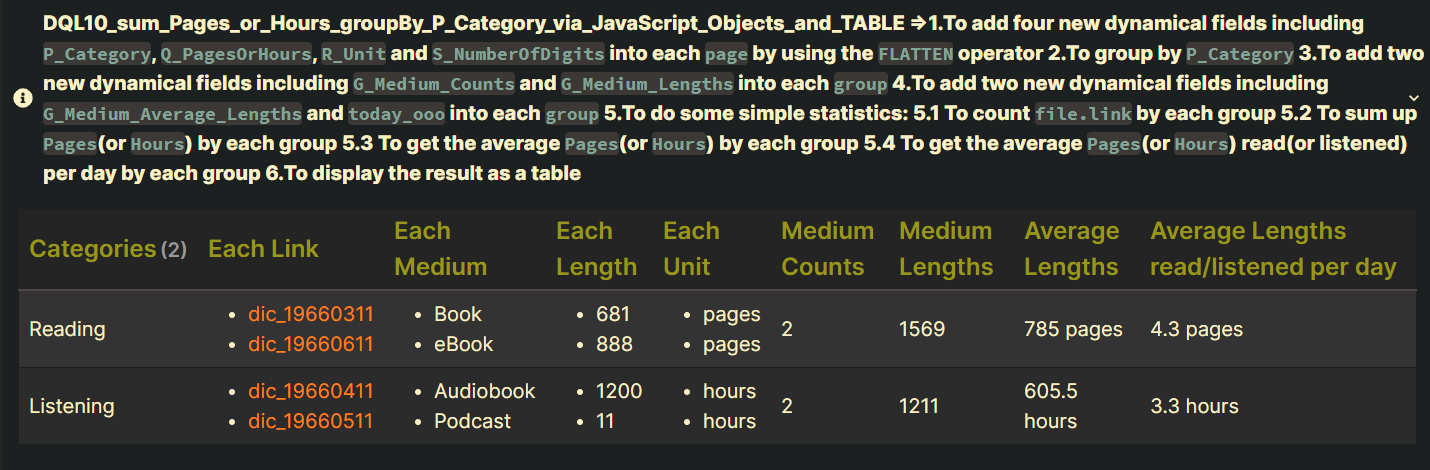
Code DQL10_sum_Pages_or_Hours_groupBy_P_Category_via_JavaScript_Objects_and_TABLE
Summary_code
title: DQL10_sum_Pages_or_Hours_groupBy_P_Category_via_JavaScript_Objects_and_TABLE =>1.To add four new dynamical fields including `P_Category`, `Q_PagesOrHours`, `R_Unit` and `S_NumberOfDigits` into each `page` by using the `FLATTEN` operator 2.To group by `P_Category` 3.To add two new dynamical fields including `G_Medium_Counts` and `G_Medium_Lengths` into each `group` 4.To add two new dynamical fields including `G_Medium_Average_Lengths` and `today_ooo` into each `group` 5.To do some simple statistics: 5.1 To count `file.link` by each group 5.2 To sum up `Pages`(or `Hours`) by each group 5.3 To get the average `Pages`(or `Hours`) by each group 5.4 To get the average `Pages`(or `Hours`) read(or listened) per day by each group 6.To display the result as a table
collapse: open
icon:
color:
```dataview
TABLE WITHOUT ID

      GP_Category AS "Categories",

      rows.file.link AS "Each Link",
      rows.Medium AS "Each Medium",

      rows.Q_PagesOrHours AS "Each Length",
      rows.R_Unit AS "Each Unit",

      G_Medium_Counts AS "Medium Counts",
      G_Medium_Lengths AS "Medium Lengths",


      round(G_Medium_Average_Lengths, rows.S_NumberOfDigits[0]) + rows.R_Unit[0]
      AS "Average Lengths",


      round(G_Medium_Lengths / today_ooo , 1) + rows.R_Unit[0] AS "Average Lengths read/listened per day"


FROM "100_Project/01_dataviewjs/01_by_example/Q80_MediumCat/Q80_test_data"

WHERE Status != null
WHERE Medium != null
SORT file.name ASC

FLATTEN {
    "Book":  "Reading",
    "GraphicNovel":  "Reading",
    "eBook":  "Reading",
    "Article":  "Reading",

    "Audiobook":  "Listening",
    "Podcast":  "Listening",
    "radio":  "Listening"
}[Medium] AS P_Category


WHERE P_Category


FLATTEN {
    "Reading": Pages,
    "Listening": Hours
}[P_Category] AS Q_PagesOrHours


FLATTEN {
    "Reading": " pages",
    "Listening": " hours"
}[P_Category] AS R_Unit


FLATTEN {
    "Reading": 0,
    "Listening": 1
}[P_Category] AS S_NumberOfDigits


GROUP BY P_Category AS GP_Category
SORT GP_Category DESC


FLATTEN length(rows.file.link) AS G_Medium_Counts
FLATTEN sum(rows.Q_PagesOrHours) AS G_Medium_Lengths
FLATTEN G_Medium_Lengths/G_Medium_Counts AS G_Medium_Average_Lengths


FLATTEN number(dateformat(date("2022-12-30"),"ooo")) AS today_ooo

```
Screenshots(DQL10): today=“2022-12-30”
DQL20_sum_Pages_or_Hours_groupBy_P_Category_groupBy_true_via_JavaScript_Objects_and_TABLE
Summary
Main DQL
| Code Name | Data type | Group By | Purposes | Remark |
|---|---|---|---|---|
| DQL20 _sum_Pages_or_Hours _groupBy_P_Category _groupBy_true _via_JavaScript_Objects _and_TABLE |
(A dynamical page field)P_Category:1.“Reading” 2.“Listening” (A page field) Medium:1.“Book” 2.“GraphicNovel” 3.“eBook” 4.“Article” 5.“Audiobook” 6.“Podcast” 7.“radio” |
yes (twice) |
1.To add four new dynamical fields including P_Category, Q_PagesOrHours, R_Unit and S_NumberOfDigits into each page by using the FLATTEN operator 2.To group by P_Category 3.To add two new dynamical fields including G_Medium_Counts and G_Medium_Lengths into each group 4.To add two new dynamical fields including G_Medium_Average_Lengths and today_ooo into each group 5.To do some simple statistics: 5.1 To count file.link by each group 5.2 To sum up Pages(or Hours) by each group 5.3 To get the average Pages(or Hours) by each group 5.4 To get the average Pages(or Hours) read(or listened) per day by each group 5.5 To count the overall file.link 5.6 To get the overall average Rating 6.To display the result as a table |
1.The DQL20 is based on the DQL10. 1.1 added: 5.5 To count the overall file.link1.2 added: 5.6 To get the overall average Rating Notes: 1.The P_Category field doesn’t exist in a note. 2.It is created by using the FLATTEN operator. 3.In other words, each page.Medium is dynamically categorized by page.P_Category. |
Notes
Summary
Q1: What does the following code mean(FLATTEN ... AS S_NumberOfDigits)? ?
Summary_Q1
Original Example: Code DQL20_Q1 (To be explained)
The original DQL with a new field like
S_NumberOfDigitsdoesn’t contain achoiceexpression.
Purposes:
1.To simplify multiplechoicefunctions via JavaScript Objects
2.For best performance
3.For easier reading
4.For easier modification
5.For easier debugging
```dataview
TABLE WITHOUT ID

      // Not to use a `choice` expression
      map(rows, (rows) =>
          round(rows.G_Medium_Average_Lengths, rows.rows.S_NumberOfDigits[0]) + rows.rows.R_Unit[0]
      )
      AS "Average Lengths"


FROM "100_Project/01_dataviewjs/01_by_example/Q80_MediumCat/Q80_test_data"

WHERE Status != null
WHERE Medium != null
SORT file.name ASC


// with FLATTEN ... AS S_NumberOfDigits
FLATTEN {
    "Reading": 0,
    "Listening": 1
}[S_NumberOfDigits] AS S_NumberOfDigits


GROUP BY P_Category AS GP_Category
SORT GP_Category DESC


GROUP BY TRUE

```
A1:
Another Example: Code DQL20_A1_11
The A1_11 DQL without a new field like
S_NumberOfDigitscontains a choice expression.
```dataview
TABLE WITHOUT ID

      // To use a `choice` expression
      map(rows, (rows) =>
          choice(rows.GP_Category = "Reading",
              round(rows.G_Medium_Average_Lengths, 0) + rows.rows.R_Unit[0],
              round(rows.G_Medium_Average_Lengths, 1) + rows.rows.R_Unit[0]
         )
      )
      AS "Average Lengths"

FROM "100_Project/01_dataviewjs/01_by_example/Q80_MediumCat/Q80_test_data"

WHERE Status != null
WHERE Medium != null
SORT file.name ASC

// without FLATTEN ... AS S_NumberOfDigits


GROUP BY P_Category AS GP_Category
SORT GP_Category DESC


GROUP BY TRUE

```
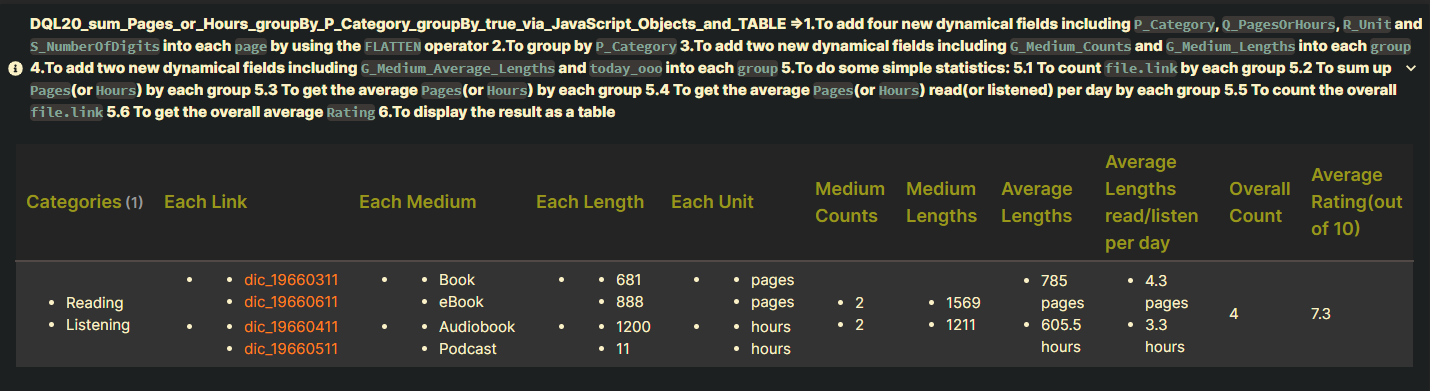
Code DQL20_sum_Pages_or_Hours_groupBy_P_Category_groupBy_true_via_JavaScript_Objects_and_TABLE
Summary_code
title: DQL20_sum_Pages_or_Hours_groupBy_P_Category_groupBy_true_via_JavaScript_Objects_and_TABLE =>1.To add four new dynamical fields including `P_Category`, `Q_PagesOrHours`, `R_Unit` and `S_NumberOfDigits` into each `page` by using the `FLATTEN` operator 2.To group by `P_Category` 3.To add two new dynamical fields including `G_Medium_Counts` and `G_Medium_Lengths` into each `group` 4.To add two new dynamical fields including `G_Medium_Average_Lengths` and `today_ooo` into each `group` 5.To do some simple statistics: 5.1 To count `file.link` by each group 5.2 To sum up `Pages`(or `Hours`) by each group 5.3 To get the average `Pages`(or `Hours`) by each group 5.4 To get the average `Pages`(or `Hours`) read(or listened) per day by each group 5.5 To count the overall `file.link` 5.6 To get the overall average `Rating` 6.To display the result as a table
collapse: open
icon:
color:
```dataview
TABLE WITHOUT ID

      rows.GP_Category AS "Categories",

      rows.rows.file.link AS "Each Link",
      rows.rows.Medium AS "Each Medium",

      rows.rows.Q_PagesOrHours AS "Each Length",
      rows.rows.R_Unit AS "Each Unit",

      rows.G_Medium_Counts AS "Medium Counts",
      rows.G_Medium_Lengths AS "Medium Lengths",


      map(rows, (rows) =>
          round(rows.G_Medium_Average_Lengths, rows.rows.S_NumberOfDigits[0]) + rows.rows.R_Unit[0]
      )
      AS "Average Lengths",


      map(rows, (rows) =>
          round(rows.G_Medium_Lengths / today_ooo , 1) + rows.rows.R_Unit[0]
      )
      AS "Average Lengths read/listen per day",


      G2_OverallCounts AS "Overall Count",

      round(G2_OverallRatings / G2_OverallCounts , 1) AS "Average Rating(out of 10)"


FROM "100_Project/01_dataviewjs/01_by_example/Q80_MediumCat/Q80_test_data"

WHERE Status != null
WHERE Medium != null
SORT file.name ASC

FLATTEN {
    "Book":  "Reading",
    "GraphicNovel":  "Reading",
    "eBook":  "Reading",
    "Article":  "Reading",

    "Audiobook":  "Listening",
    "Podcast":  "Listening",
    "radio":  "Listening"
}[Medium] AS P_Category


WHERE P_Category


FLATTEN {
    "Reading": Pages,
    "Listening": Hours
}[P_Category] AS Q_PagesOrHours


FLATTEN {
    "Reading": " pages",
    "Listening": " hours"
}[P_Category] AS R_Unit


FLATTEN {
    "Reading": 0,
    "Listening": 1
}[P_Category] AS S_NumberOfDigits


GROUP BY P_Category AS GP_Category
SORT GP_Category DESC


FLATTEN length(rows.file.link) AS G_Medium_Counts
FLATTEN sum(rows.Q_PagesOrHours) AS G_Medium_Lengths
FLATTEN G_Medium_Lengths/G_Medium_Counts AS G_Medium_Average_Lengths

GROUP BY TRUE


FLATTEN sum(map(rows.G_Medium_Counts, (e) => sum(default(e, 0)))) AS G2_OverallCounts
FLATTEN sum(map(rows.rows.Rating, (e) => sum(default(e, 0)))) AS G2_OverallRatings


FLATTEN number(dateformat(date("2022-12-30"),"ooo")) AS today_ooo

```
Screenshots(DQL20): today=“2022-12-30”
Conclusion
Summary
| Code Name | Unique Name | What to maintain | Remark |
|---|---|---|---|
| DQL10 | Q80_DQL10 | 1.Three customizable variables in different expressions: 1.1 FROM “…” 1.2 FLATTEN {…}[Medium] AS P_Category 1.3 FLATTEN number(dateformat(date(“…”),“ooo”)) AS today_ooo |
|
| DQL20 | Q80_DQL20 | The same as the Q80_DQL10 | |
| DVJS01 | Q80_DVJS01 | 1.Three customizable variables in different expressions: 1.1 // M09 let h_medium_category_of = { Book: “Reading”, GraphicNovel: “Reading”, eBook: “Reading”, Article: “Reading”, Audiobook: “Listening”, Podcast: “Listening”, radio: “Listening”, }; 1.2 // M11 let pages = dv.pages(‘“100_Project/01_dataviewjs/01_by_example/Q80_MediumCat/Q80_test_data”’) 1.3 // M13 let s_today = “2022-12-30”; |
|
| DVJS10 | Q80_DVJS10 | The same as the Q80_DVJS01 |
Reference
Summary
Q19_Sum
- Q19_Sum: Solutions
Q24_SumDuration
- Q24_SumDuration: Solutions
Q26_ReadingExercise
The DateTime formats
Related Resources
Summary
Q80_MediumCat
- Q80_MediumCat: To simplify multiple
ORoperators via JavaScript Objects: ReaderGuy42: DataviewJS: Sum of Frontmatter Variables, Book Database on 2022-12-30
Q78_MediumCat
- Q78_MediumCat: To reuse a DVJS code or a DQL query with reading a configuration from another file: ReaderGuy42: Is it possible to transclude code blocks somehow? on 2022-12-30
FLATTEN
Q20_Flags : Flags01
- Q20_Flags: S1 and S2: ReaderGuy42: How do I use “contain” if there are two true options? at 2022-11-11
- Q20_Flags: S3: ReaderGuy42: I can’t get this to work for me. When I try implementing your FLATTEN, I get Parsing errors on 2022-12-27
Q25_MetaFunction : Flags02
- Q25_MetaFunction: S1: ReaderGuy42: Comparing links to text in Dataview on 2022-02-10
- Q25_MetaFunction: S2: ReaderGuy42: I tried doing the same aliasing to my two-letter country code, e.g. Country: US to Country: “[[United States of America|US]]” so I can also have a list by country page. on 2022-02-11