I’ve searched documentation, forum, discord and on internet generally and can’t find a similar query anywhere.
What I’m doing:
I structure my daily notes with inline variables like:
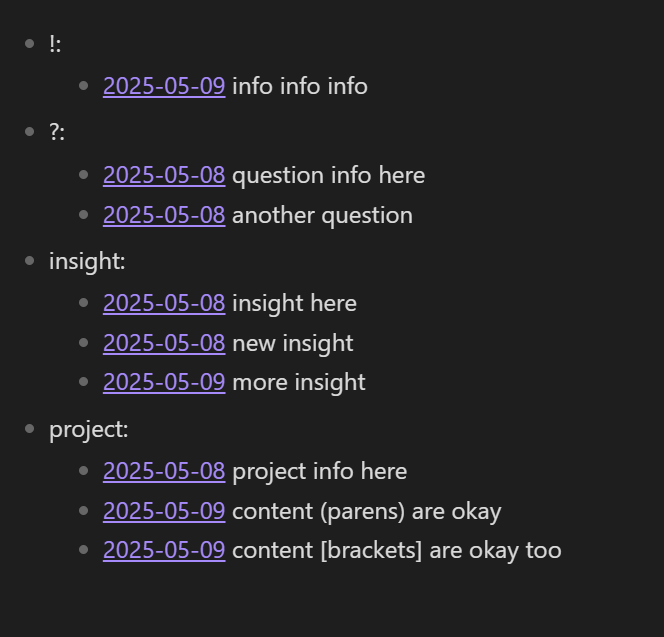
“?::”
“!::”
“insight::”
“project::”
Those inline variables are not fixed, I may have everyday a new one, depending of what I’m writing.
What I want to achieve
I want to have a list, sorted by date and variables, with the content of the variable:
I am not to be qualified as a newbie in Obsidian and have had my fair share of experience of plugins and their documentations, still, – because I was lazy(?) – I went for demo vaults where all building blocks, complete with templates that create the properties to be queried in any way have been made. Then I could go on from there to tweak templates, DV(Js) queries (if in doubt, use free AI to customize stuff), remove functionality I didn’t need, replace plugins with newer, actively maintained substitutes, etc.
If you think this is something that you want to try, read (and follow links from) here:
As for bringing in content of md files, that is trickier, and have to look up forum posts on how to do it with plain DV or better DVJs.
If you put your inline property in a list item as you type, like this:
- project::project info here
- ?::question here

Lorem ipsum dolor sit amet, consectetur adipiscing elit.

- insight::insight here

Lorem ipsum dolor sit amet, consectetur adipiscing elit.
```dataview
LIST rows.display
FROM "your/folder/path"
FLATTEN file.lists AS L
WHERE contains(L.text, "::")

FLATTEN choice( (startswith(L.text, "[") AND endswith(L.text, "]")) OR (startswith(L.text, "(") AND endswith(L.text, ")")), substring(L.text, 1, length(L.text) - 1), L.text ) AS T

FLATTEN split(T, "::")[0] AS K
FLATTEN split(T, "::")[1] AS V

FLATTEN file.link + " " + V AS display
SORT date(file.name) ASC
GROUP BY K
SORT rows.K ASC
```
Replace your/folder/path with the path to your daily notes folder.
It works when the properties are the way you showed them and also when they’re enclosed in square brackets or parentheses like [project::project info] or (project::project info).
Not with plain Dataview, but probably with DataviewJS. That’s why I said to put the properties in lists. It makes for a quick, straightforward query.
Hopefully someone else can help you with it. I messed up the simple regex check in the query I posted above and switched to choice(startswith( instead. So I’m not anyone’s go-to for that!
If you’re using dataviewjs you could opt for something like:
```dataviewjs
const data = dv.current()
delete data.file // If you _don't_ want the file (and list/task) metadata

dv.span(data) // or console.log(allData)
```
Note that this object would contain both the original key of your fields, and a sanitised version of the keys to make accessing it within javascript easier.
I updated everything. It seems to have a bug as there are no tags shown, even if a file have a tag. I tested it over various vaults with the same results and turning off the other extensions and plugins didn’t help either.
What can I do?
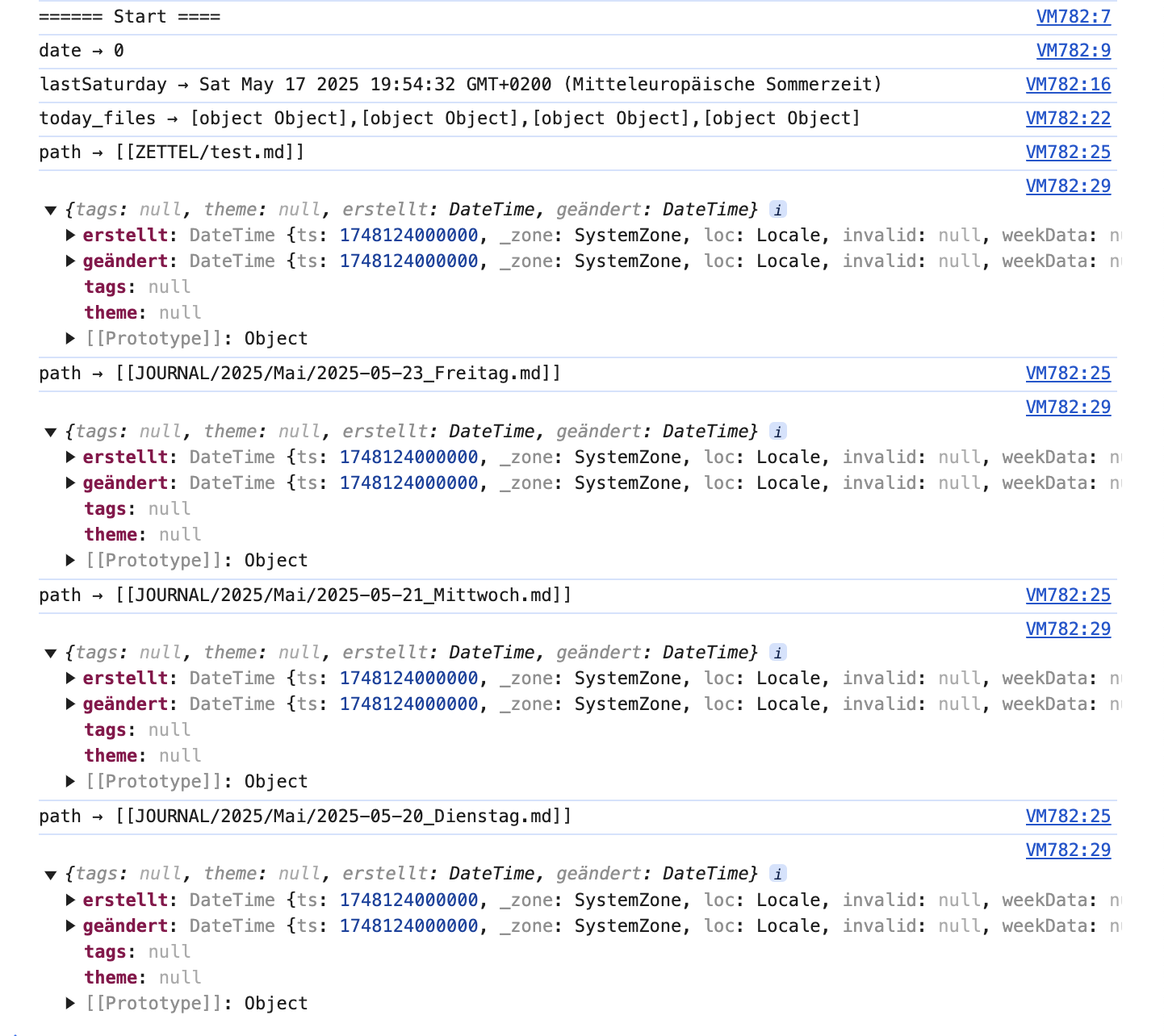
You can add more debug statements, and see where the output of those differ from what you expect them to be.
I often find it useful to add an extra console log statement at the top with some extra newlines and a unique text to help me see where the last run starts. Also adding leading text, and not just the variables can be helpful.
This part is wonky by the way. You declare lastSaturdaywithin a nested block, so outside of that block it’s not known. But you do use it outside of the block.
Add let lastSaturday on the line after the console log statement, and remove the var inside both blocks, and add a console log statement to check it’s the value you expect it to be afterwards.
It was meant as aid for you to help see where they’re is a mismatch in the information… But I can see that you’re using dv.current() which refers to file holding the query, not each of today’s files.
You need to look into how to get the page info from that file. If you’re lucky you can use file, or possibly dv.page(file.path) to get to the data of that given file.