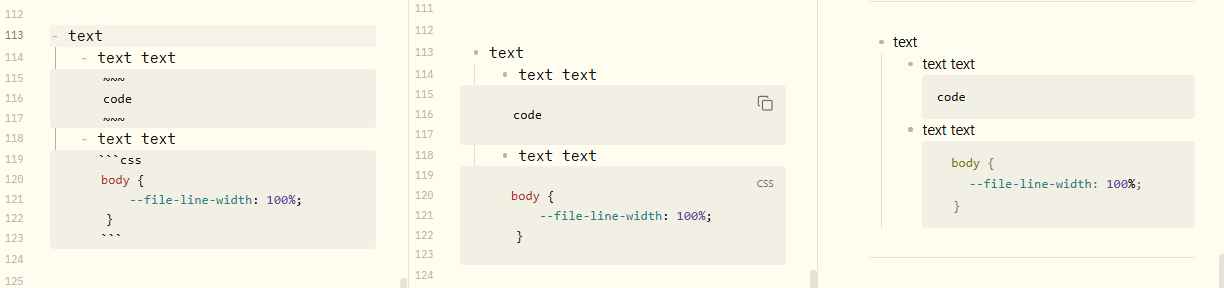
Steps to reproduce
Adding code blocks into a list after doing a no-bullet line with shift+enter
Did you follow the troubleshooting guide? [Y/N]
Yes
Expected result
I expected the code to be indented.
Actual result
Code is not indented. I tried adjusting this with css, and I can do this for the first list level, but 2nd level does not work, because apparently obsidian considers codeblocks in lists to be level 1 only (i.e. class=“HyperMD-codeblock HyperMD-codeblock-begin HyperMD-codeblock-begin-bg HyperMD-codeblock-bg HyperMD-list-line HyperMD-list-line-1 HyperMD-list-line-nobullet cm-line”).
Environment
SYSTEM INFO:
Obsidian version: v1.10.6
Installer version: v1.9.12
Operating system: Windows 11 Enterprise 10.0.22631
Login status: not logged in
Language: en
Insider build toggle: off
Live preview: on
Base theme: light
Community theme: Nord 2.0 v3.0
Snippets enabled: 0
Restricted mode: on
Additional information
As mentioned before, Obsidian treats all nesting levels in lists for code blocks as level 1.