Butter Editor - Visual Editor Mode (Obsidian WYSIWYG)

NOTICE : This topic was created by the mod-team from the respective FR topic. Please, keep the conversation about the plugin in this thread. Thank you

Disclaimer

Is this project open source? No
Is this project completely free? No
Is this project vibe-coded beyond the author’s ability to comprehend how it works? No
Community Directory: Butter Editor Plugin Page

Butter Editor

Butter Editor adds a WYSIWYG editing view to Obsidian. Supported Markdown stays rendered while you edit, including when the cursor moves through formatted text. Your notes remain ordinary .md files in your vault, and you can switch between Butter, Source, Live Preview, and Reading.

Available on desktop and mobile. Paid plugin with a 15-day full-featured trial, requiring no account, email address, or payment method.

Install Butter Editor · Website · Latest release
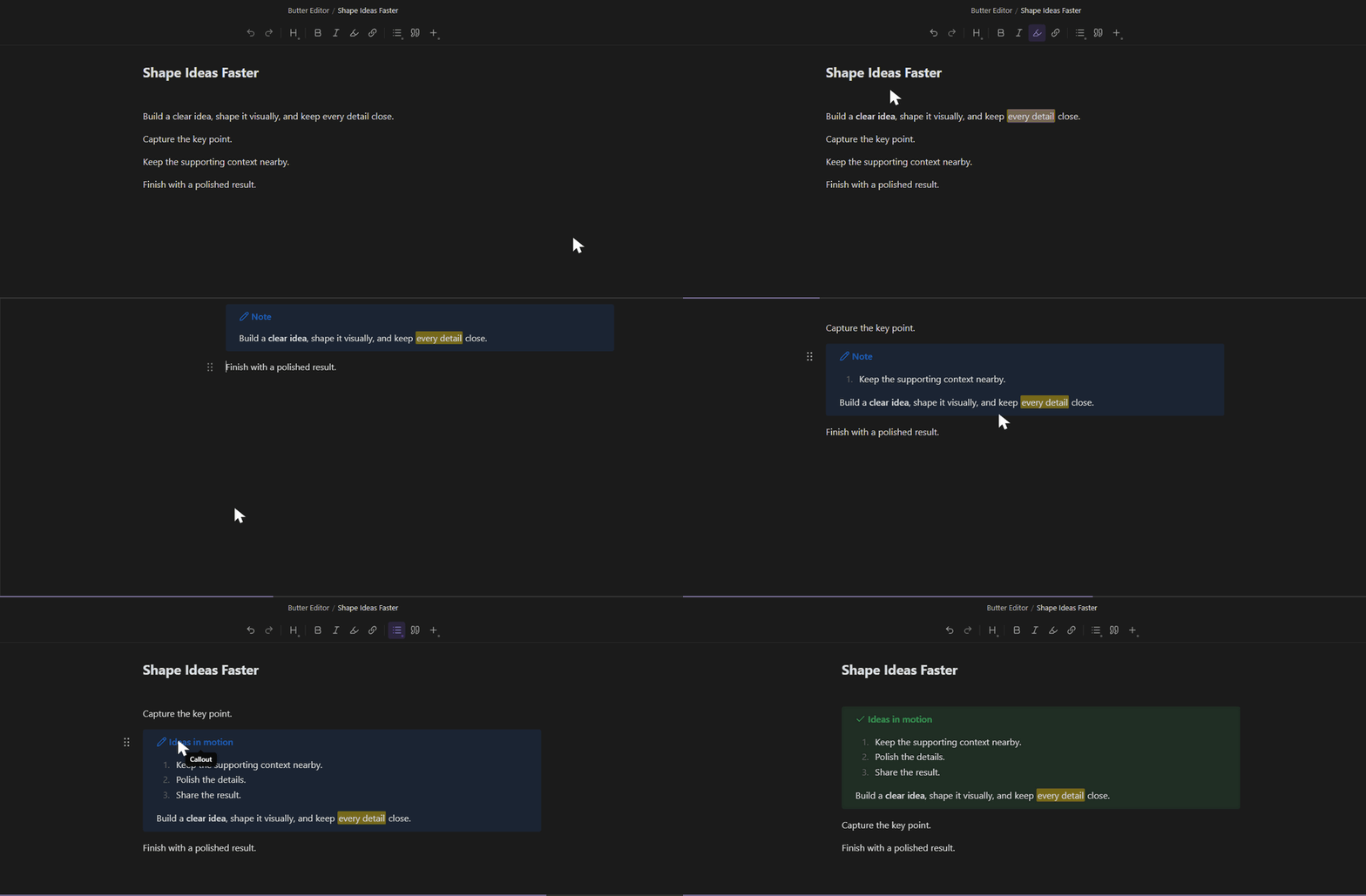
Butter Editor overview: formatting, moving blocks, and editing callouts

What it does

  • Edit headings, lists, tasks, tables, code, and math in place.
  • Work with Obsidian wikilinks, embeds, properties, footnotes, and callouts.
  • Select and reorder blocks, change block types, and collapse heading sections.
  • Insert blocks with slash commands; customize the toolbar and context menu.
  • Find and replace text, including matches inside folded sections.
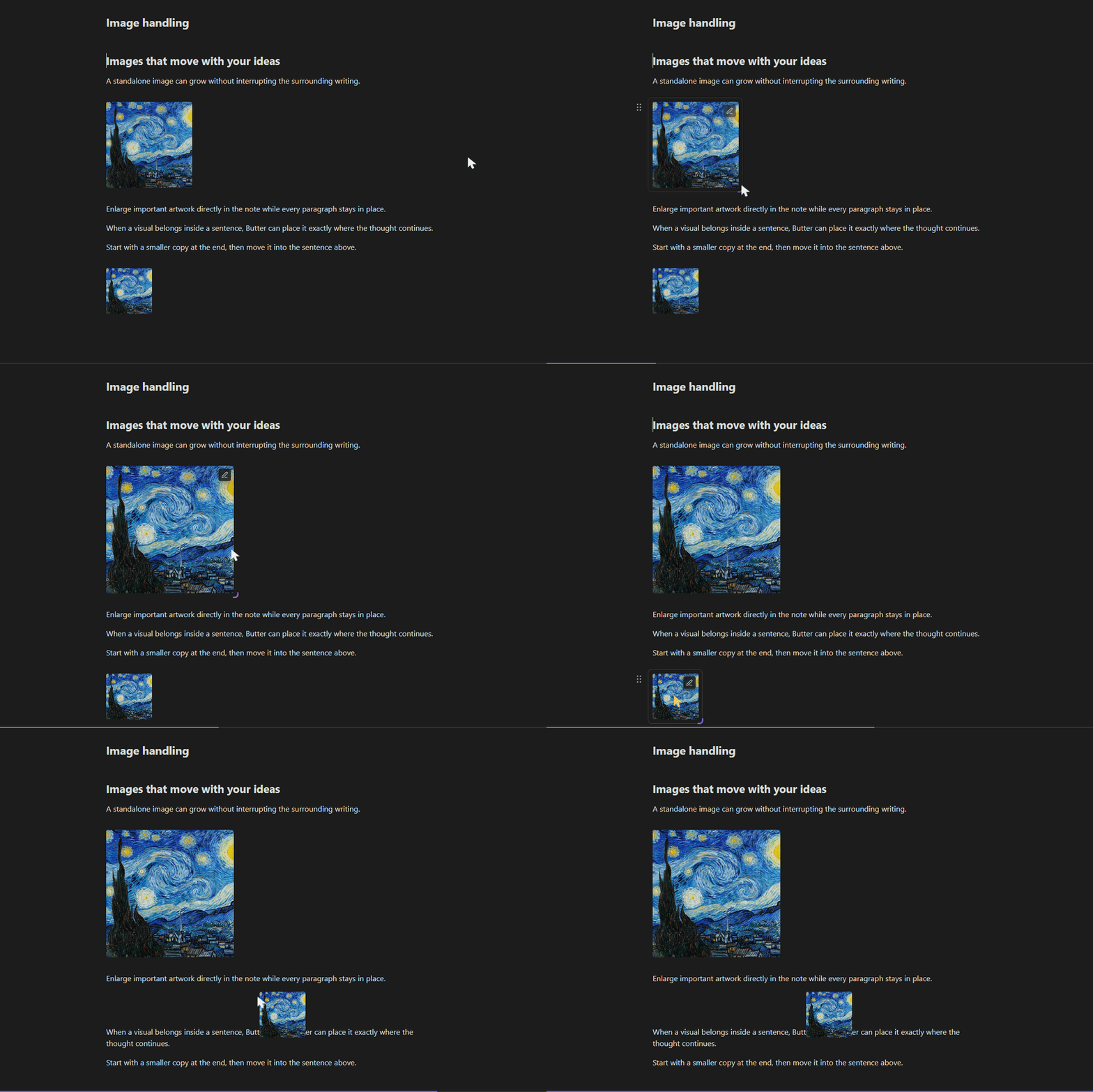
  • Resize standalone images and move images between inline and block placement.

Standard Markdown is the default. Optional rich formatting, such as text colors and underlines, uses inline HTML and may display differently in other Markdown editors.

Install and start

Search for Butter Editor under Settings → Community plugins → Browse, then install and enable it. Requires Obsidian 1.7.2 or newer.

Open a note and run Butter Editor: Open current note in WYSIWYG view from the Command Palette. The first-use setup lets you start the trial or enter a license key.

Price and license

A $16 one-time v1 license includes every v1 update, beta access, and up to five active devices by default. No subscription.

After the trial, Butter’s editing view becomes read-only until licensed. Your notes remain editable in Obsidian’s other views. The source is publicly available for inspection, but Butter Editor is proprietary software.

Pricing and purchase · License and device management

Feedback and support

Questions and discussion are welcome here. For bug reports and feature requests, use GitHub Issues or Help & feedback in Butter’s settings. Include your Obsidian and Butter versions and steps to reproduce the issue; use a small, non-sensitive example note where possible.

For private support, contact [email protected].
1 Like

Thanks for mentioning this plugin. I gave it a try, and I might keep using it.

Edit: I had some complaints about the functionality of the plugin, but they have been resolved in an update.

1 Like

Butter Editor 0.12.0

0.12.0 is available now. The main additions:

  • Find and replace inside Butter, including regular expressions and results inside folded sections.
  • Customizable right-click menu with formatting, insertion, Obsidian commands, and spelling corrections.
  • Heading and callout folding, including support for callout +/- defaults.
  • Improved image handling: resize standalone images and move images between inline and block placement.
  • Reorganized settings with desktop and mobile toolbar customization, plus bug reports and feature requests through Help & feedback.

This release also improves block dragging, link editing, large-note performance, and keeping your place when switching views. Fixes cover selected-text-to-list conversion, explicit HTML line breaks, iOS interactions, and Markdown preservation when editing and saving.

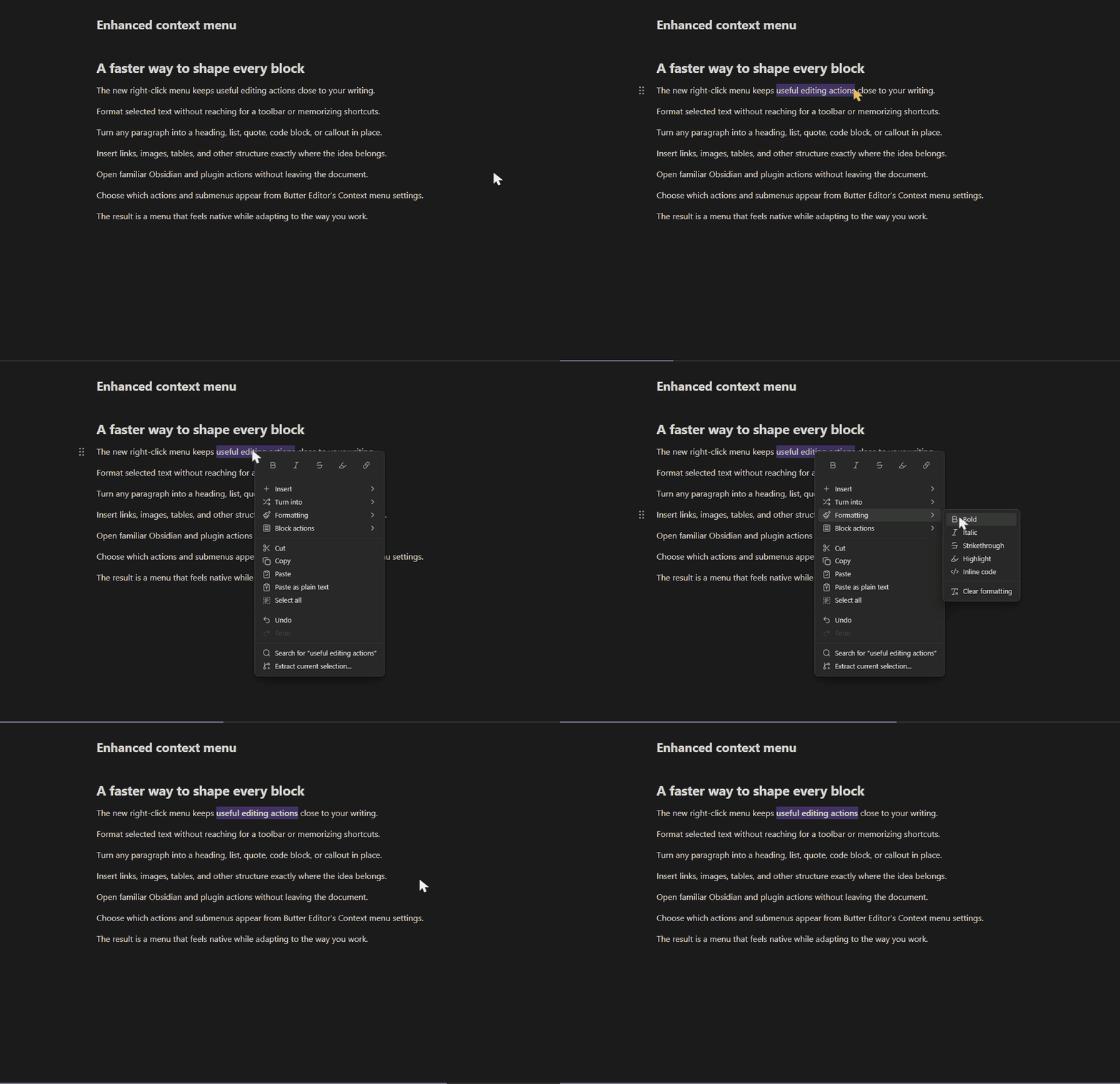
Context menu: formatting and insertion actions available with a right-click.

Butter Editor's context menu with quick actions and a formatting submenu

Image handling: resize a standalone image, then move a smaller image into a sentence.

Resizing a standalone image and moving another image into text in Butter Editor

Update through Settings → Community plugins → Check for updates. The in-app What’s New page includes feature demos.

Full release notes

Feedback is welcome here. For a reproducible bug, please include your Obsidian and Butter versions and the steps that trigger it, either in GitHub Issues or Help & feedback.

I would like the option to press ‘enter’ to go to a new line, instead of having to press ‘shift+enter’ for this.

Currently, pressing ‘enter’ goes to a new paragraph. To go to a new line instead, I need to press ‘shift+enter’.

Would it be possible to add this option? (Unless it’s already there and I’ve missed it).


Another request. I have grown accustomed in Obsidian to pressing ‘tab’ to indent my text. I like Butter Editor, but since installing it, I’ve missed being able to do this. Instead, when I press ‘tab’, my cursor leaves the note entirely!

Would it be possible to add the option to restore this behaviour of the ‘tab’ button while editing text?

I keep all my horror movie watchlists in Obsidian on my phone! Does this run okay on Android yet?

@Ham_n_pineapple Thanks, both were fair. The Tab one was a bug. In 0.14.1 Tab types a tab in a normal paragraph and keeps the cursor in the note, and Shift+Tab removes it. Enter for a new line is now an option too: Settings, Butter Editor, Editor, “Enter in a paragraph”, choose “New line”. Shift+Enter then starts a new paragraph.

1 Like

@skiboardskeet It does run on Android. If it felt rough for you, what was off? Anything specific (scrolling, the keyboard, the toolbar, speed on long notes) helps me fix the right thing.