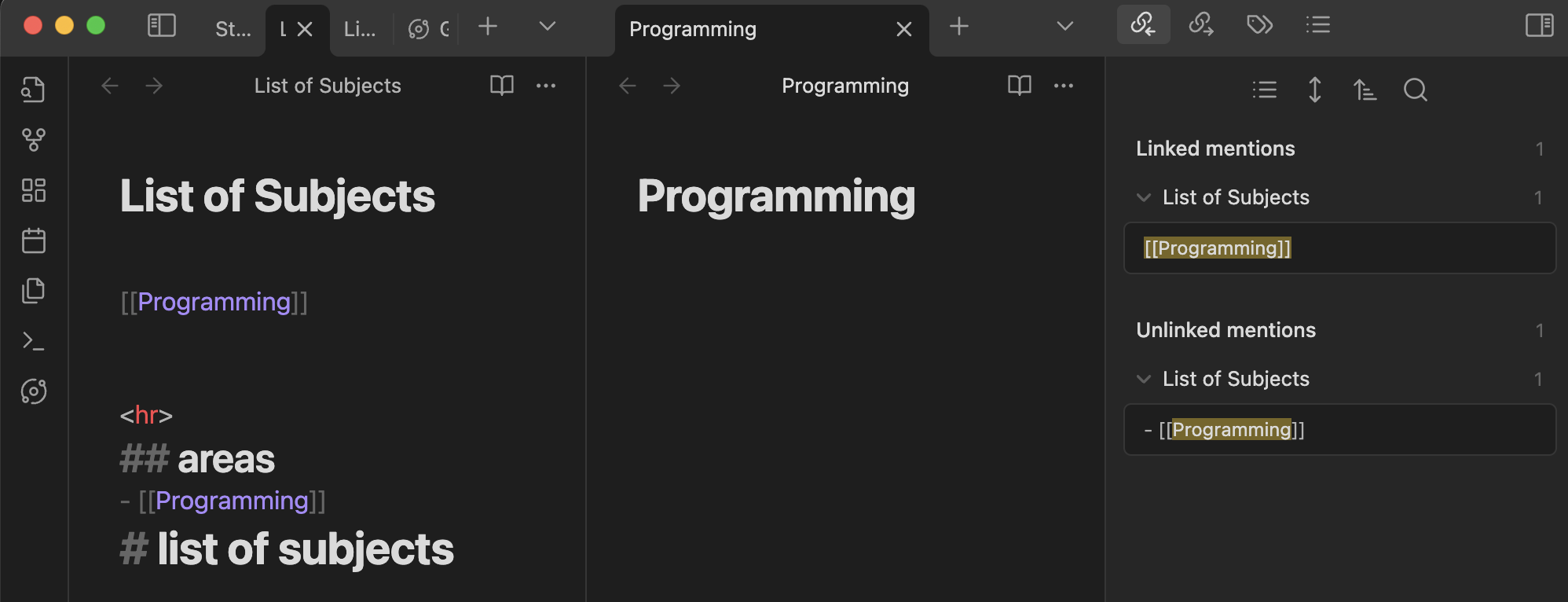
I appear to be having an issue with the backlinks panel where links that should be linked are showing as unlinked mentions. My issue seems to be similar to the one described in this Obsidian forum post from 2020. I’ve mostly relied on folder structure until now so I haven’t noticed this issue previously for lack of needing to check until now.
Has anyone else had this issue? Is this a known bug or am I missing something glaringly obvious?
Reddit Feedback Update
My post on Reddit resulted in the revelation that having any sort of text/heading above the linked caused it to not be recognised in the backlinks tab. Now I’d be content with this discovery except that I still can’t replicate the issue in a sandbox vault having text directly above a link. So now I’m wondering what is causing text/headings to break backlinks in my actual vault.
My System
- OS: Windows 11 Pro (most recent update)
- Obsidian Version: 1.6.7
- Custom CSS: all disabled for testing.
- Community Plugins: restricted mode enabled for testing.
Expectation
Links should appear under linked mentions in the backlink tab.
Reality
As demonstrated in this screenshot, links instead appear under unlinked mentions in the backlink tab. What is most strange is that the correct format is shown in the preview of unlinked mentions… [[Note]].
What I’ve Tried
- Linking by using [].
- Linking by selecting the Link button on an unlinked mention from the backlinks tab.
- Unchecking the WikiLinks setting and linking as Note.
- Markdown link also tried from the backlink tab.
- With each unsuccessful attempt I tried closing/opening Obsidian and also reloading the app from the command palette.