Okay, I looked into it last night.
It was working almost straight away.
But there are caveats.
I tried to have a different method created but never could spare post-processing replacements.
The caveat is that if there is another tp.user script one’s template calls and that other one is using Obsidian API’s processFrontmatter function then one needs to clean up the aliases list.
The current implementation does a simple insertion of AI generated list below the aliases frontmatter key. – As I said, I didn’t like this and wanted to pursue a “get AI to generate strings without dashes we put in an array and we push that” solution but lost my patience with it.
So what I did was tweak my more elaborate template with post-processing replacements, which I know is not a good programming solution…
So when I said we need a solution that works for everyone with any template sounded doable but if users have different templates with different creation mechanisms, then they would run into problems anyway. So I reverted to the original method in the end. (Simple reason: I made it work for all my templates.)
So I am offering this original method that’ll work in normal Templater scripts that don’t call other scripts with their own logic of frontmatter value merges:
Save this script as getAliases.js and place it in the user scripts folder of your choice (of Templater):
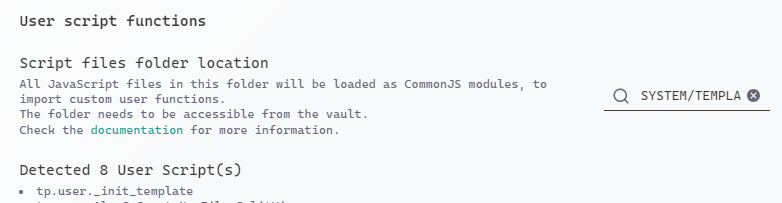
Templater will automatically see it, but there is a refresh button you can press as well if you had your Obsidian open when you added the script in your file explorer.
There are options at the top of the script you can modify:
// FILE: getAliases.js
// This script should be placed in Templater's User scripts directory
// and can be called with 'tp.user.getAliases(title)' from Templater

// CONFIG - Modify these settings as needed
const CONFIG = {
    native_language: "German", // Change to your preferred language
    INFLECT: false,  // Set to false if you don't want inflections
    include_original: true, // Whether to include original title as alias
    model1: "gemini-2.0-flash-thinking-exp",
    model2: "gemini-2.0-flash",
    API_key: "YOUR_KEY_HERE",
    max_retries: 2 // Maximum number of retry attempts
};

async function getAliases(title, tp) {
    try {
        // If no title provided, get it from tp.file.title
        if (!title && tp?.file?.title) {
            title = tp.file.title;
        }

        const prompt = createPrompt(title);
        const aliases = await communicateWithGemini(prompt);
        return formatAliases(aliases, title);
    } catch (error) {
        console.error("Error generating aliases:", error);
        return "  - ERROR: Could not generate aliases";
    }
}

function createPrompt(title) {
    // Check if the title contains spaces
    const isSingleWord = !title.includes(' ');

    return `Generate aliases for "${title}" with these rules:
1. If "${title}" is in English, provide translations in ${CONFIG.native_language}.
2. If "${title}" is in ${CONFIG.native_language} or any other language, provide English translations.
3. Include inflections: ${isSingleWord && CONFIG.INFLECT ? "yes" : "no"}.
4. Format as a simple list with each alias on a new line prefixed with a dash (-).
5. For multiple word phrases, include variations with each significant word.
6. Include singulars and plurals where applicable.
7. Include common synonyms in both languages.
8. Include a maximum of 6 most relevant aliases.
9. DO NOT include variations on names of people but if they are well-known, you can add 'Aristotle, the Greek philosopher', or similar handles
10. DO NOT include any extra formatting, backticks, code blocks or yaml tags in your response.`;
}

async function communicateWithGemini(message) {
    let lastError = null;
    const models = [CONFIG.model1, CONFIG.model2];

    for (const model of models) {
        for (let attempt = 0; attempt < CONFIG.max_retries; attempt++) {
            try {
                const response = await fetch(`https://generativelanguage.googleapis.com/v1beta/models/${model}:generateContent`, {
                    method: 'POST',
                    headers: {
                        'Content-Type': 'application/json',
                        'x-goog-api-key': CONFIG.API_key
                    },
                    body: JSON.stringify({
                        contents: [{
                            role: 'user',
                            parts: [{ text: message }]
                        }],
                        generationConfig: {
                            temperature: 0.1,
                            maxOutputTokens: 2048,
                            topP: 1
                        }
                    })
                });

                if (!response.ok) {
                    throw new Error(`HTTP error! status: ${response.status}`);
                }

                const data = await response.json();

                if (data.candidates && data.candidates.length > 0) {
                    return data.candidates[0].content.parts[0].text;
                }

                throw new Error('No valid response from the API');

            } catch (error) {
                lastError = error;
                if (attempt < CONFIG.max_retries - 1) {
                    await new Promise(resolve => setTimeout(resolve, 1000 * (attempt + 1)));
                    continue;
                }
            }
        }
    }

    throw lastError || new Error('Failed to get response from all models');
}

function formatAliases(response, title) {
    // Clean up the response
    let cleanedResponse = response.trim();

    // Remove various markdown and YAML markers
    cleanedResponse = cleanedResponse.replace(/^```(?:yaml|)\s*|\s*```$/gm, '');
    cleanedResponse = cleanedResponse.replace(/^aliases:\s*$/im, '');

    // Process each line
    const lines = cleanedResponse.split('\n')
        .map(line => line.trim())
        .filter(line => line) // Remove empty lines
        .map(line => {
            // Remove any existing dashes and spaces
            line = line.replace(/^[-\s]+/, '').trim();
            return `  - ${line}`;
        });

    // Add original title as an alias if configured
    if (CONFIG.include_original && title) {
        if (!lines.includes(`  - ${title}`)) {
            lines.unshift(`  - ${title}`);
        }
        // Add first-char lowercase version if different
        const firstCharLowerCase = title.charAt(0).toLowerCase() + title.slice(1);
        if (firstCharLowerCase !== title && !lines.includes(`  - ${firstCharLowerCase}`)) {
            lines.push(`  - ${firstCharLowerCase}`);
        }
    }

    return lines.join('\n');
}

module.exports = getAliases;
If the title is a single word, then it will add inflections, but since we have Include a maximum of 6 most relevant aliases in the prompt and also ask for synonyms, they are likely drowned out. You can increase 6 if you want. The inflections can be turned off or the system prompt rewritten to have custom results. Feel free to experiment.
- Inflections I wanted to add because I remember Feature Requests regarding this in the past.
I always want the original title and its lowercase version added as well. There is a setting for that too.
We are using free Gemini, for which you can get API keys from Google. Check how here:
In the template you are using (it means every template you want to use AI generated aliases in) you need to add the script caller below the aliases key line:
aliases:
<%* tR += await tp.user.getAliases(tp.file.title) %>
If you had let title = tp.file.title; in your script, simple title is enough in the brackets.
I am only mentioning this because there may be cases when tp.file.title will give (partly) wrong results, if one uses a tp.user script that cleans titles for example (like mine).
The models can be also changed in an effort to make the process slightly faster. So gemini-2.0-flash-thinking-exp could be used as model2, but named gemini-2.0-pro or some other model that is efficient enough but faster. (The current note generation takes something like 3 seconds.)
I cannot experiment enough with this now to suit everyone’s needs.
Works on mobile as well!
The script can be enhanced:
- Using the other way, where we push values and merge into frontmatter with Obs. API
- Checks for internet connection and if none found, uses some local LLM (but you’d need to load the model manually with Ollama or LM Studio before).