what is the output of your show debug info?
Here it is:
SYSTEM INFO:
	Obsidian version: 1.12.7 (303)
	API version: 1.12.7
	Operating system: Android 12 (ONYX NoteAir3C)
	Webview version: 148.0.7778.120
	Login status: not logged in
	Language: fr
	Live preview: on
	Base theme: adapt to system
	Community theme: none
	Snippets enabled: 0
	Restricted mode: off
	Plugins installed: 1
	Plugins enabled: 1
		1: Remotely Save v0.5.25

RECOMMENDATIONS:
	Community plugins: for bugs, please first try updating all your plugins to latest. If still not fixed, please try to make the issue happen in the Sandbox Vault or disable community plugins.
I can reproduce, but I have to try 50 times. Now sure why for you is so consistent.
Yup, I can reproduce this every single time on this device (the app freezes the right before the second time the menu should be displayed).
I can record a screencast if it helps. Thanks!
I’m using webview 148 and that’s exactly what’s causing the issue in Obsidian. I had to go back to webview 144 to fix it (Google pixel 3 - Android 12)
Thank you for your answer.
Nice reproducible steps with a screencast could be found here, though I would add
Step 0 - Make sure that Webview 148.0.7778.120 is installed, not the version with 49 in the end or lower
Steps to reproduce
- Open the file tree in Obsidian Mobile.
- Long press a random file until the file window where you can move files etc opens.
- Close this window and then take your finger off the screen. Ensure the file is unselected.
- Long press another file.
- The file gets stuck in
:focus/:hovermode and you cannot click anything in Obsidian anymore, just scroll the file tree. You have to re-open the app again for Obsidian to work.
(View the attached screenrecording at the end to see it in action).
Did you follow the troubleshooting guide? [Y/N]
Yes
Expected result
The second selected file gets selected normally and the file menu of said file opens normally and Obsidian doesn’t freeze.
Actual result
The last selected file in the file tree is stuck in :focus mode and the file tree freezes. You have to close the app again for Obsidian to work.
Environment
- Samsung A56 5G (Android 16/ One UI 8)
- Obsidian Android App (Latest/1.12.7), loaded from the Google Play Store
- Issue started today (May 21st, 2026).
Additional information
Things I have tried:
- Restricted mode: Issue present.
- Restricted mode without snippets and with custom theme: Issue present
- Default theme without snippets: Issue present.
- Custom theme with snippets: Issue present.
- Clearing the cache of the app: Issue present.
Down below is a screenrecording of my issue. As you can see after the second selection, I could only scroll the file tree and nothing else.
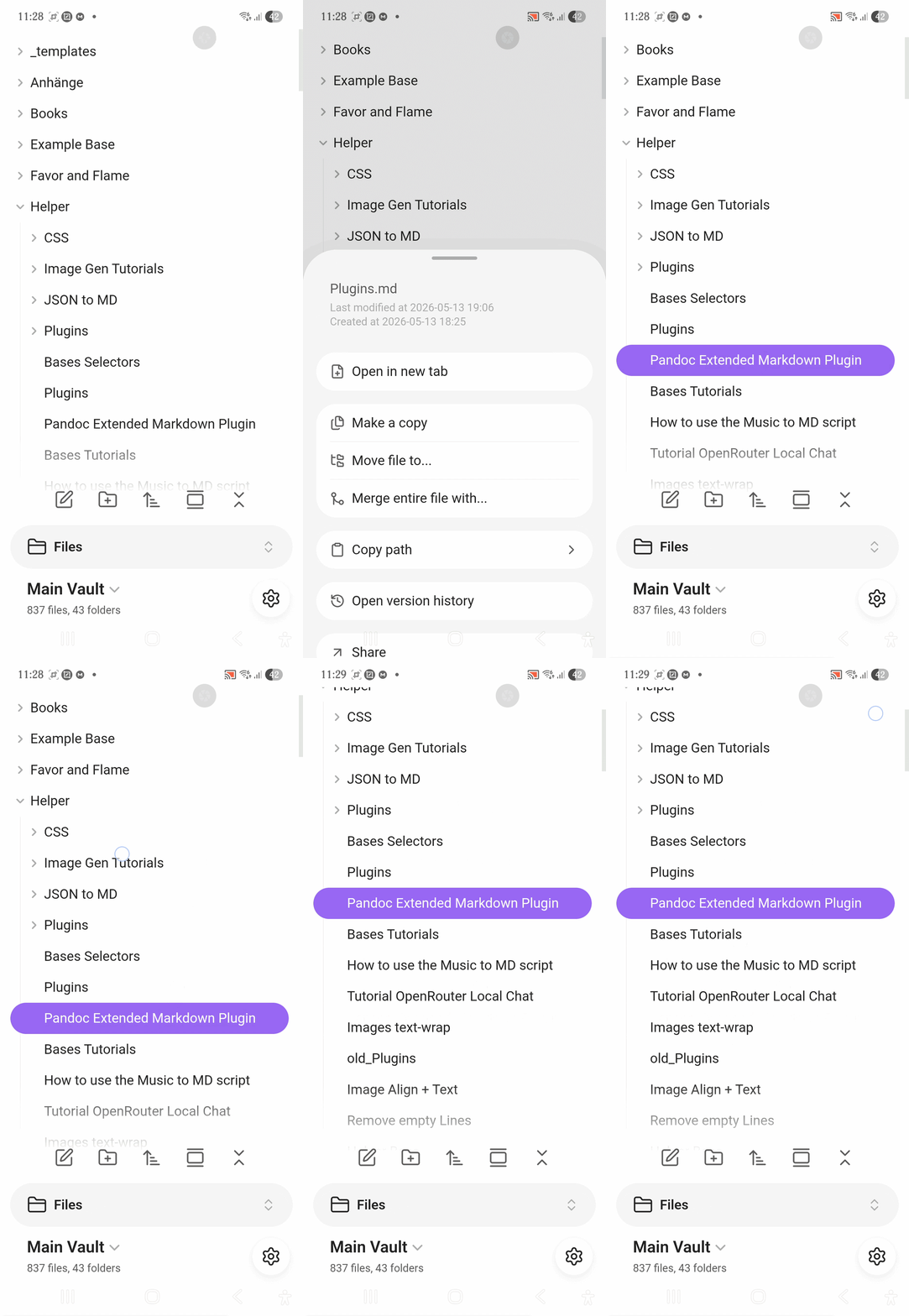
And here is a screenshot in the default theme and one in my custom theme.

Additional info:
- I just found out this happens in any vault of mine and not just this one. It seems to be an issue with the app itself.
- Android System WebView version: Version: 148.0.7778.120 / Target: Android 16 / SDK 36
I have that version installed. I can reproduce but only very sporadically.
i see, thank you for telling me. nothing came up when i searched for the bug on google, so i thought it may be a problem with my phone only and therefore i made a new forum post. since multiple people have this bug, i hope it gets fixed soon.
Hmm… do you need any tech details, like logcat? Or, I can write my own repro steps, if that helps.
Today Webview started to update to xxx.178 version, but nothing changed.
I don’t think we need other repro steps. The screen recordings are pretty clear. For some people, this manifests everytime, other people (like me) it happens very rarely, for other people it doesn’t happen at all. We suspect the webview 148.0.7778.120 introduced some race condition.
I uninstalled updates for Android System Webview and downloaded this version :
android-system-webview-146-0-7680-120.apk
It seems to be working for now. I tried turning off all community plugins, checking phone settings, uninstalling and reinstalling Obsidian. This is the only thing that worked for stopping the freezing issue. I’m glad someone suggested it because I didn’t know what else to try.
Lol this did help me. Thank you so much!!
By following the link below to ‘Remove Updates’ for Android System WebView, then restarting Obsidian and allowing it to re-index (automatically), I was able to restore Obsidian to its former user-friendly state.
Please insert ‘h’.
ttps://play.google.com/store/apps/details?id=com.google.android.webview
We have confirmed that this is an upstream WebView/Chromium issue.
The fix has to come from upstream, at some point. I will keep you updated.
In the meantime, you can follow @Ataracsia suggestion. That will force your phone into using an older version of WebView.
I am experiencing the same issue. Below is what I found and tested so far.
Summary
Obsidian Mobile becomes partially non-responsive after performing a file or folder action from the long-press context menu and then attempting to long-press a second file or folder.
The issue appears to be related to the long-press context menu workflow rather than the underlying file operation itself.
This is a recent development and was not previously observed in normal use.
Environment
Device
Samsung Galaxy S23 FE
Operating System
Android 16
One UI
One UI 8.5
Obsidian Version
1.12.7 (303)
Android System WebView
148.0.7778.215
Vault Information
-
Internal storage
-
Under 500 notes
-
Issue reproduces in both primary vault and newly created test vault
Community Plugins Installed
-
Excalidraw
-
Remotely Save
-
QuickAdd
-
Templater
-
Buttons
Description
The first long-press operation works normally.
After selecting an item via long-press and performing an action from the context menu, a second long-press on any file or folder causes the file explorer and portions of the UI to become non-responsive.
The application does not crash.
The issue persists until the application is fully restarted.
Steps to Reproduce
Method 1
-
Open Obsidian Mobile.
-
Long-press a note or folder.
-
Select an action from the context menu (Move, Rename, etc.).
-
Complete the action.
-
Long-press another note or folder.
Result
The file explorer becomes non-responsive.
Method 2
-
Open Obsidian Mobile.
-
Long-press a note or folder.
-
Select Rename.
-
Cancel the rename operation.
-
Long-press a second note or folder.
Result
The same issue occurs.
This suggests the problem is related to the context menu workflow itself and not necessarily to file modifications.
Observed Behavior
After the second long-press attempt:
-
Long-press highlighting may still occur.
-
Context menus no longer appear.
-
Folder expansion/collapse stops functioning.
-
File explorer interactions stop responding.
-
Settings and other interface buttons may stop responding.
-
Notes can sometimes still be viewed and scrolled.
-
Editing may eventually stop functioning as well.
-
The application remains visible and does not crash.
A full application restart is required to restore normal behavior.
Tests Performed
Test: Disable Remotely Save
Result: Issue persists.
Conclusion: Not caused by Remotely Save.
Test: Enable Restricted Mode
Result: Issue persists.
Conclusion: Not caused by installed community plugins.
Test: Create New Vault
Result: Issue reproduces in a newly created vault.
Conclusion: Not caused by vault contents.
Test: Create New Notes and Folders
Result: Works normally.
Conclusion: General file creation is not affected.
Test: Move Notes Using Long-Press Context Menu
Result: First operation succeeds. Second long-press causes UI failure.
Conclusion: Issue is reproducible.
Test: Move Notes Using Three-Dot Menu Instead of Long-Press
Result: Multiple move operations completed successfully.
Conclusion: File operations themselves appear functional.
Issue appears specific to the long-press context menu workflow.
Test: Update Android System WebView
Result: Issue persists after update.
Conclusion: Issue does not appear to be resolved by WebView update.
Test: Internal Storage
Result: Vault stored on internal device storage.
Conclusion: Issue is not related to removable storage.
Current Workaround
Avoid using the file explorer long-press context menu.
Instead:
-
Open notes directly.
-
Use the three-dot menu for move and management actions.
-
Restart Obsidian if the UI enters the non-responsive state.
Using the three-dot menu allows repeated file operations without triggering the issue.
Additional Notes
The behavior appears to indicate a problem with the state management of the mobile long-press context menu rather than a filesystem operation failure.
Because the issue reproduces in a fresh vault, with plugins disabled, and even when file operations are canceled, the problem may be isolated to the mobile UI interaction layer.
I didn’t see mentions of the drag and drop core outline view/features which completely stopped working for me today. It’s safe to assume this BR encompass it?
I used Ataracsia link and after installing updates it started working again.
In my case, the file explorer issue happened when I holded 2 times in a row and but after restarting the app I could try again and it sometimes worked. On the other hand Outline drag and drop didn’t work at all. (Android System WebView
148.0.7778.178)
Steps to reproduce
Long pressing items (e.g. folders) on the side barDid you follow the troubleshooting guide? [N]
Expected result
being able to move the selected item with my finger (drag and drop)Actual result
nothing happens. The item doesn't move. I can only open the menu.Environment
SYSTEM INFO:Obsidian version: 1.12.7 (303)
API version: 1.12.7
Operating system: Android 16 (Google Pixel 7)
Webview version: 147.0.7727.138
Login status: not logged in
Language: de
Live preview: on
Base theme: light
Community theme: none
Snippets enabled: 0
Restricted mode: on
RECOMMENDATIONS:
none
Additional information
this is working fine for me.
You don’t need to long press to drag and drop. Just tap and drag.