Adding characters (< > |) to note names on Linux/iOS makes them inaccessible on Windows

Steps to reproduce

  • On Linux or iOS, open a note in a synced vault.
  • Open the same vault on a Windows device.
  • In the iOS app, add one of these characters: < > | to the note’s name.
  • Sync will delete the file on the Windows device and reject the renamed version due to illegal characters.

Did you read and follow the Troubleshooting Guide ?

Yes

Expected result

Any of these would be an improvement:

  • Show a notice on the Windows device alerting the user that some files were rejected by sync.

  • Prevent < > | from being used in file names (maybe gated behind a setting).

  • Show a warning when renaming indicating that files with those characters will not be usable on Windows.

Actual result

If adding |, a warning popup appears saying “Links will not work with file names containing any of these characters: # ^ [ ] |”, but there’s nothing saying sync will reject the file on Windows.

If adding < or >, there is no warning, and the file simply goes missing from vault instances on Windows devices.

It should’ve shown up in your Sync activity log as “Unable to download file with illegal name”: Status icon and messages - Obsidian Help.

Feature request for failed-sync notifications, that you could support:

Feature request for consistency across OSs:

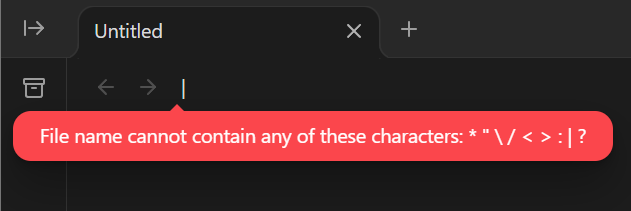
And FYI, this is what happens on Windows:

And this on (I think) all systems: