Use case or problem
As of now, I am aware of the following ways to open Obsidian Vaults:
- Through the internal menu (Vault Manager) within Obsidian itself
- Using a custom shortcut
The problem is that if some vaults aren’t static and change from time to time, it’s not very convenient to create shortcuts for them every time and place them in a directory indexed by the operating system’s native search.
It’s also not very convenient to open them via the internal menu within Obsidian itself, since you first have to launch Obsidian with the last vault you opened in it, and only then select the desired vault.
Proposed solution
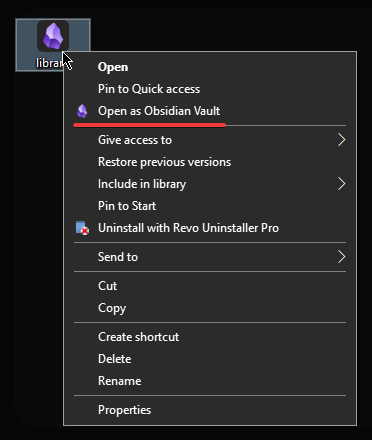
I’d like to be able to open folders as an Obsidian Vault by Right Click → Open as Obsidian Vault.
In practice, this has proven to be very convenient for me.
I propose implementing a feature that adds an Open as Obsidian Vault option to the folders context menu, which opens the selected folder as an Obsidian vault.
When opening a folder as an Obsidian vault, the necessary .obsidian folder could be created automatically within it, but the inconvenience would be that you’d have to manually move the .obsidian folder from the main vault to the new one in order to replicate all your settings.
That’s not very convenient.
Therefore, I think that for folders opened via Right Click → Open as Obsidian Vault, it would be better to implement the application of all settings from the .obsidian folder located at the Obsidian software level as a whole.
Especially since a number of other feature requests also directly or indirectly require the implementation of something similar.
Current workaround
For now, the following PowerShell script can be used as a workaround:
param (
    [string]$folderPath
)

if (-not $folderPath) { exit }

$folderPath = $folderPath.Trim('"').TrimEnd('\')

$obsidianFolder = Join-Path -Path $folderPath -ChildPath ".obsidian"
if (-not (Test-Path -Path $obsidianFolder)) {
    New-Item -ItemType Directory -Path $obsidianFolder -Force | Out-Null
}

$obsidianJsonPath = Join-Path $env:APPDATA "obsidian\obsidian.json"
if (Test-Path $obsidianJsonPath) {
    $json = Get-Content $obsidianJsonPath -Raw | ConvertFrom-Json

    if ($json.vaults) {
        $vaults = $json.vaults
        $found = $false

        foreach ($prop in $vaults.psobject.properties) {
            if ($prop.Value.path -ieq $folderPath) {
                $found = $true
                break
            }
        }

        if (-not $found) {
            $newId = [guid]::NewGuid().ToString().Replace("-", "").Substring(0, 16)
            $ts = [int64]([datetime]::UtcNow - (New-Object datetime 1970,1,1,0,0,0,([DateTimeKind]::Utc))).TotalMilliseconds

            $newVault = [PSCustomObject]@{
                path = $folderPath
                ts = $ts
                open = $true
            }

            $vaults | Add-Member -MemberType NoteProperty -Name $newId -Value $newVault

            $jsonString = $json | ConvertTo-Json -Depth 10
            $utf8NoBom = New-Object System.Text.UTF8Encoding $false
            [System.IO.File]::WriteAllText($obsidianJsonPath, $jsonString, $utf8NoBom)
        }
    }
}

$encodedPath = [System.Uri]::EscapeDataString($folderPath).Replace('%3A', ':')
$obsidianUri = "obsidian://open?path=$encodedPath"

$obsidianExe = "C:\software\Obsidian\Obsidian.exe"

if (Test-Path -Path $obsidianExe) {
    Start-Process -FilePath $obsidianExe -ArgumentList "`"$obsidianUri`""
} else {
    Start-Process $obsidianUri
}
Windows Registry Editor Version 5.00

[HKEY_CLASSES_ROOT\Directory\shell\OpenObsidianVault]
@="Open as Obsidian Vault"
"Icon"="C:\\software\\Obsidian\\Obsidian.exe"

[HKEY_CLASSES_ROOT\Directory\shell\OpenObsidianVault\command]
@="powershell.exe -ExecutionPolicy Bypass -WindowStyle Hidden -File \"C:\\software\\Obsidian\\open_as_obsidian_vault.ps1\" \"%1\""

[HKEY_CLASSES_ROOT\Directory\Background\shell\OpenObsidianVault]
@="Open as Obsidian Vault"
"Icon"="C:\\software\\Obsidian\\Obsidian.exe"

[HKEY_CLASSES_ROOT\Directory\Background\shell\OpenObsidianVault\command]
@="powershell.exe -ExecutionPolicy Bypass -WindowStyle Hidden -File \"C:\\software\\Obsidian\\open_as_obsidian_vault.ps1\" \"%V\""
… however, I’m unreasonably unsure about the safety of this workaround for files.
Related feature requests
Open as Obsidian Vault:
- Open a folder as a (new) Obsidian vault using its filepath via the URI
- Open folder as an Obsidian vault from terminal / command line / CLI
- Right-click: Open as another vault
- Add an "Open in Obsidian" option in the context menu (Archived)
- Have Obsidian be the handler of .md files / Add ability to use Obsidian as a markdown editor on files outside vault (file association)
Universal app-wide .obsidian folder:
- Store .obsidian folder outside the vault folder (one level higher or in user AppData, Library/Application Support, .config)
- One folder for all themes and snippets for all vaults
- Global Settings / Same settings, themes, and plugins across multiple vaults
Other: