I am new to Obsidian. In trying to use it for a religious research project, I have become stymied.
I have a large collection of blocks I have brought in from Readwise. Some are alone in their file, others are together in larger files but the blocks are separated by blank lines. I want to gather in a new note all of each block that has the word “bless” and the word “breath” in it. It is OK if those words are embedded in larger words like “breathe” and “blessing.”
In a new note file called “b and b.md” I use the editor to put at the top of the file
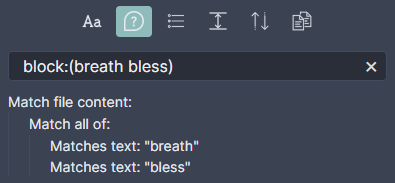
block:(breath bless)
I go to preview, and voila, there seem to be many chunks of blocks and they are all correct answers to the query. It is finding all the right blocks, but it is not bringing the entire block for longer blocks.
When I look at the file with another application (VSCode), I discover that all that is in the “b and b.md” file is the query. Those blocks it had seemed to have brought in were not there.
What I’m trying to do
So my questions are, is there a way to make obsidian actually gather the blocks that satisfy the query into a new note, and to bring in all of each block?
Getting a list of notes ($filename) where any of the blocks has the word “bless” and the word “breath” in it is simple:
```expander
block:(breath bless)
- $filename
```
Getting the contents ($match) seems to be more complex. I’ve only been able using regex and explicitly considering the two orders of the words in which they may appear inside a block:
```expander
block:(/.*breath.+bless.*/ OR /.*bless.+breath.*/)
- $match
```
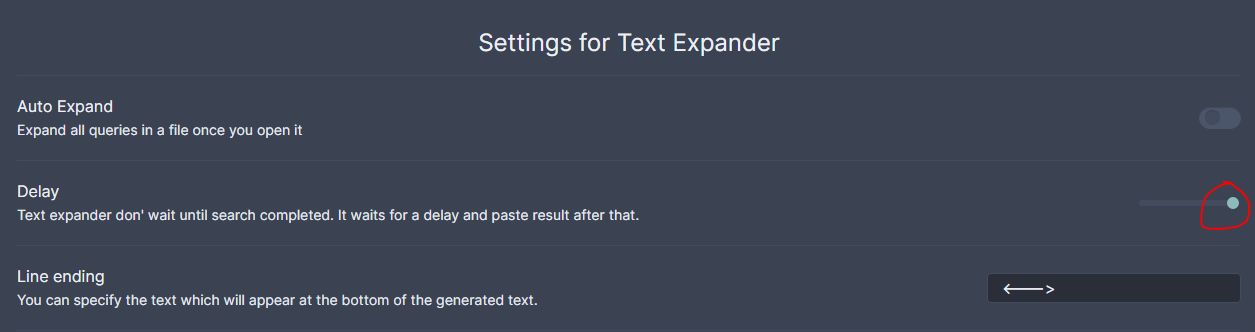
This search takes more to compute. So I’ve extended the plugin’s delay confi as much as it allows:
Could I now ask how I can save the result? This search in a query block gets the right answers when previewed, but does not seem to store them. It only stores the query block. (“Export to pdf” gets only part of the larger blocks.)
I think the post by @birrellwalsh show (block:( /.*bless.breath.|.*breath.bless./)) is because the website mistook the * for italics.
The line of code is: (block:( /.*bless.*breath.*|.*breath.*bless.*/))
Dear GCC, it is as you say. When I used the version you show here, it worked.
I am grateful.
I so not know regex much at all, but I am puzzled why your code brings in entire blocks (as I wished) while block:(breath bless) often brings in only partial blocks?
Glad it work for you!
I am sorry that I cannot help explain about the search function and regex. I ran into the same problem as you, and some one else in the community helped me. Maybe @andrezgz or @ryanjamurphy can help you.
I think the vantage plugin will also be beneficial for you.
I’ll try to explain this with Obsidian’s search examples. The same applies to the Text Expand plugin cause it’s based on Obsidian’s search.
A match is obtained when the regex definition is found inside the content. The matched text, the characters that correspond to the regex definition, are returned.
In Obsidian, when you search for block:(breath bless), you are not specifying a regex, so it’s up to Obsidian’s code how to deal with it - I think it is converted to some kind of regex, though. Anyway, you get certain files matched, but the matched text returned is just “breath” or “bless” in each case.
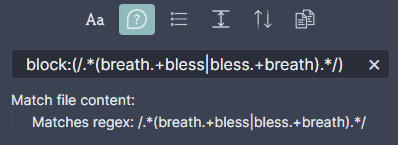
Now, when you use a regex like block:(/.*(breath.+bless|bless.+breath).*/) you are specifying a /regex/ between forward slashes.
Note: the block: part is a feature provided by Obsidian, not regexes.
In regex notation:
the . is matching any character (except for line terminators), and
* matches the previous token between zero and unlimited times, as much as possible
This regex is matching further more than just the words “breath” or “bless”. It’s considering the text before and after those words. So, in this case, the matched text returned is the whole “block”.