Is this project open source? Yes
Is this project completely free? Yes
Is this project vibe-coded beyond the author’s ability to comprehend how it works? No
Community Directory: ZotLit
ZotLit v2: Zotero integration for Obsidian
ZotLit connects Obsidian to your Zotero library. v2 is a ground-up rewrite. The old version relied on a third-party SQLite binary (better-sqlite3) that broke every time Obsidian shipped an Electron update. v2 uses Node’s built-in node:sqlite module instead, so that class of breakage is gone. No more downloading a separate binary during setup.
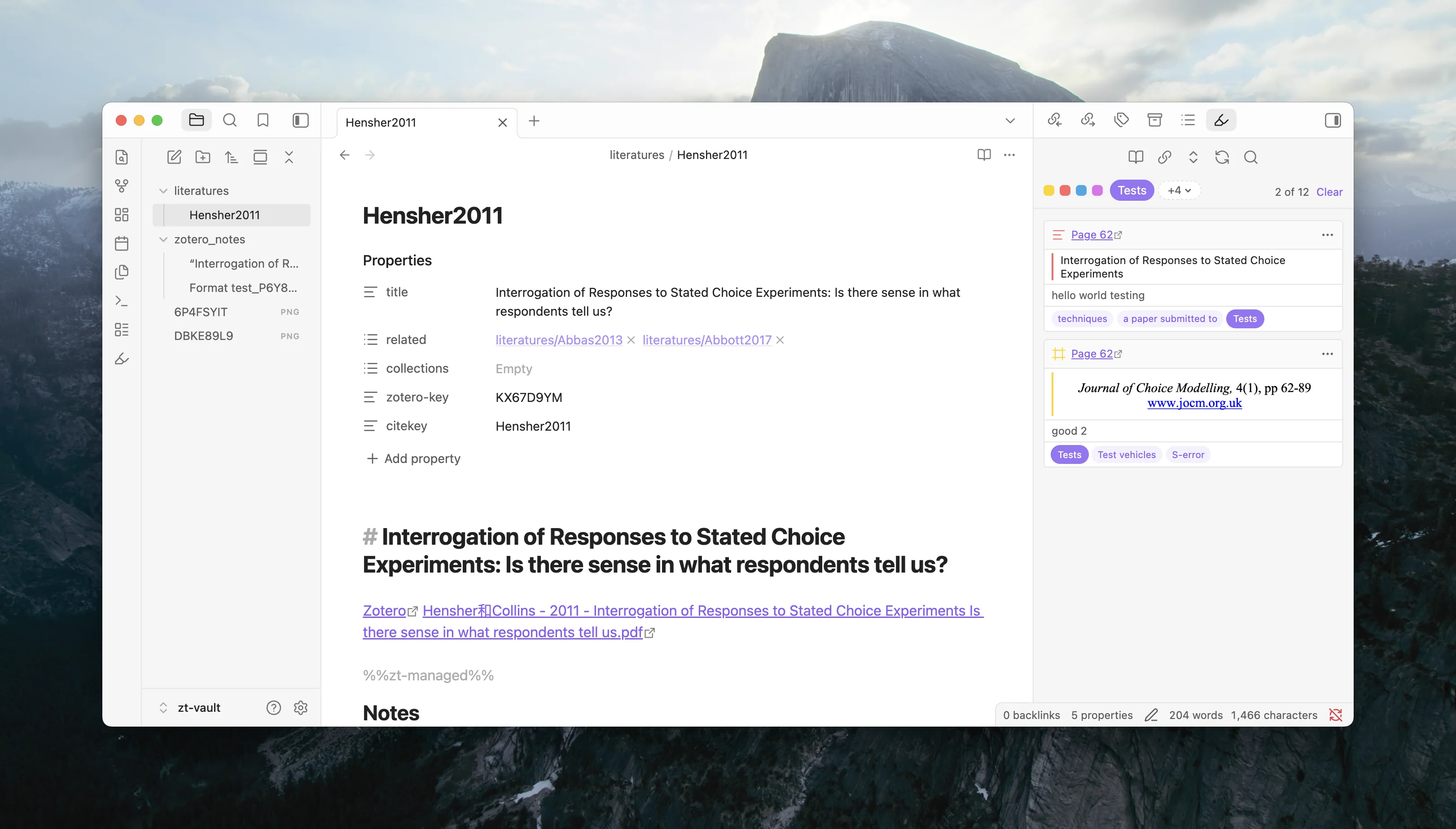
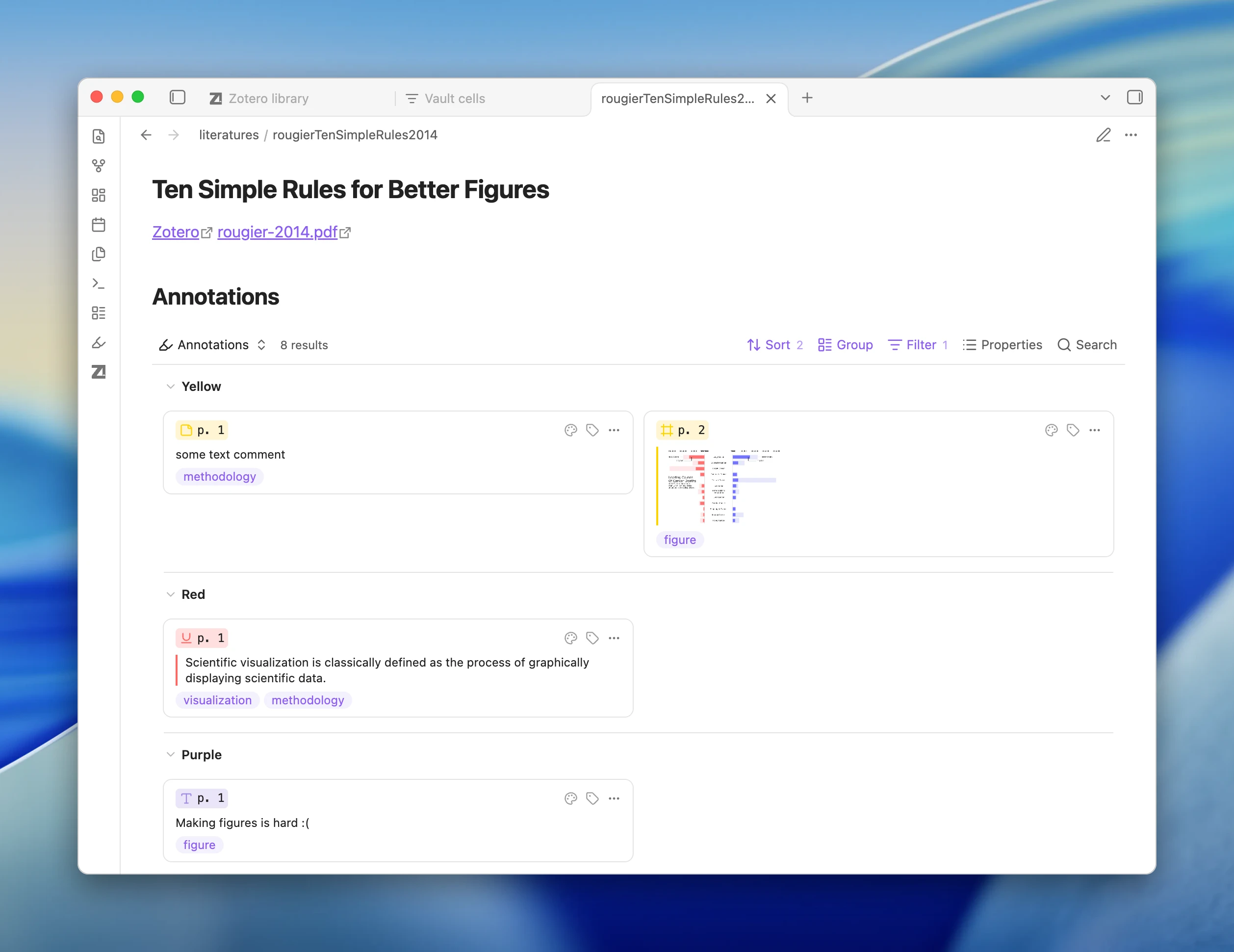
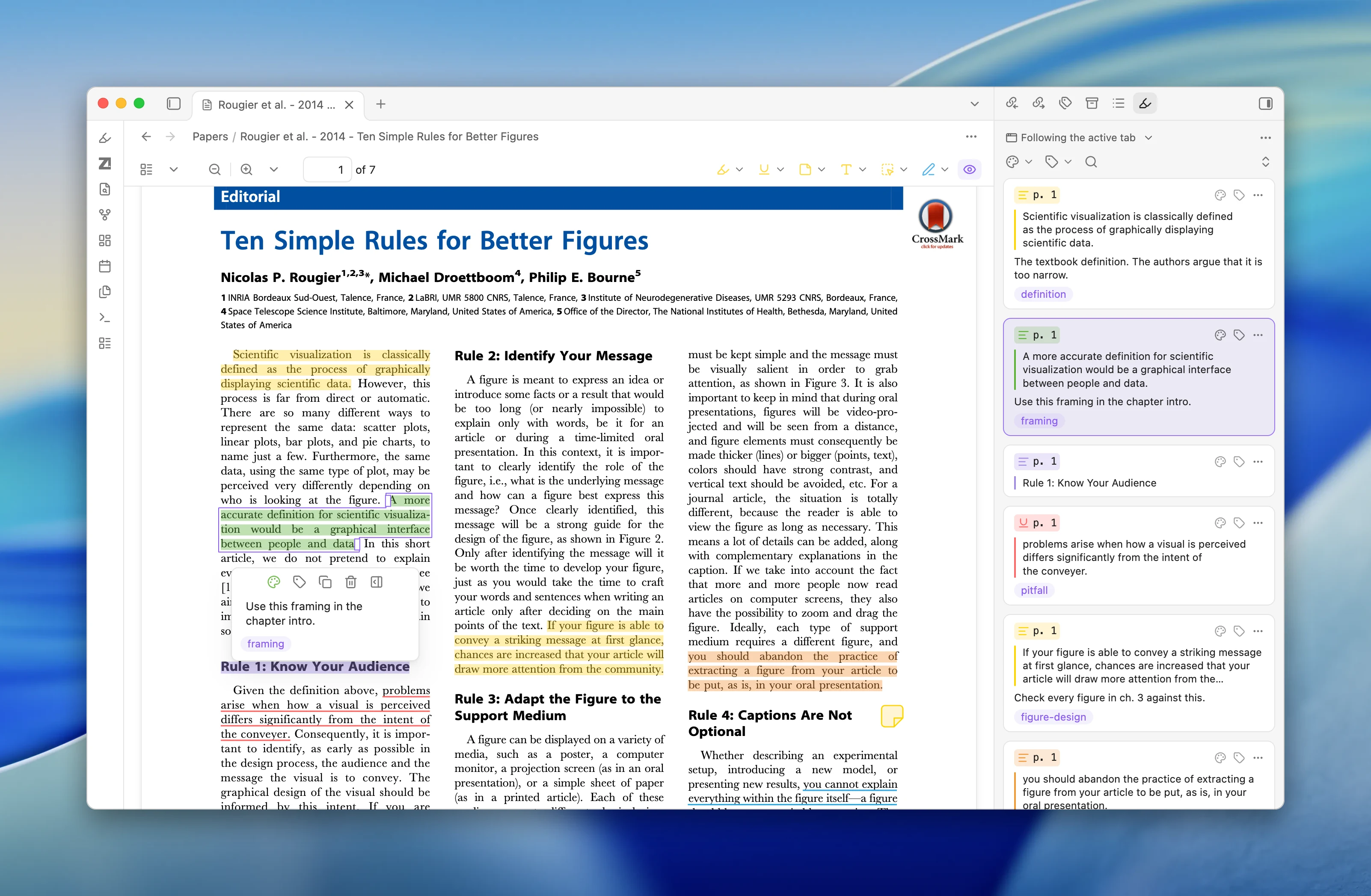
Annotation workspace — Browse your Zotero highlights, comments, and annotations in a side panel next to your Literature Note. Search by text, filter by color or tag, drag annotations into your note. Clicking an annotation jumps to that spot in the PDF in Zotero.
Batch Literature Notes — Create or update notes for many Zotero items at once, useful when onboarding an existing library or after a literature search.
Templates & Data Explorer — Customize how Literature Notes, annotations, and citations are formatted. v2 defaults to Liquid templates (easier to learn than v1’s Eta syntax), with JavaScript Templates available for full control. The Template Data Explorer shows the exact typed fields available for any Zotero item.
SQLite driver switched from better-sqlite3 (external binary) to node:sqlite (built-in). No more binary downloads or Electron-version breakage.
Database layer uses Drizzle ORM with field types generated from Zotero’s own schema definitions. Mismatches surface in the Data Explorer instead of silently wrong notes.
Zotero companion add-on targets Zotero 9.
v1 features annotation merging and topic-based imports are retired in v2.
Upgrading from v1
Same plugin ID — install the beta and it upgrades in place. Settings migrate automatically. You’ll need to rename template files and update it.* references to zt.* in your templates. Full migration guide: Migrate from v1
This release introduces Template Workbench, which adds ZotLit commands to obsidian-cli. Agents can use it to inspect template state, explore Zotero data, render templates in memory, and configure managed frontmatter.
You can install the companion zotlit-template skill and ask your agent to customize or troubleshoot your ZotLit templates in plain language.
This update also improves several other parts of the ZotLit workflow for managing Zotero literature in Obsidian:
Reorder managed frontmatter fields by dragging them in the settings.
Add new Liquid filters for transforming arrays and converting Zotero tags into valid Obsidian tags.
Copy Zotero keys from items, attachments, notes, annotations, and literature notes.
Import attachments from approved folders, including linked-attachment folders.
Keep item summaries consistent across the Annotation View, Template Data Explorer, and Citation Suggester.
Update the minimum requirement to Obsidian 1.13.4 and the latest Obsidian installer.
I would also welcome feedback from anyone willing to try the new zotlit-template skill and obsidian-cli workflow, especially on how well they support agent-assisted template customization and previewing rendered results.
Collection-scope batch operations. You can now target an entire Zotero library or a specific collection (including subcollections) when creating or updating Literature Notes. Right-click a library or collection in Zotero’s sidebar, or use the command palette in Obsidian.
Citation Key Links is disabled by default. If you had it enabled during the beta, your setting is preserved.
Chinese (Simplified) is the first non-English language pack, shipped as a version-pinned release asset.
ZotLit is now licensed under AGPL-3.0-or-later, matching Zotero’s own license for code that ZotLit ports.
Requires Obsidian 1.13.4+ desktop.
Plugin review
You may see a “Caution” label on the plugin listing page. ZotLit passes all of Obsidian’s developer guideline checks (verified in v2.0.1), but the automated review cannot finish due to a limitation in how the review system handles this project. We are in contact with the Obsidian team to get this resolved.
What’s next
Working on two things: searching and filtering your Zotero library from inside Obsidian, and improvements to the citation workflow. No timeline on either, but the groundwork is in place for both.
ZotLit 2.1.0-beta.0 is out. This release adds a References Sidebar, formatted in-text citation rendering, and a new command to export notes with citations.
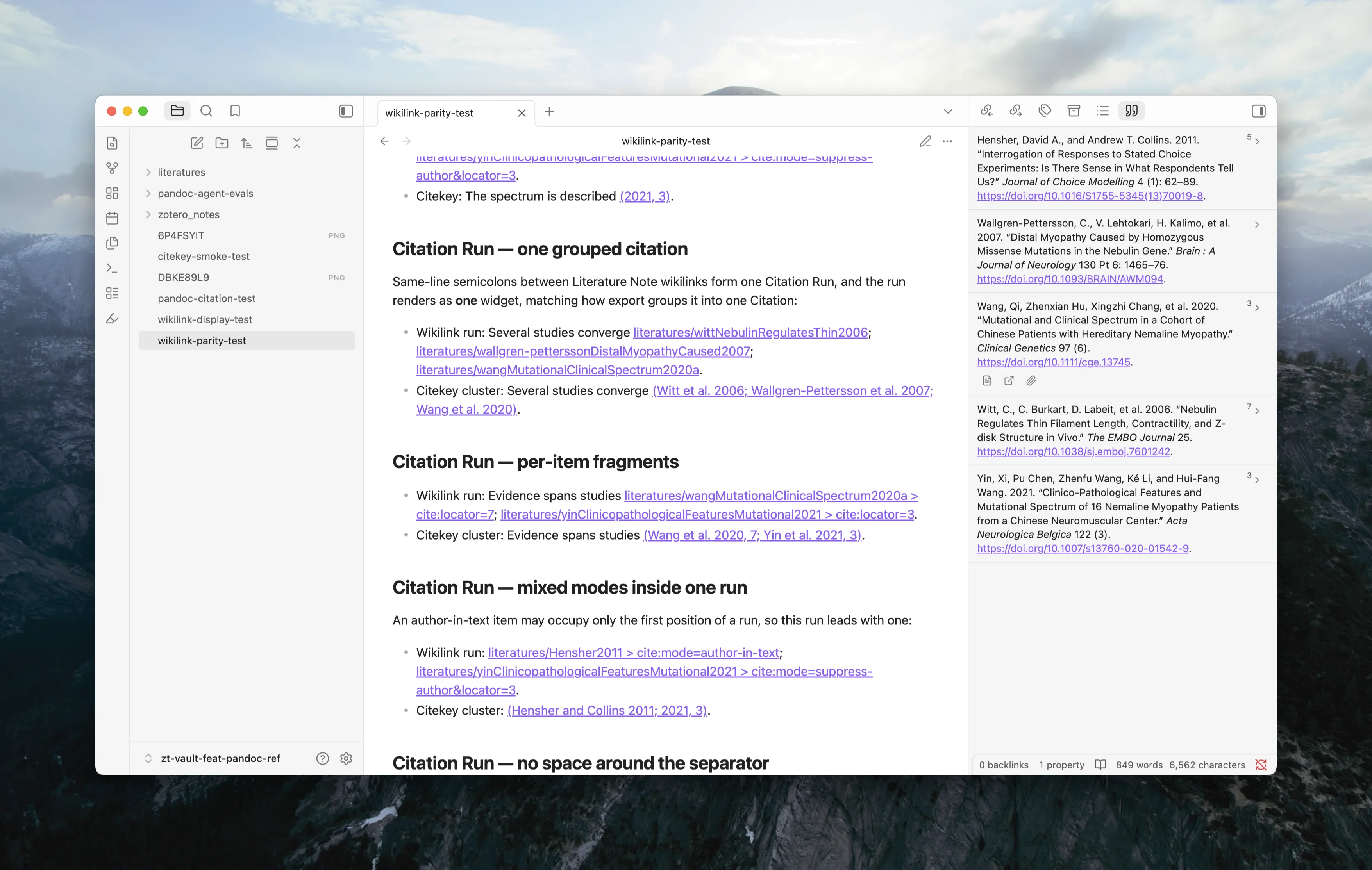
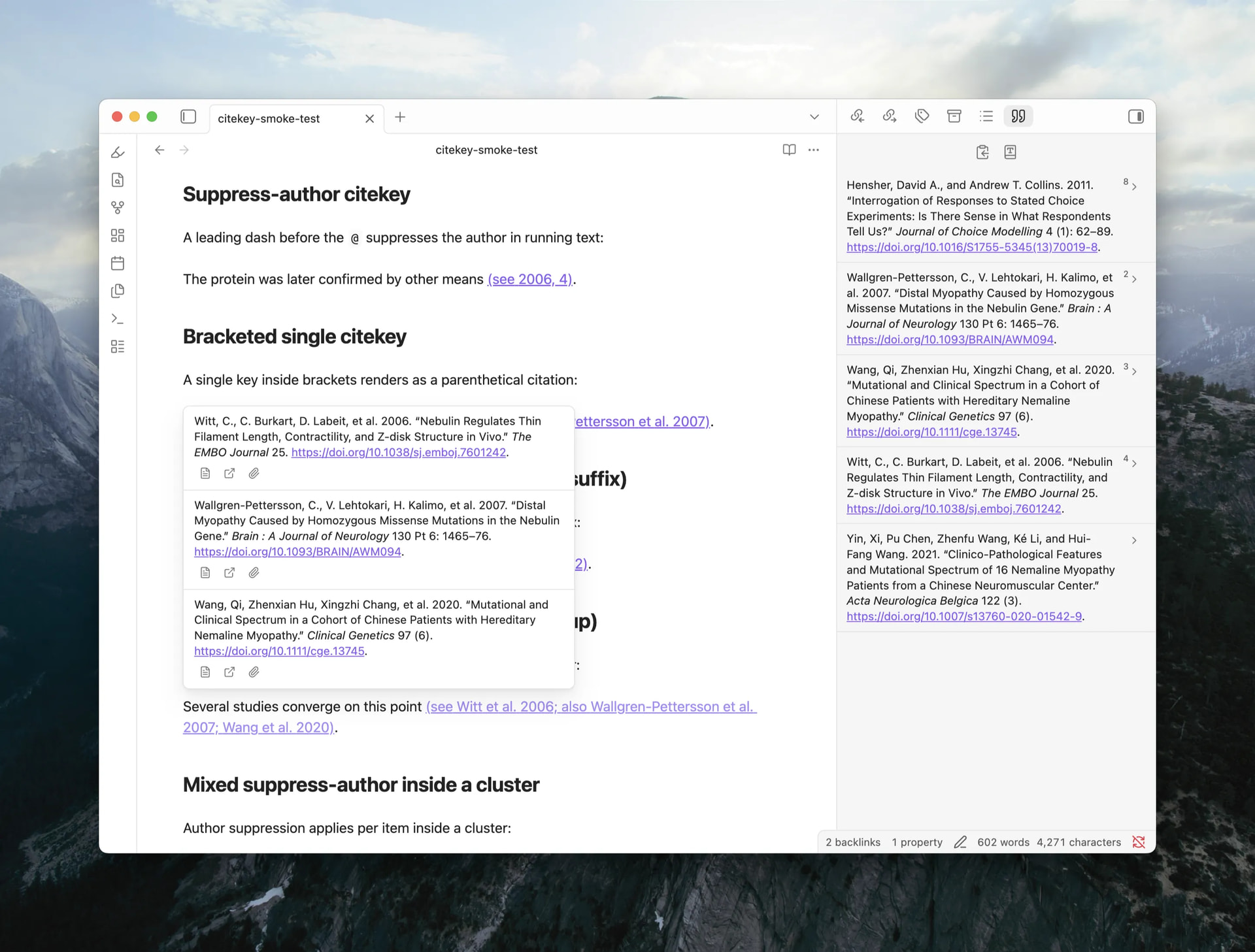
References Sidebar: a new view lists citations in the active note as a formatted bibliography, with actions to open the Literature Note, the Zotero item, or the attached PDF.
In-text citation rendering: literal citation clusters like [see @wang2020, p. 3; @lee2019] now render as formatted text in Live Preview and Reading view. Literature Note wikilinks can render the same way. Enable Wikilink citations in Settings > ZotLit > Citations.
Export a note with citations: the new ZotLit: Export note with citations command converts a note to DOCX or HTML with a formatted bibliography, no external Pandoc install required. This command is available to test but not finalized yet.
What’s New
Citation keys in the editor are now styled as links, distinguishing resolved from unresolved keys. Click to open the Literature Note, or hover for a preview. Rendered citations in Reading view are also clickable.
Citation keys now resolve against Zotero’s native citation keys instead of a frontmatter property. The old Citation Key Property setting is retired and migrated automatically.
Pick a CSL style from your installed Zotero styles in Settings > ZotLit > Citations, used by the References Sidebar and in-text rendering.
A native Pandoc CLI workflow: save integration files (a Lua filter and defaults file) to convert notes outside Obsidian, with wikilinks resolving to citation keys.
New CSS classes on citation elements let theme authors style resolved, unresolved, pending, and rendered citation states.
ZotLit 2.1.0-beta.1 is out. This release adds a Cited By Sidebar that shows which vault notes cite the active Literature Note, plus author fields for filename templates.
Cited By Sidebar. A new sidebar view shows which notes in your vault cite the active Literature Note. Open it from the command palette via “Open cited by”. Results are grouped by source file with occurrence counts, and each occurrence displays a search-result-style excerpt card. Click any occurrence to jump to its location. The toolbar offers search filtering, context toggling, six sort modes, and collapse/unfold controls.
What’s New
Filename templates can now include authors and authorsShort helper variables, consistent with the note template data.
ZotLit 2.1.0-beta.2 is out. This release adds a Citation Popover on hover, copy bibliography from the References Sidebar, and note-class Entry Serials.
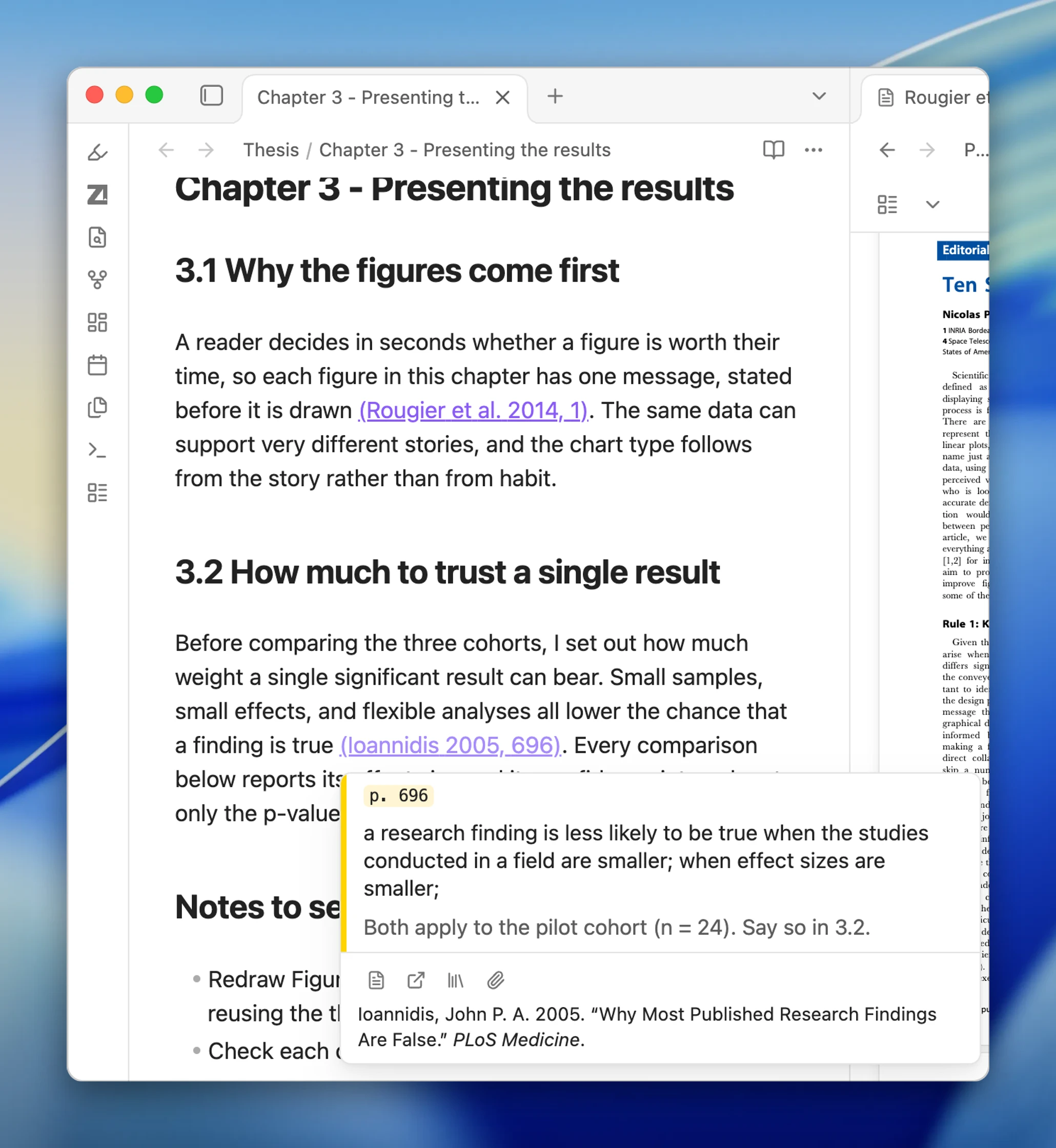
Citation Popover: Hovering a citation shows a popover with each cited item’s formatted bibliography entry plus action buttons. A new Hover action setting lets you choose Citation Popover, Page preview, or Off, with modifier-key toggles per editing mode.
Citation data commands for agents: Three new CLI commands (zotlit:cited-by, zotlit:references, zotlit:citations-guide) let an AI agent query citation relationships.
What’s New
Copy bibliography: One click copies the full reference list as rich text and plain text. Formatting and DOI links survive a paste into Word or Google Docs.
Note-class citation styles: Footnote styles (like Chicago full-note) now show numbered Entry Serials beside each citation inline and in the References Sidebar gutter.
Open citations as links: Now covers both Pandoc citations and Literature Note wikilinks. Off by default. While off, clicking a rendered citation places the cursor in its Markdown source.
Style picker shortcut added to the References Sidebar toolbar.
Two-creator summaries now follow your locale’s list formatting conventions.
Bug Fixes
Fixed the Zotero database refreshing every few seconds due to a filesystem echo on APFS volumes.
Fixed Mod+Enter in the note quick switcher not opening the note in a new pane.
Fixed Shift+Enter in the citation insert modal not inserting the secondary citation form.
Fixed citations inside inline footnotes rendering at body text size.
Fixed ^[...] being read as a citation cluster instead of an inline footnote.
Fixed References Sidebar engine banners overlapping with the reference list.
Fixed two items with the same filename colliding in citation rendering.
ZotLit 2.1.0-beta.3 is out. This release adds Zotero 10 support, multi-library scope, ambiguous citation key handling, and per-note citation styling.
Both Obsidian plugin and Zotero add-on have been updated, make sure to update both:
Highlights
Zotero 10 support. ZotLit now works with Zotero 10 and Zotero 9. The companion keeps the database current automatically, so changes in Zotero reach Obsidian without delay. A new Database Status panel on the Zotero sidebar confirms recent changes have landed.
Library scope. ZotLit now searches across several Zotero libraries at once. A new Library scope setting replaces Default library, with two modes: All libraries (auto-includes new groups) and Selected libraries (explicit control). Results name the library each item comes from.
Ambiguous citation keys. When one citation key matches several items, ZotLit reports the ambiguity instead of picking the first match. Opening such a citation asks which item you mean. Inserting one is refused with a notice.
What’s New
Citation style and language per note. A note can render citations under its own style and language. ZotLit: Set citation presentation opens a dialog to set both, stored in note properties (zotlit-csl and lang).
Citation locale. A new Citation locale setting sets the language for citation terms, dates, names, and sorting across the vault.
Bug Fixes
Fixed slow or broken database refreshes when the Zotero data directory sits on a different drive than the system temp folder.
Fixed dragging an annotation inserting raw highlight text or the annotation key instead of the rendered template.
ZotLit 2.1 is out. It delivers the citation workflow: insert a citation, see your references, and export a finished document with a bibliography.
Both Obsidian plugin and Zotero add-on have been updated, make sure to update both:
Write with citations
Type @ to insert a Pandoc citation key, or [@ for a full cluster with locators and prefixes.
Clusters render as formatted citation text in Live Preview and Reading view, in a CSL style from Zotero. Literature Note wikilinks can render the same way.
Citation keys are styled as links. Click one to open its Literature Note.
See your references
References Sidebar: the note’s citations as a formatted bibliography, with buttons for the Literature Note, Zotero, and the PDF.
Citation Popover: hover a citation to see the full entry of every cited item.
Cited By Sidebar: reverse lookup of which notes cite the active Literature Note, with excerpt cards per file.
Export and share
ZotLit: Export note with citations converts the note to DOCX or HTML with a bibliography. The Pandoc engine is built in.
Copy bibliography copies the reference list as rich text for Word or Google Docs.
With Pandoc installed, you also get a matching Lua filter and defaults file for the CLI.
Multi-library and Zotero 10
The new Library scope setting covers several Zotero libraries at once. An ambiguous citation key asks you which item you mean.
Zotero 10 works alongside Zotero 9. The Companion keeps the database current, and a Database Status panel confirms it.
And more authors and authorsShort in filename templates, a vault-wide Citation locale, per-note style and language, Entry Serials for footnote styles, CSS theme hooks, and colored note-import highlights.
ZotLit 2.2.0-beta.0 is out. Literature note templates now live in a single profile document, with a workbench to edit them and citations drawn in the graph view.
Looking for testers for the single-file profile template migration. If you have custom 2.1 templates, try the conversion and report any issues.
Highlights
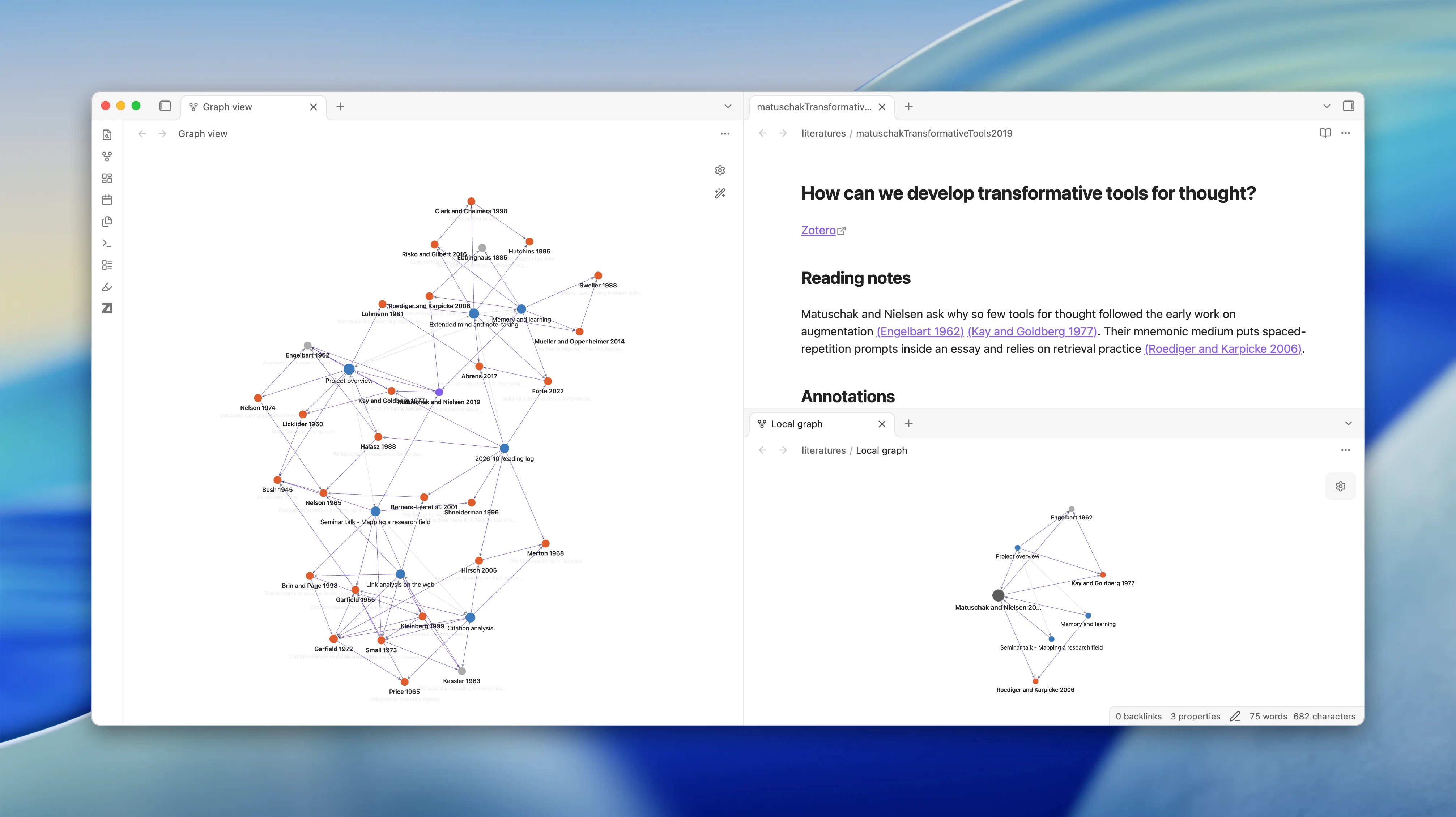
Citations in the graph view. Your citations appear in Obsidian’s graph. Literature notes gain edges to every work they cite, and two notes citing the same paper meet at its node.
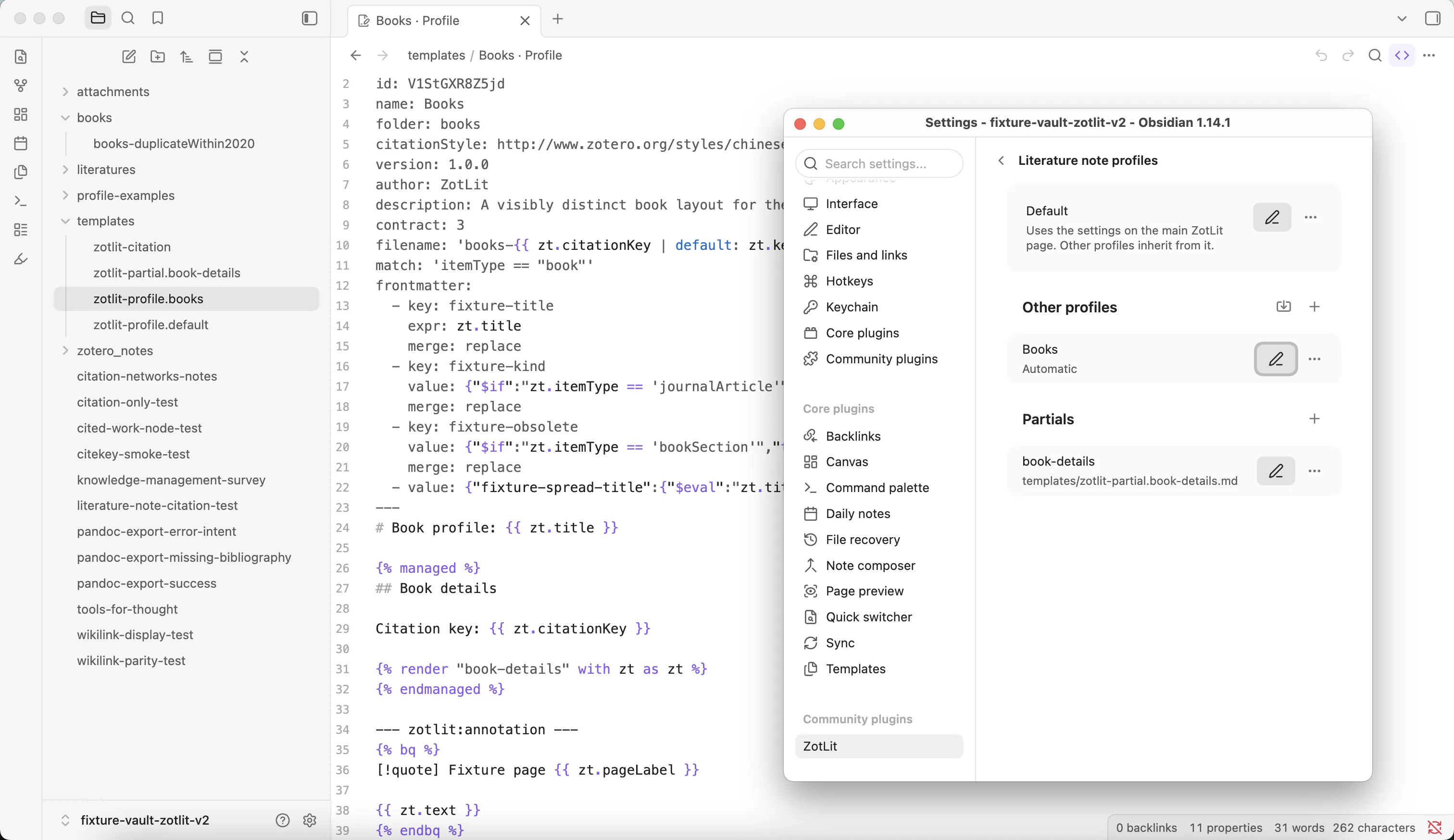
Literature note profiles. The whole template lives in one Markdown document per profile, replacing the separate note, filename, annotation, and managed-region files.
Template Workbench. A dedicated view with fields beside the editor and live preview on the other side. Syntax highlighting, error reporting, and partial extraction built in.
Breaking Changes
2.1 template files must convert to profile documents. One-click conversion runs after the update; old files keep working until then.
Export with citations stops on an unknown or ambiguous key instead of silently dropping it.
Nine agent template CLI commands are retired. Use template-inspect, template-data, and template-check.
Settings tab reorganized. Row names unchanged; settings search still works.
What’s New
Highlight color mapping for imported Zotero notes, compatible with Obsidian 1.14. Opt-in.
Template data explorer rebuilt on the workbench’s field browser.
Citation hover retargets one popover instead of opening one per citation.
ZotLit 2.2.0-beta.1 is out.
You can now read and annotate your Zotero PDFs in Obsidian, and every mark you make is saved in Zotero.
Beta testers wanted
The PDF reader needs Obsidian 1.14.2+, which is Catalyst only for now. If you have Catalyst (insider) access, please install the beta with BRAT (aidenlx/zotlit) and tell us what you find. Saving edits also needs Zotero 10+.
Both Obsidian plugin and Zotero add-on have been updated, make sure to update both:
Highlights
A Zotero item’s PDF opens in an Obsidian tab beside your note, with your Zotero highlights already on the page.
Open it with the Open PDF command, Shift+Enter in the literature note switcher, a file link in a note, or Open PDF in Obsidian in Zotero.
Highlight, underline, add notes, text, images, and ink. Change color, comment, and tags, or move a mark. Ctrl/Cmd+Z undoes it.
To edit, Zotero must run on the same computer. Select Allow editing in the annotation view once, then choose Always Allow in Zotero.
What’s new
Annotation view: select several cards to delete, recolor (keys 1 to 8), or copy together. Insert into note from a card’s menu. Image and ink cards show their picture.
Companion: choose where notes opened from Zotero appear (active tab, new tab, new tab group, or new window). obsidian://zotlit/ links take a paneType parameter.
Breaking changes
Export note with citations and native Pandoc now use the note’s own citation style (zotlit-csl, profile style, or your default). When Zotero cannot supply that style, the export stops and tells you.
If you run Pandoc yourself with ZotLit’s integration files, save them again from this version.
Bug fixes
The empty ZotLit submenu on PDF attachments in Zotero is now dimmed.
Template conversion from 2.1 is kept when the trash step fails, and error messages name only the files you need to edit.
ZotLit 2.2.0-beta.2 and beta.3 are out with background database reads, an experimental Zotero Query CLI, full note paths in profiles, and Chinese word search.
New
Experimental Zotero Query CLI: query papers, files, and annotations from the terminal with zotlit:query, explore values with zotlit:query-values, inspect schemas with zotlit:query-schema, read the built-in guide with zotlit:query-guide, and cancel exports with zotlit:query-cancel. Full guide: How to query your Zotero library | ZotLit
Background database reads: Zotero database reads, search indexing, and citation lookups run in a background worker, keeping Obsidian smooth during refreshes.
Full note path display: the Template Workbench shows the complete vault path while you edit a profile.
Simpler profiles: add a profile with only a name; folder paths are optional and inherit from Default.
Chinese word search: install the Chinese segmenter from Zotero settings to split Chinese titles into searchable words.
Reorganized Zotero settings: settings follow research tasks with a dedicated Zotero location sub-page.
Context menu grouping: ZotLit file and tab menu entries sit in dedicated sections beside native options.
Bug fixes
Annotation view: cards scroll clear of the status bar, top fades under the toolbar, and edits are protected during refreshes.
Template Workbench: typed property rules and note names save verbatim without breaking quotes or special characters.
Citations: plain clicks place the cursor in citation source text; wikilink fragments resolve correctly; closed note citations release memory after 5 minutes.
Batch windows: group rows mount on demand, keeping large library updates responsive.
Export: Word export fixes for callouts, quotes, and localized reference list headings.
ZotLit 2.2.0-beta.4 is out. Browse your Zotero library directly in Obsidian with the new Library View, embed interactive query tables and blocks, and track reading status in place.
Highlights
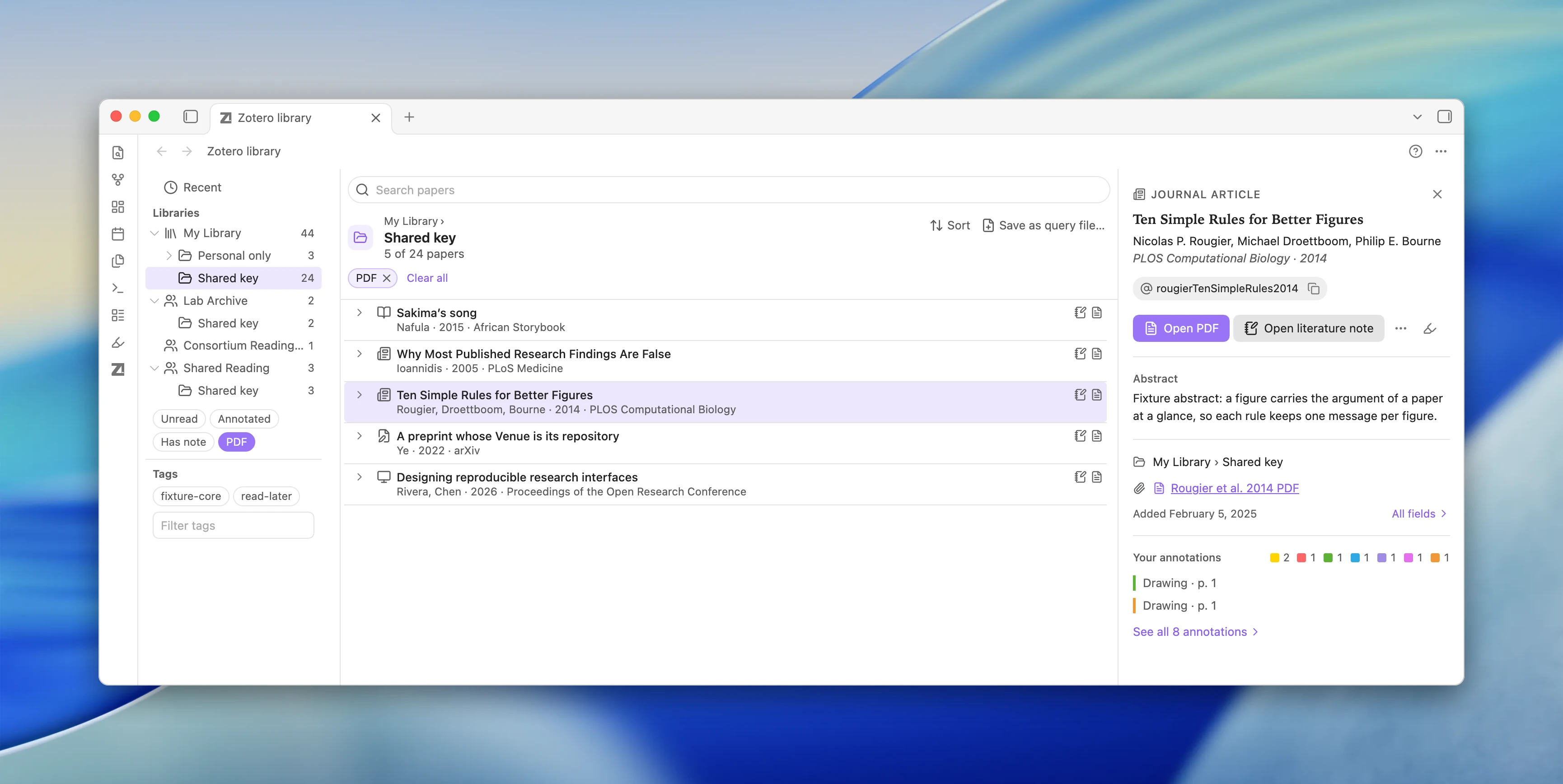
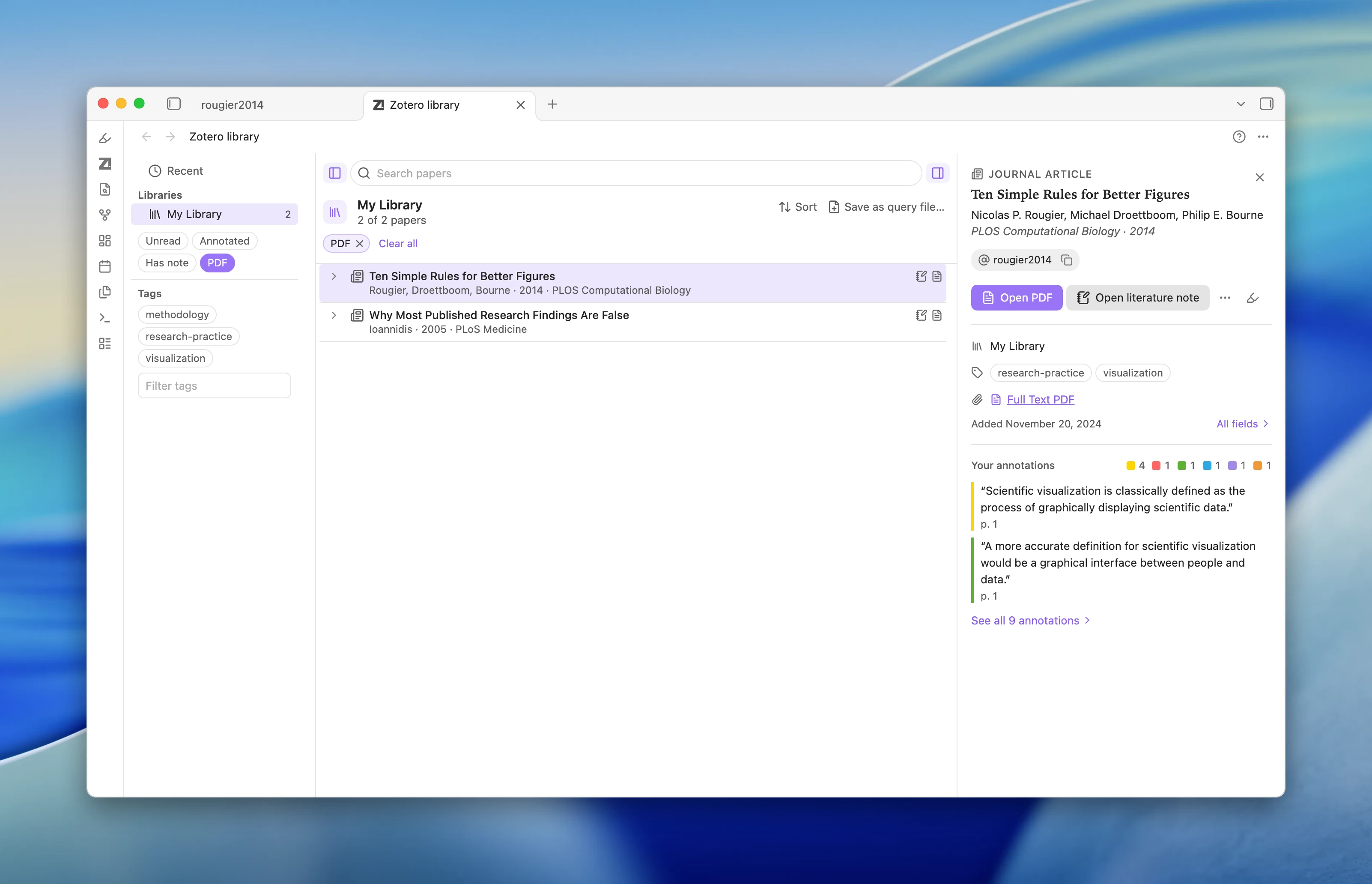
Library View: Browse your library, collections, tags, and reading state facets directly in Obsidian. Shows a two-line papers list with drag-to-cite, Quick Switcher shortcuts, and an expandable Reading Card.
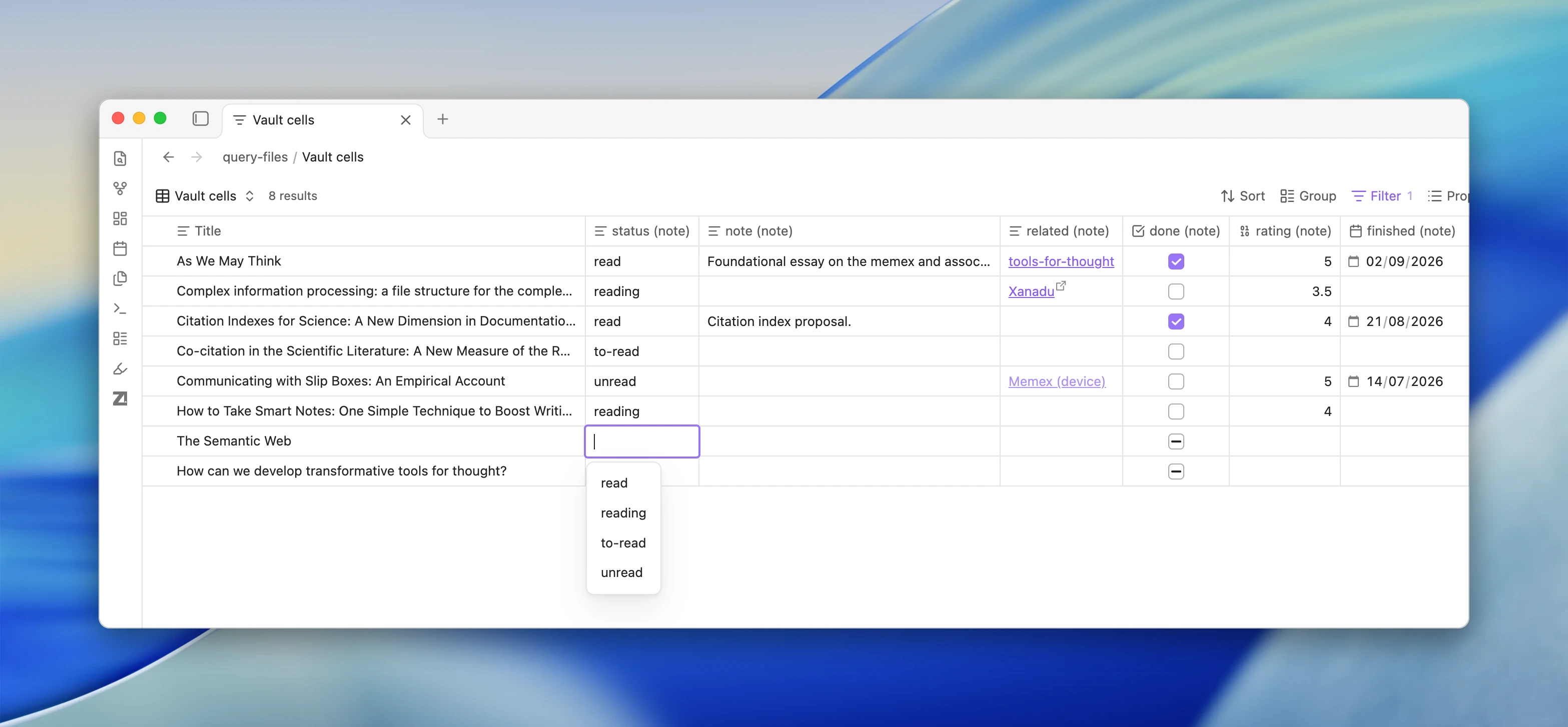
Reading status in tables: Display literature note properties like reading-status as table columns and edit cells in place without opening notes.
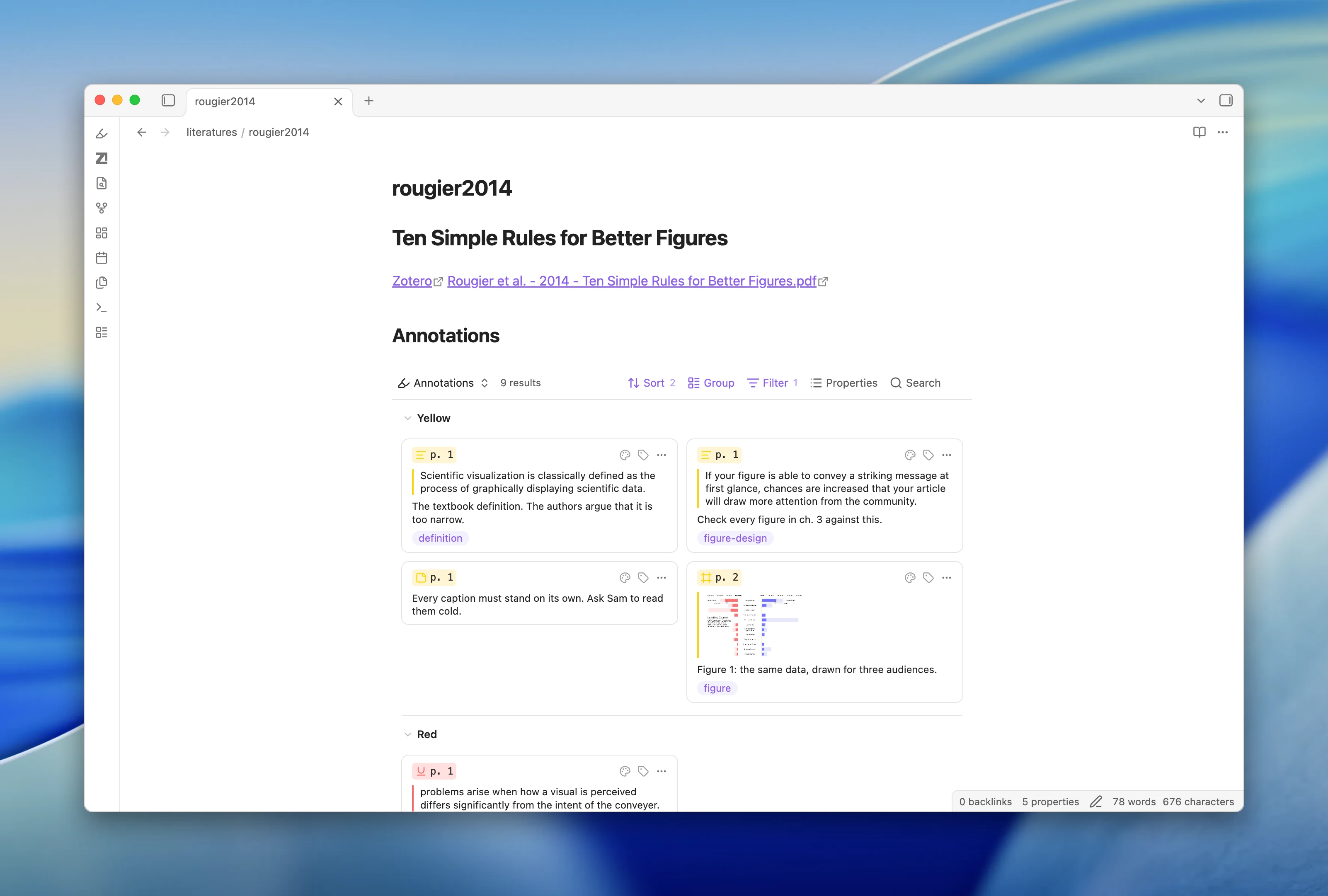
Default literature note template: Literature notes now embed an interactive query block instead of a static markdown list. Updating an existing default note replaces its static annotation list with live query cards.
New
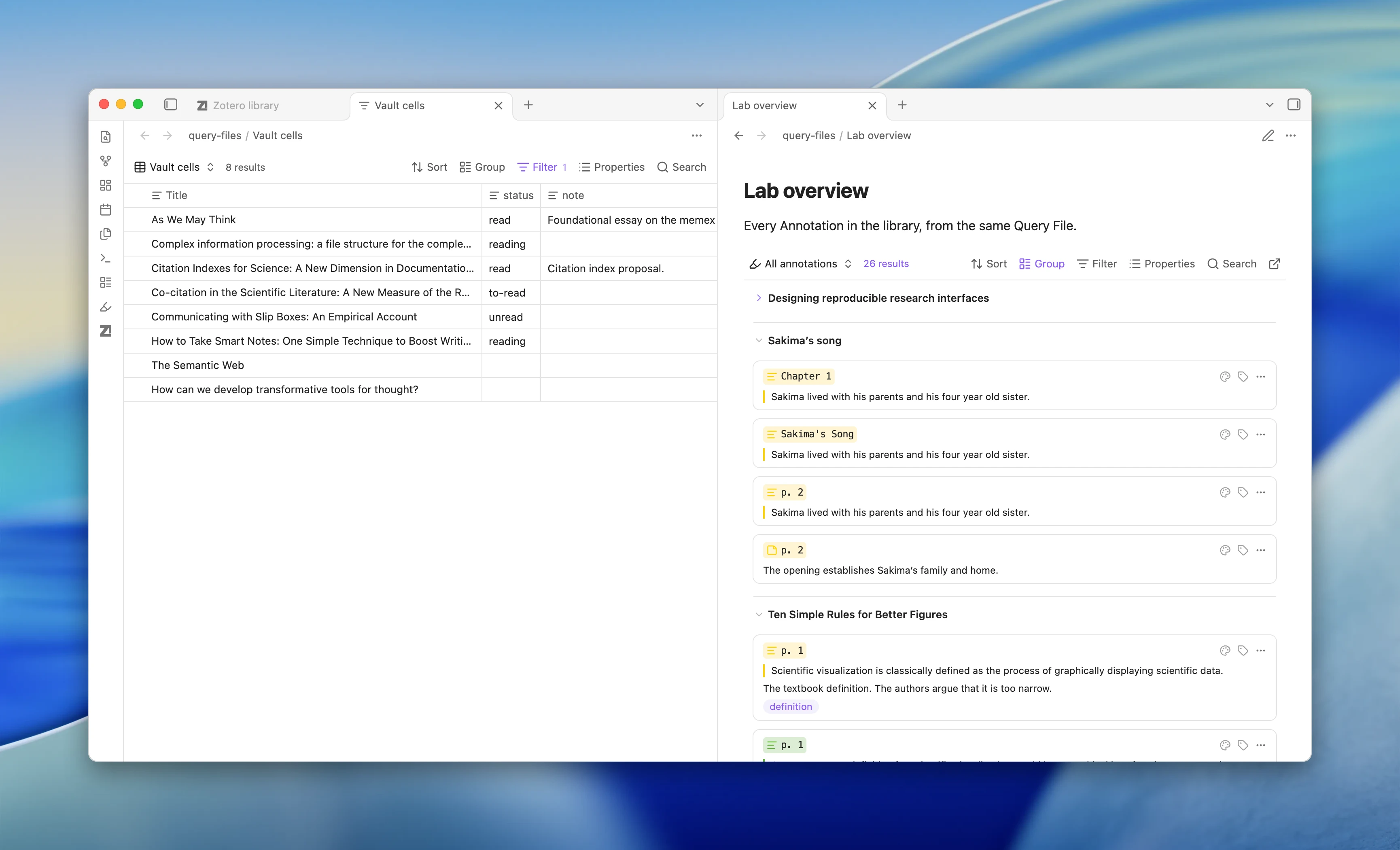
Query files and blocks: Create standalone .zotquery files with Create new query file or embed query blocks in notes. Supports Table, Cards, List, and Annotations layouts, draggable columns, nested filter groups, and CSV or TSV export.
Recent papers ranked by activity: Recent lists now prioritize papers based on your latest research actions, including note edits, PDF reading, citing, and annotations.
Query engine in annotation sidebar: The Zotero annotations sidebar now runs on the Query View engine with instant live card updates and direct query file export.
Quick Switcher shortcut: Press Alt+Enter on a paper in the Quick Switcher to reveal and select it in the Library View.
Bug fixes
Local connection probe: Detects when another app occupies Zotero’s HTTP port and prompts you to open Zotero and check settings.
Reading view insertion: Prevents inserting annotation text into hidden source editors when a note is open in Reading view.
ZotLit 2.2.0-beta.5 is out. Annotation links now work on every computer, and you can jump to any paper in the Zotero library view.
Breaking changes
The default template writes a literature note body once, when you create the note. After that, the body is yours. Update literature note refreshes only the properties. The annotations query block still shows new highlights live. Zotero child notes become files only when you import them. Creating or updating a note no longer imports them.
Existing notes do not change. Notes with %%zt-managed%% markers keep refreshing that region.
What’s new
Annotation links use a zotero://open link that works on every computer. A click opens the PDF in Obsidian when the file is on this computer, and Zotero otherwise. Hover a link to preview the annotation.
The default annotation template puts the citation after the quote. Custom templates are not affected.
The new “Annotation citations” setting (off by default) counts an annotation link as a citation of its paper.
“Show in Zotero library” is now in the References sidebar, Cited by, the citation popover, the graph menu and the note’s file menu, plus the new Show item in Zotero library command. New template variable zt.librarylink.
Library View item details show and hide with a toggle. The filter expression editor colors code, underlines errors and completes names. Create or update all literature notes is much faster in large libraries.
Bug fixes
Pickers no longer act on an earlier search when you press Enter right after typing.
Search finds eight-letter words such as “thinking”.
The annotation view no longer stays on “Loading…”.
A citation inside another citation no longer breaks Pandoc export.
A restored PDF tab no longer counts as a read.
Filter conditions show in full, and some keyboard problems are fixed.
Needs Obsidian 1.14.5 or later and ZotLit Companion 2.2.0. Saving annotation edits needs Zotero 10.
PDF file links now open in Obsidian’s reader. Turn this off in Reader settings.
The default template writes a note body once. Updates then refresh only properties. The next update replaces older %%zt-managed%% text with a live query block.
Child notes import only when you ask.
2.1 template files keep working until you convert them to profiles.
Export stops on an unknown citation key or a missing style.
Eta tag suggestions are gone, some settings moved, and eight agent template commands are retired.
Highlights
Library View: browse libraries and collections in a tab, and drag a paper into a note to cite it.
PDFs open beside your note with your Zotero annotations. With Zotero 10, edits save to Zotero.
ZotLit Query: show papers as a table, cards, or a list. Edit note properties such as reading-status in place.
New
The graph view draws citation edges and shows works you have no note for.
Literature note profiles and the Template Workbench replace template files.
The annotation view has compact cards, multi-select, and saved filters.
Annotation links work on every computer. Hover one to see the annotation above the paper’s reference.
Show in Library, recent papers, and faster search.
Bug fixes
Pickers no longer act on an earlier search when you press Enter right after typing.
Search finds eight-letter words such as “thinking”.
Live updates keep your reading position.
Coming in November
A new documentation site and video tutorials for common research workflows.
More workflow improvements. If something feels slow or confusing, tell me here.
ZotLit 2.2.1 is out. This release adds one Update notes command, puts every Zotero field in the Query View Filter, and fixes template conversion problems.
What’s New
New Update notes command. It opens a dialog to update the active note or all notes, and it creates no notes unless you turn that on.
The Query View Filter now lists every Zotero field. Everyday words find a field, so journal finds Publication.
Text filter rows now ignore letter case. New match case rows keep case, and saved filters keep their results.
Filter expressions now close brackets and quotes for you.
The Query View is faster in large libraries. On a 100,000-item test library, the first page, sorting, and common title searches came back about 3 to 4 times faster.
Update imported note from Zotero is now Overwrite imported note. Your hotkeys keep working.
Bug fixes
A frontmatter field that failed its check stopped the 2.1 template conversion and left the Profile editor locked. Now the conversion finishes and a notice names the field to fix.
A Template Workbench preview with citations and no Pandoc engine showed as broken. Now it shows a hint that leads to the setting.
A template folder that differed from a vault folder only in letter case broke template customizing. Now ZotLit finds the existing folder.
Tooltips inside popups appeared behind the popup. Now they show above it.
The argument hint in filter expressions flashed and jumped as the cursor moved. Now it stays in place.


 Highlights
 What’s New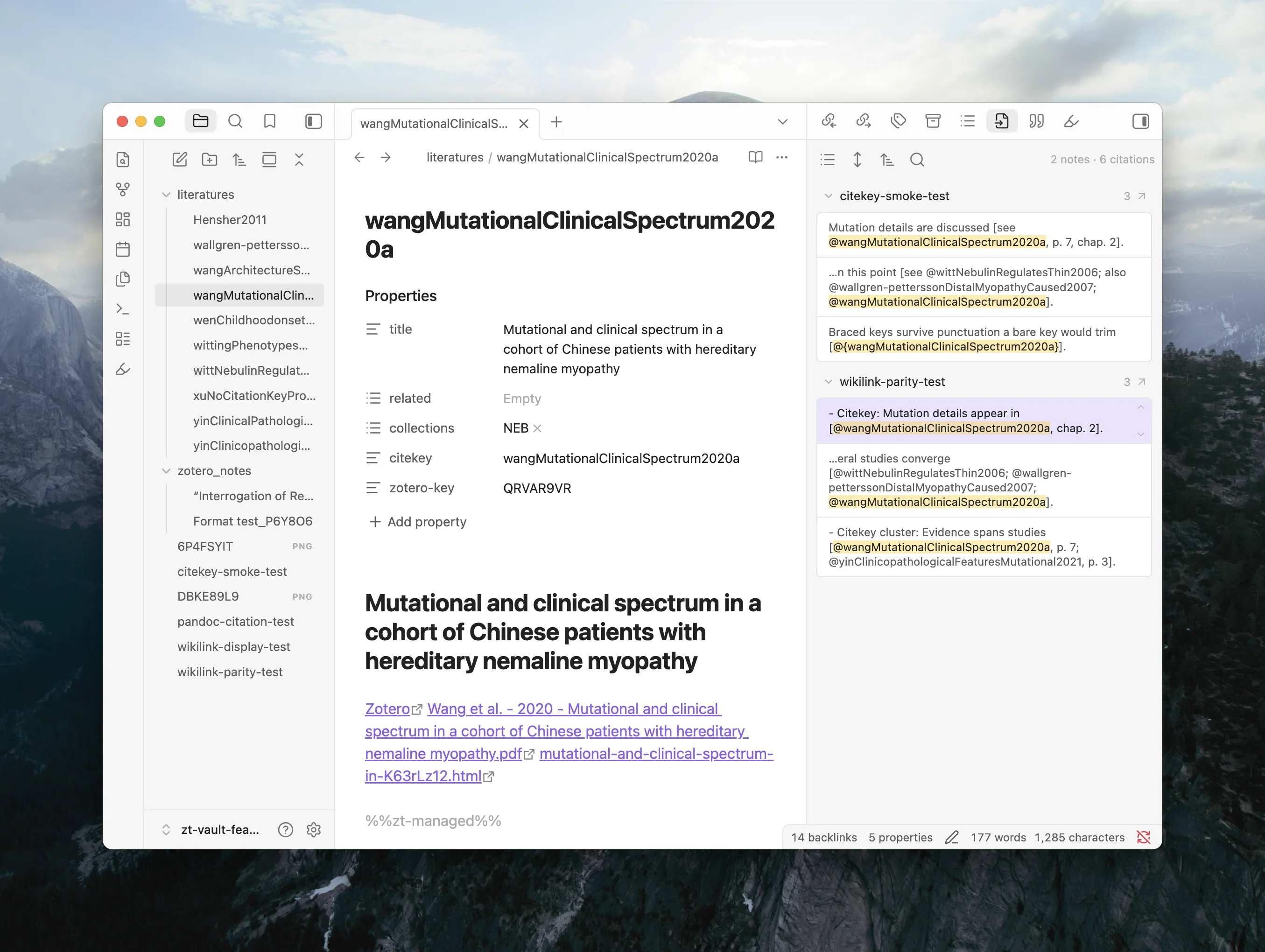
 Bug Fixes
 Write with citations
 See your references
 Export and share
 Multi-library and Zotero 10
 Coming from Pandoc Reference List? Migration guide: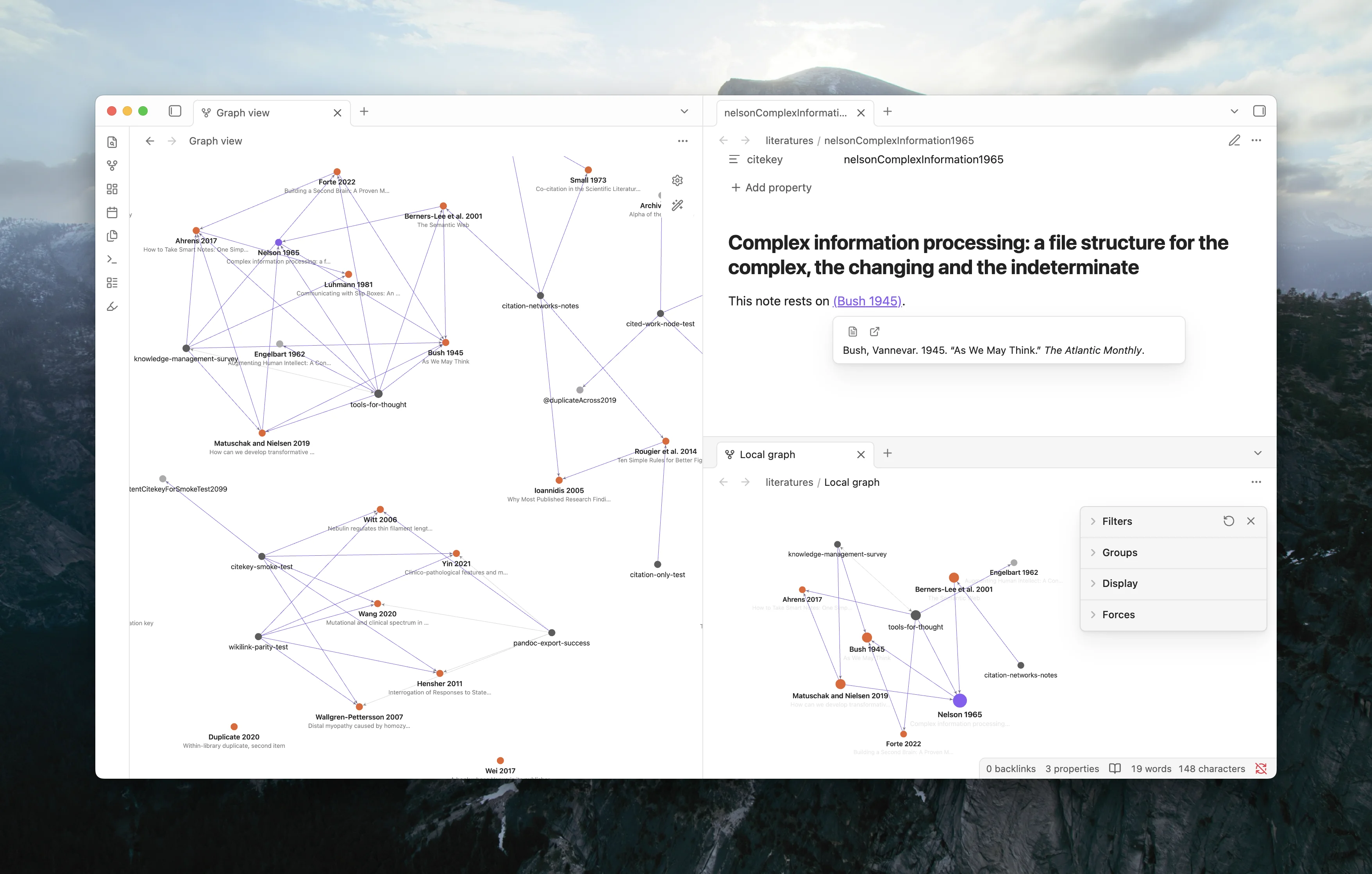

 Breaking Changes
 Beta testers wanted
 Coming in November