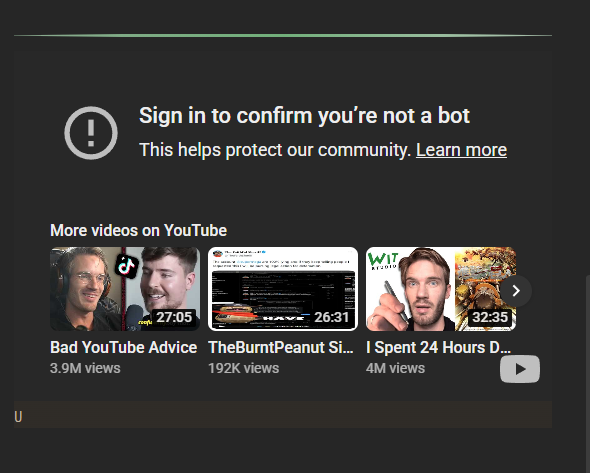
Steps to reproduce
- Embed YT link in a note
- Start the video
- See the error
Did you follow the troubleshooting guide? [Y/N]
Please, follow the Troubleshooting Guide before answering Yes.
Expected result
Youtube’s video playing as intended
Actual result
Youtube’s video not playing
Environment
SYSTEM INFO:
Obsidian version: 1.12.4
Installer version: 1.12.4
Operating system: Windows 11 Pro 10.0.26200
Login status: not logged in
Language: en
Insider build toggle: off
Live preview: on
Base theme: dark
Community theme: Typewriter 2.2.4
Snippets enabled: 7
Restricted mode: off
Plugins installed: 104
Plugins enabled: 71
1: About Blank v1.2.0
2: Advanced Canvas v6.0.0
3: Better File Link v1.2.1
4: Better Word Count v0.10.1
5: BRAT v2.0.2
6: Buttons v0.9.13
7: Calendar v1.5.10
8: Code Styler v1.1.7
9: Collapse All v2.1.0
10: Dataview v0.5.68
11: DOCX Exporter v1.0.2
12: Docxer v2.3.0
13: Enhancing Export v1.11.1
14: Excalidraw v2.21.0
15: Excel to Markdown Table v0.4.0
16: Extended File Support v1.4.1
17: Filename Heading Sync v1.11.0
18: Find and replace in selection v1.0.1
19: Find orphaned files and broken links v1.10.1
20: Folder Focus Mode v0.9.13
21: Hotkey Helper v0.3.21
22: HTML Reader v1.0.13
23: Image Converter v1.4.1
24: Importer v1.8.4
25: Kanban v2.0.51
26: LanguageTool v1.4.3
27: Linter v1.31.2
28: Link Embed v2.10.5
29: Local REST API v3.4.6
30: Longform v2.1.0
31: Media DB v0.8.0
32: Multi Properties v1.4.0
33: Multi-line Formatting v0.4.1
34: Novel word count v4.6.1
35: Number Headings v1.16.0
36: Omnisearch v1.28.2
37: Outliner v4.10.0
38: PDF Highlights v0.0.4
39: PDF++ v0.40.31
40: Project Browser v0.3.2
41: Projects v0.0.0-1004
42: QueryDash v2.0.3
43: Quick Explorer v0.2.16
44: Quick Switcher++ v6.1.0
45: Quiet Outline v0.5.12
46: Workspaces Plus v0.3.3
47: Webpage HTML Export v1.9.2
48: Various Complements v11.0.0
49: Toggle Readable line length v1.0.0
50: Text Extractor v0.7.0
51: Tag Wrangler v0.6.4
52: Style Settings v1.0.9
53: Spaced Repetition v1.13.9
54: Shell commands v0.23.0
55: Settings Management v1.0.7
56: Search on Internet v0.5.0
57: Regex Find/Replace v1.2.0
58: Recent Files v1.7.6
59: Canvas Mindmap v1.0.2
60: Mindmap NextGen v1.15.1
61: Ribbon Divider v1.1.1
62: Smart Memos v1.1.8
63: Templater v2.18.1
64: Iconic v1.1.8
65: Iconize v2.14.7
66: Image Toolkit v1.4.3
67: Text Format v3.1.0
68: APIRequest v2.0.8
69: Advanced Tables v0.22.1
70: Slides Extended v2.3.3
71: Soundscapes v1.5.0
RECOMMENDATIONS:
Custom theme and snippets: for cosmetic issues, please first try updating your theme and disabling your snippets. If still not fixed, please try to make the issue happen in the Sandbox Vault or disable community theme and snippets.
Community plugins: for bugs, please first try updating all your plugins to latest. If still not fixed, please try to make the issue happen in the Sandbox Vault or disable community plugins.
Additional information
Restricted mode gives the same result.