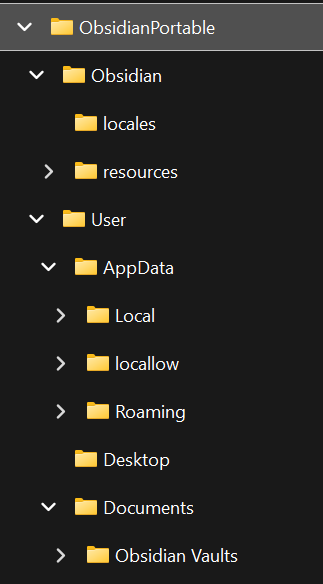
First, thanks to @Royi for sharing the elements of the script which setup the required directories and environment variables to make this work in a Portable manner. I’ve expanded upon his template for those who want to roll their own portable install (and be able to update it).
The Windows batch file I’ve created does the following:
- Checks for the presence of the Obsidian-x.y.z.exe installer within the same directory as the batch file
- If the installer exists, extract the app-64.7z file from the installer (if present) and delete the installer, then extract the contents of the app-64.7z file to .\Obsidian\ and delete the app-64.7z file
- If the installer is not present, echo in the command window that no Installer was found
- Check for the presence of the .\Obsidian\ subdirectory
- If present, create subdirectories for user profile information, set environment variables for user profile information, and start Obsidian
- If not present, echo with pause that Obsidian is not installed and to put the installer file in this directory
Requirements to make this batch file work:
- Create a root directory in which to put this batch file
- Copy 7z.exe. 7z.dll, 7-zip.dll, 7-zip32.dll, License.txt to the newly created directory from a copy of 7-Zip
- Download the latest Obsidian installer to the directory
- Create a new batch file containing the following code:
@echo off
%~d0
cd %~dp0

:: Installing Obsidian from Obsidian-VersionNumber.exe
IF EXIST ".\Obsidian-*.exe" (
	FOR /F "TOKENS=*" %%F IN ('DIR /B "Obsidian-*.exe"') DO 7z e "%%~fF" -r app-64.7z
	DEL Obsidian-*.exe /Q
	7z x -aoa -o".\Obsidian\" app-64.7z
	DEL app-64.7z /Q
) ELSE (
	echo Obsidian installer not found.
	echo -------------------------------
)

IF EXIST "Obsidian" (
	:: Creating Folders
	REM if not exist "%~dp0User\AppData" mkdir "%~dp0User\AppData"
	REM if not exist "%~dp0User\AppData\Local" mkdir "%~dp0User\AppData\Local"
	REM if not exist "%~dp0User\AppData\Local\Temp" mkdir "%~dp0User\AppData\Local\Temp"
	if not exist "%~dp0User\AppData\Roaming" mkdir "%~dp0User\AppData\Roaming"
	if not exist "%~dp0User\Desktop" mkdir "%~dp0User\Desktop"
	if not exist "%~dp0User\Documents" mkdir "%~dp0User\Documents"
	REM if not exist "%~dp0User\ProgramData" mkdir "%~dp0User\ProgramData"
	REM if not exist "%~dp0User\Public" mkdir "%~dp0User\Public"

	:: Setting Env Variables
	set HOMEPATH=%~dp0User
	set USERPROFILE=%~dp0User
	set APPDATA=%~dp0User\AppData
	REM set LOCALAPPDATA=%~dp0User\AppData\Local
	set ALLUSERSPROFILE=%~dp0User\ProgramData\Roaming
	set ALLUSERSAPPDATA=%~dp0User\AppData
	REM set ProgramData=%~dp0User\ProgramData
	REM set Public=%~dp0User\Public
	REM set TEMP=%~dp0User\AppData\Local\Temp
	REM set TMP=%~dp0User\AppData\Local\Temp

	:: if not exist "%dp0User\Documents\Obsidian" goto message
	goto message

	:message
	echo PORTABLE Obsidian
	echo -------------------------------
	goto start

	:start
	start .\Obsidian\Obsidian.exe
	goto end
) ELSE (
	echo Obsidian not installed
	echo Please put Obsidian-x.y.z.exe file in this directory
	pause
)

:end
exit
- Run the batch file (You will need to launch Obsidian with this batch file each time)
Provided Obsidian don’t make changes to their installer filename structure, or the structure of the contents of the installer, this batch file is version agnostic and will appropriately replace files when run with an updated installer in the root directory prior to launching the program.