Widgets for Obsidian – iOS App

Hi @rvdakker,

the spacing issue is indeed a bug in the app. I never tested it with that many actions! Thanks for mentioning it. I will keep you updated on a fix.
I’ll also think about ways to organise the Actions into different widgets.

In other news, here is the update for the recent release:

1.6.0

:sparkles: Features

  • The Add Quick Note dialog has got a design refresh to be more on line with Obsidian, put the spotlight and your text and to make saving notes more convenient.
  • You can set a different attachment path per destination
  • You can configure to save the note when closing the app. This can be enabled via the settings. @kalintri while the app still can’t auto-close after saving, this means you can just close the app to save the note.

:bug: Fixes

  • Notes can be saved without entering a body
1 Like

Hi @Joschua! Congrats on your app so far; it looks fantastic from the thread.

I wanted to ask if there is currently support for MacOS. Unfortunately, when I tried to install it earlier today, I encountered some app-breaking bugs, including the widgets’ inability to load.

If not, I hope support can come soon.

Thanks!

1 Like

Hi, and thank you for the kind words!

The app doesn’t intentionally support MacOS yet. But I’ve heard that the Actions functionality still works, while Quick Note doesn’t. Has that also been your experience?

For an alternative on MacOS, you could have a look at the Raycast Obsidian extension. I believe it has functionality similar to Quick note.

For iOS and macOS, MacOS Shortcut update

2 Likes

1.6.1

:bug: Fixes

  • Improve Actions widget layout with more items (thanks @rvdakker!)
  • Fix focus jumping to textfield from title

You can update or download now from the App Store.

Hey man! The app is GOLDEN!! Between shortcut functionality and Lock Screen widget it’s literally everything I need!

However I have one piece of input. Whenever I open the app it pauses the music I’m playing. Idk if it’s a common bug or smth with my specific device but it’s even when I transition from shortcuts through your app to obsidian itself.

Is this a known issue?

Hi! Thank you so much for your kind words. I’m glad you like the app! (if you haven’t already, an App Store rating is appreciated :hugs:).

To the issue, I have had another user mention it as well. I couldn’t reproduce it on my device, but I understand how it’s annoying that that happens. I added it to my roadmap to investigate. Thank you for bringing it to my attention!

1.7.0

:sparkles: Features

  • You can now reorder Actions
  • Single Action widget displays nicer in dark mode

:bug: Fixes

  • Add support for tinted mode
  • Allow more actions in extra large widget

@DukeVonFace, can I send you a DM to debug the issue? I can’t reproduce it on my device.

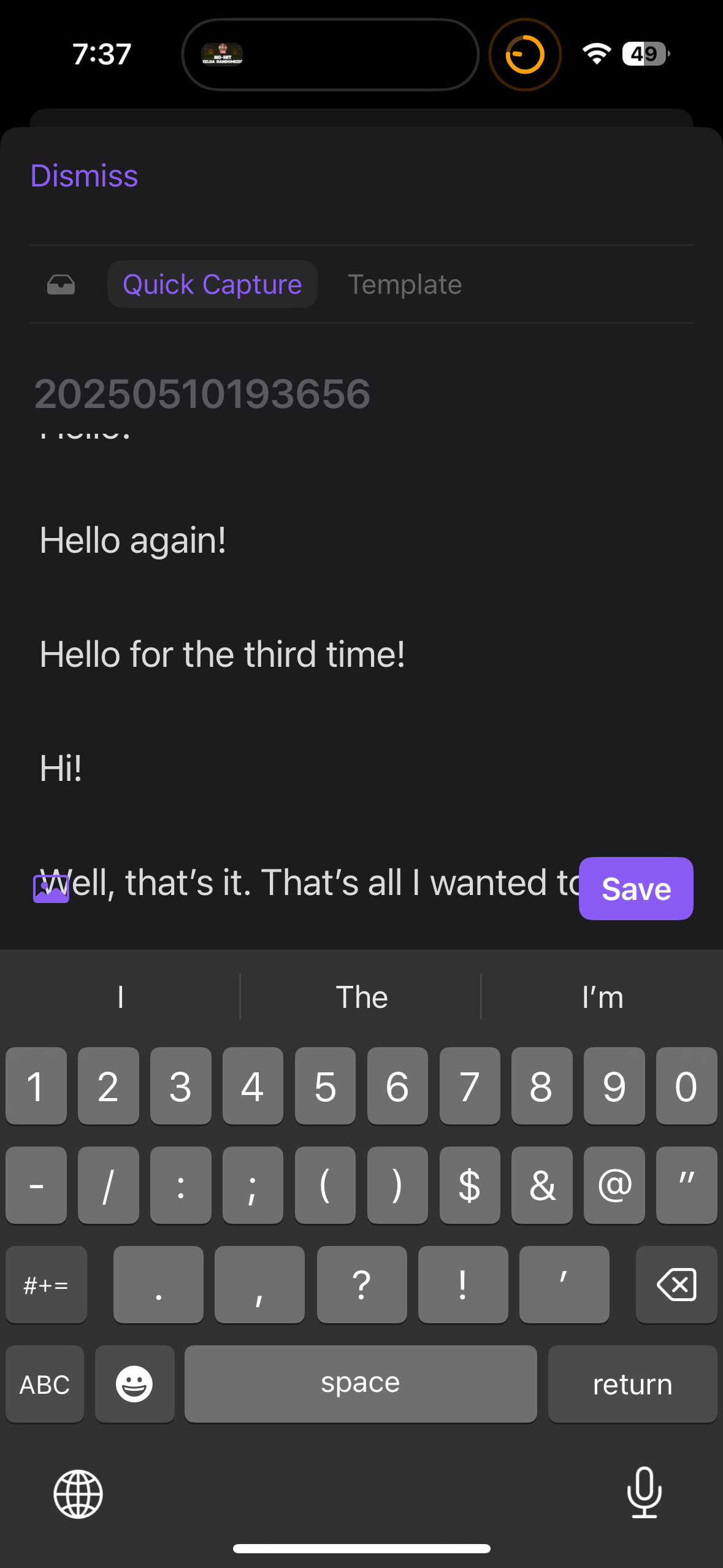
Hello! Quick little bug report (if you would consider it that). When writing in a new capture, the text ends up behind the buttons at the bottom of the screen. I’m not sure if the intention is that captures should never be that long or what’s up.

Transcript of text on screen:

Hello!

Hello again!

Hello for the third time!

Hi!

Well, that’s it. That’s all I wanted to say.

Specs:

  • iPhone 15
  • iOS 18.4.1 (it’s been happening for a few versions)

Hi! Thank you for raising this issue. I’ll make sure to fix this in the next release.

1 Like

Just discovered this, it is absolutely amazing. Thank you so much for the development.

1 Like

Thank you for your kind words! I’m glad you enjoy it!
A rating in the App Store helps others discover this too :smiling_face:

Hey Joshua, I’m new to obsidian, Does my vault have to be in iCloud to use this?

Hi Wes! Welcome to Obsidian :grinning_face_with_smiling_eyes:

You don’t need your Vault in iCloud to use Widgets for Obsidian.

If you run into any problems, or have a question, feel free to shoot me a DM!

Can you download widgets from other users ?
Is there a catalog or something ?

I think the bigger market is getting widgets into the hands of people who can’t make them !

The people that can make widgets can also make their own shortcuts.

That’s a great idea! Do you mind if I send you a DM, I’d love to chat about it further.


In other news…

1.8.0

:sparkles: Features

  • Widget groups: You can organise your actions into sets. (Premium only)
  • Auto-focus quick note title if empty

:bug: Fixes

  • Move attachment and save buttons below text (Thanks @Stray-Sticky-Note !)
  • Fix typos
  • Set default existing strategy to append.

sure.
The most useful part of Premium should be access to 100s of premade actions. Your target audience (like me) can’t make shortcuts. :slight_smile:

But I don’t mind spending money for something that works.

Buy an app, download the pre-made shortcuts I need, possibly with some customization, done.

1 Like

I’d love if this could show the contents of a file in a widget (like the Markdown Widget app can), with an option to hide the front matter, and clicking the widget would bring you to the file in Obsidian. Would this be possible to implement?

1 Like

Yes, I believe that’s doable! I put it on the roadmap, and will keep you updated.

1 Like

Thanks! Can’t wait :smiley:

1 Like