Just getting into customizing my Obsidian workspace through CSS snippets recently. Extremely fun and engaging. I am new to CSS as well and am slowly gaining an understanding, but I have hit a wall recently.
I have been going through the Obsidian Dev Documentation over CSS Classes and Variables. Primarily trying to correlate the classes in the snippet I have with the information on the documentation; however it doesn’t seem to line up exactly.
For Example, I have the following snippet which hides properties in Reading Mode.
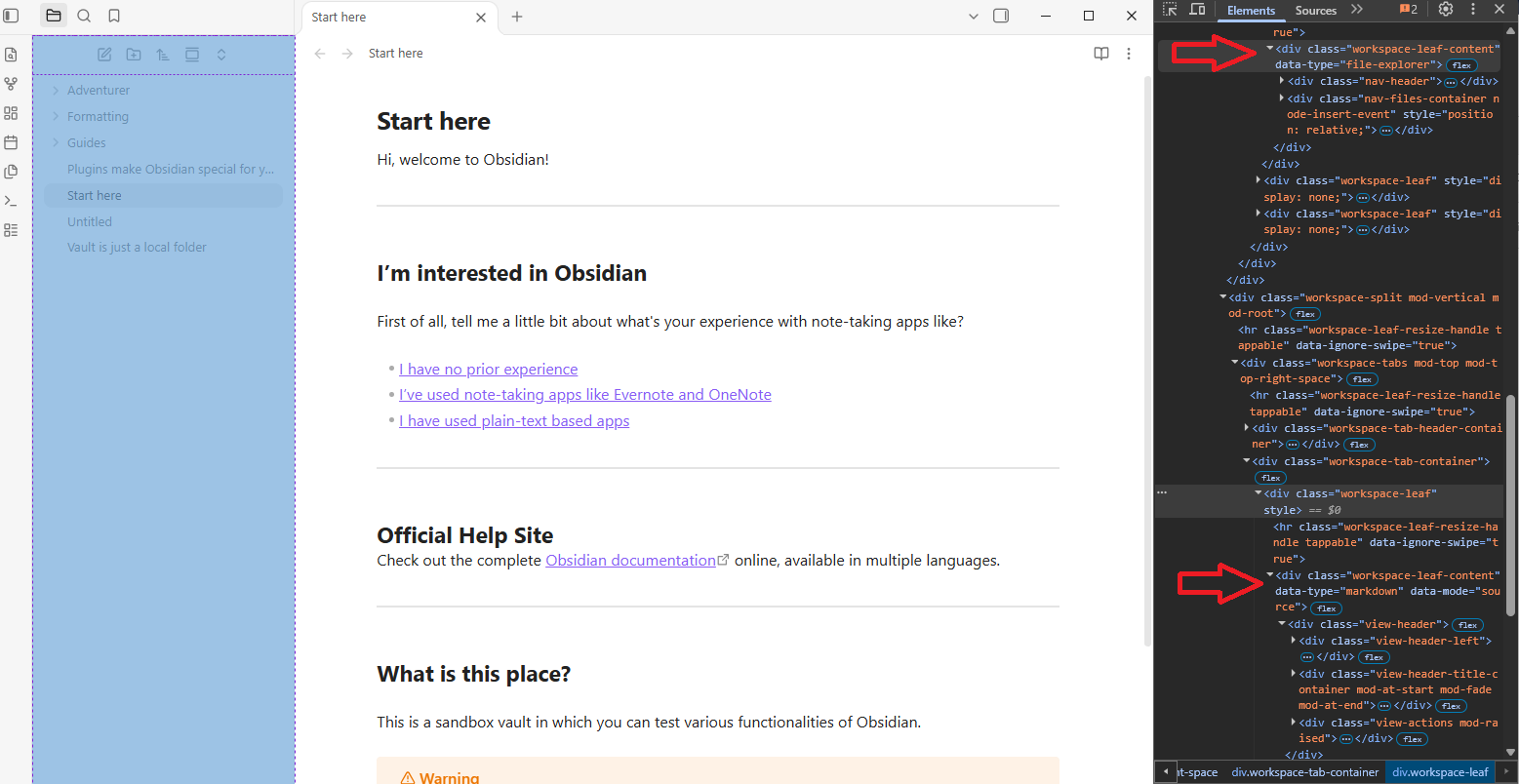
I want to alter this to hide properties in Live Editing mode (I have since found a solution to that). When breaking it down, I wanted more info on the .workspace-leaf-content class and the data-mode property within. However, the best I could do is the CSS Variable and the TypeScript API in the documentation. Neither of which, from what I could tell, had the documentation for the class specifically. I was able to find it through “inspect element” in the HTML code, but that’s hardly helpful. Additionally, I could not find “data-mode” information anywhere except forum posts. I can find some variables that almost match the class, but in use don’t work as expected.
Am I missing some knowledge of how to interpret the documentation to create and use these classes?
Are the classes specific to Obsidian or some common repo? I couldn’t find them on the Mozilla CSS Docs.
Would appreciate more guidance in this. Feel like I gave it my due diligence before coming here. Thank you!
I don’t think I’ve seen any official Obsidian documentation for data-mode specifically. It’s not in app.css (Obsidian’s default CSS), but it does show up in the DOM/HTML in the DevTools, so you can target it with CSS.
Try searching the web for “CSS attribute selector” or similar.
Seems you’ve sorted it out already, but there are two variables for showing/hiding the metadata editor in the different views that can be used with a cssclass:
For .workspace-leaf-content, I think that is specific to Obsidian, but I’m not really playing around in the dev tools for other apps, so can’t say for sure.
I think of .workspace-leaf and the inner .workspace-leaf-content as the panes in Obsidian.
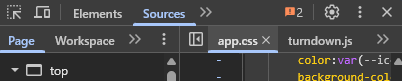
Thank you for the shout of grabbing the whole app.css file. I’m assuming the .workspace-leaf-content class would be defined in that app.css file? That was more my general question, where would classes like .workspace-leaf-content and variables such as metadata-display-reading would be. If those are all in app.css then I think that answers my question.
It definitely does contain the class. I think my confusion comes from not fully understanding the hierarchy of where variables could be. i.e. of course the variable controlling the visibility of the properties is in that section the documentation. Thank you for the help!
This is just a little more info for your knowledge. Every class won’t necessarily be in app.css.
Devs assign classes to HTML elements to identify them for JavaScript manipulation, for styling, and even just to have an organized structure for maintaining and understanding the layout and functionality.
Classes will appear in app.css for that second reason only. There are classes whose creation have nothing to do with styling; it’s incidental (and helpful) that they can be used for styling too. Also, Obsidian might assign a class for the specific purpose of giving users easier styling access, but if Obsidian itself doesn’t style the class by default, then it has no reason to be in app.css.
The best way to find them, to know what their styles’ values are in a specific state, and to know the specificity you need to change their values… truly is to look in DevTools.
The panel where you got app.css, if you got if from the place in ariehen’s screenshot, is DevTools.
In Obsidian, press Cmd + Opt + I / Ctrl + Shift + I to open it. Then press Cmd + Opt + C / Ctrl + Shift + C to inspect elements. Then move your mouse over things to see the info in the popup and in the Elements panel on the right.