Hi all,
As ‘26 comes around I am winter cleaning my vault. I came across my tried and true Weather Widget and figured I would share it with you all as a way to give back to an awesome community.
The widget has caching built in so you won’t exhaust(or even come close) the OpenWeather API rate limits.
Screenshots
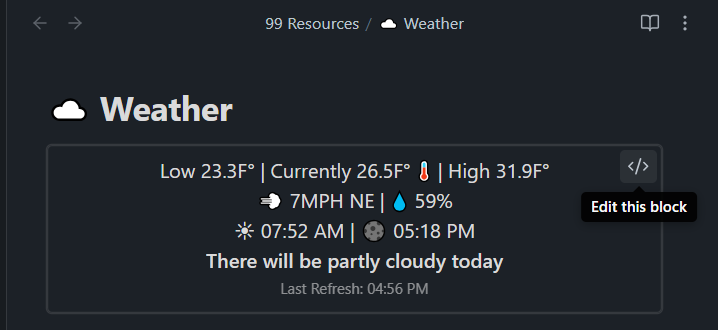
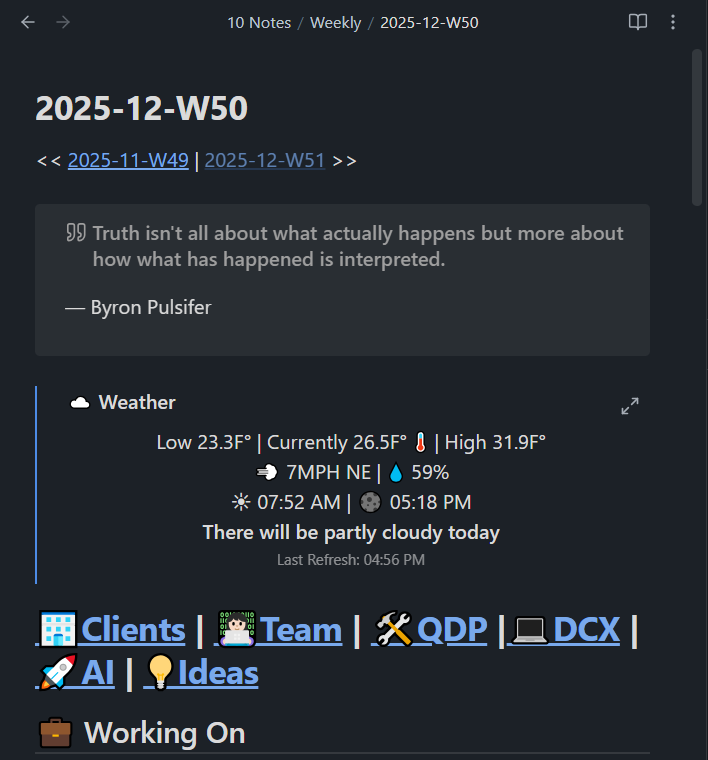
Here’s what it looks like in my weekly note.
Requirements
- OpenWeather API Token
- Dataview plugin Installed with JS queries enabled
- Longitude & Latitude for your location
Copy and paste the following into a dataviewjs markdown block. I recommend putting it in a separate file and reference it in your daily/weekly note.
Expand for dataviewjs code
// Update the data points below
const OPENWEATHER_LON = "-00.000";
const OPENWEATHER_LAT = "00.000";
const OPENWEATHER_API_KEY = "8b5fxxxxxxxxxxxxxxxxxxxxxxxxxxxx";
// DO NOT TOUCH BELOW UNLESS YOU KNOW WHAT YOU ARE DOING
const OPENWEATHER_API_URL = `https://api.openweathermap.org/data/3.0/onecall?lat=${OPENWEATHER_LAT}&lon=${OPENWEATHER_LON}&units=imperial&appid=${OPENWEATHER_API_KEY}`
loadOpenWeatherData().then(data => {createWeatherWidget(data)});
async function loadOpenWeatherData() {
//cache for 30 minutes, if stored data is older than 30 minutes, refresh
let owCache = window.localStorage.getItem("openweather-cache");
if (owCache) {
let cacheObj = JSON.parse(owCache);
//if 30 minutes haven't passed, return cache
if ((Date.now() / 1000).toFixed(0) - cacheObj.current.dt < 1800) {
return cacheObj;
}
}
let res = await fetch(OPENWEATHER_API_URL);
let resJSON = await res.json();
//save to cache
window.localStorage.setItem("openweather-cache", JSON.stringify(resJSON));
return resJSON;
}
function createWeatherWidget(data) {
console.log("data", data)
let tmpLowStr = `Low ${data.daily[0].temp.min.toFixed(1)}F°`;
let tmpStr = `Currently ${data.current.temp.toFixed(1)}F° 🌡️`;
let tmpHighStr = `High ${data.daily[0].temp.max.toFixed(1)}F°`;
const timeFmtOpts = {
minutes: "numeric",
hours: "numeric"
}
let sunriseTime = `☀️ ${(new Date(data.current.sunrise * 1000)).toLocaleTimeString(navigator.language, { hour: '2-digit', minute: '2-digit' })}`;
let sunsetTime = `🌑 ${(new Date(data.current.sunset * 1000)).toLocaleTimeString(navigator.language, { hour: '2-digit', minute: '2-digit' })}`;
let windStr = `💨 ${data.current.wind_speed.toFixed(0)}MPH ${degreeToCardinalDirection(data.current.wind_deg)}`;
let humidity = `💧 ${data.current.humidity}%`;
const elAttrs = {
attr: {
style: "line-height: 0.5; text-align: center;"
}
}
dv.el("p", `${tmpLowStr} | ${tmpStr} | ${tmpHighStr}`, elAttrs);
dv.el("p", `${windStr} | ${humidity}`, elAttrs);
dv.el("p", `${sunriseTime} | ${sunsetTime}`, elAttrs);
dv.el("p", `<b>${data.daily[0].summary}</b>`, elAttrs);
elAttrs.attr.style = "line-height: 0.5; text-align: center; font-size: 12px; opacity: 0.6;";
dv.el("p", `Last Refresh: ${new Date(data.current.dt * 1000).toLocaleTimeString(navigator.language, { hour: '2-digit', minute: '2-digit' })}`, elAttrs);
}
function degreeToCardinalDirection(degree) {
if (degree < 0 || degree > 360) {
return 'Degree must be between 0 and 360';
}
const directions = ['N', 'NE', 'E', 'SE', 'S', 'SW', 'W', 'NW'];
const index = Math.floor((degree + 22.5) / 45);
return directions[index % 8];
}
Enjoy!
-Alex