Steps to reproduce
- Enable Vim in editor settings.
- Follow the link to another page (I used the “I have no prior experience” page on the “Start Here” page in Sandbox) using ⌘
 .
.
- The Vim cursor is gone.
- If I switch to the “Start Here” page with ⌘⇧← and back with ⌘⇧→ then the cursor appears.
Yes.
Expected result
I should get to the end result of step 4 without having to switch back and forth
Actual result
No Vim cursor.
Environment
SYSTEM INFO:
	Obsidian version: v1.8.4
	Installer version: v1.6.7
	Operating system: Darwin Kernel Version 24.1.0: Thu Oct 10 21:02:45 PDT 2024; root:xnu-11215.41.3~2/RELEASE_ARM64_T8112 24.1.0
	Login status: not logged in
	Language: en
	Insider build toggle: off
	Live preview: on
	Base theme: adapt to system
	Community theme: none
	Snippets enabled: 0
	Restricted mode: on

RECOMMENDATIONS:
	none
Additional information
None.
I forgot to include this in the initial report, but please let me know if you are unable to reproduce this bug. I would be happy to provide a screen recording of it on my end if there are any issues.
I can’t reproduce. In the troubleshooting guide you were asked to download and reinstall Obsidian, please do so.
After that, please post a screen recording of this happening in the sandbox vault.
Do you have any other software that may intercept the alt-enter?
Thank you so much for following up.
I forgot to reinstall Obsidian last time, so I did that this time. I am still able to reproduce the bug.
For the screen recording, I had KeyCastr turned on, but the bug can be duplicated without keystroke visualization turned on (and KeyCastr completely quit).
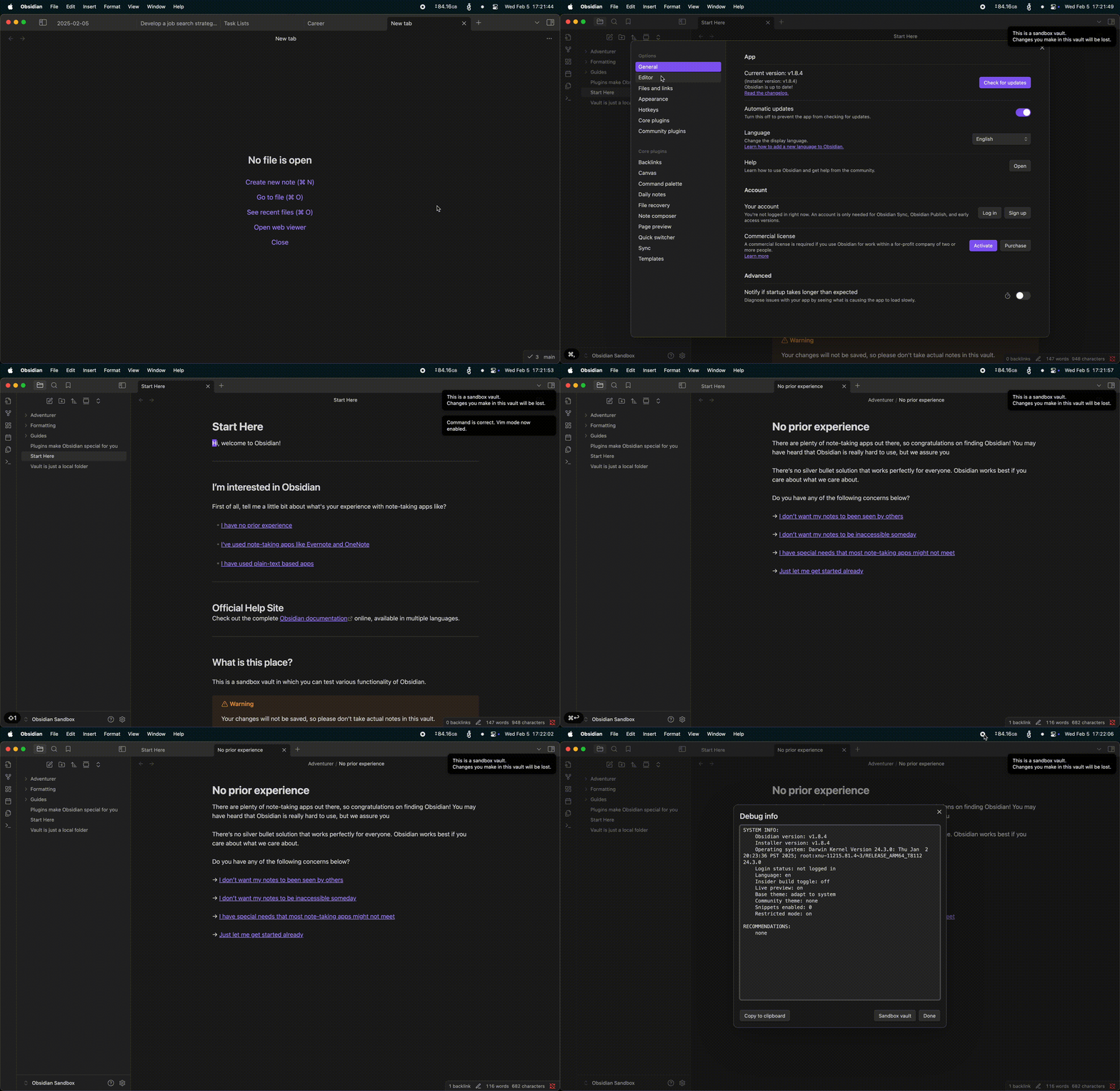
Not sure how relevant this would be, but I use a Japanese keyboard for input. I’ll see if I can reproduce this bug with an external keyboard that has the standard US layout.
If I can think of any other non-standard parts of my setup I’ll come back with updates, but that’s all I have for now.
Did this problem begin with 1.8.4 or you had this problem with previous releases as well?
I only recently switched to Vim so I can’t speak to exactly when this problem started for me. However, I don’t think it started with 1.8.4. I remember using Vim before 1.8.4 and still having this issue. Please take this with a grain of salt because I can’t double check right now.
Is there a good way to downgrade and install previous versions like 1.8.3 or 1.7.x? I would be more than happy to try to determine if this is a regression, and identify the exact release if so.
I was able to confirm that I can reproduce the bug with a non-Japanese keyboard layout as well.
I rebooted my computer in Safe Mode and was able to reproduce the bug. The only other application I had open at the time was Alfred.
@WhiteNoise have you been able to reproduce the bug?
I haven’t been able to reproduce. Does it happen if you bid the command with another hotkey?
Unfortunately, yes. I rebound “Open link under cursor in new tab” to ⌃O (instead of ⌘↩) and the bug is still the same.
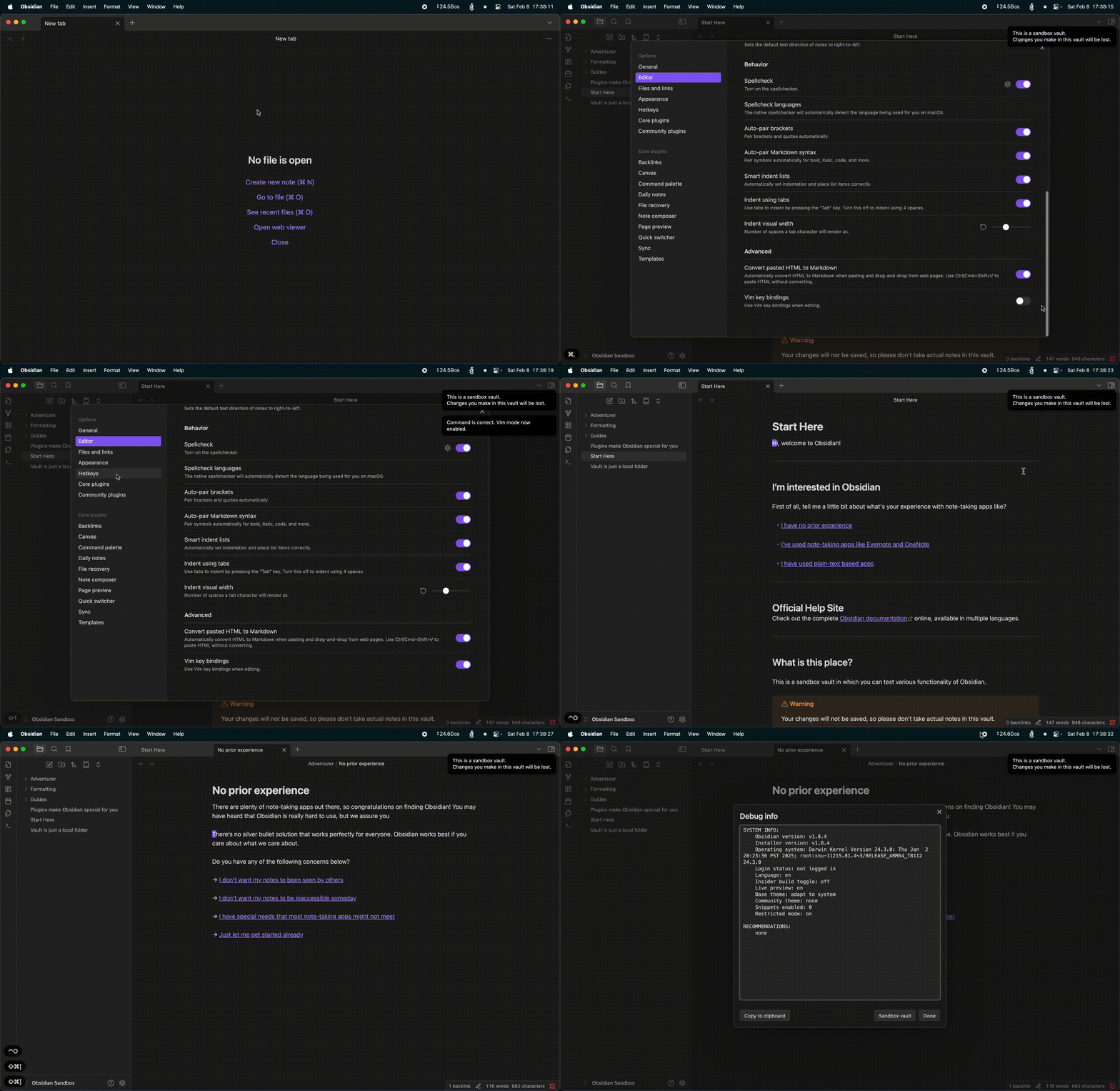
I can reproduce the problem when opening to the right, new tab, window. Not same tab. Regardless of vim. I am going to fork the issue I can reproduce in a different thread.
To clarify, when you say “regardless of vim”, do you mean…
- You can reproduce only when vim is not enabled
- You can reproduce regardless of whether or not vim is enabled
If you mean #2, then we are able to reproduce the same behavior, and I think this topic can be marked repro as well. If you mean #1, then I’d love to see a screen recording of the vim cursor not disappearing when opening in a new tab (or to the right / new window), just to see if I can figure out what differences are causing the issue on my end but not yours.
No rush on this by the way. I’m already very appreciative of the effort you’ve put into responding to my messages.
No this topic can’t be marked because I can’t reproduce what you described.
It’s possible that the two issues are connected but I am not sure.
Thank you for confirming.
I’ll see what I can do to narrow down the issue further.