Disclaimer
Is this project open source? Yes
Is this project completely free? Yes
Is this project vibe-coded beyond the author’s ability to comprehend how it works? Yes
Community Directory: N/A (This is a workflow showcase / CSS snippet, not a plugin)
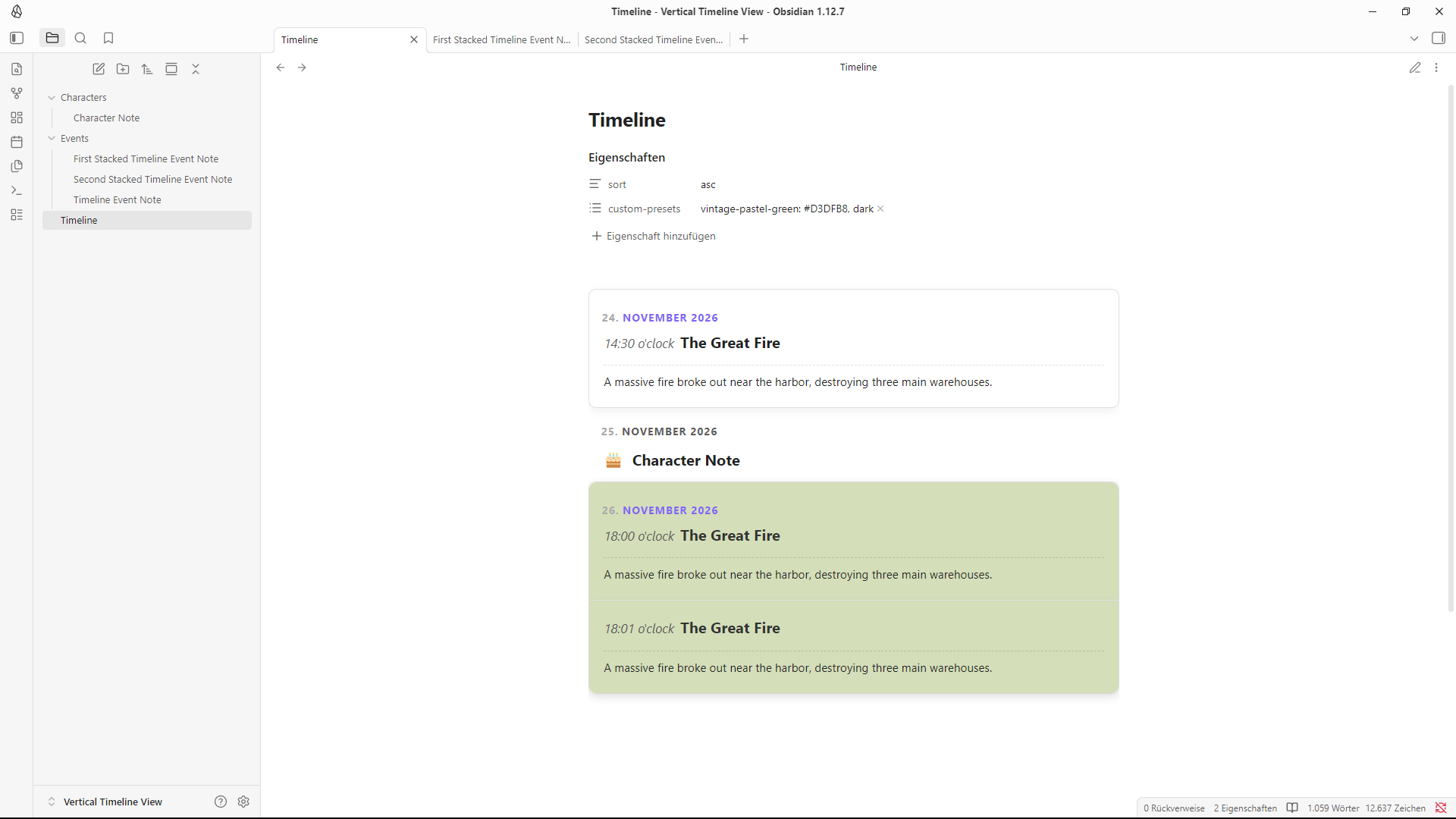
Vertical Timeline View (DataviewJS + CSS snippet)
Hey there,
first up, I am not a programmer, but my drive for perfectionism never let’s me rest, so with the help of heavy vibe coding I created this and thought it still might be worth to share. I made sure that the code is clean and should work regarding your theme, is highly customizable and shouldn’t break with the next update. If there is any issue, I will try to fix it to the best of my capabilities.
Support for the Style Settings plugin was added, but maybe will be expanded on in the future.
What’s it for?
This is a custom DataviewJS code that searches your notes for specific frontmatter dates and organizes them into a clean, interactive and adaptive, vertical timeline layout using custom CSS. It supports customization options and should work regardless of the theme as well as light and dark modes.
Step 0: Plugins
To use this, you need to install the following community plugins:
- Dataview (Ensure Enable JavaScript Queries is turned on in the plugin settings)
- Optional: StyleSettings (Allows changing a few variables to customize the look)
Step 1: Create the CSS Snippet
- Open your vault settings and navigate to Appearance.
- Under the CSS snippets section, click the folder icon to open the snippets directory.
- Right-Click, to create a new text file named
timeline.css. - Paste the following code into it:
Code
/* @settings
name: Vertical Timeline View
id: vertical-timeline-view-settings
settings:
  - id: timeline-max-width
    title: Timeline Max Width
    type: variable-number
    default: 750
    format: px
  - id: timeline-card-radius
    title: Card Border Radius
    type: variable-number
    default: 10
    format: px
  - id: timeline-row-gap
    title: Space Between Cards
    type: variable-number
    default: 0.85
    format: rem
  - id: timeline-title-size
    title: Title Text Size
    type: variable-number
    default: 1.25
    format: rem
  - id: timeline-body-size
    title: Body Text Size
    type: variable-number
    default: 0.95
    format: rem
  - id: hide-timeline-properties
    title: Hide Page Properties
    description: When enabled, file properties (YAML metadata) will be completely hidden.
    type: class-toggle
*/

/* Initialize variables */
:root {
    --timeline-max-width: 750px;
    --timeline-card-radius: 10px;
    --timeline-row-gap: 0.85rem;
    --timeline-title-size: 1.25rem;
    --timeline-body-size: 0.95rem;
}

/* =========================================================================
   1. TABLE WRAPPER & CONTAINER ISOLATION
   ========================================================================= */

.custom-timeline-view table.dataview.table-view-table {
    display: block !important;
    width: 100% !important;
    max-width: var(--timeline-max-width) !important;
    margin: 1rem auto !important;
    border-collapse: collapse !important;
    border: none !important;
    background: transparent !important;
}

.custom-timeline-view thead,
.custom-timeline-view th {
    display: none !important;
}

.custom-timeline-view tbody {
    display: flex !important;
    flex-direction: column !important;
    gap: var(--timeline-row-gap) !important;
    width: 100% !important;
    border: none !important;
    background: transparent !important;
}

/* =========================================================================
   2. CARD LAYOUT AND INTERACTION ENGINE
   ========================================================================= */

.custom-timeline-view tbody tr {
    display: flex !important;
    flex-direction: column !important;
    width: 100% !important;
    padding: 1.2rem !important;
    box-sizing: border-box !important;
    position: relative !important;
    background-color: var(--background-primary) !important;
    border-radius: var(--timeline-card-radius) !important;
    border: 1px solid var(--background-modifier-border) !important;
    box-shadow: 0 4px 12px rgba(0, 0, 0, 0.06) !important;
    margin: 0 !important;
    transition: transform 0.2s ease, box-shadow 0.2s ease !important;
}

.custom-timeline-view tbody tr:not(.timeline-birthday-row):hover,
.custom-timeline-view .timeline-group-block tr:not(.timeline-birthday-row):hover,
.custom-timeline-view table.dataview.table-view-table tbody tr:not(.timeline-birthday-row):hover {
    background-color: var(--background-primary) !important;
    --table-row-hover-background: var(--background-primary) !important;
    transform: translateY(-1px) !important;
    box-shadow: 0 6px 16px rgba(0, 0, 0, 0.12) !important;
    z-index: 10 !important;
}

.custom-timeline-view tbody tr[data-custom-bg]:not(.timeline-birthday-row):hover {
    transform: translateY(-1px) !important;
    box-shadow: 0 6px 16px rgba(0, 0, 0, 0.2) !important;
    z-index: 10 !important;
}

/* =========================================================================
   3. INTERNAL CELL STRUCTURE & TYPOGRAPHY
   ========================================================================= */

.custom-timeline-view tbody td {
    display: block !important;
    width: 100% !important;
    max-width: 100% !important;
    border: none !important;
    padding: 0.2rem 0 !important;
    background: transparent !important;
}

.custom-timeline-view tbody tr td:nth-child(1) {
    font-weight: bold !important;
    color: var(--text-accent) !important;
    font-size: 0.9rem !important;
    text-transform: uppercase !important;
    letter-spacing: 0.05em !important;
    box-sizing: border-box !important;
    min-width: max-content !important;
    overflow: visible !important;
    white-space: nowrap !important;
}

.custom-timeline-view tbody tr td:nth-child(3) {
    display: flex !important;
    align-items: center !important;
    flex-wrap: wrap !important;
    font-size: var(--timeline-title-size) !important;
    margin-bottom: 0.5rem !important;
}

.custom-timeline-view tbody tr:not(.timeline-birthday-row) td:nth-child(3) a.internal-link {
    color: var(--text-normal) !important;
    font-weight: bold !important;
    text-decoration: none !important;
    border-bottom: none !important;
    box-shadow: none !important;
    pointer-events: none !important;
}

.custom-timeline-view tbody tr td:nth-child(4) {
    font-size: var(--timeline-body-size) !important;
    line-height: 1.5 !important;
    padding-top: 0.6rem !important;
    margin-top: 0.4rem !important;
    position: relative !important;
    z-index: 6 !important;
    border-top: 1px dashed var(--background-modifier-border) !important;
}

.custom-timeline-view tbody tr:not([data-custom-bg]):not([data-force-dark-text]) td:nth-child(4) {
    color: var(--text-normal) !important;
}

.custom-timeline-view .timeline-timestamp {
    font-style: italic !important;
    font-weight: normal !important;
    font-size: calc(var(--timeline-title-size) * 0.85) !important;
    margin-right: 0.5rem !important;
    display: inline-block !important;
    color: var(--text-muted) !important;
}

.custom-timeline-view tbody tr:not(.timeline-birthday-row) td:nth-child(3) a.internal-link .iconize-icon,
.custom-timeline-view tbody tr:not(.timeline-birthday-row) td:nth-child(3) a.internal-link svg,
.custom-timeline-view tbody tr:not(.timeline-birthday-row) td:nth-child(3) a.internal-link img {
    display: none !important;
}

/* =========================================================================
   4. NATIVE CLICKABLE CONTAINER OVERLAY SYSTEM
   ========================================================================= */

.custom-timeline-view tbody tr:not(.timeline-birthday-row) td:nth-child(2) {
    display: block !important;
    position: static !important;
    height: 0px !important;
    padding: 0 !important;
    margin: 0 !important;
}

.custom-timeline-view tbody tr:not(.timeline-birthday-row) td:nth-child(2) a.internal-link {
    position: absolute !important;
    top: 0 !important;
    left: 0 !important;
    right: 0 !important;
    bottom: 0 !important;
    width: 100% !important;
    height: 100% !important;
    font-size: 0 !important;
    color: transparent !important;
    background: transparent !important;
    border: none !important;
    box-shadow: none !important;
    z-index: 5 !important;
}

/* =========================================================================
   5. COLOR ROLE DESIGNATION OVERRIDES
   ========================================================================= */

.custom-timeline-view tbody tr[data-custom-bg] td:nth-child(3) a.internal-link { color: #ffffff !important; }
.custom-timeline-view tbody tr[data-custom-bg] .timeline-timestamp { color: rgba(255, 255, 255, 0.6) !important; }
.custom-timeline-view tbody tr[data-custom-bg] td:nth-child(4) { color: rgba(255, 255, 255, 0.9) !important; }
.custom-timeline-view tbody tr[data-custom-bg] td:nth-child(4) { border-top-color: rgba(255, 255, 255, 0.25) !important; }

.custom-timeline-view tbody tr[data-force-dark-text] td:nth-child(3) a.internal-link { color: #333333 !important; }
.custom-timeline-view tbody tr[data-force-dark-text] .timeline-timestamp { color: #555555 !important; }
.custom-timeline-view tbody tr[data-force-dark-text] td:nth-child(4) { color: #222222 !important; }
.custom-timeline-view tbody tr[data-force-dark-text] td:nth-child(4) { border-top-color: rgba(0, 0, 0, 0.15) !important; }

/* =========================================================================
   6. COMPLEX MULTI-LOG GROUPING BLOCKS
   ========================================================================= */

.custom-timeline-view .timeline-group-block {
    display: flex !important;
    flex-direction: column !important;
    width: 100% !important;
    border-radius: var(--timeline-card-radius) !important;
    overflow: visible !important;
    box-shadow: 0 4px 12px rgba(0, 0, 0, 0.08) !important;
    border: 1px solid var(--background-modifier-border) !important;
}

.custom-timeline-view .timeline-group-block tr {
    border: none !important;
    box-shadow: 0 4px 12px rgba(0, 0, 0, 0.06) !important;
    border-radius: 0px !important;
}

.custom-timeline-view .timeline-group-block tr + tr {
    border-top: 1px solid var(--background-modifier-border) !important;
}

.custom-timeline-view .timeline-group-block tr:first-child {
    border-top-left-radius: var(--timeline-card-radius) !important;
    border-top-right-radius: var(--timeline-card-radius) !important;
}
.custom-timeline-view .timeline-group-block tr:last-child {
    border-bottom-left-radius: var(--timeline-card-radius) !important;
    border-bottom-right-radius: var(--timeline-card-radius) !important;
}

.custom-timeline-view .timeline-group-block tr.same-day-card td:nth-child(1) {
    display: none !important;
}

/* =========================================================================
   7. MINIMALIST BIRTHDAY ROW STRUCTURAL COMPONENT
   ========================================================================= */

.custom-timeline-view tbody tr.timeline-birthday-row {
    background-color: transparent !important;
    border: none !important;
    box-shadow: none !important;
    padding: 0 !important;
    margin-top: 0 !important;
    margin-bottom: 0 !important;
    gap: 0 !important;
}

.custom-timeline-view tbody tr.timeline-birthday-row + tr.timeline-birthday-row {
    margin-top: 0.85rem !important;
}

.custom-timeline-view tbody tr.timeline-birthday-row td:nth-child(1) {
    display: block !important;
    width: 100% !important;
    max-width: 100% !important;
    padding-left: 1.2rem !important;
    padding-bottom: 0px !important;
    margin-bottom: 0px !important;
    color: var(--text-normal) !important;
}

.custom-timeline-view tbody tr.timeline-birthday-row td:nth-child(2),
.custom-timeline-view tbody tr.timeline-birthday-row td:nth-child(4) {
    display: none !important;
}

.custom-timeline-view tbody tr.timeline-birthday-row td:nth-child(3) {
    display: flex !important;
    align-items: center !important;
    width: 100% !important;
    padding-left: 1.2rem !important;
    margin-top: 0.5rem !important;
    margin-bottom: 0px !important;
}

.custom-timeline-view tbody tr.timeline-birthday-row td:nth-child(3) a.internal-link {
    display: inline-flex !important;
    align-items: center !important;
    pointer-events: auto !important;
    font-weight: bold !important;
    text-decoration: none !important;
    border-bottom: none !important;
    box-shadow: none !important;
    color: var(--text-normal) !important;
}

.custom-timeline-view tbody tr.timeline-birthday-row:hover {
    background-color: transparent !important;
    transform: none !important;
    box-shadow: none !important;
    z-index: initial !important;
}

/* =========================================================================
   8. OPTIONAL PROPERTY INTERFACES (STYLE SETTINGS CONTROLLED)
   ========================================================================= */

body.hide-timeline-properties .metadata-container {
    display: none !important;
}
- Save the file (Strg + S) and return to the CSS snippets section in Obsidian.
- Refresh and toggle the
timelinesnippet on.
Step 2: Create the Timeline Note
- Create a new note, where you want your timeline to appear, anywhere in your vault.
- Paste the following Frontmatter into it:
Code
---
sort: asc
custom-presets:
  - "vintage-pastel-green: #D3DFB8, dark"
---
Notes
- sort: (optional) Choose between
ascanddescfor an ascending or descending sort. If left empty the timeline is sorted in ascending order beginning with the oldest date at the top. - custom-presets: (optional) Add custom card color presets by defining a reference name, hex code and light or dark default text. Use the code above as reference for each entry.
- Paste the following DataviewJS code below the Frontmatter into it:
Code
```dataviewjs
// Initialization: Bind custom class targeting for modular timeline rendering overrides
this.container.addClass("custom-timeline-view");
// Fetch the sort preference from frontmatter (Default to "asc" if not defined)
const sortOrder = dv.current().sort === "desc" ? "desc" : "asc";
// Multi-language chronological index routing for explicit textual strings
const monthMap = {
januar: 1, feb: 2, februar: 2, märz: 3, maerz: 3, april: 4,
mai: 5, juni: 6, juli: 7, august: 8, september: 9,
oktober: 10, november: 11, dezember: 12,
jan: 1, january: 1, february: 2, mar: 3, march: 3, apr: 4,
april: 4, may: 5, jun: 6, june: 6, jul: 7, july: 7, aug: 8,
august: 8, sep: 9, september: 9, oct: 10, october: 10,
nov: 11, november: 11, dec: 12, december: 12
};
// Normalization Engine: Convert custom string timestamps into primitive Unix integers
const getAbsoluteTimestamp = (dateVal) => {
if (!dateVal) return 0;
const str = String(dateVal).trim().toLowerCase();
if (/^\d{4}-\d{2}-\d{2}$/.test(str)) {
return new Date(str).getTime();
}
const match = str.match(/^(\d+)\.\s*([a-zä]+)\s*(\d{4})$/);
if (match) {
const day = parseInt(match[1], 10);
const monthName = match[2];
const year = parseInt(match[3], 10);
const monthNum = monthMap[monthName] || 1;
return new Date(year, monthNum - 1, day).getTime();
}
return Date.parse(str) || 0;
};
// Normalization Engine: Clean textual log timestamps down to structural standard strings
const getNormalizedTime = (timeVal) => {
if (!timeVal) return "00:00";
let cleanTime = String(timeVal).replace(/uhr/i, "").trim();
if (cleanTime.includes(":")) {
let [hours, minutes] = cleanTime.split(":");
hours = hours.padStart(2, "0");
minutes = minutes.padEnd(2, "0");
return `${hours}:${minutes}`;
}
return cleanTime;
};
// Data Pipeline: Fetch and ingest page tags
const allPages = dv.pages("#timeline-event or #character");
const flattenedEvents = [];
allPages.forEach(p => {
const isCharacter = p.file.tags.includes("#character");
const dateField = p["timeline-date"];
if (!dateField) return;
const dateArray = Array.isArray(dateField) ? dateField : [dateField];
dateArray.forEach((singleDate, arrayIdx) => {
const currentDateStr = singleDate ? String(singleDate).trim() : "—";
if (isCharacter) {
const timeField = p["timeline-time"];
const singleTime = Array.isArray(timeField) ? timeField[arrayIdx] : timeField;
flattenedEvents.push({
date: currentDateStr,
time: singleTime || "00:01",
link: p.file.link,
isBirthday: true,
rawPage: p
});
} else {
flattenedEvents.push({
date: currentDateStr,
time: p["timeline-time"],
link: p.file.link,
isBirthday: false,
rawPage: p
});
}
});
});
// Data Pipeline: Sort dynamically by Frontmatter Direction
flattenedEvents.sort((a, b) => {
const timeA = getAbsoluteTimestamp(a.date);
const timeB = getAbsoluteTimestamp(b.date);
if (timeA !== timeB) {
return sortOrder === "desc" ? timeB - timeA : timeA - timeB;
}
const clockA = getNormalizedTime(a.time);
const clockB = getNormalizedTime(b.time);
return sortOrder === "desc" ? clockB.localeCompare(clockA) : clockA.localeCompare(clockB);
});
// Layout Generation: Construct structural matrix data and build table layout
if (flattenedEvents.length > 0) {
let lastDate = "";
const sameDayIndices = [];
const rows = flattenedEvents.map((ev, index) => {
if (index > 0 && ev.date === lastDate && ev.date !== "—") {
sameDayIndices.push(index);
} else {
lastDate = ev.date;
}
if (ev.isBirthday) {
return [ ev.date, "", `🎂 `, ev.link ];
} else {
const timeStr = ev.time ? `<span class="timeline-timestamp">${ev.time}</span>` : "";
const displayTitle = ev.rawPage["timeline-title"] || ev.rawPage.file.name;
const targetPath = ev.link.path.replace(/"/g, '"');
const HTMLTitleBlock = `${timeStr}<a class="internal-link timeline-title-link" href="${targetPath}">${displayTitle}</a>`;
return [
ev.date,
ev.link,
HTMLTitleBlock,
ev.rawPage["timeline-desc"] || "—"
];
}
});
dv.table(["Date", "Event Note", "Display Title", "Description Log"], rows);
const tableComponent = this.container.querySelector("table.table-view-table");
if (tableComponent) {
const trElements = Array.from(tableComponent.querySelectorAll("tbody tr"));
flattenedEvents.forEach((ev, idx) => {
const row = trElements[idx];
if (!row) return;
// DOM Transformation: Restructure row elements for Birthday layouts
if (ev.isBirthday) {
row.classList.add("timeline-birthday-row");
row.classList.remove("same-day-card");
row.querySelectorAll("td").forEach(td => {
td.style.setProperty("background", "transparent", "important");
});
const dateCell = row.querySelector("td:nth-child(1)");
const ghostCell = row.querySelector("td:nth-child(2)");
const iconCell = row.querySelector("td:nth-child(3)");
const nameCell = row.querySelector("td:nth-child(4)");
if (dateCell) dateCell.style.setProperty("color", "var(--text-muted)", "important");
if (ghostCell) ghostCell.style.setProperty("display", "none", "important");
if (iconCell && nameCell) {
iconCell.style.setProperty("font-weight", "500", "important");
iconCell.style.setProperty("font-style", "normal", "important");
iconCell.innerHTML = `<span>🎂 </span>`;
const linkNode = nameCell.firstChild || nameCell;
if (linkNode && linkNode.style) {
linkNode.style.setProperty("font-style", "normal", "important");
}
iconCell.appendChild(linkNode);
nameCell.style.setProperty("display", "none", "important");
}
return;
}
// Color Engine: Map styling keywords to hexadecimal palettes
const presets = {
// Obsidian Callout Presets
note: { color: "#E5ECF8", defaultText: "dark" },
info: { color: "#DEF1F4", defaultText: "dark" },
todo: { color: "#DEF1F4", defaultText: "dark" },
tip: { color: "#DEF1EF", defaultText: "dark" },
hint: { color: "#DEF1EF", defaultText: "dark" },
important: { color: "#DEF1EF", defaultText: "dark" },
success: { color: "#DEF2E6", defaultText: "dark" },
check: { color: "#DEF2E6", defaultText: "dark" },
done: { color: "#DEF2E6", defaultText: "dark" },
question: { color: "#E8F5E0", defaultText: "dark" },
help: { color: "#E8F5E0", defaultText: "dark" },
faq: { color: "#E8F5E0", defaultText: "dark" },
warning: { color: "#F8EDDE", defaultText: "dark" },
caution: { color: "#F8EDDE", defaultText: "dark" },
attention: { color: "#F8EDDE", defaultText: "dark" },
failure: { color: "#F8E6E6", defaultText: "dark" },
fail: { color: "#F8E6E6", defaultText: "dark" },
missing: { color: "#F8E6E6", defaultText: "dark" },
danger: { color: "#F8E0E5", defaultText: "dark" },
error: { color: "#F8E0E5", defaultText: "dark" },
bug: { color: "#F7DEE7", defaultText: "dark" },
example: { color: "#EBE6F8", defaultText: "dark" },
quote: { color: "#EEEEEE", defaultText: "dark" },
cite: { color: "#EEEEEE", defaultText: "dark" }
};
// Dynamic Frontmatter Preset Parser
const rawCustomPresets = dv.current()["custom-presets"];
if (rawCustomPresets) {
const presetArray = Array.isArray(rawCustomPresets) ? rawCustomPresets : [rawCustomPresets];
presetArray.forEach(str => {
if (!str || !str.includes(":")) return;
const mainParts = str.split(":");
const name = mainParts[0].trim().toLowerCase();
const valueData = mainParts.slice(1).join(":").trim();
let colorValue = valueData;
let textValue = "dark";
if (valueData.includes(",")) {
const dataParts = valueData.split(",");
colorValue = dataParts[0].trim();
textValue = dataParts[1].trim().toLowerCase();
}
colorValue = colorValue.replace(/['"},\s]/g, "");
textValue = textValue.replace(/['"},\s]/g, "");
if (name && colorValue) {
presets[name] = { color: colorValue, defaultText: textValue };
}
});
}
const p = ev.rawPage;
let customColor = p["timeline-color"];
let presetDefaultText = "";
if (customColor) {
const lookup = String(customColor).trim().toLowerCase();
if (presets[lookup]) {
customColor = presets[lookup].color;
presetDefaultText = presets[lookup].defaultText;
}
}
const manualTextSetting = p["timeline-text"] ? String(p["timeline-text"]).trim().toLowerCase() : "";
let finalDarkText = false;
if (manualTextSetting === "dark" || manualTextSetting === "true" || presetDefaultText === "dark") {
finalDarkText = true;
}
// DOM Transformation: Assign color flags for CSS dark/light mode balancing
if (customColor) {
row.style.setProperty("background-color", customColor, "important");
if (finalDarkText) {
row.setAttribute("data-force-dark-text", "true");
row.removeAttribute("data-custom-bg");
} else {
row.setAttribute("data-custom-bg", customColor);
row.removeAttribute("data-force-dark-text");
}
} else {
row.removeAttribute("data-custom-bg");
row.removeAttribute("data-force-dark-text");
}
if (sameDayIndices.includes(idx) && !ev.isBirthday) {
row.classList.add("same-day-card");
}
});
// DOM Transformation: Wrap same-day sequential cards into grouping containers
let currentGroup = null;
trElements.forEach((row, idx) => {
const ev = flattenedEvents[idx];
const isFollower = sameDayIndices.includes(idx) && !ev.isBirthday;
const hasFollower = sameDayIndices.includes(idx + 1) && !flattenedEvents[idx + 1]?.isBirthday;
if (!isFollower && hasFollower) {
currentGroup = document.createElement("div");
currentGroup.className = "timeline-group-block";
row.parentNode.insertBefore(currentGroup, row);
currentGroup.appendChild(row);
row.classList.add("group-lead");
} else if (isFollower && currentGroup) {
currentGroup.appendChild(row);
if (!hasFollower) {
row.classList.add("group-tail");
currentGroup = null;
}
}
});
}
} else {
dv.paragraph("> [!minder] No events found.");
}
```
Grouping & Stacking
The code above automatically groups and stacks entries with the same date, removing redundant date lines and unnecessary spaces between the entries.
Step 3: Create a Timeline Event Note
These are notes tagged with #timeline-event that show up as regular cards in your Timeline Note. The content of the note is fully customizable, but the Frontmatter needs to at least contain the following code.
Code
---
tags:
  - timeline-event
timeline-date: 2026-06-24
timeline-time: "14:30 o'clock"
timeline-title: "The Great Fire"
timeline-desc: "A massive fire broke out near the harbor, destroying three main warehouses."
timeline-color: #333333
timeline-text: light
---
Notes
- tags: (mandatory) Each Timeline Event Note needs to at least contain
#timeline-event. - timeline-date: (mandatory) Supports the YYYY-MM-DD and DD. MMMM YYYY date formats and automatically sorts English and German month names.
- timeline-time: (optional) Supports the 24h time format with or without additional text behind and sorts accordingly.
- timeline-title: (optional) Add a custom card title. If left empty it defaults to the note name.
- timeline-desc: (optional) Add a custom card description. If left empty it adds
—instead. - timeline-color: Used to reference
custom-presetsdefined previously in the Timeline Note Frontmatter, custom hex codes such as#333333, predefined presets for each Obsidian callout name listed below.
| Property Value | Visual Style Context |
|---|---|
| note / quote / cite | Soft Gray |
| info / todo | Soft Blue |
| tip / hint / important | Soft Teal |
| success / check / done | Soft Green |
| question / help / faq | Soft Lime Green |
| warning / caution / attention | Soft Amber/Orange |
| failure / fail / missing | Soft Crimson |
| danger / error | Soft Rose |
| bug | Soft Pink |
| example | Soft Purple |
- timeline-text: (optional) Used to override the text color when using a custom hex code for the
timeline-color. Valid values arelight/falseordark/true.
Step 4: (optional) Create a Character Note
These are notes tagged with #character that have a different and more simple styling and allow to add character’s birthdays into the sorting of the timeline. The content of the note is fully customizable, but the Frontmatter needs to at least contain the following code.
Note: The character entries in the Timeline Note will automatically render as a streamlined row prefixed with a  emoji and followed by the name of the note.
Code
---
tags:
  - character
timeline-date:
  - 2026-05-12
timeline-time: "08:15"          # Optional: Birth time (Defaults to "00:01" for sorting preservation)
---
Notes
- tags: (mandatory) Each Character Note needs to at least contain
#character. - timeline-date: (mandatory) List each birthday that you wish to display in the Timeline Note. Supports the YYYY-MM-DD and DD. MMMM YYYY date formats and automatically sorts English and German month names.
- timeline-time: (optional) Add a specific time of birth for sorting. If left empty it defaults to
00:01.
(optional) Customization Options
If you are using the Style Settings plugin, you can adjust the following variables:
- Timeline Max Width: (default: 750) Changes the width of all cards.
- Card Border Radius: (default: 10) Changes the border radius of all cards, but remains the stacked look.
- Space Between Cards: (default: 0.85) Changes the spacing between cards.
- Title Text Size: (default: 1.25) Changes the text size of the date and title.
- Body Text Size: (default: 0.95) Changes the text size of the description.
- Hide Page Properties: Hides the properties of the Timeline Note (YAML metadata) when enabled.
To-Do
- Add Screenshots to this guide
- Add more features to the compatibility with the Style Settings plugin