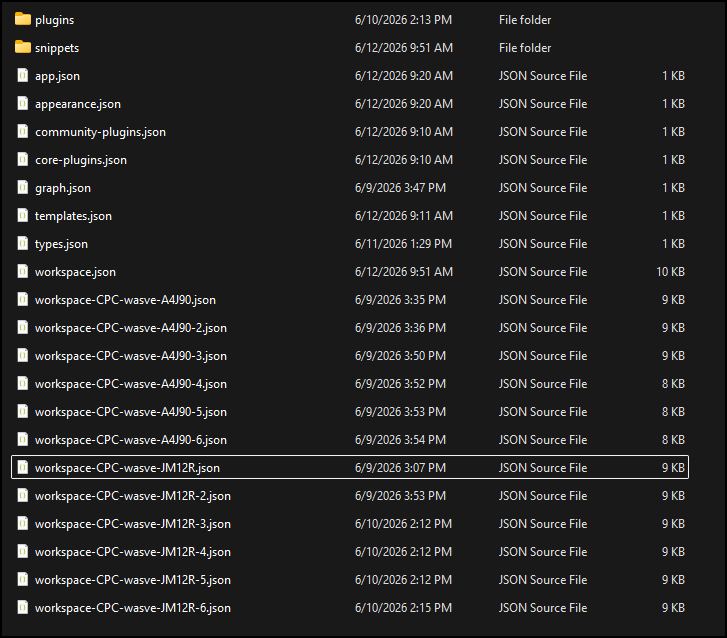
I’m trying out using OneDrive to sync my Obsidian vault across multiple PCs, and I’m noticing that Obsidian has been generating multiple copies of the workspace.json file over the past few days:
CPC-wasve-JM12R and CPC-wasve-A4J90 are the names of the two machines syncing the vault that I’ve been switching between.
I’m not surprised there’s sometimes conflicting workspace state between the two when syncing over OneDrive, and I haven’t noticed any problematic behavior from the Obsidian app when moving between them, but I’m concerned that Obsidian will just generate a ton of these every time there’s a slight conflict and won’t clean them up. Does Obsidian clean up the old files? Could I have to deal with my .obsidian folder being flooded with hundreds or thousands of these old workspace save states?
workspace.json changes a lot because it is UI state, so OneDrive conflict copies are pretty believable when two machines touch the vault close together. I would treat it as per-device state, not important note data: close Obsidian on the other PC before switching, clean up the old conflict copies, and if OneDrive allows it, exclude .obsidian/workspace*.json from syncing. Keep a separate backup of the vault before deleting anything in .obsidian, though.
I think it would be more accurate to say that OneDrive has been generating multiple copies.
One thing to verify: make sure that you have OneDrive set to always keep your files downloaded. If they are offloaded to the cloud, it might be causing trouble.
One extra check: workspace.json is mostly layout/session state, so losing a conflict copy is usually less serious than losing note files. I’d still quit Obsidian on both PCs first, make a quick backup of the vault, then delete only the obvious OneDrive conflict copies and reopen one machine. If the copies keep reappearing, that points more to OneDrive conflict/offline-file behavior than to Obsidian cleaning up incorrectly.
This is key and the OneDrive client on macOS forgets this setting occasionally (usually with an update of itself or macOS).
I’ve had a vault in OneDrive for years (used on macOS and Windows) and have always gotten these named/numbered workspace.json files. If there’s any kind of number or device name in the file name, it’s not being used anymore and can be deleted.
The vault can be closed or open on the other machine; it just happens occasionally. I roll through and delete them when I think of it.