Vault Curate - search + discover plugin built around CJK notes

Disclaimer

Is this project open source? Yes
Is this project completely free? Yes
Is this project vibe-coded beyond the author’s ability to comprehend how it works? No
Community Directory: obsidian.md/plugins?id=vault-curate
Source: github.com/notoriouslab/vault-curate

Background

I’ve been writing in Obsidian primarily in Traditional Chinese for about 3 years. Built-in search works fine when the thing I’m looking for is a unique English keyword. It misses on Chinese proper nouns, on private vocabulary that only appears in my own notes, and on domain-specific terms.

There’s a second problem that crept up over time, which has nothing to do with language: I have hundreds of notes I no longer remember writing. Regular search doesn’t help with this, because I don’t know what to search for.

Vault Curate is my attempt at both.

Search

Semantic search using bge-small-zh-v1.5 on WebGPU, falling back to WASM if WebGPU isn’t available. Fused with BM25 and a Jaro-Winkler fuzzy match via Reciprocal Rank Fusion. Indexing my ~340-note vault (~5,000 chunks) takes about 1m23s on an M2 Air the first time; after that it’s incremental on save.

The model is small (~98MB) but it’s actually trained on Chinese, not a distilled multilingual encoder. That’s the part that matters for CJK content — multilingual models work, but they’re noticeably weaker on personal vocabulary and proper nouns because their pre-training corpus is mostly English.

If you write Japanese, Korean, or mixed languages, bge-ja, bge-ko, and the multilingual bge-m3 are all swappable in settings.

Discover

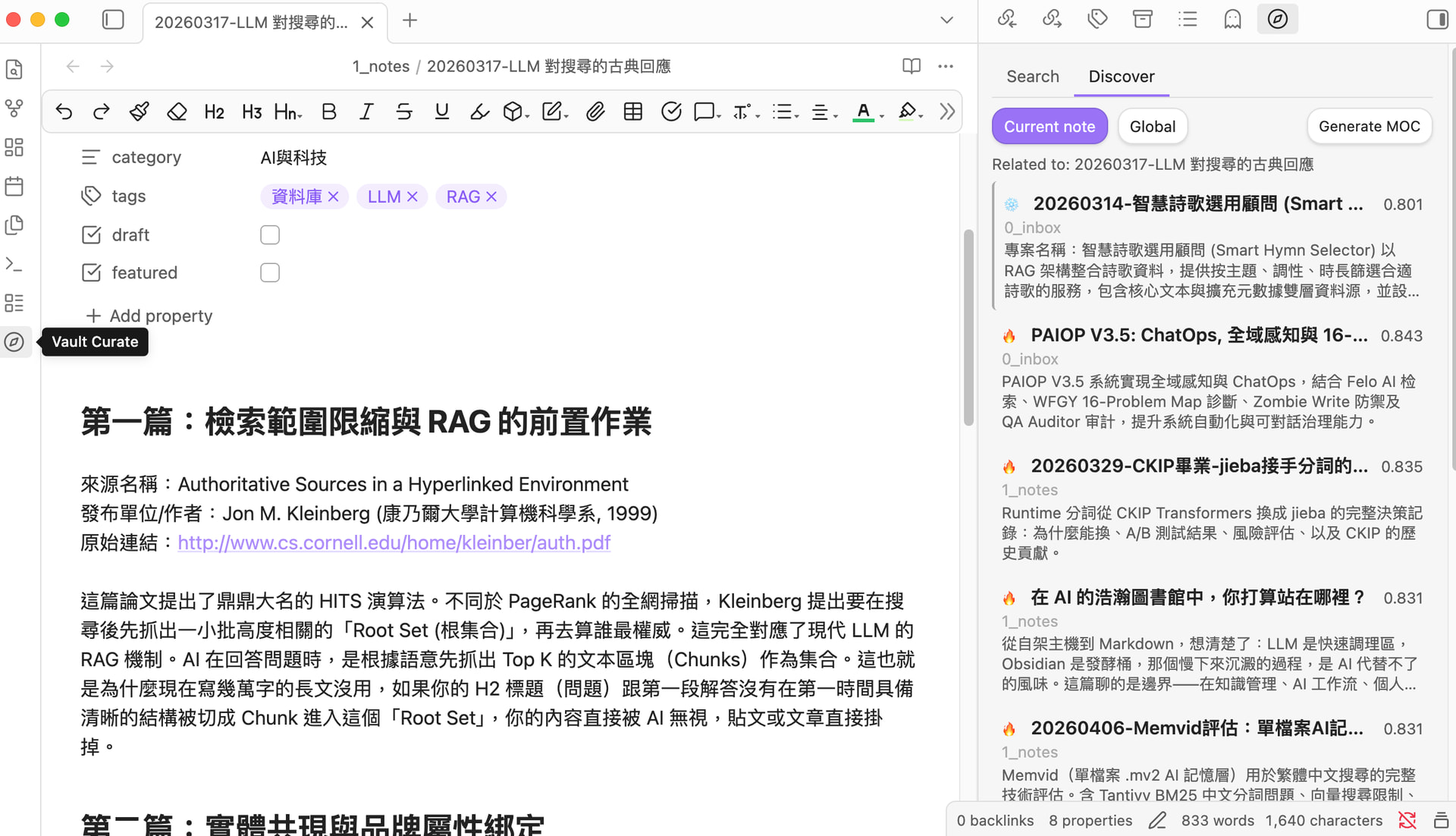
At index time, each note is tagged Hot or Cold. Hot = recently created or has links going in and out. Cold = old, isolated, no links anywhere. The threshold is one setting (hotDays, default 90).

The Discover sidebar has two modes. In the first, when you have a note open, it shows semantically similar notes from your whole vault — but Cold notes get a ranking boost. The idea is that you don’t need to be reminded of what you wrote yesterday; you need to be reminded of the thing from two years ago that you’ve already forgotten.

The second mode is a global view that ranks Cold notes by how similar they are to your current Hot pool. Roughly: “stuff you used to care about that’s still relevant to what you’re working on now.”

This is just cosine similarity plus a re-ranking pass. No LLM involved.

LLM features (separate, off by default)

A toggle, off on first install, exposes two LLM-driven commands: auto-generating a one-line description for each note, and generating topic-grouped Map-of-Content files. Bring your own provider — local Ollama (I’ve been using qwen3 and gemma3) or any OpenAI-compatible endpoint works. Nothing makes a network call unless you turn this on and point it somewhere.

Search and Discover never call out. They run entirely on your machine.

Install

Community plugin store → search “Vault Curate”.

I’d appreciate feedback particularly from other CJK writers (does it surface things built-in search misses for you?), anyone running a 10k+ note vault (I haven’t stress-tested at that scale), and anyone willing to play with the hotDays threshold and tell me whether 90 feels right for how you actually use your vault.

Thanks for reading.

1 Like

v1.0.3 Quick update

  • Hover preview: Cmd/Ctrl + hover on Search/Discover results now opens
    Obsidian’s native Page Preview popup, same as wikilinks.
  • Pin Discover: :pushpin: button on the Discover sidebar to lock the current
    note. Click through to peek at results without losing your discovery
    context. Auto-unpins on delete or Global mode switch.
  • Fix: LLM model dropdown was stuck on “Loading…” when using the
    built-in WebGPU embedding + AI curation. Now correctly populates
    from Ollama.
  • Resolved Dashboard “Direct Filesystem Access” warning by stripping
    the dead-code node:fs path from the bundled sql.js Emscripten
    output. Runtime behaviour unchanged.
  • README now includes an “Audit disclosures” section explaining the
    remaining recommendations (vault enumeration is necessary for the
    index; bundled transformers.js uses new Function for its method
    dispatcher — plugin code itself has zero eval / new Function).

v1.1.0 — Relation graph (Canvas)

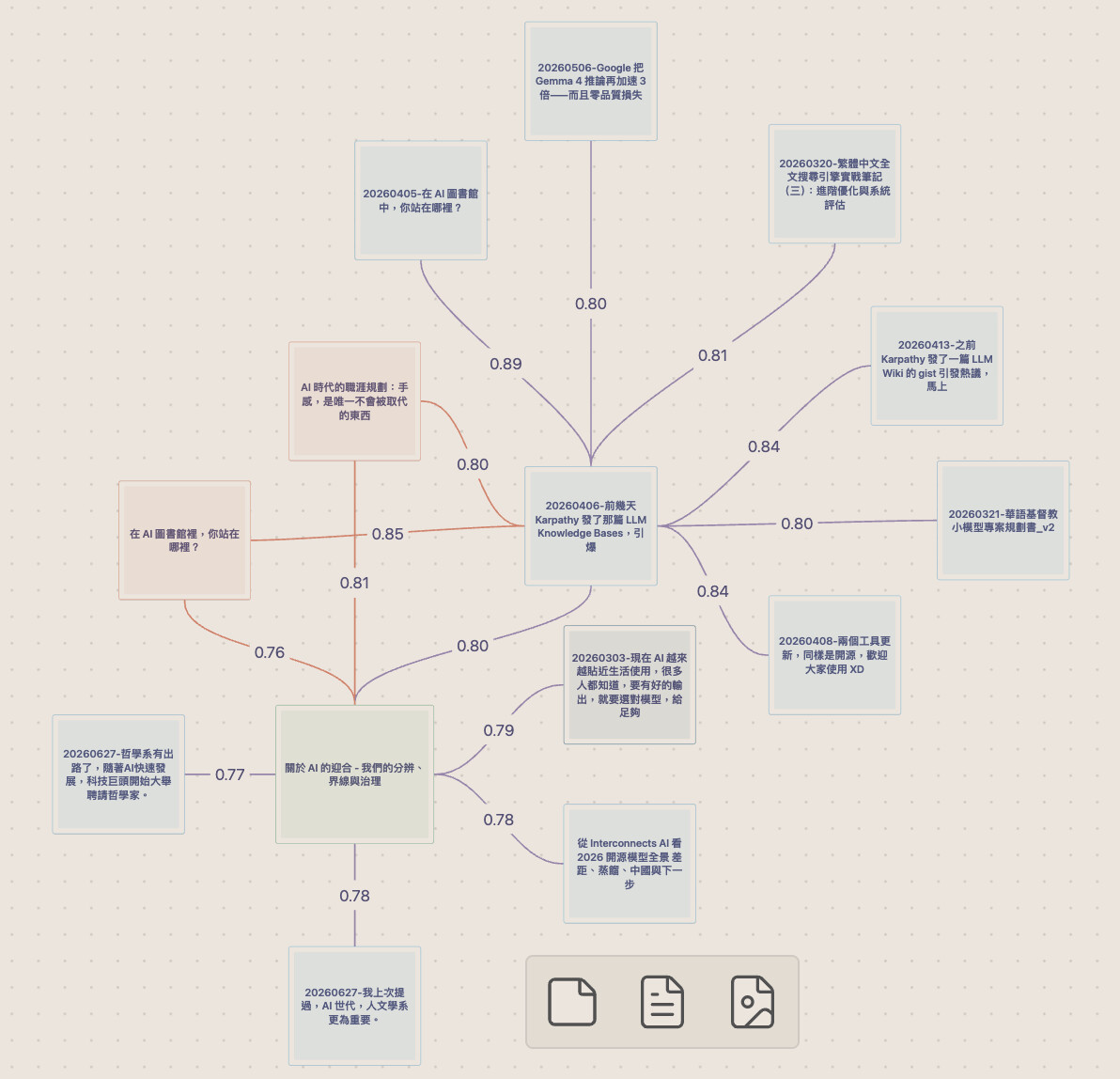
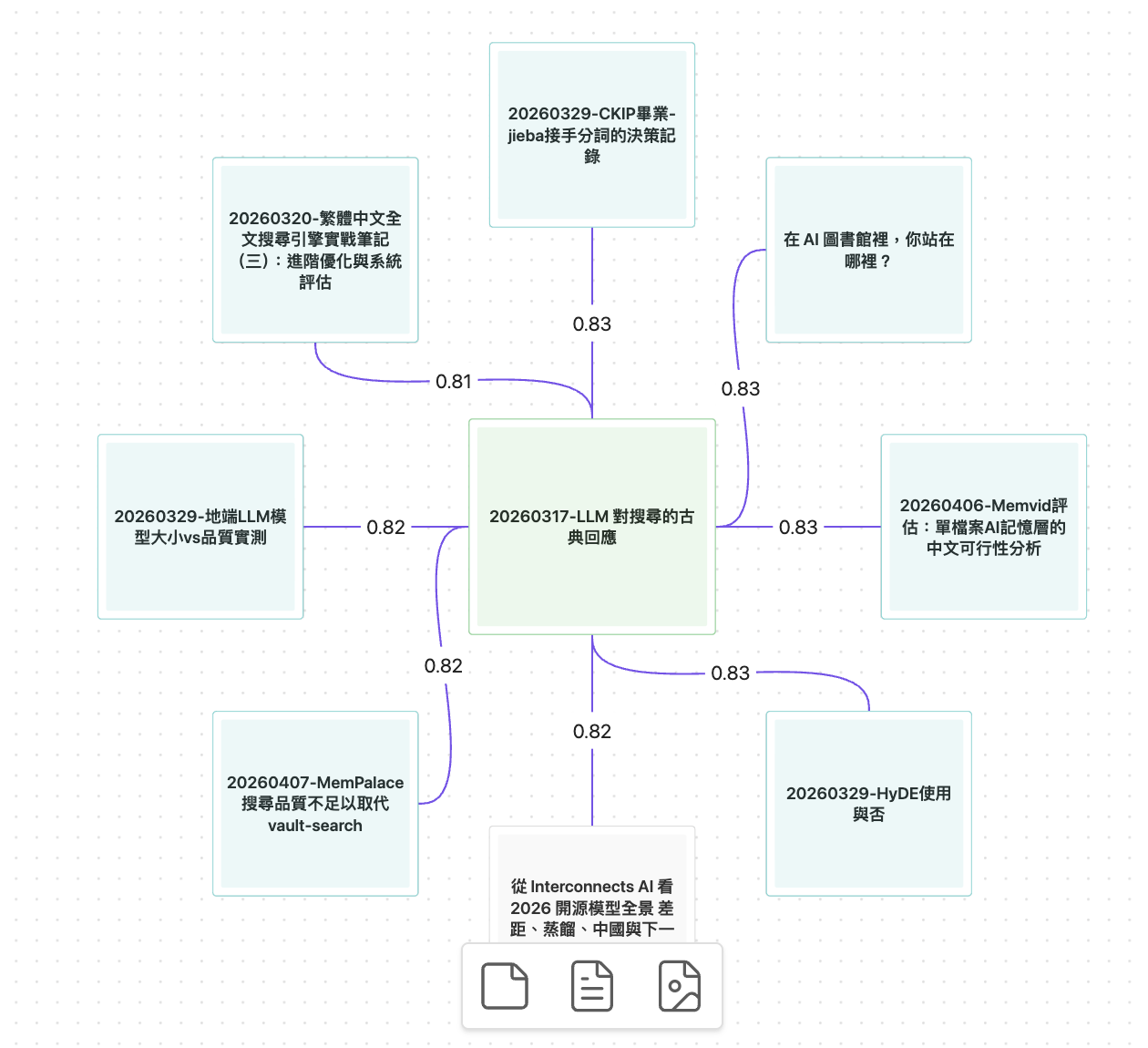
New since the last update here: generate an editable Obsidian Canvas around any note — the note in the center, its top-K semantic neighbors laid out radially, every edge labeled with its similarity score.

  • Purple edges = semantically close but not yet linked — connections the built-in graph view can’t surface
  • Gray edges (with direction arrows) = existing wikilinks
  • Cyan nodes = Cold notes you haven’t touched in a while

Entry points: command palette, right-click on any note (VC: Generate relation graph), or the Graph button on the Discover sidebar. Each run writes a fresh timestamped .canvas file, so a graph you’ve edited is never overwritten. Right-click any node inside the canvas to expand one hop further.

Why Canvas instead of a custom graph pane: editing comes for free (drag, annotate, add cards, delete), and the output is an open format — nothing gets locked inside the plugin.

Smaller updates since v1.0.3: v1.0.4 fixed duplicate-looking titles for template-generated notes (same H1 across many files now falls back to the filename), and v1.1.1 is a type-safety compliance patch from the Developer Dashboard audit.

This one came straight from a feature request on the Chinese forum — keep the feedback coming. :folded_hands:

Vault Curate has just been updated to version 1.2.2 in the Obsidian official community! :tada:

Same spirit: All your files run locally on your computer. Your Obsidian second brain can work entirely without cloud LLMs, without payment, and with no note exfiltration. Just type a concept or a passage, and it will retrieve well-organized files from your own notes. Traditional Chinese–friendly, table-friendly, privacy-friendly :slightly_smiling_face:.

▎ What’s new in 1.2.2:

▎ - Full support for Canvas (relationship graphs)! Generate an editable semantic association graph centered on any note. Discover hidden connections that haven’t been linked yet, and automatically get concept templates – even your oldest notes can be brought back to light.
▎ - More accurate Chinese retrieval and faster speed – runs smoothly even on 8GB laptops.
▎ - Built-in WebGPU models – zero setup required; no need to install Ollama first.
▎ - No manual maintenance – upgrades automatically rebuild indexes incrementally with progress notifications, so you don’t have to worry.

The Cold boost is the strongest idea in this plugin. Almost every search tool leans toward what is recent and what you already touch a lot, and deliberately going the other way is the right call for a vault that has been running a few years.

The problem with a big vault is rarely that a note is missing. It is that the note sits there connected to nothing, and never comes up at the moment it would have been useful. Ranking Cold notes up is a direct attack on that, and it is doing more work than the semantic search itself.

The purple edges in the Canvas view are the half that stops short. The plugin works out that two notes belong together, draws the edge, and then nothing persists — open the same canvas next week and it recomputes the same suggestion from scratch. A purple edge also only says the two notes are near each other. Whether one supports the other, contradicts it, or is an example of it are three different claims, and semantic adjacency renders all three in the same colour.

The other thing I would look at is the heat signal. Hot/Cold coming from creation date and link count means a note you open every week but never edit and never link to stays Cold indefinitely — which may be exactly what you want, since it will keep resurfacing, but it does mean “Cold” is not really measuring neglect.

Can a purple edge be promoted into a real wikilink from the canvas, or is the canvas read-only by design? And was leaving open/access events out of the heat calculation a deliberate choice or just what was cheap to compute?

1 Like

@gauthierae Really appreciate this , your review was by far the most helpful one we’ve gotten. So instead of telling you what I planned to do, I figured I’d just ship something. 1.4.0 is out now, and honestly, most of it came directly from your four paragraphs.

“Can a purple edge become an actual wikilink?” , Yep, now it can. Right‑click any generated canvas (or use the “Apply purple edges as wikilinks” command) and you’ll get a checklist dialog, grouped by source note, with Cmd/Ctrl‑hover previews for each page. Tick the pairs you want, and they get written into both notes’ “Related” section as real wikilinks (bidirectional by default, but you can toggle to source‑only). Those edges then turn grey and show direction arrows. Unticked ones stay untouched , the tool suggests, you decide. That also handles half of your “persistence” concern: once you accept a suggestion, it becomes a real link and won’t show up as a suggestion again. Regenerate the same canvas next week and it’ll be grey. The other half , “dismiss and never suggest again” memory , is on the roadmap, but not in this release.

“Was leaving open/access events out of the heat calculation intentional or just lazy?” , Honest answer: lazy. But your question made me rethink it, and I’m now convinced opens should stay out , not for performance, but for a better reason: Discover’s whole point is to surface cold notes, and if just viewing one reheated it, every recommendation would basically cancel itself out. “Opened” is exposure, not a signal of value. The real gap I missed was edits , heat only looked at creation date, so a two‑year‑old orphan that you rewrote last week would still be marked cold. Fixed now: any edit reheats a note (even typing a single character and deleting it ,because you still made a judgment about it), while the plugin’s own batch writes are ignored. Also, tiers are now computed live at query time, not from a stale index, so notes actually cool down on schedule too.

On the point about semantic adjacency lumping three different claims into one colour , fair call. And I’m deliberately not adding an LLM classifier to those edges; a wrong claim is worse than none, and the plugin’s stance is “suggest, don’t judge”. What did make it in is relatedness ranking: it now blends the note’s tags as a keyword signal with the embedding, which kicks out the biggest category of false neighbours , notes that only share the anchor’s writing style, not its actual topic.

And that bit about the cold boost being the strongest idea , that turned out to be spot on. Following that thread pushed this release way further than I’d planned. Testing on a real ~2.5k‑note vault showed that once tiers were honest, a cold‑first ranking actually drowned out relevant results. So now, for the current‑note Discover, ranking is purely based on relatedness (cold notes keep their visual badge, though), and Global Discover was rebuilt to rank forgotten notes against what you’ve been focusing on lately , recently edited notes, their topic tags, their embedding centroid , grouped by folder, so one giant archive can’t bury everything else.

If you’re up for giving it another spin, I’d genuinely love to hear what you think this time around.

Thank you for your excellent work.

I’d like to know if Vault Curate has plans to add a real-time knowledge graph feature similar to Smart Connections.

1 Like

Thanks for the kind words! Short answer: a real-time graph pane isn’t on the roadmap right now , that’s a deliberate choice rather than a missing feature. But depending on what you’re after, recent releases may already cover more of it than you’d expect. :slight_smile:

Vault Curate’s graphs are generated as editable Canvas files on demand, instead of a live view that recomputes as you navigate. The reasoning: a live pane is something you watch; a Canvas is something you can act on , drag, annotate, expand any node in place, and the two that matter most:

- Promote a purple (suggested) edge into a real wikilink (1.4.0): right-click the canvas → checkbox dialog → checked pairs are written into both notes as actual links. Those links then show up in Obsidian’s native graph view , so instead of rendering a parallel graph that lives inside a plugin, the plugin grows the real one your vault already has.

- Dismiss a suggestion so it never comes back (1.4.5). This is the quiet advantage over a recomputed live view: a live pane shows you the same near-miss suggestions forever, while here every accept/reject persists, so each regenerated graph is cleaner than the last.

Also, as of 1.4.5 the semantic graph under the hood is real-time in the way that matters: it builds in a background worker and then updates incrementally in milliseconds as you edit, so regenerating a canvas (or querying a semantic path) is instant even while you keep writing. What’s on-demand is only the view, not the graph.

And if what you want is ambient “what’s related to what I’m looking at right now” , the Discover sidebar already does that in real time, just in list form rather than graph form.

That said, I’m genuinely curious what a live graph view would give you that this flow doesn’t , e.g. watching connections form while writing? Seeing cluster structure at vault level? If there’s a concrete moment where the current flow falls short, please describe it , the last feature request in this thread shaped most of 1.4.0. :slight_smile:

vault-curate 1.5.0: your vault, now searchable from your phone

Desktop builds and maintains the index, mobile reads it — no extra setup. If you already sync your vault with iCloud, Obsidian Sync, or Syncthing, it just works. One writer means zero sync conflicts.

On mobile you get: search (keyword + fuzzy title, semantic too if you point it at a remote embedding server), Find Similar, both Discover modes, dismissing suggestions, and relation graphs / semantic paths (best on tablets). Index building, AI curation, MOC generation, and promoting purple edges to real links stay desktop-only.

Also fixed on both platforms: if semantic search drops out mid-query (server down, etc.), results don’t vanish — keyword and fuzzy matches still show up, with a status line noting semantic is temporarily unavailable.

Update via Community plugins, full changelog on the GitHub release.

vault-curate 1.10.0: search shows the passage that matched

  • Each result now shows the excerpt that earned its rank, with your words highlighted. Clicking opens the note right at that passage.
  • The built-in model now reads long notes in full. It takes in about 512 tokens at a time and used to silently drop the rest, so passages deep inside a long note can now be found by meaning. If you use the built-in model, your index re-indexes itself in the background on first launch.
  • Search covers all notes by default, with Hot / Cold / All buttons under the search box. Alt+Enter in the search modal inserts a link to the selected result.

Update via Community plugins, full changelog on the GitHub release.