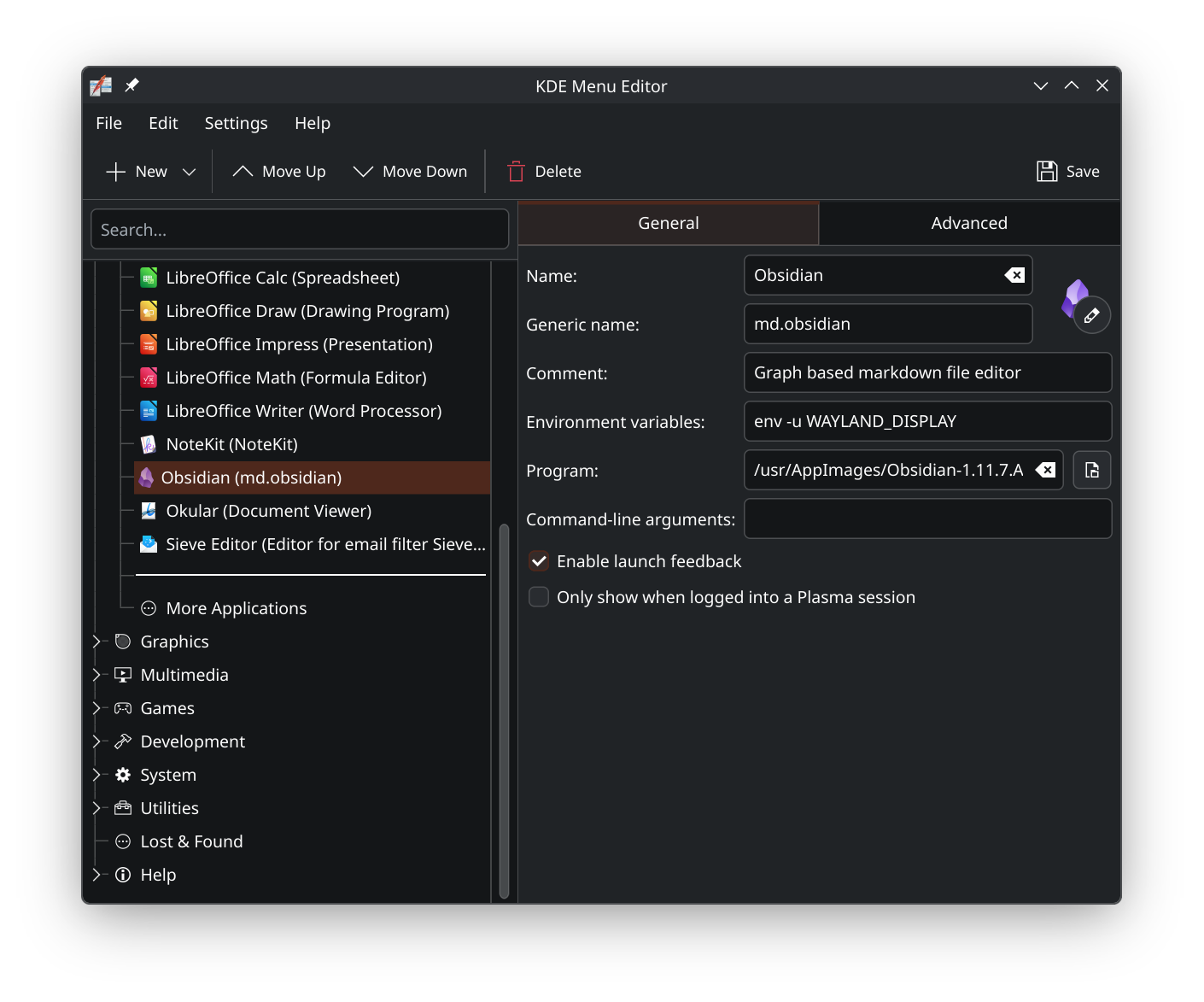
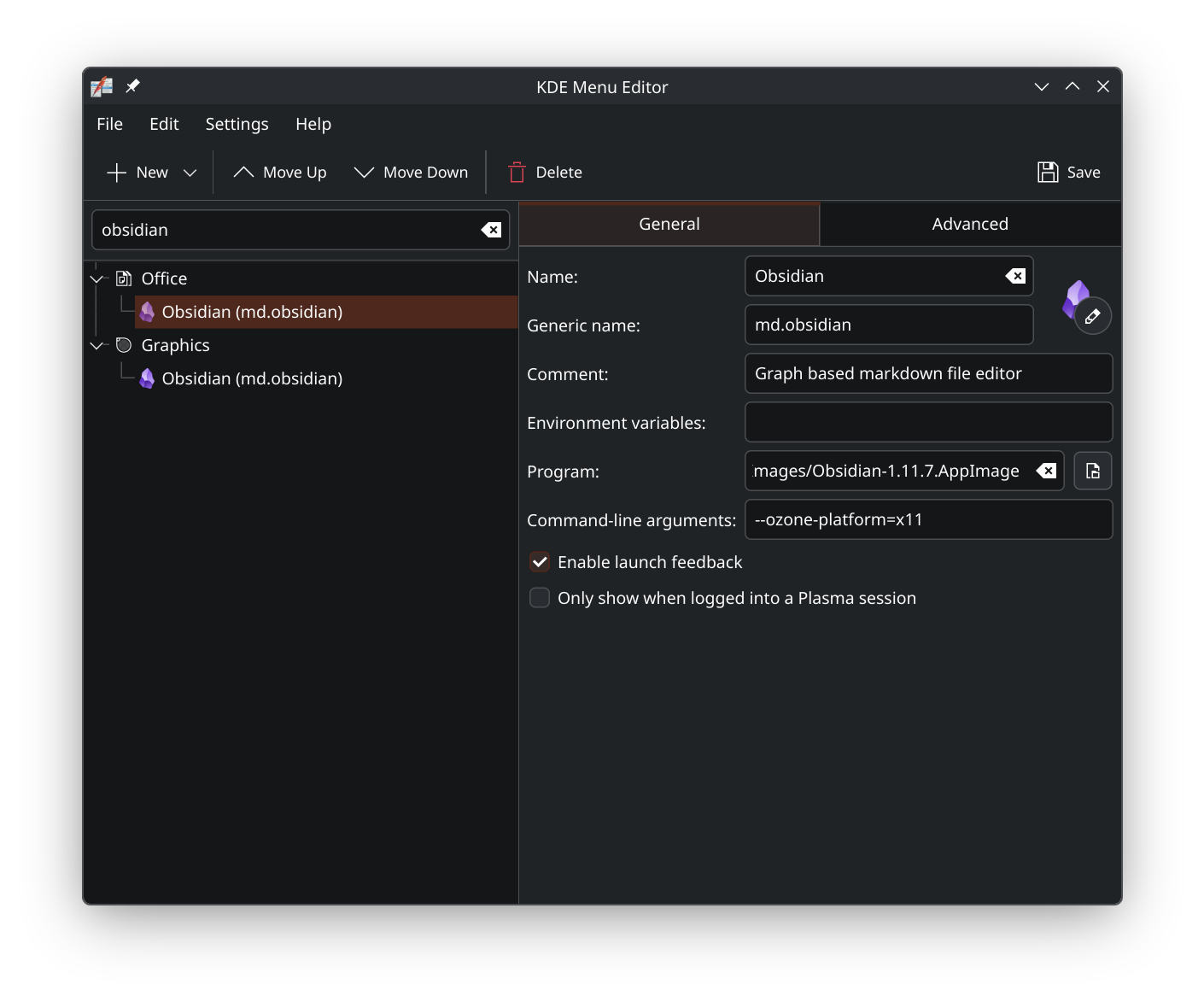
Same here, its really frustrating as I quite like the program. Im on a convertible Notebook and I really like to use excalidraw but this bug is one hell of a problem for productive workflows.
Another bug that could be related is that I can not navigate all the menus using the pen. Its getting on my nerves when I for example want to click an icon in the left ribbon, because I have to put the pen aside and use my finger to make obsidian recognize it.
System details:
Operating System: Fedora Linux 43
KDE Plasma Version: 6.6.2
KDE Frameworks Version: 6.24.0
Qt Version: 6.10.2
Kernel Version: 6.19.7-200.fc43.x86_64 (64-bit)
Graphics Platform: Wayland
Processors: 8 × Intel® Core™ Ultra 7 258V
Memory: 32 GiB of RAM (30,8 GiB usable)
Graphics Processor: Intel® Graphics
Manufacturer: LENOVO
Product Name: 83JT
System Version: Yoga 7 2-in-1 16ILL10
Further details on Wayland:
interface: ‘wl_compositor’, version: 6, name: 1
interface: ‘zwp_tablet_manager_v2’, version: 2, name: 3
tablet_seat: seat0
tablet: Wacom HID 5402 Pen
vendor: 1386
product: 21506
path: /sys/devices/pci0000:00/0000:00:19.1/i2c_designware.2/i2c-2/i2c-WACF22005402:00/0018:056A:5402.0002/input/input14/event5
tablet_tool: eraser
hardware serial: 80a00d35
hardware wacom: 8113
capabilities: tilt pressure
tablet_tool: pen
hardware serial: 80a00d35
hardware wacom: 8113
capabilities: tilt pressure
interface: ‘zwp_keyboard_shortcuts_inhibit_manager_v1’, version: 1, name: 4
interface: ‘zxdg_decoration_manager_v1’, version: 1, name: 5
interface: ‘wp_viewporter’, version: 1, name: 6
interface: ‘wp_security_context_manager_v1’, version: 1, name: 7
interface: ‘wp_fractional_scale_manager_v1’, version: 1, name: 8
interface: ‘wl_shm’, version: 2, name: 9
formats (fourcc):
0x34324752 = ‘RG24’
0x34324742 = ‘BG24’
0x38344258 = ‘XB48’
0x38344241 = ‘AB48’
0x30334258 = ‘XB30’
0x30334241 = ‘AB30’
0x30335258 = ‘XR30’
0x30335241 = ‘AR30’
0x56555958 = ‘XYUV’
1 = ‘XR24’
0 = ‘AR24’
interface: ‘wl_seat’, version: 10, name: 10
name: seat0
capabilities: pointer keyboard touch
keyboard repeat rate: 25
keyboard repeat delay: 450
interface: ‘zwp_pointer_gestures_v1’, version: 3, name: 11
interface: ‘zwp_pointer_constraints_v1’, version: 1, name: 12
interface: ‘zwp_relative_pointer_manager_v1’, version: 1, name: 13
interface: ‘wl_data_device_manager’, version: 3, name: 14
interface: ‘ext_data_control_manager_v1’, version: 1, name: 15
interface: ‘wp_cursor_shape_manager_v1’, version: 2, name: 16
interface: ‘zwp_primary_selection_device_manager_v1’, version: 1, name: 17
interface: ‘org_kde_kwin_idle’, version: 1, name: 18
interface: ‘zwp_idle_inhibit_manager_v1’, version: 1, name: 19
interface: ‘ext_idle_notifier_v1’, version: 2, name: 20
interface: ‘org_kde_plasma_shell’, version: 8, name: 21
interface: ‘org_kde_kwin_appmenu_manager’, version: 2, name: 22
interface: ‘org_kde_kwin_server_decoration_palette_manager’, version: 1, name: 23
interface: ‘org_kde_plasma_virtual_desktop_management’, version: 3, name: 25
interface: ‘org_kde_kwin_shadow_manager’, version: 2, name: 27
interface: ‘org_kde_kwin_dpms_manager’, version: 1, name: 28
interface: ‘org_kde_kwin_server_decoration_manager’, version: 1, name: 29
interface: ‘kde_output_management_v2’, version: 19, name: 30
interface: ‘zxdg_output_manager_v1’, version: 3, name: 31
xdg_output_v1
output: 64
name: ‘eDP-1’
description: ‘Samsung Display Corp. eDP-1-ATNA60HR01-0’
logical_x: 0, logical_y: 0
logical_width: 1920, logical_height: 1200
interface: ‘wl_subcompositor’, version: 1, name: 32
interface: ‘zxdg_exporter_v2’, version: 1, name: 33
interface: ‘zxdg_importer_v2’, version: 1, name: 34
interface: ‘xdg_activation_v1’, version: 1, name: 37
interface: ‘wp_content_type_manager_v1’, version: 1, name: 39
interface: ‘wp_tearing_control_manager_v1’, version: 1, name: 40
interface: ‘xdg_toplevel_drag_manager_v1’, version: 1, name: 41
interface: ‘xdg_toplevel_icon_manager_v1’, version: 1, name: 42
interface: ‘kde_screen_edge_manager_v1’, version: 1, name: 43
interface: ‘frog_color_management_factory_v1’, version: 1, name: 44
interface: ‘wp_presentation’, version: 2, name: 45
presentation clock id: 1 (CLOCK_MONOTONIC)
interface: ‘wp_color_manager_v1’, version: 1, name: 46
supported rendering intents:
perceptual
relative
absolute
relative_bpc
supported features:
parametric
extended_target_volume
set_mastering_display_primaries
set_primaries
set_luminances
windows_scrgb
supported named transfer functions:
gamma22
st2084_pq
ext_linear
bt1886
supported named primaries:
srgb
pal_m
pal
ntsc
generic_film
bt2020
cie1931_xyz
dci_p3
display_p3
adobe_rgb
output: 64
image description id: 55
primaries (xy):
red: 0.708000 0.292000 green: 0.170000 0.797000
blue: 0.131000 0.046000 white: 0.336455 0.346171
tf_named: gamma22
luminances (cd/m²): min 0.0000 max 958 reference 259
target primaries (xy):
red: 0.680664 0.318359 green: 0.219727 0.724609
blue: 0.142578 0.039063 white: 0.336455 0.346171
target_luminances (cd/m²): min 0.0050 max 958
max_cll (cd/m²): 958
max_fall (cd/m²): 430
interface: ‘xdg_wm_dialog_v1’, version: 1, name: 47
interface: ‘kde_external_brightness_v1’, version: 3, name: 48
interface: ‘wp_alpha_modifier_v1’, version: 1, name: 49
interface: ‘wl_fixes’, version: 1, name: 50
interface: ‘wp_fifo_manager_v1’, version: 1, name: 51
interface: ‘wp_single_pixel_buffer_manager_v1’, version: 1, name: 52
interface: ‘xdg_toplevel_tag_manager_v1’, version: 1, name: 53
interface: ‘wp_color_representation_manager_v1’, version: 1, name: 54
supported alpha modes:
premultiplied alpha in electrical values
supported matrix coefficients and ranges:
identity, full range
bt601, limited range
bt601, full range
bt709, limited range
bt709, full range
bt2020, limited range
bt2020, full range
interface: ‘wp_pointer_warp_v1’, version: 1, name: 55
interface: ‘zwp_linux_dmabuf_v1’, version: 5, name: 57
main device: 0xE280 (/dev/dri/card1 or /dev/dri/renderD128)
tranche
target device: 0xE280 (/dev/dri/card1 or /dev/dri/renderD128)
flags: none
formats (fourcc) and modifiers (names):
0x32335247 = ‘GR32’; 0x0000000000000000 = LINEAR
0x32335247 = ‘GR32’; 0x0100000000000001 = INTEL_X_TILED
0x32335247 = ‘GR32’; 0x0100000000000009 = INTEL_4_TILED
0x32335247 = ‘GR32’; 0x0100000000000010 = INTEL_4_TILED_LNL_CCS
0x32335247 = ‘GR32’; 0x00ffffffffffffff = INVALID
0x20363152 = 'R16 '; 0x0000000000000000 = LINEAR
0x20363152 = 'R16 '; 0x0100000000000001 = INTEL_X_TILED
0x20363152 = 'R16 '; 0x0100000000000009 = INTEL_4_TILED
0x20363152 = 'R16 '; 0x0100000000000010 = INTEL_4_TILED_LNL_CCS
0x20363152 = 'R16 '; 0x00ffffffffffffff = INVALID
0x3231564e = ‘NV12’; 0x0000000000000000 = LINEAR
0x3231564e = ‘NV12’; 0x0100000000000001 = INTEL_X_TILED
0x3231564e = ‘NV12’; 0x0100000000000009 = INTEL_4_TILED
0x3231564e = ‘NV12’; 0x0100000000000010 = INTEL_4_TILED_LNL_CCS
0x3231564e = ‘NV12’; 0x00ffffffffffffff = INVALID
0x46202052 = ‘R F’; 0x0000000000000000 = LINEAR
0x46202052 = ‘R F’; 0x0100000000000001 = INTEL_X_TILED
0x46202052 = ‘R F’; 0x0100000000000009 = INTEL_4_TILED
0x46202052 = ‘R F’; 0x0100000000000010 = INTEL_4_TILED_LNL_CCS
0x46202052 = ‘R F’; 0x00ffffffffffffff = INVALID
0x46384241 = ‘AB8F’; 0x0000000000000000 = LINEAR
0x46384241 = ‘AB8F’; 0x0100000000000001 = INTEL_X_TILED
0x46384241 = ‘AB8F’; 0x0100000000000009 = INTEL_4_TILED
0x46384241 = ‘AB8F’; 0x0100000000000010 = INTEL_4_TILED_LNL_CCS
0x46384241 = ‘AB8F’; 0x00ffffffffffffff = INVALID
0x38344258 = ‘XB48’; 0x0000000000000000 = LINEAR
0x38344258 = ‘XB48’; 0x0100000000000001 = INTEL_X_TILED
0x38344258 = ‘XB48’; 0x0100000000000009 = INTEL_4_TILED
0x38344258 = ‘XB48’; 0x0100000000000010 = INTEL_4_TILED_LNL_CCS
0x38344258 = ‘XB48’; 0x00ffffffffffffff = INVALID
0x36314752 = ‘RG16’; 0x0000000000000000 = LINEAR
0x36314752 = ‘RG16’; 0x0100000000000001 = INTEL_X_TILED
0x36314752 = ‘RG16’; 0x0100000000000009 = INTEL_4_TILED
0x36314752 = ‘RG16’; 0x0100000000000010 = INTEL_4_TILED_LNL_CCS
0x36314752 = ‘RG16’; 0x00ffffffffffffff = INVALID
0x32315241 = ‘AR12’; 0x0000000000000000 = LINEAR
0x32315241 = ‘AR12’; 0x0100000000000001 = INTEL_X_TILED
0x32315241 = ‘AR12’; 0x0100000000000009 = INTEL_4_TILED
0x32315241 = ‘AR12’; 0x0100000000000010 = INTEL_4_TILED_LNL_CCS
0x32315241 = ‘AR12’; 0x00ffffffffffffff = INVALID
0x48205247 = ‘GR H’; 0x0000000000000000 = LINEAR
0x48205247 = ‘GR H’; 0x0100000000000001 = INTEL_X_TILED
0x48205247 = ‘GR H’; 0x0100000000000009 = INTEL_4_TILED
0x48205247 = ‘GR H’; 0x0100000000000010 = INTEL_4_TILED_LNL_CCS
0x48205247 = ‘GR H’; 0x00ffffffffffffff = INVALID
0x48202052 = ‘R H’; 0x0000000000000000 = LINEAR
0x48202052 = ‘R H’; 0x0100000000000001 = INTEL_X_TILED
0x48202052 = ‘R H’; 0x0100000000000009 = INTEL_4_TILED
0x48202052 = ‘R H’; 0x0100000000000010 = INTEL_4_TILED_LNL_CCS
0x48202052 = ‘R H’; 0x00ffffffffffffff = INVALID
0x35315241 = ‘AR15’; 0x0000000000000000 = LINEAR
0x35315241 = ‘AR15’; 0x0100000000000001 = INTEL_X_TILED
0x35315241 = ‘AR15’; 0x0100000000000009 = INTEL_4_TILED
0x35315241 = ‘AR15’; 0x0100000000000010 = INTEL_4_TILED_LNL_CCS
0x35315241 = ‘AR15’; 0x00ffffffffffffff = INVALID
0x30313050 = ‘P010’; 0x0000000000000000 = LINEAR
0x30313050 = ‘P010’; 0x0100000000000001 = INTEL_X_TILED
0x30313050 = ‘P010’; 0x0100000000000009 = INTEL_4_TILED
0x30313050 = ‘P010’; 0x00ffffffffffffff = INVALID
0x38385247 = ‘GR88’; 0x0000000000000000 = LINEAR
0x38385247 = ‘GR88’; 0x0100000000000001 = INTEL_X_TILED
0x38385247 = ‘GR88’; 0x0100000000000009 = INTEL_4_TILED
0x38385247 = ‘GR88’; 0x0100000000000010 = INTEL_4_TILED_LNL_CCS
0x38385247 = ‘GR88’; 0x00ffffffffffffff = INVALID
0x56555958 = ‘XYUV’; 0x0000000000000000 = LINEAR
0x56555958 = ‘XYUV’; 0x0100000000000001 = INTEL_X_TILED
0x56555958 = ‘XYUV’; 0x0100000000000009 = INTEL_4_TILED
0x56555958 = ‘XYUV’; 0x00ffffffffffffff = INVALID
0x20203852 = 'R8 '; 0x0000000000000000 = LINEAR
0x20203852 = 'R8 '; 0x0100000000000001 = INTEL_X_TILED
0x20203852 = 'R8 '; 0x0100000000000009 = INTEL_4_TILED
0x20203852 = 'R8 '; 0x0100000000000010 = INTEL_4_TILED_LNL_CCS
0x20203852 = 'R8 '; 0x00ffffffffffffff = INVALID
0x38344241 = ‘AB48’; 0x0000000000000000 = LINEAR
0x38344241 = ‘AB48’; 0x0100000000000001 = INTEL_X_TILED
0x38344241 = ‘AB48’; 0x0100000000000009 = INTEL_4_TILED
0x38344241 = ‘AB48’; 0x0100000000000010 = INTEL_4_TILED_LNL_CCS
0x38344241 = ‘AB48’; 0x00ffffffffffffff = INVALID
0x48344241 = ‘AB4H’; 0x0000000000000000 = LINEAR
0x48344241 = ‘AB4H’; 0x0100000000000001 = INTEL_X_TILED
0x48344241 = ‘AB4H’; 0x0100000000000009 = INTEL_4_TILED
0x48344241 = ‘AB4H’; 0x0100000000000010 = INTEL_4_TILED_LNL_CCS
0x48344241 = ‘AB4H’; 0x00ffffffffffffff = INVALID
0x48344258 = ‘XB4H’; 0x0000000000000000 = LINEAR
0x48344258 = ‘XB4H’; 0x0100000000000001 = INTEL_X_TILED
0x48344258 = ‘XB4H’; 0x0100000000000009 = INTEL_4_TILED
0x48344258 = ‘XB4H’; 0x0100000000000010 = INTEL_4_TILED_LNL_CCS
0x48344258 = ‘XB4H’; 0x00ffffffffffffff = INVALID
0x46205247 = ‘GR F’; 0x0000000000000000 = LINEAR
0x46205247 = ‘GR F’; 0x0100000000000001 = INTEL_X_TILED
0x46205247 = ‘GR F’; 0x0100000000000009 = INTEL_4_TILED
0x46205247 = ‘GR F’; 0x0100000000000010 = INTEL_4_TILED_LNL_CCS
0x46205247 = ‘GR F’; 0x00ffffffffffffff = INVALID
tranche
target device: 0xE280 (/dev/dri/card1 or /dev/dri/renderD128)
flags: none
formats (fourcc) and modifiers (names):
0x34325241 = ‘AR24’; 0x0000000000000000 = LINEAR
0x34325241 = ‘AR24’; 0x0100000000000001 = INTEL_X_TILED
0x34325241 = ‘AR24’; 0x0100000000000009 = INTEL_4_TILED
0x34325241 = ‘AR24’; 0x0100000000000010 = INTEL_4_TILED_LNL_CCS
0x34325241 = ‘AR24’; 0x00ffffffffffffff = INVALID
0x34324258 = ‘XB24’; 0x0000000000000000 = LINEAR
0x34324258 = ‘XB24’; 0x0100000000000001 = INTEL_X_TILED
0x34324258 = ‘XB24’; 0x0100000000000009 = INTEL_4_TILED
0x34324258 = ‘XB24’; 0x0100000000000010 = INTEL_4_TILED_LNL_CCS
0x34324258 = ‘XB24’; 0x00ffffffffffffff = INVALID
0x34324241 = ‘AB24’; 0x0000000000000000 = LINEAR
0x34324241 = ‘AB24’; 0x0100000000000001 = INTEL_X_TILED
0x34324241 = ‘AB24’; 0x0100000000000009 = INTEL_4_TILED
0x34324241 = ‘AB24’; 0x0100000000000010 = INTEL_4_TILED_LNL_CCS
0x34324241 = ‘AB24’; 0x00ffffffffffffff = INVALID
0x34325258 = ‘XR24’; 0x0000000000000000 = LINEAR
0x34325258 = ‘XR24’; 0x0100000000000001 = INTEL_X_TILED
0x34325258 = ‘XR24’; 0x0100000000000009 = INTEL_4_TILED
0x34325258 = ‘XR24’; 0x0100000000000010 = INTEL_4_TILED_LNL_CCS
0x34325258 = ‘XR24’; 0x00ffffffffffffff = INVALID
tranche
target device: 0xE280 (/dev/dri/card1 or /dev/dri/renderD128)
flags: none
formats (fourcc) and modifiers (names):
0x30335258 = ‘XR30’; 0x0000000000000000 = LINEAR
0x30335258 = ‘XR30’; 0x0100000000000001 = INTEL_X_TILED
0x30335258 = ‘XR30’; 0x0100000000000009 = INTEL_4_TILED
0x30335258 = ‘XR30’; 0x0100000000000010 = INTEL_4_TILED_LNL_CCS
0x30335258 = ‘XR30’; 0x00ffffffffffffff = INVALID
0x30334241 = ‘AB30’; 0x0000000000000000 = LINEAR
0x30334241 = ‘AB30’; 0x0100000000000001 = INTEL_X_TILED
0x30334241 = ‘AB30’; 0x0100000000000009 = INTEL_4_TILED
0x30334241 = ‘AB30’; 0x0100000000000010 = INTEL_4_TILED_LNL_CCS
0x30334241 = ‘AB30’; 0x00ffffffffffffff = INVALID
0x30334258 = ‘XB30’; 0x0000000000000000 = LINEAR
0x30334258 = ‘XB30’; 0x0100000000000001 = INTEL_X_TILED
0x30334258 = ‘XB30’; 0x0100000000000009 = INTEL_4_TILED
0x30334258 = ‘XB30’; 0x0100000000000010 = INTEL_4_TILED_LNL_CCS
0x30334258 = ‘XB30’; 0x00ffffffffffffff = INVALID
0x30335241 = ‘AR30’; 0x0000000000000000 = LINEAR
0x30335241 = ‘AR30’; 0x0100000000000001 = INTEL_X_TILED
0x30335241 = ‘AR30’; 0x0100000000000009 = INTEL_4_TILED
0x30335241 = ‘AR30’; 0x0100000000000010 = INTEL_4_TILED_LNL_CCS
0x30335241 = ‘AR30’; 0x00ffffffffffffff = INVALID
interface: ‘wp_linux_drm_syncobj_manager_v1’, version: 1, name: 58
interface: ‘xdg_wm_base’, version: 6, name: 60
interface: ‘zwlr_layer_shell_v1’, version: 5, name: 61
interface: ‘org_kde_kwin_keystate’, version: 5, name: 62
interface: ‘kde_output_device_v2’, version: 20, name: 63
interface: ‘wl_output’, version: 4, name: 64
name: eDP-1
description: Samsung Display Corp. eDP-1-ATNA60HR01-0
x: 0, y: 0, scale: 2,
physical_width: 340 mm, physical_height: 220 mm,
make: ‘Samsung Display Corp.’, model: ‘eDP-1-ATNA60HR01-0’,
subpixel_orientation: unknown, output_transform: normal,
mode:
width: 2880 px, height: 1800 px, refresh: 120.000 Hz,
flags: current
interface: ‘wp_drm_lease_device_v1’, version: 1, name: 65
path: /dev/dri/card1
interface: ‘kde_output_order_v1’, version: 1, name: 66
interface: ‘zwp_text_input_manager_v1’, version: 1, name: 67
interface: ‘zwp_text_input_manager_v2’, version: 1, name: 68
interface: ‘zwp_text_input_manager_v3’, version: 1, name: 69
interface: ‘org_kde_kwin_blur_manager’, version: 1, name: 71
interface: ‘org_kde_kwin_contrast_manager’, version: 2, name: 72
interface: ‘org_kde_kwin_slide_manager’, version: 1, name: 73
interface: ‘xdg_system_bell_v1’, version: 1, name: 74