After using Apple Notes for like half my life, I just couldn’t live w/o first line to title sync. The concept of a note title being separate from note body is an alien concept for me! I use Auto Filename–it puts the first x (customizable, I set it to 100) characters of the first line in title. It even has a ‘rename all files’ option to apply this rule to your entire vault (but back up your vault first!)
What about Frontmatter Title Plugin? In my understanding, the most intuitive and effective way of working with note titles in a note database is working with a metadata field.
Using the filename is not recommended and sophisticated as it is best used with an ID. And the first line or H1 text as note title seems a bit arbitrary and error-prone due to e.g. special characters.
Best use something like this (although it requires some work and maintenance):

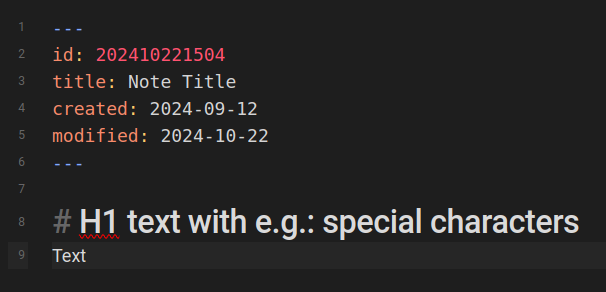
If you don’t want to work with metadata (perhaps it takes a bit getting used to) the easiest way would be to use the filename. H1 text or the first line would, as far as I know, require a plugin.
This would be really cool but would have pretty significant performance implications, so it might be better as a plugin.
Querying the file system (to get all the file names) is extremely fast since all the data can be read from the file allocation table. But opening every single file to get an alternative title could be an incredibly IO/CPU intensive-process on a large repo.
This also violates one of obsidians (apparent) design decisions: don’t let files interact with hierarchy or other files except via plugins – this is part of what keeps obsidian performant even with arbitrarily large repositories. However, I do think this would be a good candidate for a core plugin.
If I was the dev, I would suggest that, with this plugin active, the filenames would load as usual, but a background task would begin parsing and caching title data, saving it to a dictionary along with the last modified date. These new values would populate the hierarchy as they were queried–perhaps sequentially by default just to avoid hammering the system with IO requests. Modified notes would be updated as they are modified (after a brief delay to avoid re-parsing large files on every key press).
To minimize performance impact, I recommend setting a maximum number of characters that must include the title (e.g. 1000). That way if the file is, say, 500MB of text, we still only have to look at the first KB for the title.
On subsequent initializations of Obsidian, the plugin would query the file system for new/deleted entries or entries with modification dates newer than the cached value. This may also have to happen in the background periodically; I assume JS plugins won’t have access to a file system watcher.
Plugin settings:
- Allow Parallel Loading (toggle): Load titles from files in parallel; this will temporarily increase CPU and IO usage until all titles are updated
- Title Format (dropdown, default Smart): H1, YAML Title, First Line, Smart (H1 for .md, title attribute for YAML), Custom Regex
- Fallback Format (dropdown, default Filename): Format if the primary title format is not found. Same options + Filename.
- Custom Title Regex (text): Only used if “Custom Regex” is selected for “Allowed Title Formats”. Regex runs on the number of characters specified by “Max Title Depth” and
- Max Title Length (integer >= 0, default 100): Titles are truncated if longer than this (if 0, no limit)
- Max Title Depth (integer >= 0, default 1000): Maximum number of characters in a file that will be searched for a title (if 0, no limit)
- Clear Title Cache (button): Clears title & modified date cache, triggering a reload (for debugging purposes)
This is what I need. I want my Zettelkasten to comply with the Zettel schema, and that does encompass filenames, i.e., ctime: yyMMdd-hhmm (title)?.md
I made a plugin that copies the first line to note title:
What did you end up using? I haven’t found a way to have an informative File Explorer that could display content and or title in the file explorer ON mobile.
GitHub - greetclammy/first-line-is-title: Obsidian plugin to automatically set the first line as note title. what a nice plugin, really helpful. I used to lose flow when adding new pages and with this it has become a breeze.
I’m curious if this is a part of any fix that folks have found. Is there a way to use the YAML title, but have obsidian display an H1 style title automatically below the YAML block?
@rcphysics I currently write title in frontmatter and copy it to H1 or copy it from H1 to frontmatter. (Sometimes a not exists with old filenaming and not frontmatter or title. Sometimes note has H1 title but not frontmatter. Sometimes note has frontmatter but not H1 title.)
It would be invaluable to have an option to show file.title by default for interoperability of content with other frameworks that show title by default.
To make it even more powerful, perhaps livemode could show title, subtitle, description, or name by adding {{ file.title}} in the source note, which renders when updating frontmatter used in the template (not any frontmatter) or when switching between source mode and live preview, or only manually if performance is a primary concern.
Here’s some thoughts, which are not that refined, but hopefully contribute to better use and interoperability of Obsidian with other frameworks like Astro or Quarto, which means for me no copy + past H1 between frontmatter and body.
Would something like a templater function work? When a note has {{ file.title }} or as Quarto uses {{< meta title >}}. Then we may have a live preview with title while source view remains.
Source view:
---
id:
title: Title to show
subtitle: Some subtitle
description: Brief description
---


# {{ file.title }}

## {{ file.subtitle }}

{{ file.description }}
These files may be rendered in live preview and would only need to be updated when changing frontmatter values or the body.