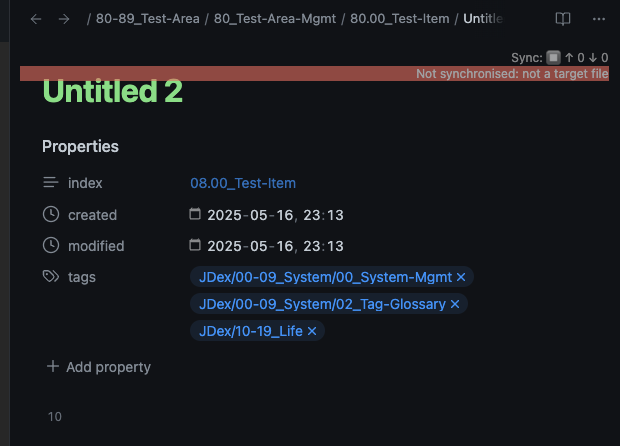
What I’m trying to do
In Editing mode, I want YAML list items (e.g., tags) to appear one per line, regardless of the note pane’s width.
At this width, tags render on a single line:
I’d like them to stack vertically always, one item per line:
Things I have tried
I searched for similar requests but didn’t find a solution.
Question
Can a CSS snippet change the appearance of YAML front matter in Editing mode to force one-per-line list items? Any guidance is appreciated.
I found the solution to my own question. In case this is helpful to someone else, I’m sharing it
here.
Place the following in your obsidian/snippets folder:
/*********************************************************
 * Properties → Multi-select pills
 * One pill per row, left-aligned, content-width pills
 *********************************************************/

/* Stack vertically, but don't use gap (we'll space pills via margins) */
.metadata-property .multi-select-container {
  display: flex;
  flex-direction: column;
  align-items: flex-start;   /* left align pills */
  gap: 0;
}

/* Each pill hugs its content width */
.metadata-property .multi-select-pill {
  display: inline-flex;
  align-items: center;
  max-width: 100%;
  white-space: nowrap;
  width: auto !important;
  margin-bottom: 6px;        /* spacing between rows */
}

/* Remove extra margin after the last pill (before the input row) */
.metadata-property .multi-select-container > .multi-select-pill:nth-last-child(2) {
  margin-bottom: 0;
}

/* collapse by default */
.metadata-property .multi-select-input {
  height: 0;
  min-height: 0;
  padding: 0;
  margin: 0;
  border: 0;
  opacity: 0;
  pointer-events: none;
}

/* expand ONLY when the input itself has focus */
.metadata-property .multi-select-input:focus {
  height: var(--input-height, 28px);
  padding: var(--size-2-2, 4px) var(--size-2-3, 6px);
  border: initial;
  opacity: 1;
  pointer-events: auto;
}
1 Like
system
Closed
4
This topic was automatically closed 7 days after the last reply. New replies are no longer allowed.