Ultra Code Fence
Good day everyone. I’d like to introduce you to my new plugin, currently in beta, Ultra Code Fence.
What it does
I love code fencing in Obsidian, but being markdown, it has to follow basic rules. And Obsidian plugins are all about going outside those rules.
As a developer I’ve used the ``` code fencing functionality a lot, but they’re limiting - you get the code, the whole code and nothing but the code.
And they’re totally unsuitable for presenting code output (where you have Prompts, commands, and output).
I found a plugin that did some of this at GitHub - almariah/embed-code-file · GitHub, but sadly the developer is seemingly no longer supporting it. Initially I did a fork of his code and tried to modify it, but then I wanted more and more features and so I outgrew that plugin.
So, I started again, and behold, I give you Ultra Code Fence!
Some features include:
-
Pull in files from your vault - Reference a script or config file once and it stays in sync
-
Fold long blocks - Show the first N lines with a click to expand (great for lengthy functions you don’t always need to see)
-
Scroll instead of fold - Keep blocks at a fixed height with scrolling
-
Line numbers and zebra striping - Makes reading code much easier
-
Filter by line range or markers - Extract just the bit you care about (lines 50-80, or everything between
// STARTand// END) -
Style terminal output - Colour your prompts, commands, and output differently
-
Mobile ready - Works on mobile and desktop
Some examples
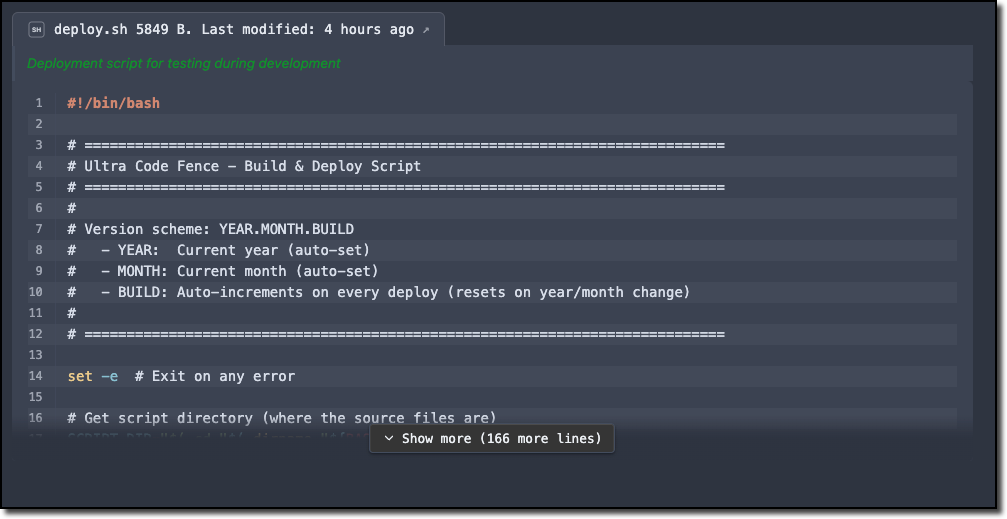
```ufence-bash
META:
  PATH: "vault://Assets/Scripts/ultra-code-fence/deploy.sh"
  DESC: "Deployment script for testing during development"
  TITLE: "{filename} {size:bytes}. Last modified: {modified:relative}"
RENDER:
  ZEBRA: true
  LINES: true
  FOLD: 20
```
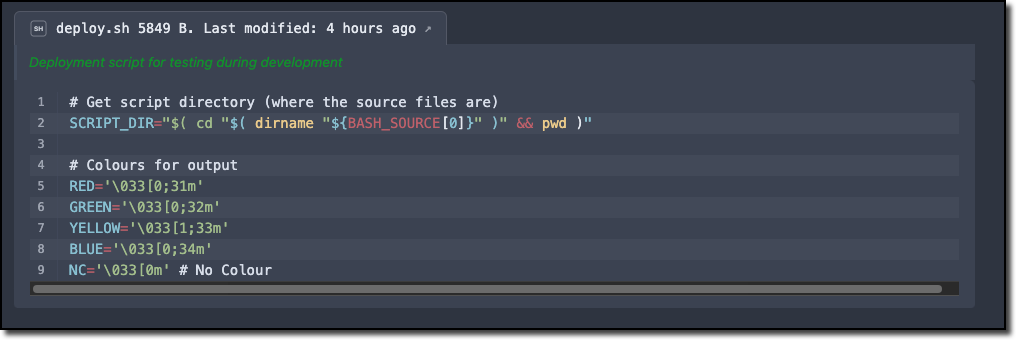
```ufence-bash
META:
  PATH: "vault://Assets/Scripts/ultra-code-fence/deploy.sh"
  DESC: "Deployment script for testing during development"
  TITLE: "{filename} {size:bytes}. Last modified: {modified:relative}"
RENDER:
  ZEBRA: true
  LINES: true
  FOLD: 20
FILTER:
  BY_LINES:
    RANGE: 16, 24
```
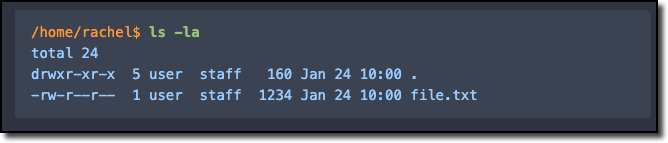
```ufence-cmdout
PROMPT: "^([/~][\\w/.-]*\\$ )(.*)"
RENDER:
  PROMPT:
    COLOUR: "#ff9933"
    BOLD: false
    ITALIC: false
  COMMAND:
    COLOUR: "#98c379"
    BOLD: true
    ITALIC: false
  OUTPUT:
    COLOUR: "#99ccff"
    BOLD: false
    ITALIC: false
~~~
/home/rachel$ ls -la
total 24
drwxr-xr-x  5 user  staff   160 Jan 24 10:00 .
-rw-r--r--  1 user  staff  1234 Jan 24 10:00 file.txt
```
Installing via BRAT
Since this isn’t in the community plugins yet, you’ll need BRAT:
-
Install BRAT if you haven’t already
-
Open BRAT settings → Add Beta plugin
-
Paste:
https://github.com/RachelAmbler/ultra-code-fence -
Click Add Plugin
-
Enable Ultra Code Fence in your Community plugins list
Links
- GitHub: GitHub - RachelAmbler/ultra-code-fence: A supercharged code fence parser for Obsidian · GitHub
Feedback welcome - I’m still actively developing this and would love to hear what works and what doesn’t.